0:56

Meet Firefly Video Model | Adobe
Adobe · Feb 2025
BridgeOpsOne · 0:38 · Code only · AI-annotated
BridgeOpsOne’s 0:38 launch film runs 14 scenes, about 2.8 s each. The product shows up at 0:10 and 1 feature is revealed. There is no explicit call to action; a voiceover carries the film. The video runs a tight problem-to-solution arc: a scattered chat thread sets the pain, the BridgeOpsOne panel and browser-extension demo show the fix, and a benefit card closes into the assembled logo. Its style is flat 3D mockups on a deep navy field with white headlines that build word by word, accented by blue icon tiles and a cursor-driven UI.
Is this your launch? to your site or press kit.
Adobe · Feb 2025
Resend · Developer tools · Sep 2026
A chat thread fills the frame as message bubbles from SR, DL, and JP pop in one by one, with green replies sliding in from the right. The camera zooms in, then pulls back to reveal the thread on a laptop mockup against a dark blue background.
Techniques: Kinetic type, UI zoom, 3D mockup
Camera: Pull out
Two flat blue icon tiles on a dark navy field, a person at a desk with notification bubbles on the left and a gear on the right, joined by a white dashed curve. The blue phrase You're trying fades in at the upper left while the icons hold still.
On-screen text: “You're trying”
Camera: Static
On a dark navy background, a headline scales in above two blue square icons, one of a person with chat bubbles and one of a gear, linked by dashed arrows. The pair fades to a single checklist icon with a red warning triangle as the headline changes.
On-screen text: “You're trying to make sense of scattered updates”, “While also managing the incident.”
Techniques: Kinetic type
Camera: Static
A dark blue gradient holds a white headline at the top. Below, a blue rounded square icon shows a white checklist with one box ticked and a dark warning triangle with an exclamation mark. The icon eases from blur into focus while the text stays locked.
On-screen text: “While also managing the incident.”
Camera: Static
A white headline sits above a blue checklist icon on a dark blue gradient. The frame transitions to a narrow white UI list with status rows and a green check, while the headline blurs.
On-screen text: “While also managing the incident:”
Camera: Static
A silver laptop mockup sits front-on in 3D perspective against a dark blue field, its screen filled with a chat thread of gray and green bubbles beside circular initial avatars. The whole device eases back and shrinks toward the center while the avatars pulse in scale.
Techniques: 3D mockup
Camera: Pull out
A silver laptop in 3D perspective sits on a dark blue field, its screen showing a chat thread of gray message bubbles and one green bubble. The headline “Take your operational notes” fades in above the laptop while a cursor drifts across the screen.
On-screen text: “Take your operational notes”
Techniques: 3D mockup, Cursor demo
Camera: Static
A 3D laptop mockup on a dark blue field shows a team chat with avatar bubbles and a cursor; the camera pans right to bring in a dark BridgeOps1 side panel with a paste-notes input, while the headline stays fixed at the top.
On-screen text: “Take your operational notes”
Techniques: 3D mockup
Camera: Pan
A tilted 3D panel of the BridgeOpsOne interface sits on a dark blue field as the headline above swaps from 'Take your operational notes' to 'Paste them into BridgeOpsOne.' The panel then slides down to reveal the Privacy Notice and Primary Workflow rows.
On-screen text: “Take your operational notes”, “Paste them into BridgeOpsOne”
Techniques: 3D mockup, UI zoom
Camera: Static
A dark blue UI panel sits under the headline Paste them into BridgeOpsOne. The panel zooms in and scrolls up, revealing sample buttons, a privacy notice, a notes field that fills with text, and an OPERATIONAL INTELLIGENCE block. A white cursor rests at the panel's right edge.
On-screen text: “Paste them into BridgeOpsOne”
Techniques: UI zoom
Camera: Static
A dark dashboard with an incident list on the left and a workflow panel on the right. The panel text resolves from overlapping lines into a clean form as a vertical light line sweeps across it, while the view widens to reveal both panels.
Techniques: Light sweep
Camera: Static
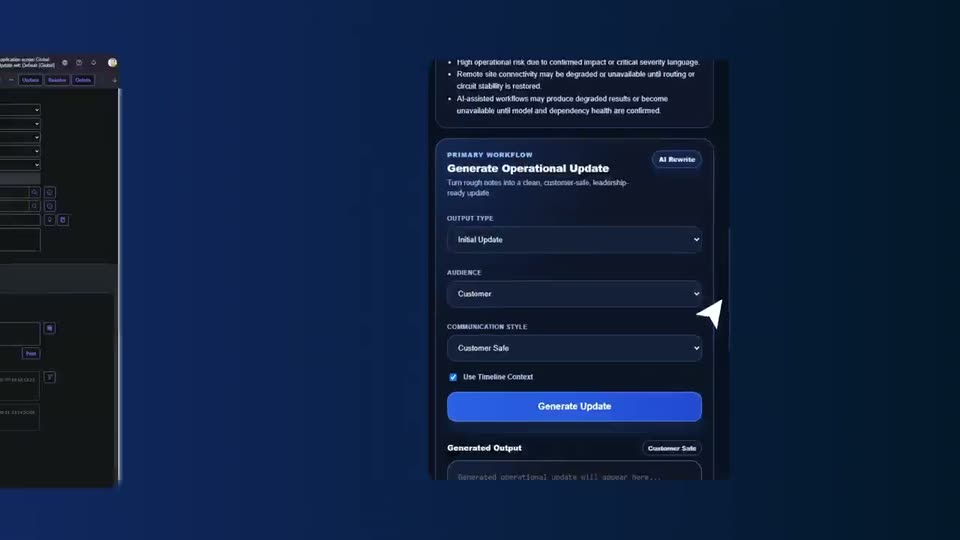
A dark blue background holds a tilted browser mockup showing a ticketing screen and a right-side update panel. A cursor clicks Generate Update, generated text appears in the output box, then the cursor moves toward Copy Update as top headlines change.
On-screen text: “BridgeOpsOne runs as a browser extension”, “Working seamlessly with your ticketing platform.”, “Right where your analysts already work”
Techniques: 3D mockup, Cursor demo
Camera: Push in
A thin outlined rounded rectangle on a dark blue grid holds a centered headline that builds word by word. 'Less time writing updates' forms, then the box shifts and 'More time solving incidents' scales in, the final word blurring as it slides from the right.
On-screen text: “Less time writing updates”, “More time solving incidents”
Techniques: Kinetic type
Camera: Static
On a white background, the BridgeOpsOne logo assembles: a dark navy stem and bowl draw in from the corners, a blue arc sweeps across the top, then the wordmark and gray tagline fade in below. A closing line scales in at the end.
On-screen text: “BridgeOpsOne”, “AI-POWERED OPERATIONAL INTELLIGENCE”, “More time solving incidents”
Techniques: Kinetic type
Camera: Static