1:17

Reconero: Supercharge your police force with AI
Reconero · Government · Oct 2026
BridgeOpsOne · 1:18 · Code only · AI-annotated
BridgeOpsOne’s 1:18 launch film runs 38 scenes, about 2.1 s each. The product shows up at 0:05 and 5 features are revealed. The call to action lands at 1:14 (95% in), over a voiceover. A dark blue launch film for the BridgeOpsOne incident communication platform, built from a red error hook, a typed product intro, a feature montage of 3D phone and dashboard demos, and a closing logo plus URL card. Its signature moves are tilted 3D interface mockups that rotate flat over a perspective grid, centered white text cards that drift on a blue gradient, and a clean white-and-blue monogram that assembles at each brand beat.
Is this your launch? to your site or press kit.
Reconero · Government · Oct 2026
Hyperagent · Nov 2026
A black frame brightens to reveal a field of floating security widgets in red and white, centered on a Critical Error dialog, with soft-focus panels at the edges. A VIRUS DETECTED panel slides in at the lower left while the rest hold still.
Camera: Pull out
Floating incident and security UI panels, a central error dialog and warning icons, recede into a blue gradient as two centered white text lines fade in to state the message.
On-screen text: “But operational communication”, “often falls behind”
Techniques: 3D mockup, Kinetic type
Camera: Static
On a blue gradient background with a faint grid, the small caption 'often falls behind' sits centered, then gives way to a large white 'Introducing' that types out letter by letter with a blinking cursor.
On-screen text: “often falls behind”, “Introducing”
Techniques: Kinetic type
Camera: Static
On a dark blue gradient with a faint grid, the R mark assembles in the center as the word Introducing fades in, then out. The BridgeOpsOne wordmark fades in beneath the mark and holds.
On-screen text: “Introducingl”, “BridgeOpsOne”
Techniques: Masking
Camera: Static
Centered white text reads 'An operational communication platform' over a blue gradient. A quick blur transition then reveals a split layout: the headline 'Designed for NOCs' on the left and a tilted 3D phone mockup of the BridgeOpsOne workspace on the right.
On-screen text: “An operational”, “communication platform”, “Designed for NOCs”
Techniques: 3D mockup
Camera: Static
A blue grid background holds a tilted 3D phone mockup of the BridgeOpsOne interface on the right. On the left, the headline “Designed for NOCs” swaps its last word to “SOCs” and back, matching the voiceover.
On-screen text: “Designed for NOCs”, “Designed for SOCs”
Techniques: 3D mockup, Kinetic type
Camera: Static
A tilted BridgeOpsOne Command Center interface card, shown in 3D perspective with a floor reflection, rotates flat to face the camera. A white headline resolves at the top while a left caption exits the frame.
On-screen text: “designed for”, “Command centers”
Techniques: 3D mockup, Kinetic type
Camera: Static
A blue gradient background holds the centered white title “Infrastructure teams”. The first word is sharp while the second blurs into focus, then both settle. The frame stays locked off.
On-screen text: “Infrastructure teams”
Techniques: Kinetic type
Camera: Static
A white text line reading 'Infrastructure teams' sits centered on a blue gradient background that brightens toward the top right. The frame is locked off; the line holds steady, then dissolves to transparent over the final moment.
On-screen text: “Infrastructure teams”
Camera: Static
A deep blue gradient fills the frame, darker on the left and brighter on the right, drifting slowly. A single line of white text, High-pressure incident environments, stays fixed at the center while the background shifts beneath it.
On-screen text: “High-pressure incident environments”
Camera: Static
A white headline reads centered on a dark blue gradient field, slightly lighter toward the right edge. The text holds still for the full shot while the voiceover lists operational contexts.
On-screen text: “High-pressure incident environments”
Camera: Static
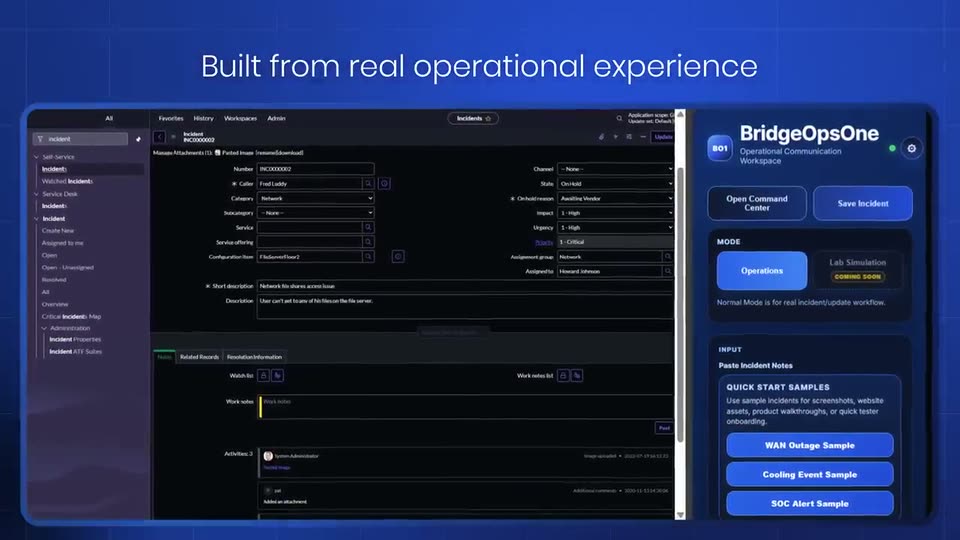
Two 3D-tilted interface mockups, a dark incident form and the BridgeOpsOne panel, sit under a white headline on a blue grid. They rotate to a flat frontal view, then the camera pushes in to fill the frame with the form fields and control buttons.
On-screen text: “Built from real operational experience”
Techniques: 3D mockup, UI zoom
Camera: Push in
Two UI panels hover above a blue grid floor. The left shows a dark incident list; the right scrolls up past blue sample buttons and a privacy notice to a monospace status box with a cursor.
Techniques: 3D mockup, Split screen
Camera: Static
A tilted phone on a dark grid background scrolls a technical incident card, while large text on the right fades in as “Rough Technical updates into clear” and then changes to “Professional communication in seconds”.
On-screen text: “Rough Technical updates into clear”, “Professional communication in seconds”
Techniques: 3D mockup, Kinetic type
Camera: Static
A flat phone mockup on the left scrolls a bulleted incident report while a blue pointer cursor hovers over the text. On the right, the white headline sits static against a dark blue grid background.
On-screen text: “Professional communication in seconds”
Techniques: Cursor demo
Camera: Static
Over a blue grid, a dark card of monitoring notes with a cursor sits left of a white headline. The layout flips: the headline slides to the left while a workflow card with a dropdown fills the right.
On-screen text: “Professional communication in seconds”, “Generate leadership ready updates”
Techniques: Cursor demo
Camera: Static
A tilted 3D phone mockup on the right scrolls through a workflow form as a cursor clicks Generate Update and a Customer Safe paragraph fills the output box. The white headline sits left on a blue grid, then fades out.
On-screen text: “Generate leadership ready updates”
Techniques: 3D mockup, Cursor demo
Camera: Static
A blue grid background holds a white headline on the left while a tilted phone mockup on the right shows a dark incident-update form with a blue button and a paragraph of output text; both hold static.
On-screen text: “Generate leadership ready updates”
Techniques: 3D mockup
Camera: Static
A dark interface panel rotates from a tilted 3D angle to a flat front view on the right, while a three-line headline fades and sharpens in on the left over a blue grid background.
On-screen text: “Track incident timelines in real time”
Techniques: 3D mockup, Kinetic type
Camera: Static
A dark phone mockup in 3D perspective on a blue grid background displays an incident timeline screen. The left headline fades out as the phone scales up, filling the right side of the frame.
On-screen text: “Track incident timelines in real time”
Techniques: 3D mockup, UI zoom
Camera: Push in
A 3D phone mockup on the right shows a leadership package interface scrolling upward as a cursor hovers over the cards; on the left, a two-line headline with 'snapshots' in light blue fades in over a dark blue grid.
On-screen text: “Executive snapshots for operational visibility”
Techniques: 3D mockup, Cursor demo
Camera: Static
A dark blue dashboard titled BridgeOpsOne Command Center fills the frame, then scales down to reveal the full rounded panel with stat cards, an incident detail workspace, and SLA timer buttons. The layout settles into a static grid of cards.
Techniques: UI zoom
Camera: Static
A dark BridgeOpsOne command dashboard sits in 3D tilt over a blue grid while Centralized command workflow assembles at the top. The frame scrolls down the interface to the timeline and history rows, then Designed to support communication scales in along the bottom edge.
On-screen text: “Centralized command workflow”, “Designed to support communication”
Techniques: Kinetic type, 3D mockup, UI zoom
Camera: Pan
A dark log panel with text blocks and small buttons occupies the left edge, then wipes out to the left as a blue gradient fills the frame. The white headline fades in letter by letter and settles centered.
On-screen text: “Reduce communication delay”
Techniques: Kinetic type
Camera: Pan
A centered white line of text holds still over a deep blue gradient that slowly drifts, the darker region sliding from the bottom edge up toward the upper right across the shot.
On-screen text: “Reduce communication delays”
Camera: Static
A deep blue gradient fills the locked-off frame while the white phrase “Improve consistency” sits centered and scales gently into place.
On-screen text: “Improve consistency”
Techniques: Kinetic type
Camera: Static
A blue gradient holds the white line 'Improve consistency', which scales and drifts up as 'Maintain operational' fades in on the left and two glowing incident-report cards slide in from the right.
On-screen text: “Improve consistency”, “Maintain operational”
Techniques: Kinetic type
Camera: Static
A dark blue backdrop holds the headline “Maintain operational clarity” on the left, while a phone mockup in 3D perspective on the right shows an incident card with a terminal snippet and a details list. The camera slowly pushes in, cropping the headline at the left edge.
On-screen text: “Maintain operational clarity”
Techniques: 3D mockup
Camera: Static
Centered text builds word by word on a deep blue gradient that slowly drifts. The first line, From network outages and failover events, fades out as the next, Security incidents and infrastructure instability, types in.
On-screen text: “From network outages and failover events”, “Security incidents and infrastructure instability”
Techniques: Kinetic type
Camera: Static
Centered white two-line text on a blue gradient that darkens toward the right edge. A faint translucent geometric shape fades in behind the text in the final frame.
On-screen text: “Security incidents”, “and infrastructure instability”
Camera: Static
A blue gradient background holds the white and blue BridgeOps mark, which scales in at center. The wordmark forms beneath it as a faint caption fades out and a blue tagline word slides in from the right.
On-screen text: “Security incidents”, “and infrastructure instability”
Techniques: Masking
Camera: Static
The BridgeOpsOne logo and wordmark sit centered on a dark blue gradient, then the lockup exits as the white headline “The gap between” scales in on the same background.
On-screen text: “The gap between”
Techniques: Kinetic type
Camera: Static
On a dark blue gradient, the thin white phrase scales and its words drift apart as a product panel with an operational intelligence list slides in from the right. The large words Technical Response fade in at the left while the panel settles into place.
On-screen text: “The gap between”, “Technical Response”
Techniques: Kinetic type
Camera: Static
A 3D-tilted intelligence panel rotates in beside the fading 'Technical Response' headline, crossfades to a tilted command-center dashboard that eases flatter under 'Operational communication', then cuts to the panel close-up while 'Because during critical incidents...' appears on a blue grid backdrop.
On-screen text: “Technical Response”, “Operational communication”, “Because during critical incidents...”
Techniques: Kinetic type, 3D mockup
Camera: Pan
On a dark blue field, an angled 3D incident dashboard sits at left, expanding from a narrow detail card into a full command center view. Large type at right swaps from “Because critical incidents.” to “Clear communication.”
On-screen text: “Because critical incidents.”, “Clear communication.”
Techniques: 3D mockup, Kinetic type, UI zoom
Camera: Pan
A dark blue incident dashboard, tilted in 3D perspective on a grid background, fills the frame. The white headline “Clear communication matters” slides up from behind the panel's top edge to rest above it. The dashboard holds steady with subtle depth.
On-screen text: “Clear communication matters”
Techniques: 3D mockup
Camera: Static
On a deep blue gradient, a white angular 'P' monogram assembles at center. White vertical and top bars hold, a blue arc fills the loop, and a white curved swoosh draws in beneath to complete the mark.
Techniques: Masking
Camera: Static
A stylized white and blue B logo holds center on a dark blue gradient, then scales down and rises as the BridgeOpsOne wordmark and a URL fade in beneath it.
On-screen text: “BridgeOpsOne”, “www.bridgeopsone.com”
Camera: Static