1:07

Superhuman for Teams 🤝
Superhuman · Productivity · Nov 2023
BridgeOpsOne · Jun 2026 · 0:22 · Full motion · AI-annotated
BridgeOpsOne’s 0:22 launch film runs 6 scenes, about 3.8 s each. The product shows up at 0:19 and 1 feature is revealed. There is no explicit call to action; a voiceover carries the film. The video alternates blur-to-sharp headline cards with a live UI demo that reframes into stacked report panels, then closes on a white logo assembly. Its signature moves are word-by-word text builds, glowing blue accents on a deep navy field, and report panels that slide in and stack from the right.
Is this your launch? to your site or press kit.
Superhuman · Productivity · Nov 2023
Akai · Oct 2025
Films whose music sounds like this one, voice left out
Arist · Modern electronic
ElevenLabs · Modern upbeat electronic
Notte · Modern electronic
A dark blue field holds centered headlines that build word by word, white with blue accent words, then swap to the second line as a cropped phone mockup of the app interface fades up at center.
On-screen text: “Leadership doesn't need”, “every technical detail”, “They need the big picture”
Techniques: Kinetic type
Camera: Static
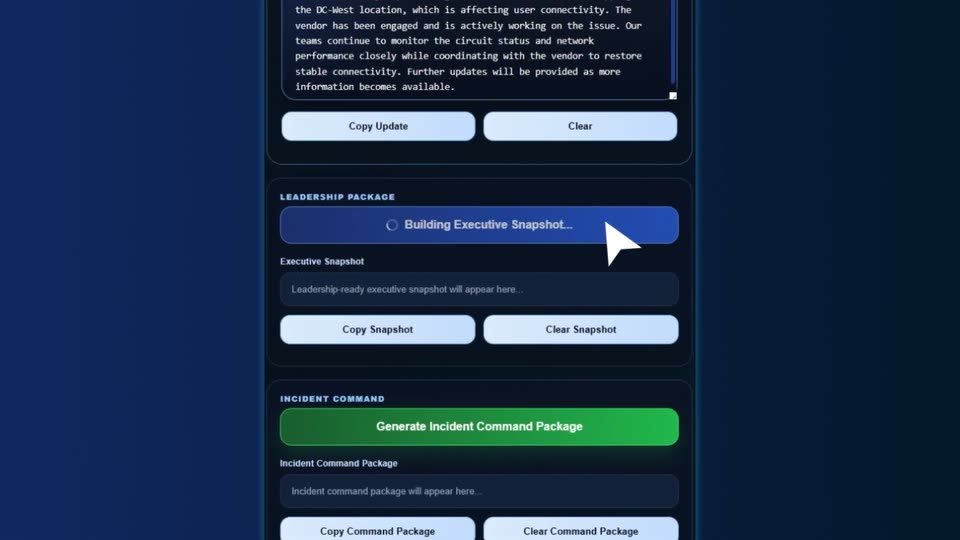
A dark incident dashboard sits centered on a blue field. A cursor clicks the blue Generate Executive Snapshot button, which flips to a spinner reading Building Executive Snapshot. The panel then reframes down to reveal the populated snapshot with status, risk and impact fields.
Techniques: Cursor demo, UI zoom
Camera: Push in
A blue card with a white line icon of a person at a laptop and the title Executive Summary scales in on the left. Four dark panels labeled Impact, Current Status, Response Actions, and Next Steps slide in from the right, stacking vertically.
On-screen text: “Executive Summary”, “IMPACT”, “Users are experiencing intermittent connectivity issues. Customer impact has not been confirmed.”, “CURRENT STATUS”, “WAN circuit at DC-West is experiencing intermittent flapping. Vendor has been engaged and is providing updates.”, “RESPONSE ACTIONS”, “Monitoring WAN circuit status, verifying remote site reachability, and coordinating with vendor for resolution. Validating network and AI/ML model dependencies.”, “NEXT STEPS”, “Await vendor updates, continue monitoring network performance metrics, and prepare to escalate to carrier or AI/ML engineering if service degradation persists.”
Techniques: Kinetic type
Camera: Pull out
A dark navy interface view shows a glowing blue Executive Summary card with a line icon of a person at a laptop on the left, and four stacked report panels labeled Impact, Current Status, Response Actions and Next Steps on the right. The layout drifts slowly to the right.
Camera: Static
A dark blue field holds a thin rounded-rectangle outline. The phrase Keep stakeholders informed fades in word by word with a soft blur that sharpens, then swaps to Without creating extra work in the same style.
On-screen text: “Keep stakeholders informed”, “Without creating extra work”
Techniques: Kinetic type
Camera: Static
On a white background, the BridgeOpsOne mark assembles from scattered navy and blue shapes into a stylized R, then the wordmark and a gray tagline fade in below it.
On-screen text: “BridgeOpsOne”, “AI-POWERED OPERATIONAL INTELLIGENCE”
Camera: Static