2:26

Google Pixel Tablet: Help in Your Hand and at Home
Google · AI · May 2023
Billabex · Nov 2026 · 2:20 · Full motion · AI-annotated
Billabex’s 2:20 launch film runs 28 scenes, about 5.0 s each. The product shows up at 0:04 and 5 features are revealed. The call to action lands at 2:02 (87% in), over a voiceover. Built as a question-led explainer that names the agent, then steps through each capability (framework, pre-send control, response reading, human decisions, four cases) as a flat UI panel or a tilting 3D mockup, bookended by a recap split-screen and a brand card. Signature moves are word-by-word typed headlines, flipping toggles, ticking checklists, and the glowing X orb anchoring the dark frames, all held at a slow pace with quick micro-animations.
Is this your launch? to your site or press kit.
Google · AI · May 2023
Shire · Nov 2026
Anthropic · AI · Jun 2026
Films whose music sounds like this one, voice left out
Zolvo · Corporate / Tech
Pine · Modern electronic corporate tech
Studio · Modern electronic
On an off-white field cut by a thin blue line, a glossy dark circular badge with a red-and-white X mark glows softly on the left. To its right, a bold navy headline types in word by word, the latest words in gray, forming two lines.
On-screen text: “Confier vos relances à une IA,”, “pas vos décisions?”
Techniques: Kinetic type
Camera: Static
A glossy 3D orb holding the red-and-white X logo pulses on a dark grid. Three white pill chips with line icons slide in to its right one after another. The layout then shifts up, revealing two persona chips in the light band below.
On-screen text: “Relance par email”, “Lit les réponses”, “Suit les engagements”, “Sophie, facturation”, “Olivier, directeur financier”
Camera: Static
A flat product UI shows a dark header with three feature pills above two name tags, while three white cards fade in from left to right. The whole view blurs as a large white headline scales in at the center.
On-screen text: “Agent IA de recouvrement”
Techniques: Kinetic type
Camera: Pan
On a dark navy field, a bold white headline scales into the center, followed by a smaller gray subline that fades in beneath it. The frame stays locked off as the two lines settle into a centered stack.
On-screen text: “Agent IA de recouvrement.”, “Ce qu'il fait, ce que vous décidez.”
Techniques: Kinetic type
Camera: Static
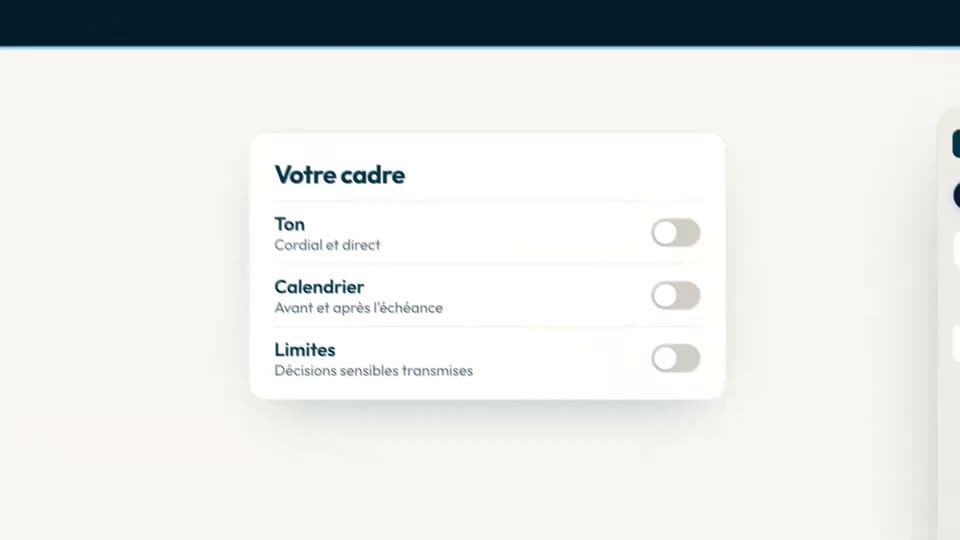
A white settings card fades in from a soft blur on a cream background. It lists three rows, Ton, Calendrier and Limites, each with a gray toggle switch on the right. A dark blue band runs across the top.
Camera: Static
A white settings card titled Votre cadre on a cream background lists three rows with toggle switches. A cursor flips the toggles on one by one, each turning navy, then the view zooms out to reveal a right-hand sidebar.
Techniques: Cursor demo, UI zoom
Camera: Pan
A messaging interface begins out of focus and racks sharp. The left sidebar shows navigation while the main panel holds a new message form, its subject line typed as “Votre compte” next to a blinking caret.
Camera: Static
A message types itself in the messaging screen as invoice chips pop in and the outstanding amount counts up. The frame pulls back to reveal a checklist on the right; four items tick to 'Conforme' while the amounts highlight, then a sent list appears and the message card fades out.
Techniques: Kinetic type, UI zoom
Camera: Pull out
A tilted 3D mockup of a French messaging interface. The draft message finishes typing, the right-hand pre-send check flags the amount, and a sentence types out in the panel while the top badge switches to Reliance non envoyée.
Techniques: 3D mockup
Camera: Static
A flat chat interface on a dark navy background shows an AI agent and a customer trading messages. New bubbles, classification tags and a date timeline fade in one after another while the thread scrolls upward.
Camera: Pull out
A dark chat card holding a French dispute message slides upward while a light task list below slides in and settles, its rows blurring then snapping sharp.
Techniques: Split screen, Speed ramp
Camera: Push in
A white chat panel sits on a dark navy background. A dark message bubble drops in on the right, a 'Réponse ambiguë' tag slides in beside it, and the bottom status chip flips to 'Suspendue'. The panel then blurs and scales down to exit.
Camera: Pull out
A two-panel product view stacks a chat card on a dark field above a light task table. The chat panel scrolls up, revealing a status line and a control row, while the task list below shifts in step. A round logo button rests at the right edge.
Camera: Static
Two stacked product panels rest on a dark band: a French chat thread with status chips above, a Tâches task table below. The whole frame drifts slowly upward.
Camera: Push in
A cream task table titled Tâches lists three rows for client Transports Garnier with assignees and En attente status. The frame drops its dark top bar, then the card tilts in 3D and blurs out as a transition.
Techniques: 3D mockup
Camera: Push in
A task panel fades in over a dimmed list, showing a client context block and three payment rows with date fields. A cursor glides across the panel and hovers on the dark 'Accorder l'échéancier' button.
Techniques: Cursor demo
Camera: Static
A white task card slides up and off the top edge, uncovering the task panel behind it, which now displays an approved badge. A mouse cursor hovers over the dark approve button.
Techniques: Cursor demo
Camera: Pull out
The right panel of a dashboard switches to a client view with SMS and Courrier channel tiles. A cursor clicks the Courrier tile, filling it dark navy, then clicks a pause button that turns navy and shows a Relances en pause badge.
Techniques: Cursor demo
Camera: Push in
A light client dashboard with a left sidebar and two channel cards slides left and blurs out of frame, dissolving into a plain white background.
Camera: Pan
A white panel fills with a two-by-two grid of dashed placeholder tiles. The camera zooms into the first tile as it becomes a beige card reading “La preuve manque” with a caption, then pans right to a second card reading “Les informations se contredisent”, ending in a blur.
On-screen text: “La preuve manque”, “Paiement annoncé, rien ne le confirme”, “Les informations se contredisent”, “Facture échue, délai accordé par un commercial”
Techniques: UI zoom, Morph
Camera: Push in
A tight view of a white panel holding a grid of rounded cards. The camera pans right from the left column to the right column, and a subtitle line fades in under each bold title as it centers. The shot then pulls back to reveal the full two-by-two grid.
Techniques: UI zoom
Camera: Pull out
A white panel holding four beige case cards sharpens out of a blur. Names type themselves into the Décide fields, then the caption below the grid types out word by word.
On-screen text: “Qui décide ? Un nom par cas.”
Techniques: Kinetic type
Camera: Pull out
A white interface card with four labeled quadrants fills the frame, then the view pans up to a second section showing a checklist and a dark action button. The fast vertical move blurs the French copy as it scrolls.
Camera: Pan
Split frame, dark navy top and cream bottom. A glowing orb with a red X sits left as the headline appears word by word, then three white pill buttons pop in. Below, two name chips stay still while a navy headline and a small exchange timeline fade in.
On-screen text: “Sophie, facturation”, “Olivier, directeur financier”, “L'agent automatise l'exécution.”, “Relance”, “Contrôle”, “Suit les engagements”, “Vous gardez les arbitrages.”, “Historique des échanges”, “Message”, “Réponse”
Techniques: Kinetic type
Camera: Static
A browser window mockup swings from an angled 3D position to face the camera on a light gray background. The page title types out letter by letter behind a blinking caret, then a dashed section box with an eye icon and its label slides in above two empty dashed rows.
Techniques: 3D mockup, Kinetic type
Camera: Static
A flat browser window mockup on a cream background shows the heading L'agent IA Billabex and three feature rows that fill in one by one. The URL billabex.com is typed into the address bar, a cursor hovers over a row, then the window blurs and slides out of frame.
On-screen text: “billabex.com”
Techniques: Cursor demo
Camera: Static
On a cream background, the billabex wordmark holds in the top-left corner while a dark navy circle bearing a red and white chevron mark fades in on the right, wrapped in a soft blue halo.
On-screen text: “billabex”
Camera: Static
On a cream background, the Billabex logo sits top-left while two French headlines and a URL fade in on the left. A glossy dark sphere bearing the red-and-white X mark floats on the right, a blue glint rotating around it.
On-screen text: “Le dialogue reprend.”, “Le paiement avance.”, “billabex.com”
Techniques: Kinetic type, Light sweep
Camera: Static