1:23

YC Launch
Zeit AI · B2B · Aug 2024
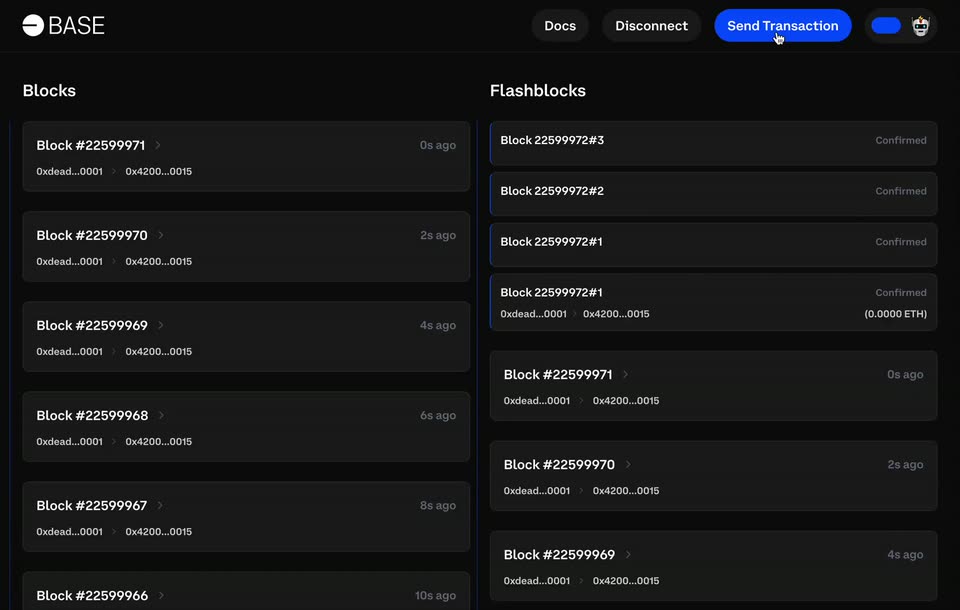
Base’s 0:13 clip runs 4 scenes, about 3.5 s each. The product is on screen from the first frame. One unbroken screen recording of the Base block explorer, paced by the steady upward scroll of two columns of block cards. Motion is minimal and mechanical: cards slide in with a blue left border, the wallet panel slides in from the top right, and the cursor moves deliberately between buttons.
Is this your launch? to your site or press kit.
Zeit AI · B2B · Aug 2024
Super Code AI · Sep 2026
A dark dashboard shows two columns, Blocks and Flashblocks. The right column scrolls up rapidly as new confirmed blocks stack into place, while a hand cursor slides from the blue Send Transaction button to the Disconnect button.
Techniques: Cursor demo
Camera: Static
A dark Base interface shows two scrolling columns of block cards on the left and right. A Coinbase Wallet confirm dialog slides in from the top right, listing address, cost and network, while a cursor hovers over the blue Confirm button.
Techniques: Cursor demo
Camera: Pull out
A dark two-column dashboard fills the frame. The left Blocks list scrolls up as new cards arrive, while the right Flashblocks column flashes through rapid sub-block entries. A white cursor drifts across the right column and ends on the blue Send Transaction button.
Techniques: Cursor demo
Camera: Static
A dark two-column block explorer fills the frame, both lists of block cards refreshing as new rows slide in with a blue left border. A cursor clicks the Confirm button on a wallet panel at right, which then closes to reveal a connected top bar.
Techniques: Cursor demo
Camera: Static