1:21

Launch film
Akon Labs · B2B · Nov 2026
Atomic Machines · Nov 2026 · 0:29 · AI-annotated
Atomic Machines’s 0:29 launch film runs 4 scenes, about 7.3 s each. The product is on screen from the first frame and 3 features are revealed. There is no explicit call to action. A persistent split-screen UI (node graph on the left, 3D viewport on the right, app bar on top) carries the whole video; the isometric device is the hero, morphing and assembling in place while short white headings and a growing red corner bracket announce each step. Pacing is slow and methodical with crossfades between states, a sliding-in color scale, and a recurring 'repeat at every step' caption, so the signature moves are in-place 3D morphs, heat-map reveals, and the bracket-and-heading cad
Is this your launch? to your site or press kit.
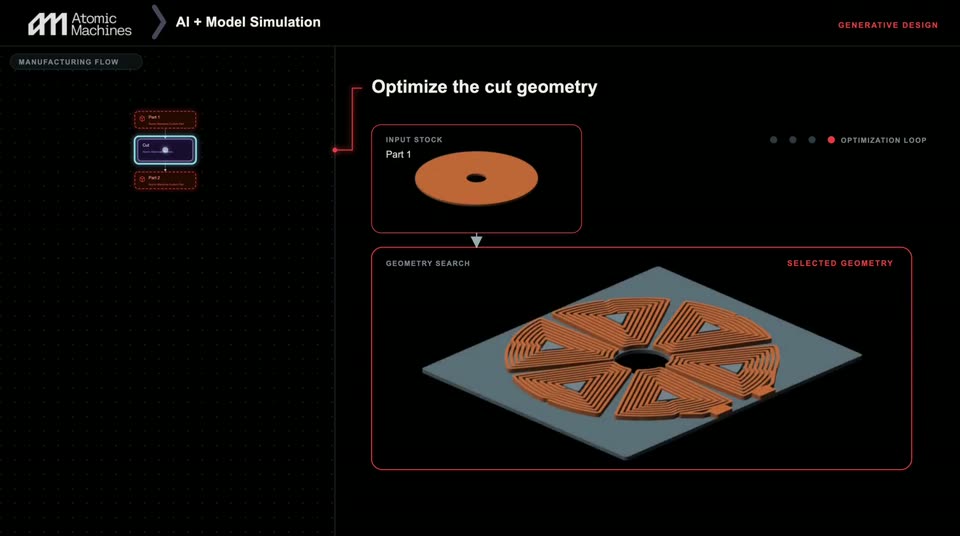
A dark UI shows an isometric orange disc on a gray plate that morphs through four spoke-cut candidates. The heading swaps from 'Choose a manufacturable next step' to 'Optimize the cut geometry,' a progress dot advances, and a color scale slides in at the right.
On-screen text: “Choose a manufacturable next step”, “Optimize the cut geometry”
Techniques: Morph, 3D mockup
Camera: Static
A dark interface holds a 3D isometric coil array heat-mapped by magnetic field density. The left flow panel switches its highlighted node, then a bottom caption fades in.
On-screen text: “REPEAT AT EVERY STEP”, “process → geometry → simulation → next workpiece”
Techniques: 3D mockup
Camera: Static
A dark product interface splits a node graph on the left from a 3D part with an orange simulation heatmap on the right. The part fades out while the node graph zooms in on a highlighted node, and a red bracket grows beside the white headline.
On-screen text: “Advance through validated steps”, “REPEAT AT EVERY STEP”, “process → geometry → simulation → next workpiece”
Techniques: 3D mockup, Kinetic type, UI zoom
Camera: Static
A split layout pairs a node graph on the left with an isometric 3D device that assembles layer by layer on the right. The model cuts away for a fluid-flow simulation, then reassembles under a black top plate as the headings step through each stage.
On-screen text: “AI + Model Simulation”, “GENERATIVE DESIGN”, “Reason through assembly geometry”, “Simulate the assembly”, “Integrate the remaining device”, “REPEAT AT EVERY STEP”, “process → geometry → simulation → next workpiece”, “Complete the device”, “FINAL TEST → INSPECTION”, “Your Device”
Techniques: 3D mockup, Split screen
Camera: Static