2:20


Executor Demo
Executor · B2B · Aug 2026
Akon Labs · Nov 2026 · 1:21 · AI-annotated
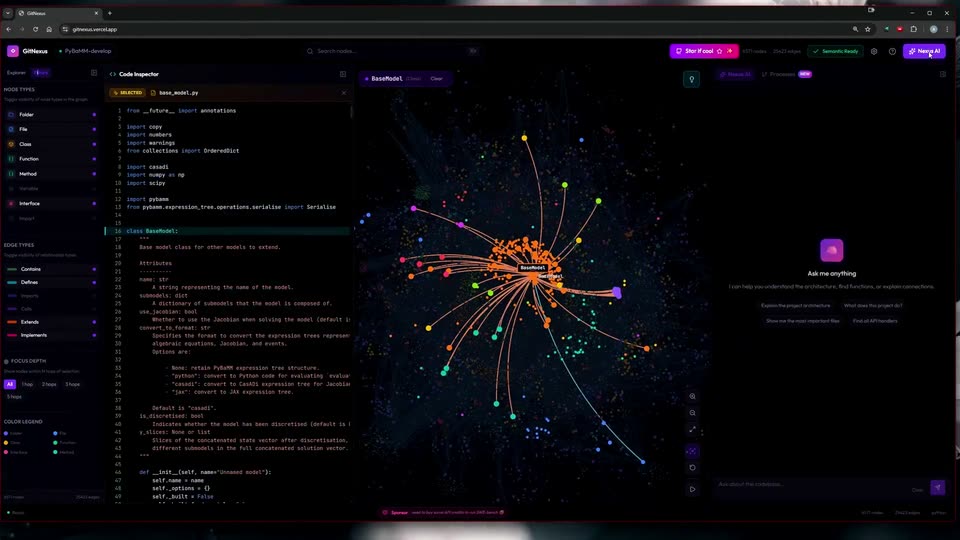
Akon Labs’s 1:21 launch film runs 22 scenes, about 3.7 s each. The product is on screen from the first frame and 2 features are revealed. There is no explicit call to action. The video is a continuous screen recording that moves from the animated 3D code graph to the AI assistant and then to a terminal pipeline, cutting only when the feature changes. Its style is defined by the dense multicolored node graph on a black canvas, with slow zooms, sliding side panels, and live typing as the main motion.
Is this your launch? to your site or press kit.
Executor · B2B · Aug 2026
Result · Consumer · Nov 2026
Instinct · Fintech · Oct 2026
A dark app screen inside a browser shows a file tree on the left and a dense 3D node graph on a black canvas. The multicolored nodes and thin connecting lines animate as the layout settles, the edges fading and the cluster spreading outward.
Camera: Static
A dark code-graph interface fills the screen. A dense cluster of multicolored nodes linked by thin lines sits centered. The left panel toggles between a file tree and node and edge type filters. The graph zooms out to spread across the canvas with labels, then back into a tight cluster.
Techniques: UI zoom
Camera: Push in
A dark developer interface fills the frame, a file tree and code editor on the left, a colorful particle knowledge graph on the right. The graph reorganizes its nodes as a cursor hovers, while the code panel switches between source and folder views.
Techniques: Cursor demo, Particles
Camera: Static
A dark code-inspector window fills the frame, a YAML file list in the center and a starfield of colored nodes on the right. The shot is locked off with no motion.
Camera: Static
A dark GitHub-style app, GitNexus, fills the frame in a locked-off view. A file tree sits on the left, a Code Inspector panel in the middle, and a 3D particle graph of code nodes on the right, with a tooltip labeling a cluster “benchmarks”.
Camera: Static
A two-pane screen of a code-graph tool: a dark editor with a Python file and file tree on the left, a 3D node graph on the right. The graph animates as nodes settle and labels fade in, with the selected node boxed in red.
Camera: Static
A dark code-graph view fills the frame, a dense web of multicolored nodes and faint lines on black. The canvas slowly zooms in, enlarging the clusters, while a file tree sits docked left and a top bar holds the search field. A cursor rests on a node label.
Techniques: UI zoom
Camera: Static
A screen recording of the GitNexus interface shows a Python code inspector on the left and a dark dependency graph on the right. A cursor selects files, and both panels re-render to the chosen node's cluster.
Techniques: Cursor demo
Camera: Static
A split code editor shows a Python file on the left and a dark node graph on the right. A cursor drifts across the graph, hovering over nodes so their labels fade in and out.
Techniques: Cursor demo
Camera: Static
A dark code-graph interface fills the frame, a dense web of multicolored nodes joined by thin lines on black. The left sidebar swaps from a file tree to a filters panel listing node and edge types. A cursor moves down the panel.
Techniques: Cursor demo
Camera: Static
A full-screen capture of the GitNexus web app shows a dense force-directed graph of multicolored nodes and cyan links on black. A left panel lists node and edge filters, and a cursor rests on the edge types list. The view holds still with no motion.
Camera: Static
A dark code-graph tool shows Python code in a left inspector and a node network in the center. An AI panel slides in from the right with the heading Ask me anything and four suggestion chips as the node labels fade to colored dots.
Camera: Static
A dark code-analysis interface with a node graph and code panels; a cursor hovers over the graph while the AI panel on the right swaps from an 'Ask me anything' card to a chat thread with 'Explain the project architecture' typed in the input box.
Techniques: Cursor demo
Camera: Static
A dark codebase visualization interface fills the frame, static. A left panel lists node and edge type filters, the center shows a dense cluster of colored dots linked by thin lines around a labeled node, and a right panel displays an AI chat with a typed prompt.
Camera: Static
A dark code-graph interface fills the frame, a dense field of multicolored nodes with a highlighted orange cluster tagged BaseModel at the center, framed by a left legend panel and a right chat box.
Camera: Static
A dark codebase graph of colored nodes and lines zooms inward on the central cluster while the right assistant panel expands to show a markdown answer. The left sidebar lists node and edge types. The frame stays locked on the full application window.
Techniques: UI zoom
Camera: Static
A dark product interface fills the frame: a dense network graph of multicolored nodes and connecting lines sits at center, flanked by a node-type sidebar on the left and a documentation panel on the right. The right panel scrolls slowly upward while the graph and layout stay locked off.
Camera: Static
A dark code-graph interface pans slowly across a network of file nodes. The left inspector swaps between Python files, the right documentation panel scrolls through architecture notes, and a cursor rests near the center of the canvas.
Camera: Static
A dark code-graph interface fills the screen, a network of labeled file nodes glowing in the center. A controls panel sits left, a numbered process list scrolls on the right, and two floating code cards show Python source as a hand cursor hovers.
Techniques: Cursor demo
Camera: Static
A locked-off full-window screen capture of the GifNexus app. The left code inspector swaps from simulation.py to parameter_values.py, the central file graph drifts slowly, and the right AI panel scrolls down to reveal the TL;DR summary.
Camera: Static
A dark GitNeus code-inspector app fills the screen with a centered PowerShell terminal. A progress bar fills as the tool indexes the repo, then a Claude Code banner appears and a typed prompt scrolls a pipeline diagram up the terminal while node and process side panels stay static.
Techniques: Cursor demo
Camera: Static
A dark three-panel IDE fills the locked-off frame. The central Code Inspector panel swaps a list of RPC entries for a vertical pipeline diagram that scrolls up through numbered phases, then shows a new assistant line with a flowchart. The left file tree and right evidence panel stay static.
Camera: Static