2:13

Brad Menezes - Introducing Superblocks 2.0: AI-generated enterprise apps – finally u
Superblocks · Apr 2026
Appkeep’s 1:10 launch film runs 35 scenes, about 2.0 s each. The product shows up at 0:21 and 5 features are revealed. The call to action lands at 1:05 (93% in), over a voiceover. The video is built as a hard-cut montage at about 125 bpm, alternating bold 3D-shadow type cards with flat UI mockups and a few 3D/live-action beats, all on a near-white field that flips to black for the closing value list. Its signature moves are word-by-word headline builds, an orange accent that wipes, underlines, and glows, and the AppKeep three-bar mark that repeatedly resolves from a glow into the logo to punctuate each section.
Is this your launch? to your site or press kit.
Films whose music sounds like this one, voice left out
Motionfly · Upbeat electronic pop transitioning to funk/disco
Slack · Upbeat electronic
F4 · Electronic
Bold sans-serif words build up word by word on a white background, each carrying a 3D extruded shadow. The color shifts from orange to gray and brown as the line completes. A faint billing card with a Yearly tag and a cursor fades in behind the text.
On-screen text: “We just killed”
Techniques: Kinetic type
Camera: Static
On a white field, the bold headline reads We just killed beside a small subscription card that swaps from Notion to Calendly as a cursor taps a Renewal pill. The headline then shatters into drifting pixels.
On-screen text: “We just killed”
Techniques: Cursor demo, Particles
Camera: Static
A white dot-grid background holds the centered headline “every mainstream”; “every” wipes from black to orange while “mainstream” shifts brown to black, and “SaaS company.” scales in below. The frame cuts to a row of seven flat SaaS app icons.
On-screen text: “every mainstream”, “SaaS company.”
Techniques: Kinetic type, Masking
Camera: Static
A row of seven flat app icons tumbles and scatters across a white background, shifting colors, then converges into a tight cluster that resolves into three UI cards, one tagged Buy once and one carrying the tagline Your SaaS, replaced.
On-screen text: “Your SaaS, replaced.”, “Buy once”
Techniques: Morph
Camera: Pan
A rounded-square app icon sits centered on a white background. Its border shifts from orange to blue while the blurred interior resolves into a crisp blue list glyph of three bars with a small dot.
Techniques: Morph
Camera: Static
Close-up of a phone screen on a blue-green gradient wallpaper. A Notion subscription renewal notification sits in the lower half, then the stack scrolls upward as more renewal cards, Higgsfield, HubSpot, DataFast, Postiz, slide in above it. The frame stays locked.
Camera: Pan
A tilted phone mockup in 3D perspective shows a notification feed scrolling upward, cycling through subscription renewal cards with colored app icons, bold titles, and now timestamps over a blue gradient.
Techniques: 3D mockup
Camera: Pull out
A plain white frame holds the black headline “Subscriptions are” as the orange line “getting ridiculous.” slides in below it with motion blur. The text then fades, leaving a thin horizontal rule with two orange dots and a small EV monogram at the center.
On-screen text: “Subscriptions are”, “getting ridiculous.”
Techniques: Kinetic type
Camera: Static
A plain off-white frame holds a thin black crosshair with small orange dots that drift inward toward the center. In the middle, the words “Every new” scale in, then “tool means...” slides in from the right with a soft blur, stacking into two centered lines.
On-screen text: “Every new”, “tool means...”
Techniques: Kinetic type
Camera: Static
The word “another” sits centered in white lowercase on black, then a black rounded rectangle shrinks to reveal a blurred forest and mountain landscape around it. The text stays locked in the center through the reveal.
On-screen text: “Every new”, “tool means...”, “another”
Techniques: Kinetic type, Masking
Camera: Static
A locked-off mountain landscape of green slopes under a cloudy sky holds still while the gray word another sits center, its orange bar shrinking to a thin underline as monthly bill fades in beneath it.
On-screen text: “another”, “monthly bill”
Techniques: Kinetic type
Camera: Static
Words “monthly bill”, “account”, “platform” slide left across a blurred mountain backdrop, each scaling up to white with an orange underline as it passes the center beneath the small gray “another”. An app icon with an orange glow enters on the right.
On-screen text: “another”, “monthly bill”, “account”, “platform”
Techniques: Kinetic type
Camera: Pull out
On a black field, two orange-outlined rounded icons merge into a single icon holding three white bars, while the wordmark APPKEEP slides into place beneath it.
On-screen text: “APPKEEP”
Techniques: Morph
Camera: Static
On a white background, a large black word slides left as an orange line draws a U-shaped curve above it. The scene cuts to a centered card: 'Free alternatives.' in orange over 'No endless subscriptions.' in dark gray.
On-screen text: “subscriptions.”, “Free alternatives.”, “No endless subscriptions.”
Techniques: Kinetic type
Camera: Static
On a plain white background, two centered lines, orange 'Free alternatives.' above near-black 'No endless subscriptions.', slide in from the right leaving a brief gray motion trail, then settle into a locked position.
On-screen text: “Free alternatives.”, “No endless subscriptions.”
Techniques: Kinetic type
Camera: Static
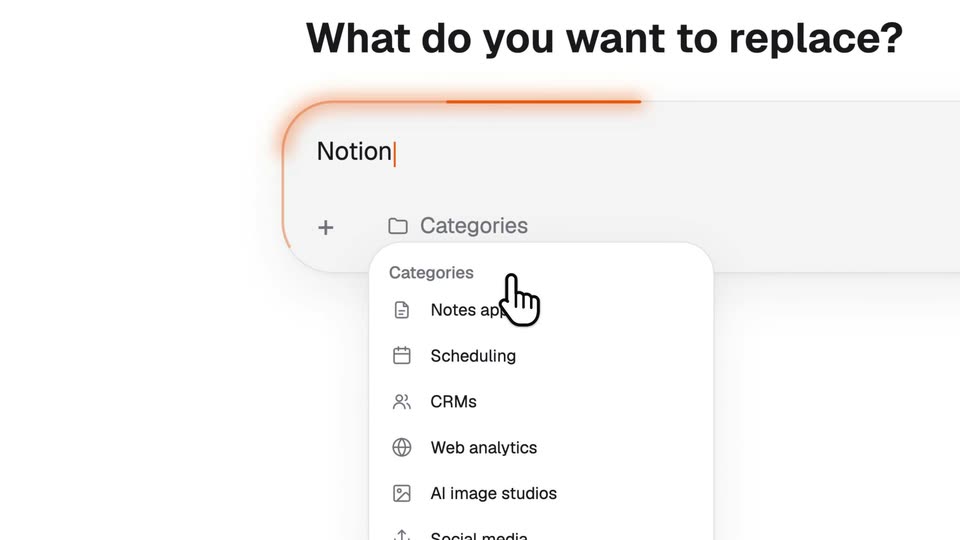
A flat search bar sits under the bold headline What do you want to replace?. The cursor types Notion, clicks Categories to open a dropdown, and the view zooms in as an orange glow travels the field's border.
On-screen text: “What do you want to replace?”, “Free alternatives.”, “No endless subscriptions.”
Techniques: UI zoom, Cursor demo, Light sweep
Camera: Static
A flat white UI mockup shows a Notion card with a Subscription dropdown and a Pricing panel below, where the highlighted Buy once row carries a hand-cursor icon and its label scales up slightly. The bold headline word place? sits cut off at the top left.
On-screen text: “place?”
Camera: Static
A hand cursor clicks the orange arrow button on a light input bar. The view zooms out to a rounded list titled Your SaaS, replaced with Notion, Calendly and HubSpot rows, each tagged Hosted for you, over concentric dashed lines.
On-screen text: “place?”
Techniques: Cursor demo, UI zoom
Camera: Push in
A rounded UI card on a white background holds a header row and a vertical list of six app entries, each with an icon and a subtitle. The card eases from a tight crop to a full frame, and the two pill badges in the header fill with peach orange.
Techniques: UI zoom
Camera: Pull out
A white setup form modal over a dimmed app screen zooms in as its fields fill with Notion, notes.appkeep.app, and AppKeep; the cursor clicks the orange Launch button, and the card fades to a centered white toast: Launch my Notion alternative.
On-screen text: “Launch my Notion alternative.”
Techniques: UI zoom, Cursor demo
Camera: Push in
On a white background, a gray chat bubble on the right holds the line Launch my Notion alternative. Beneath it, five orange status rows with small icons fade in top to bottom, each with a duration on the right, ending on a spinning circle.
Camera: Pan
A chat interface shows a gray command bubble top right. Below, a status list with checkmarks sits under an orange face icon and orange “Launching…” label. The icon fills into an orange check and the label turns black “Launched” as the steps complete.
Techniques: Morph
Camera: Static
The AppKeep My apps dashboard resolves from a quick text-overlap wipe into a clean view. Stat cards and category tabs sit above a row of five app cards, each showing a price, a Live tag and an AI-customize line.
Techniques: Masking
Camera: Push in
The view zooms from a full apps dashboard onto a chat card. A cursor clicks send on the prompt Add a dark mode to Notes app. A check message appears, then a dark Notes card with an orange toggle slides in.
Techniques: UI zoom, Cursor demo, Masking
Camera: Static
Flat chat mockup on white: two gray placeholder bars sit at top and bottom while an orange speech bubble slides in from the right, its white text 'Sell my internal tool' filling in, and a teal circle with a white D settles below the bubble.
Techniques: Kinetic type
Camera: Static
A peach app-listing card slides in from the right on a pale background, with an orange lightning icon and a Sell on AppKeep row. Left, the headline For developers darkens from gray, then swaps to One-time payment as a green check badge and No subscription fade in under the card.
On-screen text: “For developers”, “One-time payment”
Techniques: Kinetic type
Camera: Static
A large black headline reads One-time payments beside a peach AppKeep publishing card. The card blurs into a teal success state with a check and Published pill while the headline changes to Listed on AppKeep.
On-screen text: “One-time payments”, “Listed on”, “AppKeep”
Techniques: Kinetic type
Camera: Static
Black headline “Listed on” sits on the left as “AppKeep” slides in beneath it. On the right, a blurred teal app card shows a white check badge and a “Published” pill that scales up. Light background, locked-off frame.
On-screen text: “Listed on”, “AppKeep”
Techniques: Kinetic type
Camera: Static
A glowing white badge with an orange arc scales up on black, then settles into a UI row reading Publishing your tool... with a stacked-bar icon and chevron. The row text swaps to AppKeep handles it, then a large We handle the rest headline fades in over a blurred list starting with Hosting.
On-screen text: “Published”, “Listed on”, “AppKeep”, “Publishing your tool...”, “AppKeep handles it”, “We handle the rest”, “Hosting”
Techniques: Kinetic type, Morph
Camera: Static
On a black background, the bold white headline “We handle the rest” sits above a list that builds line by line, each item sliding in with an orange bullet. An orange Publish button with a hand pointer fades in at the bottom.
On-screen text: “We handle the rest”, “Hosting”, “Database”, “Authentication”, “Email”, “And so much more”
Techniques: Kinetic type
Camera: Static
On a black field, a white heading and an orange-dotted feature list sit above an orange Publish button with a hand cursor. The block slides up as a stack of gray cards, each tagged with a replaced tool and a Hosted pill, rises in from the bottom.
On-screen text: “AppKeep handles it”, “We handle the rest”, “Hosting”, “Database”, “Authentication”, “Email”, “And so much more”, “Publish”
Techniques: Kinetic type, Cursor demo
Camera: Push in
On a black background the orange headline One plan. holds the center while two columns of cream app cards, each with a small icon and an orange Hosted pill, scroll vertically above and below it in a continuous loop.
On-screen text: “One plan.”
Camera: Pull out
On a black background, white bold text reads “All your apps.” in the center while two stacks of cream app cards, each with a struck-through “replaced” and an orange “Hosted” pill, tilt and fan out in 3D around the words.
On-screen text: “All your apps.”
Techniques: Kinetic type, 3D mockup
Camera: Pull out
On a black background, the white line “The next era is” sits centered above a second line that types out letter by letter in gray behind an orange cursor, then turns orange when the full phrase completes.
On-screen text: “The next era is”, “personal software.”
Techniques: Kinetic type
Camera: Static
On a plain white background, a glowing orange mark resolves into the black AppKeep logo, then the wordmark and tagline blur in below it, and the background fades to light gray.
On-screen text: “AppKeep”, “Find your next favorite app: appkeep.io”
Camera: Static