0:35
Reve - Show, not tell.
Reve · Mar 2026
Anthropic · Nov 2026 · 1:02 · AI-annotated
Anthropic’s 1:02 launch film runs 19 scenes, about 3.3 s each. The product shows up at 0:09 and 3 features are revealed. There is no explicit call to action; a voiceover carries the film. The video is built as one unbroken meeting, handing off from the call grid to the whiteboard, the chat thread, and the launch plan while the product performs every transition. Pacing runs about seven cuts per minute, with typewriter text, loading blobs, and sticky-note pops as the signature moves.
Is this your launch? to your site or press kit.
Reve · Mar 2026
Figma · Design · May 2025
Notion · Productivity · Sep 2024
A dark video-call grid on black starts with two participant tiles, then reflows into a six-tile grid as new faces slide in, and finally a seventh dashed empty tile labeled Claude appears and fills with a coral blob.
Techniques: Split screen
Camera: Pull out
A four-tile video call grid holds two live participants. In the Claude tile, an orange half-circle rises over a white horizon line, then white rays pop out around it, above the caption 'Hey team'.
Camera: Push in
The serif title “Claude Meetings” holds center on cream while a dark bubble types “Hey Claude, can you start a whiteboard please?” and Claude’s bubble answers. It cuts to a dark whiteboard where a white scribble draws across an orange circle above “Taking notes...”.
On-screen text: “Claude Meetings”
Techniques: Kinetic type
Camera: Push in
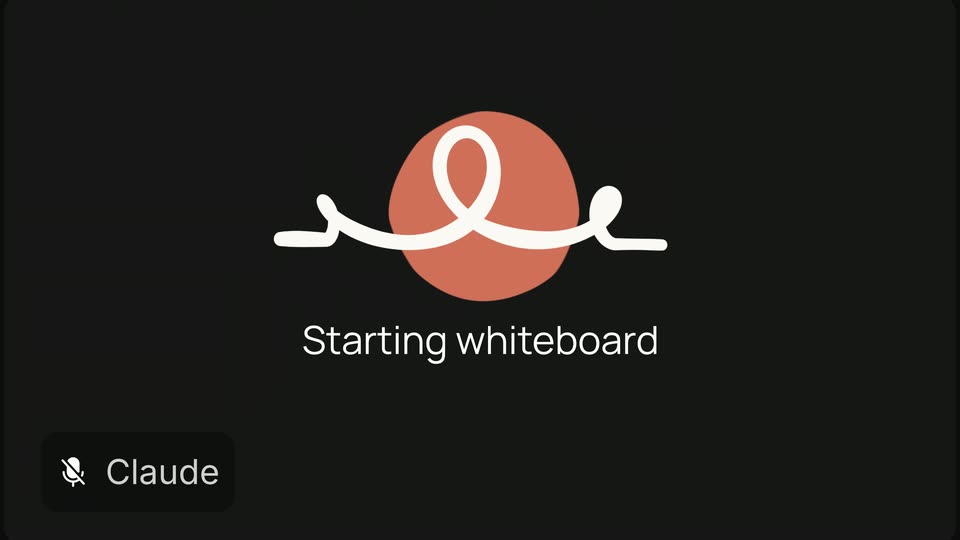
A dark screen shows a centered orange circle with a white looping line spinning around it like a loading icon. Below, the status text swaps from Taking notes... to Starting whiteboard. A small Claude chip with a muted mic icon sits in the bottom-left corner.
Camera: Push in
A pixelated white blocky shape with an orange core sits on a dark field over the words Starting whiteboard. It shrinks to a small orange dot as the field flips to a light grid canvas and Claude joins your call fades in below.
Techniques: Masking, Kinetic type
Camera: Static
A two-line serif headline sits centered on a cream grid-paper background. A dark video call window pops in at the upper right, an orange Claude avatar draws a white line, then participant avatars appear; a pink pie-shop poster slides in at the upper left, and the headline fades out.
On-screen text: “Claude joins your call”, “and builds alongside you”
Techniques: Kinetic type
Camera: Static
A grid-paper canvas fills the frame. A dark heading types out across the top, while colored sticky notes with pie ideas pop in one by one, each carrying a small name tag. A black video-call panel with the Claude logo and a row of avatars stays fixed at the right.
On-screen text: “What's our special pie this year?”
Techniques: Kinetic type
Camera: Static
A cream background holds a centered two-line serif caption as a dark rounded prompt bar with a mic icon slides in from the top right. The bar types out a voice command word by word, then its icon changes to four dots.
On-screen text: “So the work starts before the meeting ends”
Techniques: Kinetic type
Camera: Push in
A coral blob on a dark field rounds into a circle as the caption 'Organizing ideas' settles onto one line, the word 'ideas' brightening from gray to white. A Claude voice badge in the corner flips from muted to active.
On-screen text: “Organizing ideas”
Techniques: Morph, Kinetic type
Camera: Static
A white looping line ripples across a terracotta circle on a near-black field, its loops traveling along the stroke, while the caption “Organizing ideas” sits below. A small Claude badge scales in at the lower left.
On-screen text: “Organizing ideas”, “Claude”
Techniques: Morph
Camera: Static
A whiteboard of pastel sticky notes with pie names re-sorts itself into two numbered columns as the view pans across the board. A red Claude cursor tag glides from one note to another while the caption Organizing ideas holds over the canvas.
On-screen text: “Organizing ideas”
Techniques: Cursor demo
Camera: Pull out
The view pulls back from a close-up of three columns of pastel sticky notes to reveal the full whiteboard, its title, a doodled sticker, and a phone mockup showing a live recording. Small name tags with cursor arrows appear next to the notes.
Techniques: UI zoom
Camera: Pull out
A whiteboard app shows a pie-idea board with three columns of colored sticky notes, name tags and reaction stickers. The view zooms in on the Medium and Hardest columns as a corner video tile shows a face with a drawn underline, then zooms back out.
Techniques: UI zoom
Camera: Push in
A dark chat thread scrolls up on a black background as message cards from Teo, June, Vinny and Claude slide into view, ending with a “You” message asking Claude to plan the launch and a short “On it.” reply.
Camera: Pan
A Notion-style meeting notes document fills the screen. A white launch-plan card with a Gantt timeline fades in over the center, then the view zooms into the card, blurring the page behind, as a caption slides in.
On-screen text: “Ok Claude, organize next steps to get this launched by the holidays”
Techniques: UI zoom
Camera: Push in
A light project timeline card titled Huckleberry Hootenanny Launch Plan fills the frame under a serif Next steps headline. Pink and green task bars grow left to right across the November 2026 grid, a berry icon and Kansas City label pop in on the right.
On-screen text: “Next steps”
Camera: Push in
A dark serif tagline rests on a plain off-white field, its letters trailing vertical motion-blur streaks that dissolve as the line slides into a locked-off position; the camera stays static.
On-screen text: “Work at the speed of thought”
Techniques: Kinetic type
Camera: Pan
A black serif headline on cream cycles its first word, Sync to Sketch to Work, each highlighted in blue beneath an orange Claude badge and a blinking cursor. A cursor then drops a blue pill of waving-hand emojis, and the line trims to 'speed of thought'.
On-screen text: “Sync at the speed of thought”, “Claude”, “Sketch at the speed of thought”, “Work at the speed of thought”
Techniques: Kinetic type
Camera: Static
On a cream field, a small coral blob at center grows into the Claude starburst mark as its rays extend, then the black serif wordmark Claude settles in beside it. The lockup holds still, a quiet sign-off.
On-screen text: “Work at the speed of thought”, “Claude”
Techniques: Morph
Camera: Static