0:31
Explore
Figma - Introducing Figma Draw New fills, effects, brushes, and more, now in
Figma · May 2025 · 0:53 · AI-annotated
- Length
- 0:53
- Scenes
- 33 · 1.6 s avg
- Product on screen
- 0:44
- Features shown
- 5
- Voiceover
- No
00:00:00 / 00:53:02
Figma’s 0:53 launch film runs 33 scenes, about 1.6 s each. The product shows up at 0:44 and 5 features are revealed. There is no explicit call to action. The video opens with flat icons morphing into hand-drawn avatars, then runs a rapid montage of design builds (skate flyers, badges, posters, a festival page) each punctuated by a floating tool panel (Brushes, Layer blur, Pattern, Texture), and closes by naming Figma Draw and condensing a shape collage into the Figma logo. The cut rate stays high throughout, with each feature getting a tight example-plus-panel beat before the next one starts.
No filming indicatedEstimated needs: 4 capture groups — your screens or recordings · 1 official logo — reused across the film · 19 graphic passages — draw or supply
Is this your launch? to your site or press kit.
More like this

1:10

1:04

Runway - Introducing Runway for web design. Connect Runway to @Replit to gene
Runway · AI · Oct 2026
Figma - Introducing Figma Draw New fills, effects, brushes, and more, now in, scene by scene
· 33 scenes as text
01 · Hook · 0:00–0:01
A three-by-five grid of solid black icons sits on a light gray field. The icons wobble in place in a staggered wave, and a small yellow-green square flashes behind the central person icon before fading out.
Camera: Static
02 · Hook · 0:01–0:02
A centered flat avatar icon morphs on a soft purple-to-pink gradient, from a black headset silhouette into a stylized girl with pigtails inside a pale green square.
Techniques: Morph
Camera: Static
03 · Hook · 0:02–0:02
A flat cartoon avatar with glasses on a pale green square sits centered on a peach-to-lavender gradient. It swaps to a second avatar of a smiling woman with a ponytail in a dotted top, same green square and gradient.
Camera: Static
04 · Hook · 0:02–0:03
A hand-drawn line-art portrait of a smiling woman with a ponytail sits in a pale green rectangle, centered on a soft pink-to-lavender gradient. The figure and its frame drift slightly upward over the half second.
Camera: Static
05 · Hook · 0:03–0:03
A black line-drawn portrait of a smiling person with a ponytail and striped top sits on a pale green square, centered over a white-to-pink gradient. The square holds still as the gradient shifts slightly.
Camera: Static
06 · Hook · 0:03–0:06
The phrase “Draw inspiration” sits in white sans-serif on a black background. Hand-drawn marker strokes animate across it: a red underline under “Draw”, a teal loop circling “inspiration”, then a tan scribble underline.
On-screen text: “Draw inspiration”
Camera: Static
07 · Feature reveal · 0:06–0:09
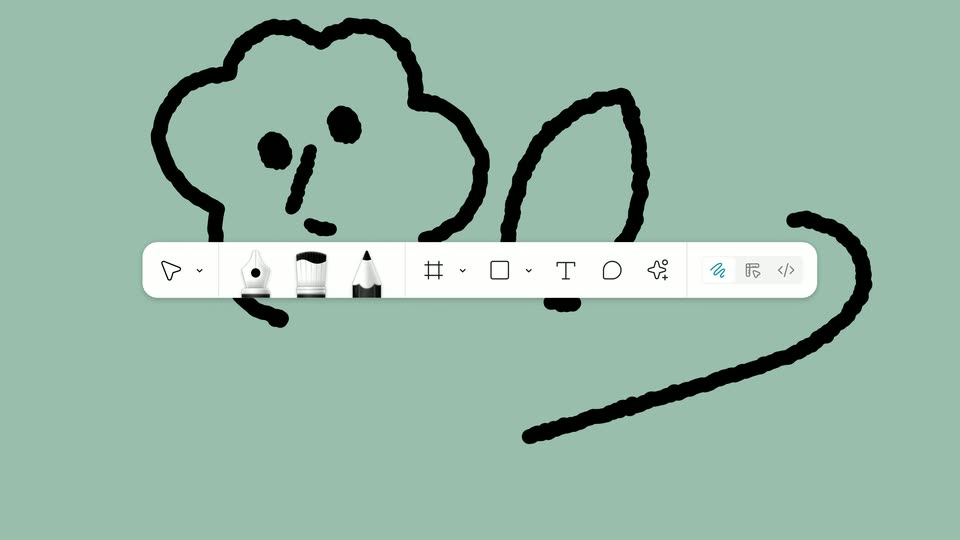
A white pill card with three blue tool icons expands into a full-width toolbar of black drawing tools on a sage background, while a thick black marker sketch of a smiling flower with a leaf and curving stem draws itself behind the bar. The headline “Draw inspiration” holds static.
On-screen text: “Draw inspiration”
Techniques: Morph, Masking
Camera: Static
08 · Feature reveal · 0:09–0:10
A design-tool screen fills the frame: a layers panel left, a canvas of hand-drawn skate posters center, a properties panel right, and a floating toolbar below. The right panel switches to a draw view while the pink poster's sun line art draws on.
Camera: Pull out
09 · Feature reveal · 0:10–0:11
A design tool workspace holds still: a left panel lists pages and layers, the center canvas shows a grid of pastel posters with hand-drawn animals on skateboards and the word Sunday, and a right panel displays frame, fill and stroke controls. A floating tool bar sits at the bottom.
Camera: Static
10 · Feature reveal · 0:11–0:13
A cartoon dog drawn in rough black strokes sits on a tan canvas, its body filled with halftone dots. A white Brushes panel floats at right as a cursor selects a new stroke, swapping the dog's fill to newspaper text while a large hand-lettered word scales slowly behind.
Techniques: Cursor demo
Camera: Static
11 · Feature reveal · 0:13–0:14
A tiled grid of hand-drawn skate flyers in tan, green, purple, and pink scrolls upward across the frame, each tile showing brush-lettered “Sunday”, a dog on a skateboard, and a San Francisco address. A small “Brushes” caption slides in, and a white cursor hovers at the right.
On-screen text: “Brushes”
Camera: Pull out
12 · Feature reveal · 0:14–0:17
On a pink field, a tight close-up of red CHESAPEAKE lettering and a blue orbit line with a moving white dot pulls back to reveal a full circular emblem. Black leaf silhouettes and white brush strokes grow in around the edges as the badge settles.
On-screen text: “CHESAPEAKE BAY WATER WATCH”, “REF N° 345”, “CHESAPEAKE BAY ESTUARINE COMPLEX”, “37.8°N 76.1°W”
Camera: Pan
13 · Feature reveal · 0:17–0:18
Locked-off close-up of a light gray grid canvas with oversized orange VOLU letters and a teal window with bare branches at the right edge. A black cursor hovers near the bottom, and a thin white line with a dot extends down from the letter V.
On-screen text: “VOLU”
Techniques: Cursor demo
Camera: Pull out
14 · Feature reveal · 0:18–0:20
Close-up of a Layer blur settings panel over a gray grid background. A cursor drags the End slider from 0 up to 68.7, blurring the grid and a turquoise map below while the large red VOLU letters stay sharp.
On-screen text: “VOLU”
Techniques: Cursor demo
Camera: Static
15 · Feature reveal · 0:20–0:21
A single dark red circle sits centered on a light gray background with fine vertical lines. It splits horizontally into two identical circles placed side by side, then holds position.
Techniques: Morph
Camera: Static
16 · Feature reveal · 0:21–0:23
Four dark red circles on a pale textured background stretch into a wide horizontal band, then resolve into a diamond lattice of dark red, pink, and lavender dots. The lattice expands outward, the outer dots grow larger, and the whole pattern pulses in place.
Techniques: Morph, Particles
Camera: Static
17 · Feature reveal · 0:23–0:25
A grid of maroon dots with scattered magenta and lavender dots drifts on a gray textured background, then huge black grunge letters NYE stamp in. The scene cuts to mustard yellow as a white hand-drawn starburst draws itself above the black 12/31 at the bottom.
On-screen text: “NYE”, “12/31”
Techniques: Kinetic type, Particles
Camera: Pan
18 · Feature reveal · 0:25–0:27
A mustard-gold field fills the frame, white hand-drawn lines radiate from the center and pulse into a starburst behind a huge black 12/31. A dithered checkered strip at the bottom carries 8PM > LATE in black.
On-screen text: “12/31”, “8PM > LATE”
Camera: Pan
19 · Feature reveal · 0:27–0:27
A mustard-yellow poster fills the frame with oversized black type reading 12/31 and 8PM → LATE over a white scribble texture. A white Pattern settings panel with a checkerboard preview pops in on the right, a black cursor resting at its lower edge.
On-screen text: “12/31”, “8PM → LATE”
Techniques: Cursor demo
Camera: Static
20 · Feature reveal · 0:27–0:29
A yellow canvas with large black lettering fills the frame behind a white Pattern inspector panel on the right. A cursor adjusts the Gap X value from 35 to 10, and the tiled background shifts from a fine checkerboard to vertical stripes.
Techniques: Cursor demo
Camera: Pan
21 · Feature reveal · 0:29–0:30
Huge black text reading 8PM and TODAY scrolls across a mustard yellow background covered in white pixelated vertical bars, while large solid black circles drift through the frame.
On-screen text: “8PM”, “TODAY”
Techniques: Kinetic type
Camera: Pull out
22 · Feature reveal · 0:30–0:34
Four black circles and a pixelated ring sit on a mustard field of dashed lines. The field turns pale green as the circles merge into a black butterfly. A Bezier path with blue anchors and hatched fill is drawn over the right wing, then clears to show the finished shape.
Techniques: Morph
Camera: Static
23 · Feature reveal · 0:34–0:36
On a pale green field, black leaf-like shapes frame a thin white curve as a blue dot travels along it and red control points trace the path. The shapes fill with warm gradients, then morph into a patterned orange butterfly with a glowing body.
Techniques: Morph
Camera: Static
24 · Feature reveal · 0:36–0:37
A colorful abstract vector shape with gradient fills and anchor points sits on a pale green background. A dashed blue loop draws around the right lobe as its points turn blue and a light beam sweeps across.
Techniques: Light sweep
Camera: Pan
25 · Feature reveal · 0:37–0:38
A colorful vector butterfly with white anchor points along its curves rotates and scales up across the frame. A blue selection box with square handles around one wing fades out early. The background gradient cycles from pale green to teal to red.
Camera: Push in
26 · Feature reveal · 0:38–0:41
A colorful abstract bird illustration fills the frame with a white Texture panel on the left. A cursor drags the Spread slider, adding a grainy noise texture to the shapes. The panel vanishes and the view zooms into the textured wings.
Techniques: Cursor demo, UI zoom
Camera: Pull out
27 · Feature reveal · 0:41–0:42
A glossy orange butterfly with yellow and violet wing spots and glowing antennae is centered over oversized lime-green all-caps text on a soft green, blue and lavender gradient. The text reads NATURE on top and FE below, partly hidden by the wings.
On-screen text: “NATURE FE”
Camera: Pull out
28 · Feature reveal · 0:42–0:42
A website hero for Nature Fest fills the frame, a large green headline and an orange butterfly centered over a green-to-yellow gradient, with a nav list at top right. The view zooms out to reveal an Events row of three columns with small icons and dates.
Techniques: UI zoom
Camera: Pull out
29 · Feature reveal · 0:42–0:44
A flat Nature Fest landing page sits on a brown backdrop. A green-to-purple gradient hero holds a multicolor butterfly under the title, with a right-hand nav and a three-column events strip below. The layout holds still.
Camera: Pull out
30 · Product intro · 0:44–0:46
On black, the white headline 'Express yourself with Figma Draw' sits upper-left; the word 'Draw' fills with a textured white-to-orange gradient. The frame cuts to a pale lavender-to-cream field holding colorful abstract shapes: a striped oval, gradient blobs, segmented bars, a gold quarter-circle and a brush-stroke square.
On-screen text: “Express yourself”, “with Figma Draw”
Techniques: Kinetic type
Camera: Static
31 · Outro · 0:46–0:47
A collage of colorful abstract shapes, a dotted spiral, a striped oval, quarter circles and soft blobs, scales up and drifts across a pale lavender field while a large two-line headline holds still.
On-screen text: “Express yourself”, “with Figma Draw”
Camera: Push in
32 · Outro · 0:47–0:49
A full-frame collage of abstract shapes, halftone circles, striped arcs, a checkered oval and grainy blobs on a pink-to-lavender gradient, flies inward and collapses into a small central cluster, which then shrinks further.
Camera: Pull out
33 · Outro · 0:49–0:53
A multicolor logo mark sits centered on a near-black background. The shapes, a red-orange pill, purple and blue circles, and a green circle, start as thin line outlines and fill in with solid color over the first second. The frame stays locked-off.
Camera: Static