0:33

Orior - Copy any pose, right from Pinterest. Any pin you find, recreated wit
Orior AI · AI · Oct 2026
Anthropic’s 4:02 launch film runs 29 scenes, about 8.4 s each. The product shows up at 0:05 and 5 features are revealed. The call to action lands at 3:30 (87% in), over a voiceover. Cream and charcoal palette with a serif wordmark and a sans UI face; the presenter is framed against a hazy Manhattan skyline while pastel UI cards, cursors and hearts animate beside him. The video alternates live talking-head beats with full-screen interface demos, each feature announced by a small top-left title card and resolved by a single orange starburst logo at the end.
Is this your launch? to your site or press kit.
Orior AI · AI · Oct 2026
Insta360 Flow 2 Pro · Jan 2025
A man in a navy hoodie talks and gestures before a window with a city skyline. Two white UI cards, Meeting notes and Whiteboard, slide in on the right, fill with text lines and colored blocks, then fade out as the shot settles into a framed rectangle.
Camera: Pull out
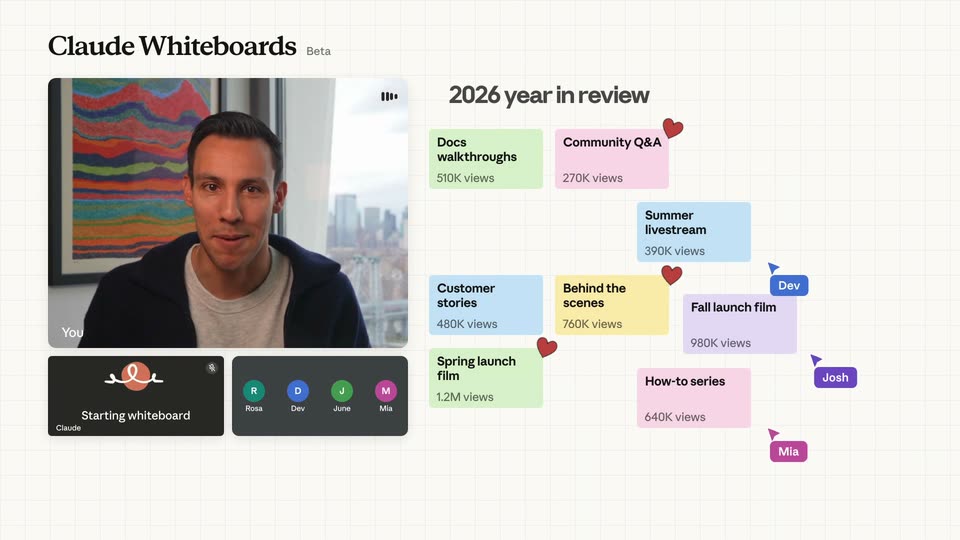
A man in a left video tile speaks as a whiteboard fills with pastel cards, each with a content name and view count. Named cursors drift between cards, hearts pop on, then the view zooms out to a full grid as a chat box types a question to Claude.
On-screen text: “Claude Meetings Beta”, “Claude Whiteboards Beta”
Techniques: Cursor demo, UI zoom
Camera: Static
A presenter in a video-call tile on the left talks over a whiteboard grid of video cards. A prompt box is replaced by a Best performing panel ranking three cards with view counts. The view then reframes left onto the presenter.
Techniques: UI zoom
Camera: Push in
A man in a navy hoodie talks to camera in front of a window with a city skyline. A white card on the right fills with feature names line by line, then swaps to a to-do list with checkboxes as he gestures.
On-screen text: “Claude Meetings Beta”, “Claude Whiteboards Beta”, “Claude Sheets Beta”, “Claude Data”, “Interactive connectors”, “Already in Claude”, “Docs Slides Design”, “After the meeting”, “Rosa Draft the recap page”, “Dev Find the team photos June Pull the results Mia Update the scorecard Josh Build the timeline”
Techniques: Kinetic type
Camera: Pull out
A dark call screen assembles: a live tile of a man speaking, four placeholder tiles with colored initial avatars, then a white calendar pill. A dashed Claude tile appears below the speaker and an orange blob avatar forms. The grid compacts into rounded squares.
On-screen text: “Claude Meetings”, “Beta”
Techniques: Morph
Camera: Static
Dark meeting UI: avatar tiles fly in from the right as a man speaks in a left video tile. A chat card types Dev's question, Claude's reply with a source line fades in, then a new card types Josh's request.
On-screen text: “Claude Meetings”, “Beta”
Techniques: Kinetic type
Camera: Static
A dark Claude Meetings interface shows a man's video tile, a Claude tile reading Starting whiteboard, a four-person participant strip, and a Josh chat bubble. The frame then reframes and zooms onto the call tiles as a soft white blur blooms at the edges and the title and chat bubble drop away.
On-screen text: “Claude Meetings Beta”
Techniques: UI zoom
Camera: Static
On a light grid, a video-call mockup shows a man speaking in a left tile above two dark panels, one reading Starting whiteboard. Four pastel cards with topic titles and view counts fade in on the right, top to bottom.
Camera: Static
A video-call tile of a man sits left of a whiteboard panel on a grid background. The whiteboard of four colored project cards crossfades into a meeting notes document, while four avatar chips lift into the panel header and the Claude card switches to Taking notes.
Techniques: Morph
Camera: Static
A man talks to the camera by a window overlooking the New York skyline. Two white cards, Meeting notes and Whiteboard, pop in on the right, gain green checkmarks, then fade. An orange Claude cursor moves in as yellow sticky notes pop in one by one. The camera pushes in.
On-screen text: “The spring launch”, “That livestream in June”, “Customer stories”, “The how-to series”, “Fall launch”, “Behind the scenes”
Techniques: Cursor demo
Camera: Push in
A man in a navy hoodie talks in front of a window overlooking a city skyline. Six translucent beige note cards with content titles float over the view, then vanish as his shot shrinks into a bordered rectangle on the left.
On-screen text: “The spring launch”, “That livestream in June”, “Customer stories”, “The how-to series”, “Fall launch”, “Behind the scenes”
Camera: Pull out
A man talks in a small video tile at lower left while a pastel content board fills in on a grid. Cards pop in row by row as an orange timeline draws itself and a red Claude tag slides along it. Finally the card labels fade, leaving blank colored blocks.
Camera: Static
A white document card titled 2026 year in review settles on a cream grid canvas beside a small video of a talking man. It gives way to pastel note cards listing projects and view counts; all dim except a yellow Scorecard card, then a spreadsheet grid fades in.
Camera: Pull out
A spreadsheet interface fills in row by row as an orange Claude badge hops between cells, switching between a Goals tab and a Results tab. A video-call tile of a man sits in column B; a share bar and an export menu pop up at the end.
Techniques: Cursor demo
Camera: Static
A man in a navy hoodie talks to camera in front of a window with the Manhattan skyline. A white scorecard card builds on the right: rows slide in one by one, then a large serif number counts up to 48 million rows.
On-screen text: “Team scorecard”, “4 rows”, “Projects shipped”, “120%”, “Total views”, “110%”, “Average per project”, “104%”, “Projects over 1M”, “50%”
Techniques: Kinetic type
Camera: Push in
A man in a navy zip jacket speaks to camera in a high-rise room, a colorful abstract print on the wall and a hazy city skyline behind him. The shot then scales down into a rounded rectangle card with a cream border.
Techniques: Masking
Camera: Pull out
A man speaks in a rounded video card on the left as a cream dashboard builds on the right: header and stat cards fade in, numbers count up, a two-line chart draws in with a dark tooltip, and green certified badges pop onto each card.
Camera: Static
A man talks in a left video panel beside the Claude Data dashboard. The right panel switches to a Design view with Scrollyteller and Visual short cards, then back to the dashboard as metrics roll to 184,300 and 12,480 while collaborator avatars appear. The interface fades out, leaving the video.
Techniques: Cursor demo
Camera: Push in
A man in a navy zip hoodie talks to the camera in front of a window overlooking the Manhattan skyline, gesturing with his hands. A white Team photos card with six pastel thumbnails appears on the right, then a Team wiki page card slides in beside it.
Camera: Pull out
A man speaks in a video tile beside a wiki card and a photo grid. The interface reflows into a window titled 2026 year in review, the tile shrinks to the top left, and a blank white panel takes the right side.
Camera: Pull out
A two-panel interface shows a video call tile and chat input on the left, a wiki page editor on the right. A command types into the input, a confirmation card slides up, then a summary line is typed into the top of the wiki page while the speaker gestures.
On-screen text: “Interactive connectors”
Techniques: Split screen
Camera: Static
A video call window showing a man in a dark hoodie against a city skyline scales up from a small tile to a large centered frame on a plain off-white background, while the surrounding wiki page fades out.
Techniques: UI zoom
Camera: Push in
A man talks to camera in a high-rise office, city skyline through the window behind him. White rounded cards fade in at right: a use-case list, a padlock note, then a feature list, each line fading in in sequence before the card scales away.
On-screen text: “Sellers”, “Prep for a call”, “Accountants”, “Analyze financial data”, “HR teams”, “Beta”, “Handle time off and expenses”, “Claude works within the permissions each person already has”, “Rolling out now”, “Claude Meetings Beta Claude Whiteboards Beta Claude Sheets Beta Claude Data Interactive connectors Who can use each one, and how: link in the description”
Techniques: Kinetic type
Camera: Pull out
A video call tile of a man talking scales down and settles into the top-left of a white grid canvas. A You label and a small audio waveform icon fade in on the tile, and a dashed orange placeholder box appears below it.
Camera: Pull out
A man talks in a video call tile on the left, above a dark Claude card where an orange line draws itself. On the right, a whiteboard panel shows rows of pastel squares; four named cursors glide across it and red hearts pop onto the squares.
Techniques: Split screen, Cursor demo
Camera: Static
On a grid background, a video call tile with a man and a whiteboard card sit side by side, with a notes panel and avatar row below. The view zooms into the video tile until it fills the frame.
Techniques: UI zoom
Camera: Push in
A man in a navy hoodie talks to camera in a high-rise office with a city skyline behind him. A lavender card pops in on the right with a cursor and a Josh tag, then the question fills in line by line, ending with a heart icon and a Claude tag.
On-screen text: “Josh”, “The first meeting”, “you would add”, “Claude”, “Claude to”
Techniques: Kinetic type
Camera: Static
A lavender sticky note with a folded corner and a red heart icon holds three lines of black text on a cream background. A small orange sunburst icon pops in at the center of the frame.
On-screen text: “The first meeting you would add Claude to”
Techniques: Kinetic type
Camera: Static
On a cream field, the orange starburst mark sits at center and rotates slowly. The black serif wordmark Claude scales in beside it, and the lockup holds as the sign-off.
On-screen text: “The first meeting”, “you would add”
Camera: Static