
1:10
Explore
ClaudeDevs - You can now build custom themes for Claude Code on desktop with mods!
Anthropic · Nov 2026 · 0:38 · AI-annotated
- Length
- 0:38
- Scenes
- 20 · 1.9 s avg
- Product on screen
- 0:01
- Features shown
- 5
- Call to action
- 0:32 · 85%
- Voiceover
- No
00:00:00 / 00:38:02
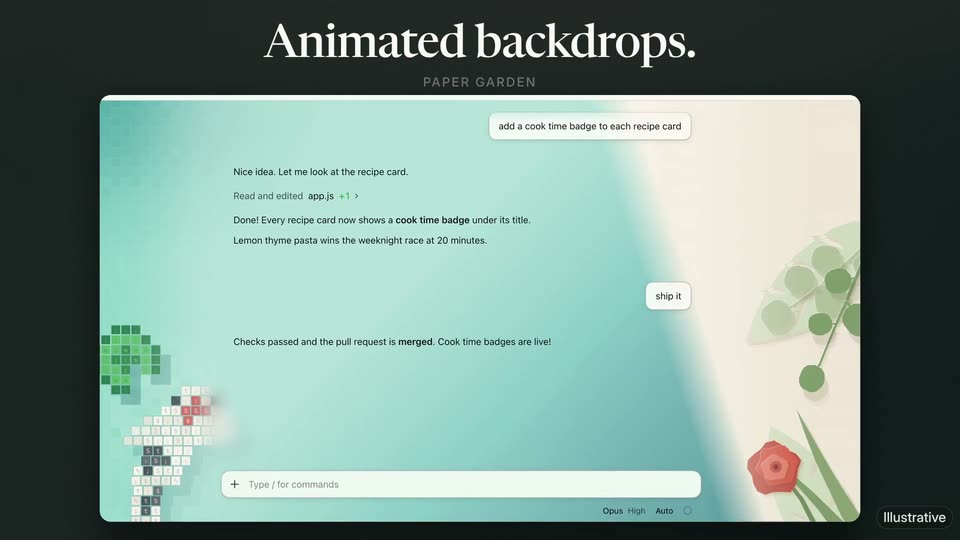
Anthropic’s 0:38 launch film runs 20 scenes, about 1.9 s each. The product shows up at 0:01 and 5 features are revealed. The call to action lands at 0:32 (85% in). A single chat-window mockup sits on a dark stage for the whole film while its backdrop, scene and color theme swap in place beneath oversized serif headlines, each feature beat announced by a headline with one italic copper keyword. The pacing is steady at about 123 bpm with quick crossfades, scale-ins and a typed-code motif, and the film closes by pulling back into a 3D grid of themed screens behind a final card with the docs URL.
No filming indicatedEstimated needs: 8 capture groups — your screens or recordings · 1 3D passage — build or supply
Is this your launch? to your site or press kit.
More like this
0:23

Moonshot - Introducing Moonshot Packs. Rip, reveal, and collect. Memecoins hav
Moonshot · Consumer · Jun 2026
1:13
LottieFiles - Day 1 is in motion: Lottie AI is live. 🚀 Describe an animation. Get
LottieFiles · Nov 2026
ClaudeDevs - You can now build custom themes for Claude Code on desktop with mods!, scene by scene
· 20 scenes as text
01 · Hook · 0:00–0:00
Under a static white serif headline, a dark chat window shows a recipe-app conversation. A command types out letter by letter in an oversized copper-bordered input field, filling from honu-lag to honu-lagoon.
On-screen text: “You asked.”, “Illustrative”
Techniques: Kinetic type
Camera: Static
02 · Hook · 0:00–0:01
The headline We listened. sits above a dark terminal chat window. A glowing circular lens expands from the center, flooding the interface with bright cyan and exposing a pixelated color preview along the right edge.
On-screen text: “We listened.”
Techniques: Masking
Camera: Static
03 · Product intro · 0:01–0:02
A flat Claude Code chat window with a turquoise pixel-turtle theme sits on a dark field and drifts down a few pixels. Above it, a centered serif headline swaps from “We listened.” to “Claude Code.”
On-screen text: “We listened.”, “Claude Code”
Camera: Static
04 · Product intro · 0:02–0:04
A flat Claude Code chat window sits beneath a white serif headline. The window scales down and drops lower, the headline swaps to a new line with a letter-spaced subtitle, and extra chat messages plus pixel koi fish populate the teal background.
On-screen text: “Claude Code has themes now.”, “And it catches up on a”, “KOI MOSAIC”
Camera: Static
05 · Feature reveal · 0:04–0:05
A white serif headline reads Animated backdrops over a dark field, with a small KOI MOSAIC caption beneath. A flat browser window mockup of a chat app scales up to fill the frame, its teal pixel-mosaic background showing koi fish and a ship it button.
On-screen text: “Animated backdrops.”, “KOI MOSAIC”
Camera: Static
06 · Feature reveal · 0:05–0:05
A dark stage frames a white serif title and a flat chat interface card bordered by paper-cut green leaves and a red flower. The interface's chat lines overlap and shift as new messages replace old ones, while the title stays fixed.
On-screen text: “Animated backdrops.”, “PAPER GARDEN”
Camera: Static
07 · Feature reveal · 0:05–0:10
A chat panel with assistant messages sits on a dark stage while its backdrop cycles: cream halftone dots, dark halftone, blurred aurora, then a pixel snow-pine night. The theme flips light to dark and the serif headline switches from “Animated backdrops.” to “Light or dark.” to “Pick a scene.”
On-screen text: “Animated backdrops.”, “HALFTONE DAWN”, “Light or dark.”, “HALFTONE DUSK”, “AURORA”, “Pick a scene.”, “SNOW PINES”, “Illustrative”
Techniques: Light sweep, Particles
Camera: Static
08 · Feature reveal · 0:10–0:12
A dark chat panel sits under the white serif headline Pick a scene. Its illustration and background crossfade from a glowing pixel turtle on navy to a wireframe mountain on green, while the subtitle swaps from NIGHT REEF to VECTOR RANGE and the chat lines dissolve.
On-screen text: “Pick a scene.”, “NIGHT REEF”, “VECTOR RANGE”
Techniques: Particles
Camera: Static
09 · Feature reveal · 0:12–0:13
A dark chat interface shows a conversation about adding cook time badges, framed by pixel-art shapes in the corners. The screen then blurs and dims as a blueprint grid and a thin circular diagram fade in over the right side.
On-screen text: “Illustrative”
Camera: Static
10 · Feature reveal · 0:13–0:14
A dark chat interface window displays a brief conversation about adding a cook time badge, ending with a merged pull request note and a command input bar. Behind it, a dotted graph pattern shifts into a starry night sky with a hill silhouette. A small Illustrative tag marks the corner.
On-screen text: “Illustrative”
Camera: Pull out
11 · Feature reveal · 0:14–0:17
A flat dark chat window sits centered below the headline Your colors. The background theme color cycles from teal to purple to blue while the window content stays still. The window shows a prompt bubble, a few status lines and a ship it button.
On-screen text: “Your colors.”
Camera: Static
12 · Feature reveal · 0:17–0:20
A flat product window with traffic-light dots sits on a navy field. A large serif headline fades in at the top, then a monospace code line types out character by character inside a dark rounded pill below.
On-screen text: “It's just a mod.”, “$.theme.set({ colors, backdrop })”
Techniques: Kinetic type
Camera: Static
13 · Feature reveal · 0:20–0:23
A dark Claude Code window sits under a white serif headline. A prompt types itself into the input field, then the view cuts to the chat where Claude's reply lines appear one after another.
On-screen text: “Ask Claude to make your own.”, “SPED UP”
Camera: Static
14 · Feature reveal · 0:23–0:24
A dark frame holds a light serif headline and a spaced SPED UP caption above a chat window. The view zooms into the window as the conversation fills in and a striped synthwave sunset illustration reveals on the right.
On-screen text: “Ask Claude to make your own.”, “SPED UP”, “Illustrative”
Techniques: UI zoom
Camera: Push in
15 · Feature reveal · 0:24–0:25
A software interface displays a chat log over a dark purple synthwave sunset background featuring a striped sun and a neon grid. A command input box sits at the bottom of the screen.
On-screen text: “Illustrative”
Camera: Pull out
16 · Feature reveal · 0:25–0:28
A centered chat window shows a synthwave sunset theme on a purple neon grid, under the headline “Dream it. Claude builds it.” It cross-dissolves to a pixel-forest window with a new chat and the headline “Fireworks when it's merged.”
On-screen text: “Dream it. Claude builds it.”, “Fireworks when it's merged.”
Camera: Static
17 · Feature reveal · 0:28–0:31
A locked-off dark chat window titled 'Cook time badges' sits beneath a serif headline. The conversation reads a request to add a cook time badge, ending in a merged pull request. Gold, pink, then orange firework bursts pop in turn over a snowy pixel-tree backdrop.
On-screen text: “Fireworks when it's merged.”
Camera: Static
18 · Feature reveal · 0:31–0:32
A flat dark chat window with pixel-art trees and two firework bursts sits under a serif headline. The camera pulls back to reveal the window as one of many overlapping screens in a 3D perspective grid.
On-screen text: “Fireworks when it's merged.”
Techniques: 3D mockup, Parallax
Camera: Static
19 · CTA · 0:32–0:33
A blurred grid of tilted Claude Code windows fills the frame as a dark rounded card scales up in the center. A row of colored dots sits above the white serif headline, the word 'yours.' in italic sliding in from the right.
On-screen text: “Make Claude Code yours.”
Techniques: Kinetic type
Camera: Static
20 · CTA · 0:33–0:38
A dark rounded card holds the serif headline over a slowly drifting grid of themed terminal screens. The subtext fades in, then the URL types out beneath a thin divider line.
On-screen text: “Make Claude Code yours.”, “Grab a look from the theme-examples plugin, or dream one up and ask Claude to build it.”, “Themes for Claude Code on desktop · Built with mods”, “code.claude.com/docs/en/plugins/mods/overview”
Techniques: Kinetic type, Parallax
Camera: Pull out