1:53

Mistral AI - Introducing powerful new features in Le Chat, making it more capable
Mistral AI · AI · Jul 2025
Fathom · Apr 2026 · 1:10 · AI-annotated
Fathom’s 1:10 launch film runs 22 scenes, about 3.2 s each. The product shows up at 0:01 and 5 features are revealed. The call to action lands at 1:08 (97% in), over a voiceover. The video opens in a stylized space scene, then hands off to a chain of dark UI cards over orange and purple gradients, each feature announced by the voiceover and closed by a glowing gradient outline. Pacing is steady at about 129 BPM, driven by quick zoom reframes, draw-on neon borders, and concentric ring transitions that carry the logo and integration badges.
Is this your launch? to your site or press kit.
Mistral AI · AI · Jul 2025
Anthropic · AI · Nov 2026
On a black field, a thin cyan arc draws itself along the left edge and resolves into a glowing sunburst emblem, its rays radiating from a bright central point. The shape holds with a slow, gentle pulse.
Camera: Static
A flat cyan-and-black illustrated planet, marked with spiky terrain silhouettes and starburst shapes, occupies the lower left of a black starfield. It drifts slowly down and left while the scattered stars slide at a slower pace.
Techniques: Parallax
Camera: Push in
A hand-drawn blue and black Earth drifts left across a starfield as a neon gradient frame draws in the upper right. A dark meeting card fades in inside it, its countdown ticks from 3 to now, and a white cursor opens the capture menu, picks Audio, then clicks the Start meeting button.
Techniques: Parallax, Cursor demo
Camera: Push in
A dark meeting card with a Start meeting button sits top right, a white cursor hovering over it. The card empties and vanishes, then concentric rings fade in left of center and an orange disc fills their middle.
Techniques: Cursor demo
Camera: Static
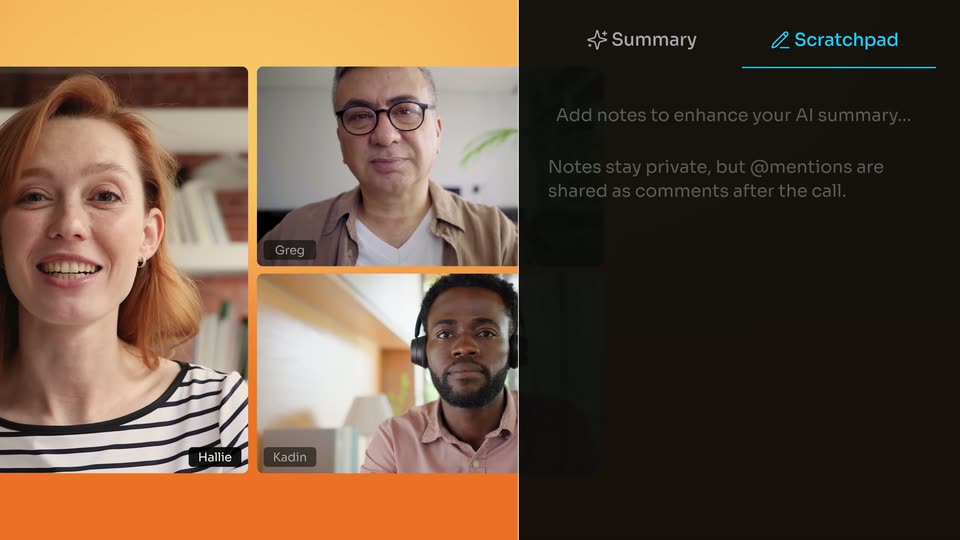
On an orange backdrop, a three-person video call grid sits left of a dark notes panel that expands to show a live AI summary building line by line. A cursor then clicks the Scratchpad tab, where a note is typed out character by character.
Techniques: UI zoom, Cursor demo, Kinetic type
Camera: Push in
A meeting view shows three video tiles on the left and a dark Scratchpad panel on the right holding a typed note and a blinking cursor; a thin white arc wipes across the frame.
Techniques: Masking
Camera: Static
A dark meeting-summary window slides in from the right over a four-person video call on an orange gradient. The view then zooms into the Ask Fathom field as a question about SOC 2 is typed.
Techniques: UI zoom, Cursor demo
Camera: Push in
A cursor opens the My meetings dropdown in a dark prompt card and picks All meetings. A glowing gradient ring sweeps the pill, the view reframes left, and meeting cards with photos and titles slide in from the right, scrolling down.
Techniques: Cursor demo, Light sweep, UI zoom
Camera: Pull out
A close-up of a question bubble zooms out over the first third to reveal the full dark interface: meeting notes on the left and an Ask Fathom panel on the right holding the question, an input field and an All meetings filter, then holds.
Techniques: UI zoom
Camera: Pull out
A dark interface splits into a document panel on the left and an Ask Fathom chat on the right. The AI answer types out word by word, then the view zooms in on the chat panel, pushing the document off screen.
Techniques: UI zoom
Camera: Push in
A dark note view lists bullet points about a compliance review. A gradient glowing border in purple, orange and pink draws itself around one line, brightening it to white while the rest of the text stays dim. A chat panel edge sits at the right.
Camera: Push in
A dark rounded card sits centered on an orange gradient background. A luminous magenta-to-amber line sweeps along the top edge while a small video thumbnail and a white heading with tags and a short paragraph fade in on the card.
Techniques: Light sweep
Camera: Static
A dark rounded panel of the Trackers interface floats on an orange gradient. A glowing outline traces the top tracker card, shifting from pink to yellow as the panel brightens. Two rows show video thumbnails, tags and small bar charts.
Techniques: Light sweep
Camera: Static
A dark meeting-summary window on an orange gradient brightens from dim to full, showing a text summary left and a three-person video call grid with an Ask Fathom chat right. A cursor hovers the Summary tab, then the window fades to black.
Techniques: Cursor demo
Camera: Static
A dark dashboard panel titled All meetings fades in over an orange gradient background. It holds a grid of six meeting cards, each with a video, document, or audio waveform thumbnail, a title, and a duration badge.
Camera: Pull out
A 3D phone mockup rotates from a slanted angle over an orange disc and white rings into a flat front view on a purple-pink gradient. The dark screen shows a meetings list above a blue Capture button; a teal cursor dot appears, then the screen clears to black.
Techniques: 3D mockup, Cursor demo
Camera: Pull out
A flat phone mockup sits centered on a purple-to-pink gradient, its black screen showing a voice-recording view. The waveform pulses, a cyan playhead dot glides down a vertical line, and a timer badge counts up rapidly from 00:01:57 to 00:10:37 while Pause and End buttons hold at the bottom.
Camera: Static
A flat phone mockup on a magenta-purple gradient shows a voice-recording screen with a waveform and Pause and End buttons, then a fast zoom-out shrinks the phone to a dot inside concentric purple and pink rings on a black starfield, white speed lines at the corners.
Techniques: Particles
Camera: Static
Concentric gradient rings in purple, orange and teal rotate at different speeds around a central dark disc bearing a cyan logo, with small white app badges riding the rings. The assembly scales up and drifts off to the right, leaving a starry black field.
Techniques: Parallax
Camera: Pull out
On a black starfield, seven rounded pill outlines in cyan and rainbow gradients draw themselves in around white feature labels. The labels fade in letter by letter, hold, then wipe away, leaving the empty outlined pills.
On-screen text: “+ more”, “Works with ChatGPT + Claude”, “AI insights across calls”, “iOS app”, “API + MCP + CLI”, “Bot-free capture”, “Live notes in-meeting”
Techniques: Kinetic type, Masking
Camera: Static
On a black starfield, neon pill outlines in cyan and warm gradient scatter, a bright beam gliding along the top edge. The pills tilt and shrink to dots as a pink-to-yellow arc traces the lower curve, while the white caption 'Bot-free capture' holds in the lower-left pill.
On-screen text: “Bot-free capture”
Techniques: Light sweep
Camera: Static
Over a black starfield, the FATHOM wordmark and blue mark settle into the center: the mark rotates from a tilted, ringed position into place while the wordmark's rainbow gradient fades to white, with the URL fathom.ai/new below in cyan.
On-screen text: “FATHOM”, “fathom.ai/new”
Camera: Static