
1:31
Explore
00:00:00 / 00:47:22
- Length
- 0:47
- Scenes
- 15 · 3.2 s avg
- Product on screen
- 0:00
- Voiceover
- No
- Views
- 1.6M on YouTube
as of November 20, 2026
Anthropic’s 0:47 launch film runs 15 scenes, about 3.2 s each. The product is on screen from the first frame. There is no explicit call to action. The video is one continuous build: a typed prompt cascades into a scrolling spec, line-drawn schematics, a time-lapsed PCB, a wireframe-to-solid enclosure assembly, and live-action shots of the finished device, all staged on flat cream and beige grounds. Pacing is slow and deliberate, with long holds, zoom-out reveals, and the exploded 3D assembly as the signature move.
Footage neededEstimated needs: 2 capture groups — your screens or recordings · 3 filmed passages — shoot, supply or replace · 4 graphic passages — draw or supply · 3 3D passages — build or supply
Is this your launch? to your site or press kit.
More like this

Similar soundtrack
Films whose music sounds like this one, voice left out
0:35

Introducing Tesla Self-Driving V15
Tesla · Modern funk, soul, and electronic dance music with synth-pop influences
0:41
3:59


Phone (2): Lights, camera, less distraction
Nothing · Modern electronic
Claude Fable 5.2 designs a working voice-assistant hub, scene by scene
· 15 scenes as text
01 · Product intro · 0:00–0:06
A light prompt interface with Local and hub pills above a rounded input field. The placeholder text is replaced by a typed prompt that grows line by line, the field expands, and the frame zooms out to fit it. A Fable 5.2 label and spinner sit at the right.
Techniques: UI zoom
Camera: Static
02 · Product intro · 0:06–0:08
A pale gray rounded card holding a dense paragraph prompt sits centered on a white background. A one-line reply and a small file-creation tag fade in beneath the card.
Camera: Static
03 · Demo · 0:08–0:12
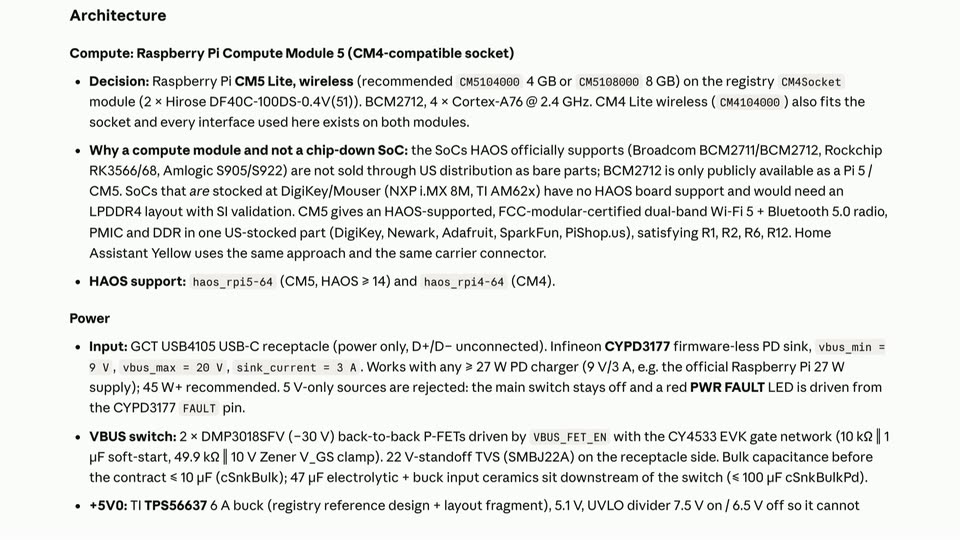
A dense specification document scrolls vertically, moving from the Purpose section through Architecture and Compute to Power. Black sans-serif body text on a light background, with a few bolded and highlighted keywords, fills the frame as it scrolls.
Camera: Pull out
04 · Demo · 0:12–0:14
A close-up of a microchip pinout sits centered on a cream field, then the view pulls back to reveal a full circuit schematic. The label USB HUB, FOUR PORTS slides in at the top left as the diagram resolves into its complete layout.
On-screen text: “USB HUB, FOUR PORTS”
Camera: Pull out
05 · Demo · 0:14–0:14
A beige schematic diagram of a USB hub circuit. The central block is labeled, with adjacent sections for power and radio visible in the wider layout.
On-screen text: “USB HUB, FOUR PORTS”, “USB PORT POWER”
Camera: Pull out
06 · Demo · 0:14–0:16
A cream technical schematic of circuit blocks fills the frame. The camera zooms out from a close-up of the USB hub section to reveal the full sheet: power, processor, audio, radio and mechanical blocks, each a labeled box of line-drawn circuits.
Camera: Pull out
07 · Demo · 0:16–0:17
On a flat cream background, a thin dark brown L-shaped corner stroke slides rightward; its vertical arm shortens while the horizontal arm extends, with a faint offset echo line trailing behind.
Camera: Static
08 · Demo · 0:17–0:24
A tan PCB canvas fills with component symbols and copper traces in a rapid time-lapse, the frame reframing from a right-side crop to a centered full board. The board tints green as a rule-check readout appears at the right edge.
Techniques: UI zoom
Camera: Pull out
09 · Demo · 0:24–0:28
A green square circuit board with USB and Ethernet ports opens as a flat top-down view, then rotates in 3D into a three-quarter angle, settling above a soft drop shadow on a cream background.
Techniques: 3D mockup
Camera: Pull out
10 · Demo · 0:28–0:36
On a cream backdrop, a green circuit board floats above a black base. A wireframe top case materializes, solidifies to black, and lowers to close the box, concealing the board. The camera holds a three-quarter angle.
On-screen text: “EEC”
Techniques: 3D mockup
Camera: Push in
11 · Demo · 0:36–0:37
A black rectangular mini PC sits in 3D perspective on a cream surface, back panel facing the camera showing USB-C, USB-A, HDMI and jack ports with vent slits on top and side. The camera orbits slowly around the device, shifting the angle between frames.
On-screen text: “EEC”
Techniques: 3D mockup
Camera: Static
12 · Demo · 0:37–0:39
A black rectangular mini-PC with two cables plugged into its ports rests on a wooden desk, shot in shallow focus against a blurred bookshelf. A dark vertical bar wipes in from the right, revealing the unit from a side angle.
On-screen text: “EP”
Techniques: Masking, Kinetic type
Camera: Static
13 · Demo · 0:39–0:42
Split screen: a black box device with Ethernet cables on a wooden desk on the left, a white code panel on the right scrolling Python code and terminal output. The panel slides off to the right, revealing the device from the back.
Techniques: Split screen, Masking
Camera: Pan
14 · Demo · 0:42–0:47
A dark box-shaped device with a vented top and a glowing green LED sits on a wooden desk. The shot opens dim and soft, sharpens into a steady warm-lit close-up as the camera settles, then fades to black.
Camera: Static
15 · Other · 0:47–0:47
A solid black frame holds for half a second. No content, text or motion is visible; the blank beat serves as a cut or pause before the next element.
Camera: Static