
0:31
Explore
Claude 3 Haiku for fast document analysis
Anthropic · Mar 2024 · 1:34 · Full motion · AI-annotated
- Length
- 1:34
- Scenes
- 5 · 18.8 s avg
- Product on screen
- 0:00
- Call to action
- 1:25 · 91%
- Voiceover
- No
- Views
- 7.3K on YouTube
as of November 28, 2026
00:00:00 / 01:34:04
- Length
- 1:34
- Scenes
- 5 · 18.8 s avg
- Product on screen
- 0:00
- Call to action
- 1:25 · 91%
- Voiceover
- No
- Views
- 7.3K on YouTube
as of November 28, 2026
Anthropic’s 1:34 launch film runs 5 scenes, about 19 s each. The product is on screen from the first frame. The call to action lands at 1:25 (91% in). Still terracotta title cards bookend one continuous screen recording of the chat interface, and the middle is carried by the cursor, the typing, and two slow zooms into the model picker and the JSON block. Keep the cards locked and quiet, and let the interface motion do the storytelling at a relaxed, deliberate pace.
No filming indicatedEstimated needs: 1 capture group — your screens or recordings
Is this your launch? to your site or press kit.
More like this



Similar soundtrack
Films whose music sounds like this one, voice left out
1:24
distributed cognition - We're excited to unveil VINCO, our frontier AI model trained to play
distributed cognition · Electronic
1:43

OS3 Robotics Launch YC
OS3 · Upbeat, modern electronic
1:19


Edgerun: The 10 lb Military Exoskeleton
Edgerun · Synthwave, future bass, and cinematic electronic
Claude 3 Haiku for fast document analysis, scene by scene
· 5 scenes as text
01 · Product intro · 0:00–0:08
A white serif headline fades in on a solid terracotta background, holds, then fades out. The frame stays locked and still throughout. The word Haiku is set in italics.
On-screen text: “Claude 3 Haiku”, “for fast document”, “analysis”
Camera: Static
02 · Demo · 0:08–0:27
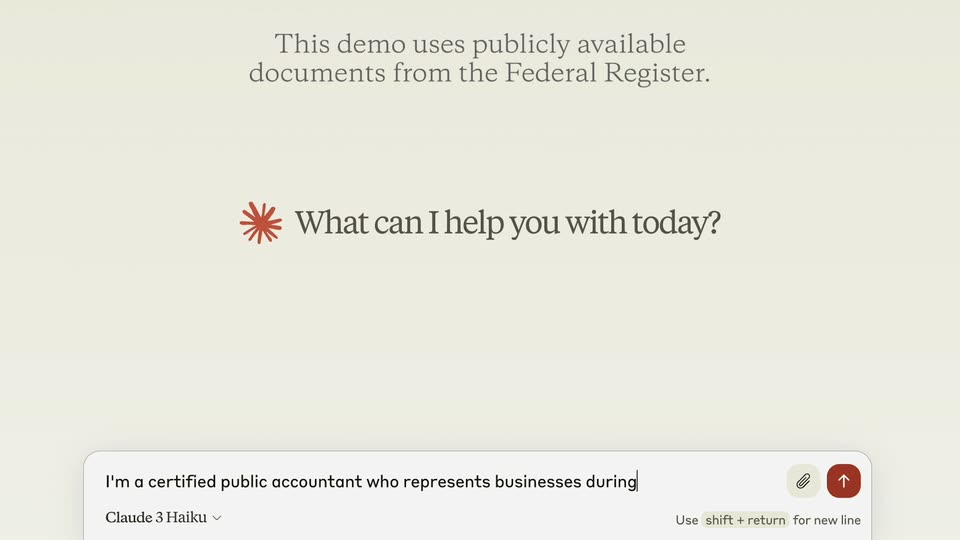
The Claude chat interface fills the frame. The cursor opens the model dropdown, the view zooms in, and the cursor picks Claude 3 Haiku. The view pulls back as a prompt is typed into the input box and a disclaimer caption appears at the top.
On-screen text: “This demo uses publicly available documents from the Federal Register.”, “Output speeds are accurate at the time of recording, but may vary depending on how you access Claude.”
Techniques: UI zoom, Cursor demo
Camera: Static
03 · Demo · 0:27–0:36
A browser window on a dark brown desktop shows the Claude chat page. A PDF file thumbnail is dragged from the desktop into the input box, then the cursor clicks the red send button. The file and prompt appear as a message bubble, and a bulleted answer types out below it.
Techniques: Cursor demo, UI zoom
Camera: Static
04 · Demo · 0:36–1:25
A chat window scrolls through a bulleted answer, then a cursor types a request into the input bar and sends it. A dark code block with a JSON object appears and zooms to fill the frame while its lines scroll horizontally.
Techniques: Cursor demo, UI zoom
Camera: Pan
05 · CTA · 1:25–1:34
A white serif line reads Try Claude 3 Haiku, with Haiku in italics, above a smaller at claude.ai, centered on a solid rust field. The text holds still for several seconds, then fades out to bare color.
On-screen text: “Try Claude 3 Haiku”, “at claude.ai”
Camera: Static