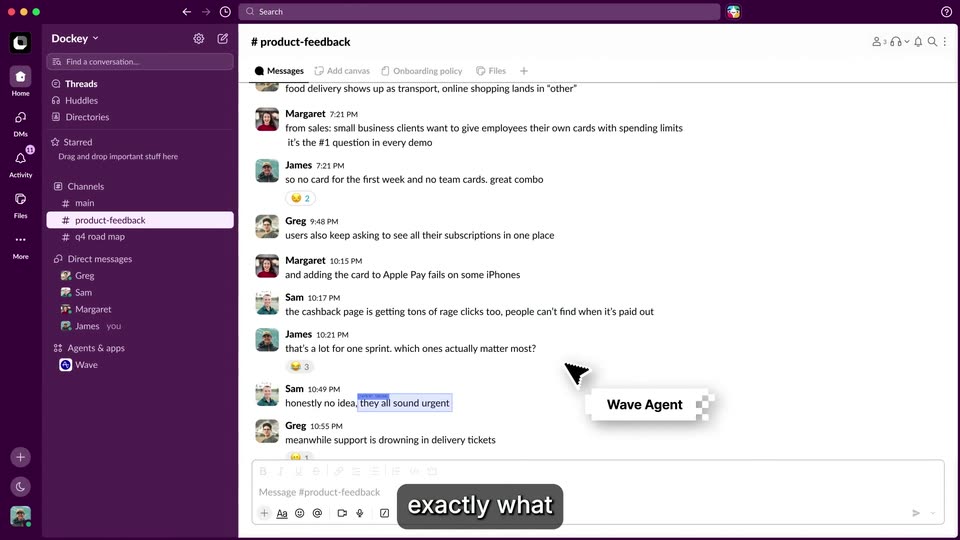
0:46
Explore
Spenser Skates - Introducing Wave. The world's first AI that reads your customers' mi
Amplitude · Nov 2026 · 1:59 · AI-annotated
- Length
- 1:59
- Scenes
- 70 · 1.7 s avg
- Product on screen
- 0:00
- Voiceover
- Yes
00:00:00 / 01:59:18
Amplitude’s 1:59 launch film runs 70 scenes, about 1.7 s each. The product is on screen from the first frame. There is no explicit call to action; a voiceover carries the film. The video opens on the Wave wordmark, runs a fast montage of UI screens, then settles into a presenter-led walkthrough that cuts between live action, screen recordings and 3D blueprints as it moves from data collection to autonomous shipping. Signature moves are the pixelated Wave Agent tag riding the cursor, caption pills that type and swap in step with the voiceover, and blueprints that tilt and resolve from scattered dots.
Footage neededEstimated needs: 5 capture groups — your screens or recordings · 1 official logo — reused across the film · 6 filmed passages — shoot, supply or replace · 10 graphic passages — draw or supply · 10 3D passages — build or supply
Is this your launch? to your site or press kit.
More like this
0:18
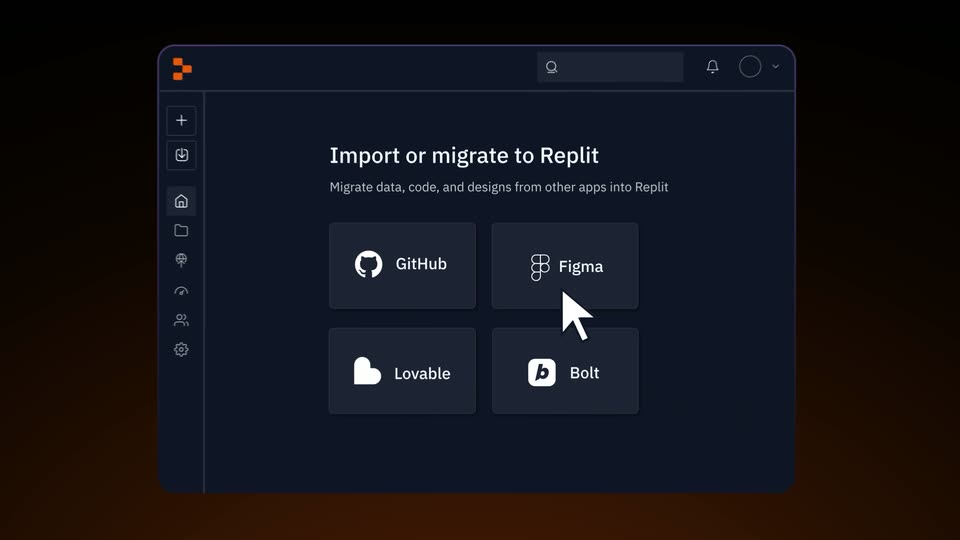

Replit ⠕ - Import Figma & Other Designs into Fully Functional Apps with Repl
Replit · Developer tools · Jun 2025
1:12
supermemory - Introducing the supermemory company brain A super employee with all
Supermemory · Jul 2026
Spenser Skates - Introducing Wave. The world's first AI that reads your customers' mi, scene by scene
· 70 scenes as text
01 · Product intro · 0:00–0:01
A presenter in a green jacket gestures in front of a bookshelf as a title overlay, with the headline, the Wave logo and two ratings cards, dissolves out. A bottom caption reads Introducing Wave, then fades.
On-screen text: “AI Self-Improving Product”, “Introducing Wave,”
Camera: Static
02 · Product intro · 0:01–0:03
A blue 3D tunnel of dots streams past the camera while the bold blue wordmark 'Wave' scales up at center and motion-blurs as it flies forward. A glowing arc rises at the bottom as white captions state the tagline.
On-screen text: “the world's first agentic”, “Wave”, “product team.”
Techniques: Kinetic type, Particles, Speed ramp
Camera: Pull out
03 · Demo · 0:03–0:06
A chat app interface fills the frame as the camera zooms into the message list. A cursor hovers over the thread while a Wave Agent posts a pixelated message that types itself in. White caption pills swap in at the bottom.
On-screen text: “product team.”, “your customers want next,”
Techniques: UI zoom, Cursor demo
Camera: Push in
04 · Demo · 0:06–0:07
A chat thread blurs at the edges as the Wave app posts a white card listing three ranked opportunities. A pixelated cursor drifts left across the message while a dark caption pill at the bottom reads “your customers want next,”.
On-screen text: “Wave Agent”, “your customers want next,”
Techniques: Cursor demo
Camera: Static
05 · Demo · 0:07–0:08
A screen recording of a call-intelligence interface shows a speaker-labeled transcript on the left and a blurred video player with a waveform timeline on the right. A cursor glides across the screen as a 'Wave Agent' tag fades in beside the transcript. A bottom caption reads 'develops proactively,'.
On-screen text: “develops proactively,”
Techniques: Cursor demo, Masking
Camera: Static
06 · Demo · 0:08–0:08
A browser window displays a notes document. A cursor moves and highlights a line, then a second line, as a small Wave Agent tag drifts across the top. A dark caption pill at the bottom reads develops proactively
On-screen text: “develops proactively,”
Techniques: Cursor demo
Camera: Static
07 · Demo · 0:08–0:10
A light-themed product page fills the frame as a cursor clicks the Run agent dropdown, opening a menu with Wave Agent highlighted. Two pixel-edged Wave Agent labels point to the menu, while a black caption pill at the bottom swaps from and ships to and proactively develops.
On-screen text: “Wave Agent”, “and ships”, “and proactively develops”
Techniques: Cursor demo
Camera: Static
08 · Demo · 0:10–0:13
A GitHub pull request screen is shown as a cursor clicks the Confirm merge button in a side panel. A Wave Agent tag drifts across the right side while rolling captions appear at the bottom, then the screen blurs out.
On-screen text: “Wave Agent”, “and new features”, “without you ever needing”, “Let me show you”
Techniques: Cursor demo
Camera: Static
09 · Demo · 0:13–0:14
A man in a green bomber jacket stands centered before a wall of bookshelves, gesturing with both hands as he speaks to camera. Subtitles read at the bottom of the frame.
On-screen text: “Let me show you”, “how it works.”
Camera: Push in
10 · Demo · 0:14–0:16
A presenter in a black jacket gestures behind a laptop on a wooden table in a leafy office. The shot then splits, revealing a white interface panel with a search field on the left as he moves to the right.
On-screen text: “Let's say”, “you work at a fast”
Techniques: Split screen
Camera: Pull out
11 · Demo · 0:16–0:20
A split screen pairs the Wave interface on the left with a presenter at a laptop on the right. The interface panel widens until it fills the frame and dims, while a cursor types a goal into the input field. Subtitle captions sit at the bottom.
On-screen text: “growing fintech startup,”, “and you want to”, “exactly what”, “Without you ever”
Techniques: Split screen, Cursor demo
Camera: Pull out
12 · Demo · 0:20–0:21
A flat analytics dashboard crossfades in, filling the frame. A dark caption pill at the bottom builds a phrase word by word while a black cursor, tagged “Wave Agent”, hovers over the Error insight card.
On-screen text: “Without you ever prompting”, “Wave Agent”
Techniques: Kinetic type, Cursor demo
Camera: Static
13 · Demo · 0:21–0:24
A session-replay dashboard centers a login page; a pixelated cursor tagged Wave Agent clicks the Sign In button, which flashes red, then the view zooms in. It cuts to a product analytics dashboard with metric cards and a line chart as the cursor hovers.
On-screen text: “Wave watches”, “thousands of user”, “sessions, reads”
Techniques: Cursor demo, UI zoom
Camera: Push in
14 · Demo · 0:24–0:25
A light analytics dashboard scrolls slowly upward while a white “Wave Agent” tag with a black cursor hovers over the line chart, and a black caption pill types out “sessions, reads” along the bottom.
On-screen text: “Wave Agent”, “sessions, reads”
Techniques: Kinetic type
Camera: Pan
15 · Demo · 0:25–0:26
A product analytics table with country rows and metric columns dissolves into a social media post feed, while feature cards fade beneath. A dark caption pill at the bottom swaps between two phrases, and a Wave Agent tag with a checkered pattern hovers mid-screen.
On-screen text: “your product data,”, “feedback from all over the world,”
Camera: Pan
16 · Demo · 0:26–0:26
A browser window shows a Reddit thread in r/ProductManagement about Arlo security exploits, with the post title and a stack of user comments. The view crossfades from a post-composer screen into the thread. A dark caption pill at the bottom reads “and collects feedback”.
On-screen text: “and collects feedback”
Camera: Static
17 · Demo · 0:26–0:27
A browser window displays a G2 reviews page for Arlo Analytics, with star ratings and two review cards by Carlos M. and Sarah T. A dark rounded caption pill reading “from all over” sits centered at the bottom of the frame.
On-screen text: “from all over”
Camera: Static
18 · Demo · 0:27–0:28
A light-themed AI Feedback dashboard fills the frame. A list of user comments scrolls upward past filter chips and colored category tags, while a black pill caption at the bottom center reads “from the” then “the internet.”
On-screen text: “from the”, “the internet.”
Camera: Pan
19 · Demo · 0:28–0:29
A light product UI shows a customer feedback list, then switches to an insights page with a line chart and a follow-up card. A dark rounded caption at the bottom center updates from “Here's what” to “Wave found,” in step with the voiceover.
On-screen text: “Here's what”, “Wave found,”
Techniques: Kinetic type
Camera: Static
20 · Demo · 0:29–0:35
A close-up of an analytics dashboard zooms in on a line chart titled Highest value customers aren't using crypto feature. A cursor sweeps across the graph, popping up tooltips with daily active-customer counts, while caption phrases build the sentence at the bottom.
On-screen text: “Wavefeund,”, “a large group”, “of our highest valued”, “customers aren't”, “using the crypto”, “investment feature,”
Techniques: UI zoom, Cursor demo
Camera: Push in
21 · Demo · 0:35–0:38
The Session Replays list fills the frame after a brief crossfade from a line chart. A cursor drifts down the rows of timestamps and user IDs while a caption pill at the bottom swaps phrases in sync with the voiceover.
On-screen text: “investment feature,”, “watching through”, “session replays,”, “it notices”
Techniques: Kinetic type, Cursor demo
Camera: Pull out
22 · Demo · 0:38–0:39
A static session replay screen shows a browser view of the Arlo login page on the left, a cursor resting on the sign-in button next to floating 3D credit cards, and an event timeline on the right. A bottom caption reads that customers aren't.
On-screen text: “that customers aren't”
Techniques: Cursor demo
Camera: Static
23 · Demo · 0:39–0:42
The Ario session-replay interface plays back a visit: a cursor moves through the left app as it switches from a transactions table to a revenue chart, while the right-hand event list highlights each step in turn. The view then zooms onto the chart.
On-screen text: “that's why we aren't”, “feature listed.”
Techniques: Cursor demo, UI zoom
Camera: Push in
24 · Demo · 0:42–0:44
A man in a dark jacket and gray shirt sits behind a laptop in a plant-filled office, speaking to the camera and gesturing with both hands. Subtitles at the bottom of the frame caption his words as he talks.
On-screen text: “That means it's”, “too far buried.”
Camera: Push in
25 · Demo · 0:44–0:47
A light feedback dashboard shows a list of user comments scrolling upward while a dark rounded caption at the bottom swaps through phrases. The view then zooms into the middle rows of the list.
On-screen text: “But that's not all.”, “While searching through”, “user reviews,”, “too far buried.”
Techniques: Kinetic type, UI zoom
Camera: Pull out
26 · Demo · 0:47–0:47
A hollow sphere of blue particles rotates slowly on a near-black background, its strands swirling around a dark center. A dark rounded caption pill at the bottom center reads “user reviews,” while the voiceover continues.
On-screen text: “user reviews,”
Techniques: Particles
Camera: Static
27 · Demo · 0:47–0:49
A 3D web of colored dots and thin connecting lines, each tagged with a user name, spins while the camera pushes in toward the Arlo logo inside a selection box. A dark pill caption at the bottom reads 'Wave discovers,' then 'another problem.'
On-screen text: “Wave discovers”, “another problem”
Techniques: Parallax
Camera: Push in
28 · Demo · 0:49–0:52
A dark blue network of named user nodes spreads across a starfield. A white marquee box selects a cluster, then the camera pushes in as a large cursor points to avatars tagged Wave Agent, while bottom captions read 50 users are complaining about the lack of crypto.
On-screen text: “50 users”, “Wave Agent”, “are complaining”, “about the lack of crypto”
Techniques: UI zoom, Cursor demo, Parallax
Camera: Push in
29 · Demo · 0:52–0:55
A 3D network of user nodes drifts on a dark blue field; review cards and Wave Agent labels pop up at the nodes, then the camera pushes in on a centered one-star review card.
On-screen text: “about the lack of crypto”, “friendly features”, “on the platform.”
Techniques: 3D mockup, Parallax, UI zoom
Camera: Push in
30 · Demo · 0:55–0:56
A dark frame opens through an expanding white circular mask onto a product screen. A left icon rail and a top filter bar appear, then rows of an opportunity list fade in. A dark caption pill at the bottom carries the spoken line.
On-screen text: “Wave doesn't”, “just spot the problems.”
Techniques: Masking
Camera: Push in
31 · Demo · 0:56–0:57
A light opportunity board lists rows of text across columns. A mouse cursor hovers the top row, tinting it gray. A dark pill caption at the bottom reads 'just spot the problems.' then swaps to 'and the greatest.'
On-screen text: “just spot the problems.”, “and the greatest.”
Techniques: Cursor demo
Camera: Static
32 · Demo · 0:57–0:59
A flat product UI displays a problem card about crypto investment with a dashboard preview beneath it. The screen scrolls up to expose a line chart and a red Problem alert, as a dark caption at the bottom swaps text in sync with the voiceover.
On-screen text: “It also suggests”, “needed to fix them.”
Camera: Push in
33 · Demo · 0:59–1:00
A dashboard zooms from a full view to a tight crop on the left sidebar. A red callout and a dashed outline flag the Crypto investing item, with a cursor on it. A dark caption pill at the bottom reads needed to fix them.
On-screen text: “needed to fix them.”
Techniques: UI zoom
Camera: Push in
34 · Demo · 1:00–1:03
A flat product UI (Arlo) starts blurred with green and red annotation boxes explaining a sidebar change, then sharpens and reframes onto the highlighted Crypto investing menu item, and scrolls down to reveal a Technical Plan list. Dark caption pills read out the change at the bottom.
On-screen text: “New”, “Move the crypto feature higher for better visibility and conversions.”, “Problem: Crypto feature far below”, “High-value customers aren't scrolling enough to see the crypto feature listed on sidebar, so an otherwise engaged segment never discovers it.”, “Moving the feature”, “up in the sidebar,”, “a development plan”
Techniques: UI zoom
Camera: Pull out
35 · Demo · 1:03–1:06
A flat product screen shows an opportunity card with Spec, Execute and Measure tabs. The view zooms out to reveal the full card and activity feed, then the cursor clicks the Measure tab, swapping the technical plan for a metrics chart with expected-impact stats.
On-screen text: “with PR ready.”, “Testing experiments”, “and project impact.”
Techniques: UI zoom, Cursor demo
Camera: Pull out
36 · Demo · 1:06–1:08
A product dashboard on the Measure tab displays two impact charts and expected-impact figures, then slides left off-screen to reveal a blue wireframe cube with bright edges on a dotted grid.
On-screen text: “and project impact.”, “it boosts the map.”
Camera: Pull out
37 · Demo · 1:08–1:08
A white metrics dashboard slides out to the left, freeing a blue document icon in a selection box that glides right along a dotted timeline on a dark grid, beaming into a crosshair target. A bottom caption shows the line.
On-screen text: “If this small”, “change ships,”
Camera: Pan
38 · Demo · 1:08–1:10
A dashboard interface tilts in 3D perspective on a blue grid floor, rotating from an edge-on sliver to face the camera. A wireframe document icon with a plus and a circular node sit to the left. White captions in a black pill swap at the bottom.
On-screen text: “change ships,”, “it could add”, “hundreds of thousands”, “in revenue per year”
Techniques: 3D mockup
Camera: Push in
39 · Demo · 1:10–1:11
A financial dashboard interface with a sidebar, graph, and transaction list. The view reframes to the left as a cursor hovers over a menu item. White captions in black boxes appear at the bottom.
On-screen text: “hundreds of thousands”, “in revenue per year.”
Techniques: UI zoom, Cursor demo
Camera: Push in
40 · Demo · 1:11–1:12
A dotted 3D terrain holds a translucent blue area chart that grows on the right, its peak traced by a dashed line. A dollar tag with a text-tool icon counts up from $3.2M to $8.7M while selection-handled year labels 2026, 2027 and 2028 slide into place.
Techniques: 3D mockup
Camera: Push in
41 · Demo · 1:12–1:13
A flat blue map region with a dashed white route sits on a dark navy field. A white badge holding the blue Amazon A logo and a value counter ticks up from $9.5M to $10M while sliding upward, with small yellow bars and a white node on the route. A caption fades in at the bottom.
On-screen text: “$9.5M”, “$10M”, “Wave also suggests”
Camera: Pan
42 · Demo · 1:13–1:16
A man in a dark jacket sits at a table with a closed laptop, talking to the camera in a plant-filled office. Subtitles cycle at the bottom while a large $10M figure slides across the frame.
On-screen text: “Wave also suggests”, “of other improvements”, “in parallel.”, “$10M”
Camera: Static
43 · Demo · 1:16–1:18
A cursor hovers over a highlighted issue row in a project tracker, then the view reframes into that issue's detail page with a problem summary and an embedded mobile login mockup. A dark “Wave caught” caption sits at the bottom.
On-screen text: “Wave caught”, “in parallel.”
Techniques: Cursor demo, UI zoom
Camera: Push in
44 · Demo · 1:18–1:20
A blurred analytics screen holds a pink REACH card reading ~700 web log-in starters per day. A black cursor points at the card as it slides down and right, and a bottom caption counts the users getting stuck at login.
On-screen text: “700 users”, “getting stuck at login.”
Techniques: Cursor demo
Camera: Push in
45 · Demo · 1:20–1:23
A white login form card is centered, with red dashed annotation boxes pointing to the email and sign-in fields. A cursor hovers near the button. The scene cuts to a document interface with green annotation boxes highlighting new features.
On-screen text: “the fix,”, “tested it”
Techniques: Cursor demo
Camera: Pull out
46 · Demo · 1:23–1:24
A login screen mockup for Arlo sits centered, ringed by green “New” annotation boxes joined by dashed lines. The view zooms in on the form while a dark caption pill at the bottom reads “tested it”, then “and tested the PR.”
On-screen text: “tested it”, “and tested the PR.”
Techniques: UI zoom
Camera: Push in
47 · Demo · 1:24–1:27
A task detail screen zooms in on the blue Create ticket button, opening a dropdown of cloud and local agents. A cursor hovers over the Cursor row, and a dark tooltip slides in beside it.
On-screen text: “and pushed the PR.”, “waiting on approval.”
Techniques: UI zoom, Cursor demo
Camera: Push in
48 · Demo · 1:27–1:31
A product screen starts blurred over a dropdown and table, then sharpens to a spreadsheet of top subscription requests. A cursor hovers at the right while rows highlight, and the view reframes to a feature spec page showing a Subscriptions mockup. Captions run along the bottom.
On-screen text: “It read through requests”, “asking for a way”, “to track subscriptions,”, “so it mapped out the entire feature from the screens,”
Techniques: UI zoom, Cursor demo
Camera: Pull out
49 · Demo · 1:31–1:32
A Figma spec page titled Subscription Plan Request shows a Solution paragraph above an embedded Subscriptions screen mockup with a table of recurring charges. A dark rounded caption box at the bottom center swaps phrases as the voiceover plays.
On-screen text: “to track subscriptions,”, “so it mapped out”, “the entire feature”
Camera: Static
50 · Demo · 1:32–1:33
A document page titled Subscription Plan Request scrolls up, dropping the heading and revealing an embedded Subscriptions screen mockup that grows to fill the frame. A dark caption pill reads the entire feature at the bottom.
On-screen text: “the entire feature”
Techniques: UI zoom
Camera: Push in
51 · Demo · 1:33–1:34
A 3D-tilted mockup of the Arlo dashboard floats on a pale background, its sidebar and subscription table fully visible, with a dark tooltip at the top right. A white caption on a dark pill reads 'from the screens,' at the bottom.
On-screen text: “from the screens,”
Techniques: 3D mockup
Camera: Static
52 · Demo · 1:34–1:34
A light issue-tracker interface shows a Technical Plan list. The view scrolls down a few lines as a blue highlight slides from the first bullet to the Subscriptions screen line. A dark caption pill at the bottom swaps its text.
On-screen text: “from the screens,”, “to the dev plan,”
Camera: Static
53 · Demo · 1:34–1:35
A dimmed spec document fills the frame, its headings and bullet points faded to light gray. Two phrases, cancel and renewal reminder, sit in sharp blue highlight boxes mid-page. A dark caption bar at the bottom reads to the dev plan.
On-screen text: “to the dev plan,”
Camera: Pan
54 · Demo · 1:35–1:36
The interface shows a Subscription Plan Request page. The two blue bars in the Projected impact chart rise, their labels counting from 14% and 5% to 35% and 15%, filled with a dotted texture. A dark caption box at the bottom reads “to the projected impact.”
On-screen text: “to the projected impact.”
Camera: Push in
55 · Demo · 1:36–1:37
A white dashboard shows a two-bar chart updating in place: the blue bars grow and the hatched ghost bars fade as the labels tick from 92% and 44% to 99% and 48%, while a dark bottom caption swaps to “And when the new iOS”.
On-screen text: “to the projected impact.”, “And when the new iOS”
Techniques: Morph
Camera: Push in
56 · Demo · 1:37–1:40
A phone mockup sits centered on a dark blue grid, its screen blurred behind a foreground notification banner. The banner shifts from a Software Update alert to a verifying spinner, then to an update completed checkmark. A bottom caption tracks the voiceover.
On-screen text: “And when the new iOS”, “update broke”
Techniques: 3D mockup
Camera: Pull out
57 · Demo · 1:40–1:41
A tilted phone mockup displays a crypto watchlist on a dark grid background. A blue glitch bar flashes across the screen, then the view reframes to the lower half where a pixelated cursor and a white Wave Agent tag appear. A caption reads the mobile layout.
On-screen text: “the mobile layout”, “Wave Agent”
Techniques: 3D mockup, UI zoom, Cursor demo
Camera: Push in
58 · Demo · 1:41–1:42
A product issue screen fills the frame, a phone mockup centered with orange callout labels fading in around it to mark layout breaks. A dark caption box at the bottom cycles through the lines “Wave flagged it” and “the same morning”.
On-screen text: “Wave flagged it”, “the same morning”
Camera: Pull out
59 · Demo · 1:42–1:43
Two tilted iOS phone mockups of a crypto app sit on a white canvas in a design tool, with colored tags marking the header and new bar. The view pulls back to show the full workspace and a side-by-side comparison panel. A 'redesigned screens' caption holds at the bottom.
On-screen text: “redesigned screens”
Techniques: 3D mockup, UI zoom
Camera: Pull out
60 · Demo · 1:43–1:45
A 3D phone mockup on a blue grid background zooms in from a desktop app view to a close-up of the crypto interface, with white captions on black backgrounds appearing at the bottom.
On-screen text: “redesigned screens”, “already attached.”
Techniques: 3D mockup, UI zoom
Camera: Pan
61 · Demo · 1:45–1:46
A dark square panel rotates in 3D and flattens into a horizontal board over a blue grid. On the board sit a dark cube at left, a wireframe pyramid in the center, and a small cube at right, framed by corner markers and thin wireframe brackets.
On-screen text: “Now, three”, “different teams ship”
Techniques: 3D mockup
Camera: Static
62 · Demo · 1:46–1:48
Three dark photo cards, each holding a team member's headshot, rotate flat into a row on a blue grid. Below each, a file label and a DEPLOY button with a cursor icon flip to DEPLOYING, while pixelated Wave Agent tags pop in.
On-screen text: “different teams ship”
Techniques: 3D mockup, Cursor demo
Camera: Pan
63 · Demo · 1:48–1:50
On a dark blue blueprint grid, three panels hang from thin cables. Document icons flip into checkmarks on isometric planes as labels switch from INSTALLING to INSTALLED, while a bottom caption reads 'thanks to their' then 'AI agent workers.'
On-screen text: “thanks to their”, “AI agent workers.”
Techniques: Morph
Camera: Pan
64 · Demo · 1:50–1:50
Three isometric “INSTALLED” cards hang on a dark blue grid, each with a stacked-panel line icon, a blue check and an Arla tag. The cards dim as a blue four-point star flares in the center.
On-screen text: “AI agent workers.”, “We're using AI”
Camera: Push in
65 · Demo · 1:50–1:51
A glowing blue four-pointed star sits centered on a dark blue grid, with thin lines radiating outward to small dots. The star pulses gently while a black caption box holds white text at the bottom center.
On-screen text: “We're using AI”
Techniques: Kinetic type
Camera: Pull out
66 · Demo · 1:51–1:52
On a dark blue dotted grid, a radial burst of lines with white dots at their ends contracts into a single horizontal line, then expands into a row of three cube icons linked by a glowing line, with a black caption pill at the bottom.
On-screen text: “to help you ship”
Techniques: Morph
Camera: Static
67 · Demo · 1:52–1:53
On a dark blue field crossed by thin horizontal streaks, a row of square tiles holding white line-art cubes slides left along a glowing line. Corner handles mark the selected tiles as the bottom caption changes.
On-screen text: “the right products”, “at the exact moment”
Camera: Static
68 · Demo · 1:53–1:55
A dark blue grid holds a white corner-bracket frame with four task cards, each pairing a wireframe cube icon with a label. Below each, a status pill switches from blue 'Wave is working' to green 'FIXED' with a glitch, as white captions run along the bottom.
On-screen text: “at the exact moment”, “customers need them most.”
Camera: Static
69 · Demo · 1:55–1:56
A man in a dark jacket sits at a desk behind a laptop, speaking to camera in a plant-filled office. A wireframe UI overlay of labeled boxes with green FIXED tags hovers over him and fades out in the first second. A subtitle sits at the bottom.
On-screen text: “customers need them most.”
Camera: Pull out
70 · Outro · 1:56–1:59
On a dark navy grid, the Amplitude mark and wordmark assemble from scattered blue dots, the dotted texture resolving left to right into solid white. A dashed selection frame flickers around the logo as the wordmark locks in.
On-screen text: “customers need them most.”
Techniques: Particles
Camera: Static