
0:15
Explore
Alex - Xcode AI Coding Assistant
Alex · May 2025 · 1:06 · Clip · AI-annotated
- Length
- 1:06
- Scenes
- 8 · 8.3 s avg
- Product on screen
- 0:00
- Voiceover
- No
00:00:00 / 01:06:01
- Length
- 1:06
- Scenes
- 8 · 8.3 s avg
- Product on screen
- 0:00
- Voiceover
- No
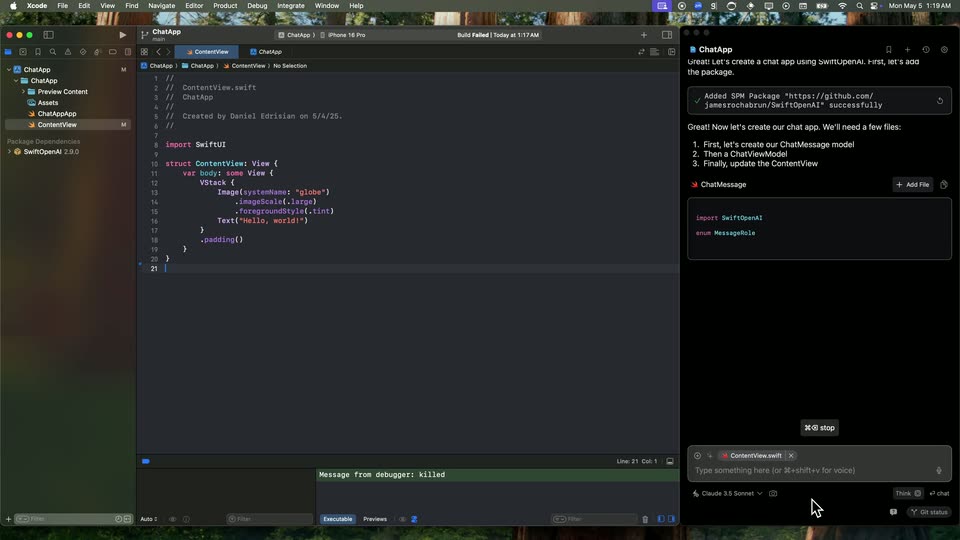
Alex’s 1:06 clip runs 8 scenes, about 8.3 s each. The product is on screen from the first frame. The video is one uncut screen recording of Xcode that follows a single prompt from typing to a working chat app in the simulator. Its style is plain and literal: steady framing, occasional zooms into the code and the phone, and a build badge as the only graphic accent.
No filming indicatedEstimated needs: 1 capture group — your screens or recordings
Is this your launch? to your site or press kit.
More like this

0:38

Retool - Say hello to the fusion of visual programming, code, and AI. Retool
Retool · Developer tools · Oct 2023
0:58
Yash - Today we're launching Nova - an AI software engineer by @supercodeai.
Super Code AI · Sep 2026
Alex - Xcode AI Coding Assistant, scene by scene
· 8 scenes as text
01 · Demo · 0:00–0:34
A locked-off screen capture of a code editor with a chat panel. The view reframes onto the input, where a cursor types a prompt. The panel then fills with reply bubbles, a package dialog, and streaming Swift code blocks as the file tree updates.
Techniques: UI zoom, Cursor demo
Camera: Static
02 · Demo · 0:34–0:43
A macOS screen shows Xcode with Swift code on the left and an AI chat panel on the right. The code editor scrolls as new lines are generated while the chat panel streams the assistant's reply, then the view zooms into the code.
Techniques: UI zoom
Camera: Push in
03 · Demo · 0:43–0:49
A code editor fills the frame as a cursor pastes an API key into a Swift line. The file scrolls, an autocomplete list of model names pops up, and gpt4o is chosen. The view pulls back to reveal the full IDE window with a chat panel at right.
Techniques: Cursor demo, UI zoom
Camera: Pull out
04 · Demo · 0:49–0:50
A dark code editor fills the frame, Swift code on the left and a ChatGPT chat panel on the right. A rounded dark badge with a hammer icon and the words Build Succeeded fades in at the center over the code.
Camera: Static
05 · Demo · 0:50–0:51
A dark Xcode window holds still: Swift code fills the left pane, a black iPhone simulator sits centered, and an AI chat panel on the right lists the app's features. A blinking caret rests in the code and a spinner loads on the phone screen.
Camera: Static
06 · Demo · 0:51–0:51
A static screen capture of Xcode on a Mac. Swift code fills the editor, a black iPhone mockup with a loading spinner sits in the center, and a dark AI chat panel on the right lists the app's features and options. A text cursor rests in the code.
Camera: Static
07 · Demo · 0:51–0:58
A wide Xcode workspace with Swift code and an AI chat panel frames an iPhone simulator in the center. The view zooms into the simulator, a cursor taps the message field, types 'Hi' and sends it, then a 'Hello' reply bubble appears.
Techniques: UI zoom, Cursor demo
Camera: Push in
08 · Demo · 0:58–1:06
A front-facing phone mockup sits centered over a dark code editor. A cursor taps an on-screen keyboard to type a message, sends it, and the chat app replies. The view then pulls back to reveal the full desktop workspace.
Techniques: Cursor demo, UI zoom
Camera: Pull out