0:38

Parallel Agents on Navi
Parsewise · B2B · Nov 2026
Airtable · Jan 2022 · 3:17 · Full motion · AI-annotated
Airtable’s 3:17 launch film runs 17 scenes, about 12 s each. The product shows up at 0:09 and 1 feature is revealed. There is no explicit call to action; a voiceover carries the film. The video is built as a tutorial: a quick montage of automation cards, a 3D laptop title card, a problem setup over a launch-goals grid, then a long cursor-driven walkthrough of the builder, and a logo outro. Signature moves are flat light UI panels floating on near-black, crossfade dissolves between workflows, a white band sweeping across tables, and zoom-and-pan moves through the grid.
Is this your launch? to your site or press kit.
Parsewise · B2B · Nov 2026
Boston Dynamics · Feb 2024
GodHands · B2B · Oct 2026
A light automation-workflow panel on a dark background shows a trigger card and a send-email action card, then the cards cross-fade into a second layout with a form trigger and three create-record actions.
Techniques: Morph
Camera: Static
A flat Airtable automation interface sits on a dark background. The list of actions and conditional actions scrolls upward, revealing the Engineering and Design branches, then the screen fades out to a plain light-gray field.
Camera: Pull out
A 3D laptop mockup on the right shows the Airtable automations builder while a large dark headline fades in on the left, holds, then fades out. The Airtable logo sits in the lower left corner.
On-screen text: “Introducing conditional logic for automations”
Techniques: 3D mockup
Camera: Static
A white card with a large pale gray headline and the Airtable wordmark at lower left gives way to a dark screen where the Airtable grid view, titled Virgo Industries Product Launch Ops, fills the frame.
On-screen text: “Introducing”, “conditional logic”, “for automations”, “Airtable”
Camera: Static
A Notion-style table of launch goals, grouped under two leads with colored status pills, sits on a dark background. A soft white band sweeps across the columns left to right, then the view zooms in and pans down through the rows.
Techniques: Light sweep, UI zoom
Camera: Push in
A grid-based campaign tracker interface fades in from a pale, low-contrast state to full color against a dark backdrop, a cursor hovering at the top header. The table groups fall 2020 product rows by status with channel and date columns.
Camera: Static
A cursor clicks the Automations button in the green top bar of a campaign tracker grid. A white side panel slides in from the right edge, listing four action-item automations with green ON toggles and a Suggested automations section, while the grouped campaign table stays on the left.
Techniques: Cursor demo
Camera: Static
A crossfade dissolves a campaign table and automations list into an automation editor, then the editor scrolls down to reveal a second conditional branch with a Slack step.
Camera: Pan
A white caption fades out over a task table interface. The cursor clicks the AUTOMATIONS button in the top right, and a white side panel slides in from the right, showing a balloon illustration and automation options. The cursor hovers over the Create a custom automation row.
On-screen text: “with one trigger. You can add conditional logic to any automation in just a couple steps.”
Techniques: Cursor demo
Camera: Static
A cursor works through an automation builder on a dark backdrop, naming the flow, picking a trigger, setting a condition, and testing it to a green success state. It then adds two conditional branches that route notifications to named collaborators.
Techniques: Cursor demo
Camera: Static
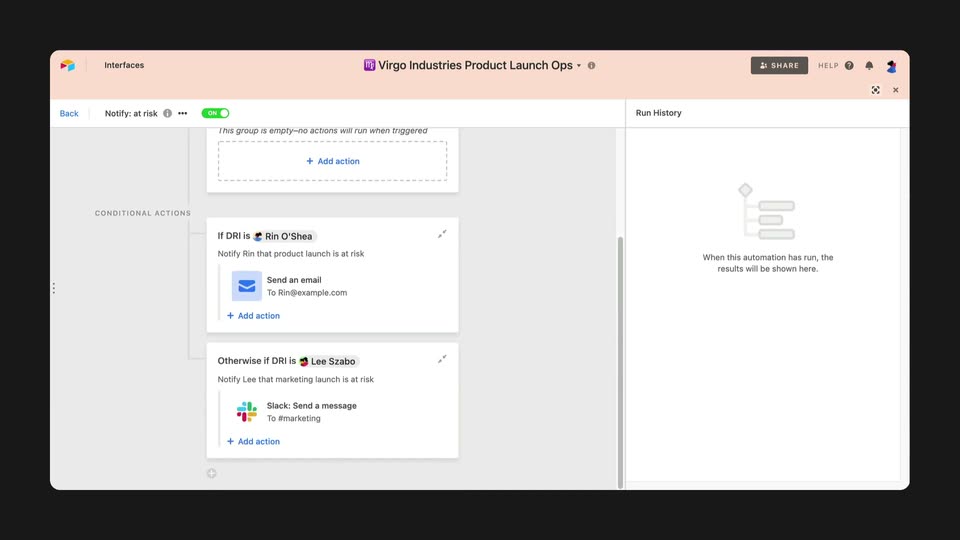
A flat automation-builder window sits on black. A cursor selects the Rin O'Shea conditional group, opens an action menu, and chooses Send email. The right panel then fills with the email's recipient, subject and message body.
Techniques: Cursor demo
Camera: Static
A tilted Airtable automation editor on a black field. A cursor opens and closes an email preview modal, adds a Slack action to the Lee Szabo branch, fills the message field. The view zooms to the top bar as the cursor flips the toggle from off to on.
Techniques: Cursor demo, UI zoom
Camera: Static
A light automation builder fills the frame: conditional group cards on the left, a Slack message configuration panel on the right. A cursor rests on the ON toggle in the top bar. The view holds steady with no camera movement.
Techniques: Cursor demo
Camera: Static
The automation builder window fades in, showing a trigger card, an empty actions group, and conditional group cards for funnel stages. After a brief hold, the view scrolls down to reveal the Awareness, Consideration and Conversion email actions.
Camera: Pull out
A Notion automation builder, framed as a rounded card on a black background, switches from a pink marketing workflow to a green applicant tracker workflow. A cursor rests in the canvas as the action list updates.
Techniques: Cursor demo
Camera: Static
A flat automation-builder UI with a green header. The left panel scrolls down to a conditional branch, then a cursor moves down the list, outlining each action row in turn: send an email, create a record, update a record. The right panel stays on an empty run-history state.
Techniques: Cursor demo
Camera: Static
On a white background, the Airtable mark forms in the center as its orange, pink and blue facets rotate into place, then the wordmark Airtable slides in beside it. The frame holds still on the finished lockup.
On-screen text: “Airtable”
Techniques: Kinetic type
Camera: Static