
0:44
Explore
Introducing Hosting Tools for Airbnb Services
Airbnb · May 2025 · 2:52 · Full motion · AI-annotated
- Length
- 2:52
- Scenes
- 18 · 9.6 s avg
- Product on screen
- 0:00
- Features shown
- 5
- Voiceover
- Yes
- Views
- 9.2K on YouTube
as of November 27, 2026
00:00:00 / 02:52:21
- Length
- 2:52
- Scenes
- 18 · 9.6 s avg
- Product on screen
- 0:00
- Features shown
- 5
- Voiceover
- Yes
- Views
- 9.2K on YouTube
as of November 27, 2026
Airbnb’s 2:52 launch film runs 18 scenes, about 9.6 s each. The product is on screen from the first frame and 5 features are revealed. There is no explicit call to action; a voiceover carries the film. The video is a tab-by-tab tour of the host app, each feature named by the voiceover and then demoed inside one locked-off phone mockup centered on a white field. Pacing is slow between cuts but busy inside the screen, with crossfades, scrolls and bottom-sheet slides as the signature moves, and the Airbnb red reserved for the closing logo.
No filming indicatedEstimated needs: 6 capture groups — your screens or recordings · 1 official logo — reused across the film
Is this your launch? to your site or press kit.
More like this
2:11
Bambu Lab S1 | 3D Scanner
Bambu Lab · Nov 2026
1:12

CORSAIR Platform:4 Desk - Elevate Your Workspace
CORSAIR · Feb 2025
Similar soundtrack
Films whose music sounds like this one, voice left out
1:46


Introducing Google News Showcase
Google · Modern corporate electronic
2:06

1:53

Introducing DJI SDR Transmission
DJI · Modern electronic, ambient
Introducing Hosting Tools for Airbnb Services, scene by scene
· 18 scenes as text
01 · Product intro · 0:00–0:04
A silver service bell emoji sits centered above the black title “Airbnb Services” on a plain off-white background. The bell scales up during the first second, then holds still for the remainder of the locked-off shot.
On-screen text: “Airbnb Services”
Camera: Static
02 · Feature reveal · 0:04–0:10
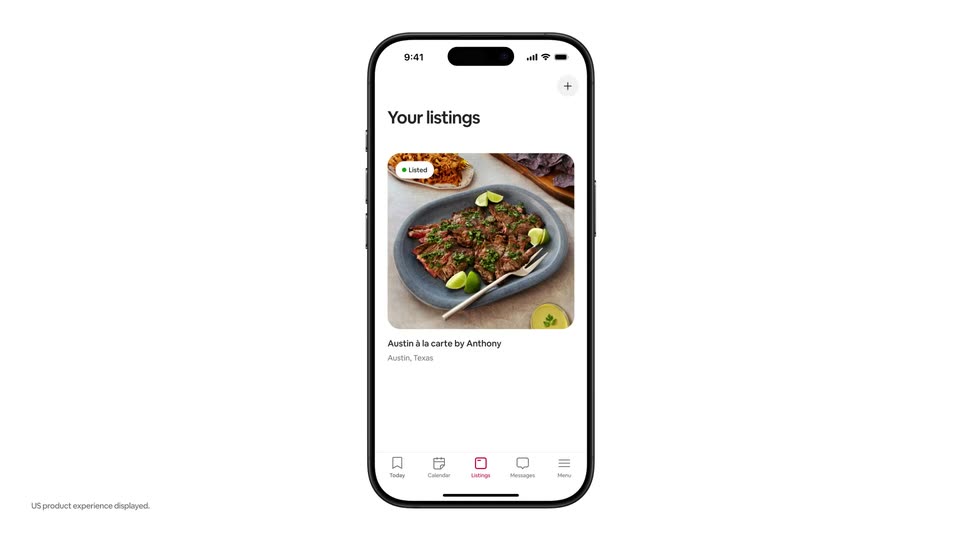
A flat phone mockup fades in on a white background, holding the listings screen with a food photo and a Listed badge. The screen then swaps to a listing editor showing photos, title, and expertise fields. The device stays centered and still.
On-screen text: “US product experience displayed.”
Camera: Static
03 · Feature reveal · 0:10–0:20
A flat phone mockup on a plain light background shows a Listing editor screen that scrolls down past photo, title and expertise cards to reveal two food offerings, then cuts to a full-screen Offerings list.
On-screen text: “US product experience displayed.”
Camera: Static
04 · Feature reveal · 0:20–0:39
A front-facing iPhone mockup sits centered on a white background. Inside, the host taps the plus button on an Offerings list, types a title, picks a food photo from a grid, enters a price, and sets days and hours, each step crossfading to the next.
On-screen text: “US product experience displayed.”
Camera: Static
05 · Feature reveal · 0:39–0:45
A flat iPhone mockup on a white background shows a listing editor screen. A bottom sheet closes, a Tex-Mex taco bar row slides into the offerings list, then the back button is tapped and the view switches to a Your listings card with a food photo.
Camera: Static
06 · Feature reveal · 0:45–0:47
A front-facing phone mockup on a white background displays the listings screen with a steak photo and title. The highlighted bottom tab changes from Listings to Calendar while all other content stays still.
On-screen text: “US product experience displayed.”
Camera: Static
07 · Feature reveal · 0:47–0:55
A flat iPhone mockup on a plain background shows a September month grid; rows fade in and a blue event card appears at 10 AM. The grid compresses to a one-week strip as the screen reflows into an hourly day view with two event cards, ending on a highlighted toggle.
On-screen text: “US product experience displayed.”
Techniques: Morph
Camera: Static
08 · Feature reveal · 0:55–0:59
A flat iPhone mockup centered on a white background. A bottom sheet slides up over a dimmed calendar, listing benefits of linking Airbnb and Google calendars, then the screen switches to a checkmark confirmation with a faint ring pulse around it.
On-screen text: “US product experience displayed.”
Camera: Static
09 · Feature reveal · 0:59–1:09
A flat iPhone mockup sits centered on white. A 'You're connected' confirmation fades out to reveal a September day calendar with two blue event blocks, then a white 'Line dancing class' block fades in at 1 PM and a bottom tab bar slides up.
On-screen text: “US product experience displayed.”
Camera: Static
10 · Feature reveal · 1:09–1:15
A front-facing phone on a white background shows the app's reservation screen. The dimmed timeline view brightens into a list with a guest card and meal details, then holds static.
Camera: Static
11 · Feature reveal · 1:15–1:26
A front-facing iPhone mockup on a white background shows an upcoming-reservations list, then crossfades to a reservation detail screen. The view zooms in as the screen scrolls to the notes and guest list, a Birthday trip note pops in, then it scrolls up and zooms out.
On-screen text: “US product experience displayed.”
Techniques: UI zoom
Camera: Pull out
12 · Feature reveal · 1:26–1:52
The host app plays out on a flat iPhone mockup, locked-off on white: a reservation card with a say-hello prompt, a pre-written welcome message sent in chat, a quick-replies list where Thanks for booking! is highlighted, then a schedule sheet where 5 minutes after a guest books is selected.
On-screen text: “US product experience displayed.”
Camera: Static
13 · Feature reveal · 1:52–1:57
A front-facing phone mockup on a white background shows the Messages app. A schedule-message sheet fades out to reveal the conversation list, then the screen crossfades into a chat thread with the keyboard open.
On-screen text: “US Product experience displayed.”
Camera: Static
14 · Feature reveal · 1:57–2:09
An iPhone on a light background shows a text thread with Diego. 'Of course!' is typed letter by letter, then sent as a dark bubble. The plus icon opens a bottom sheet menu; 'Request payment' is selected and a payment sheet with a keypad slides up.
On-screen text: “US Product experience displayed.”
Camera: Static
15 · Feature reveal · 2:09–2:18
On a flat phone on white, a payment sheet types “Filet mignon x3” into a field and “$54” on the keypad, then slides away to reveal a chat thread with a “Request sent” card. The screen then fades to an empty Messages list.
On-screen text: “US product experience displayed.”
Camera: Static
16 · Feature reveal · 2:18–2:42
A front-facing iPhone mockup on a pale background walks through the Airbnb host app: Messages list, Menu with earnings and rating cards, Earnings bar chart, ratings screen, and Listings view, ending with a Traveling/Hosting sheet sliding up from the bottom.
On-screen text: “US product experience displayed.”, “Earnings, ratings and reviews are for illustrative purposes. Earnings are not guaranteed. Any of these will vary by hosts and locations.”
Camera: Static
17 · Demo · 2:42–2:48
A flat front-facing iPhone mockup on a white background shows the Airbnb Services list for Austin. A chef profile card slides up from the bottom, revealing the title, menu items and a pink Book button. A small gray caption sits in the lower-left corner.
On-screen text: “US product experience displayed.”
Camera: Static
18 · Outro · 2:48–2:52
A plain white field holds, then a small red line-drawn logo, a rounded triangle outline with a loop inside, fades in at the center and stays static for the rest of the clip.
Camera: Static