0:57

Spacesheep: Turn any session into a shareable space your team can work on
Spacesheep · B2B · Oct 2026
AgentSkills · Nov 2026 · 2:02 · Full motion · AI-annotated
AgentSkills’s 2:02 launch film runs 29 scenes, about 4.2 s each. The product is on screen from the first frame and 5 features are revealed. The call to action lands at 1:55 (94% in), over a voiceover. A neon HUD launch video built on a dark grid with cyan corner brackets, alternating flat UI mockups with pixel-art character cards. It opens on the lead agent, tours his workspace, pivots on a 'you do the work' catch, then reveals the six-agent team and demos each role before a cost comparison and URL close. Pacing is steady at 112 bpm with glitch text resolves, counting numbers, and tilted approval stamps as the signature moves.
Is this your launch? to your site or press kit.
Spacesheep · B2B · Oct 2026
AgentMail · B2B · Oct 2026
Films whose music sounds like this one, voice left out
Tolmo · Modern electronic
KelAI · Modern electronic
ClickHouse · Corporate tech promo with modern electronic music bed
A pixel-art portrait of a bespectacled man in a suit appears in a cyan frame on the left as the large title TOMMI brightens beside it. A caption box reading CHIEF OF STAFF = YOUR RIGHT HAND and a RUNNING pill drop in below.
On-screen text: “DIVISION 6 · MEET TOMMI”, “AGENTSKILLS”, “TOMMI”, “CHIEF OF STAFF =”, “YOUR RIGHT HAND”, “RUNNING”
Techniques: Kinetic type
Camera: Static
A dark grid backdrop hosts a neon-framed portrait of a suited man left of a cyan counter counting up to 15 above “FRAMEWORKS”; fifteen labeled cards fill a 5x3 grid on the right, then chips “GO, CHANGE, OR KILL?” pop in below.
On-screen text: “DIVISION 6 - MEET TOMMI”, “AGENTSKILLS”, “15 FRAMEWORKS”, “01 PRE-MORTEM”, “02 SWOT”, “03 OPPORTUNITY COST”, “04 REGRET MINIMIZATION”, “05 REVERSIBILITY TEST”, “06 FOUNDER-MARKET FIT”, “07 CHANNEL ROI”
Techniques: Kinetic type
Camera: Static
A neon-framed illustration of a suited man with glasses sits at the center of a dark grid, inside a dashed circle. Five mock social cards (ads, pages, emails, posts, blogs) fade in around him, each tagged with a glowing label chip. A caption reads “DIVISION 6 - MEET TOMMI” top left.
On-screen text: “DIVISION 6 - MEET TOMMI”, “ADS”, “PAGES”, “EMAILS”, “POSTS”, “BLOGS”, “AGENTSKILLS”
Camera: Static
A dark Hermes chat screen sits flat on a faint grid. A cyan outline box frames the Tommi agent row, then expands to surround the whole agents list, while the message thread with tag chips stays static.
On-screen text: “DIVISION 6 · MEET TOMMI”, “AGENTSKILLS”
Camera: Static
A dark grid backdrop frames a flat Gmail inbox mockup on the left and a tall info card on the right. The list rows settle into place as the headline and the card's stacked INBOX, REPLIES, CALENDAR labels resolve from a doubled glitch state.
On-screen text: “DIVISION 6 - WHAT HE DOES”, “TOMMI - YOUR INBOX”, “INBOX AND CALENDAR”, “EXAMPLE DATA”, “INBOX”, “REPLIES”, “CALENDAR”, “AGENTSKILLS”
Camera: Static
A flat Gmail inbox mockup sits left on a dark grid, showing a draft reply; a right panel stacks the words INBOX, REPLIES, CALENDAR with REPLIES glowing. Headlines read INBOX AND CALENDAR top left. A caption, TOMMI DRAFTS - YOU SEND, fades in beneath the inbox.
On-screen text: “DIVISION 6 - WHAT HE DOES”, “TOMMI - YOUR INBOX”, “INBOX AND CALENDAR”, “EXAMPLE DATA”, “INBOX REPLIES CALENDAR”, “TOMMI DRAFTS - YOU SEND”, “AGENTSKILLS”
Camera: Static
A flat week-view calendar with colored event blocks and a locked focus day sits beside a dark card where 'CALENDAR' glows over dimmed 'INBOX' and 'REPLIES.' The hold ends with a rightward pan that reveals a 'GOALS AND DEADLINES' checkmark chip under the calendar.
On-screen text: “DIVISION 6 - WHAT HE DOES”, “TOMMI - YOUR CALENDAR”, “INBOX AND CALENDAR”, “EXAMPLE DATA”, “INBOX”, “REPLIES”, “CALENDAR”, “AGENTSKILLS”, “GOALS AND DEADLINES ✓”
Camera: Static
A dark grid screen framed by cyan HUD corners. A cyan number counts up from 01 to 78 above “SKILLS” while a cyan-bordered panel scrolls a monospace list of skill names upward. A magenta “NO TRAINING NEEDED” badge pops in at bottom left, then the frame pushes in slightly.
On-screen text: “DIVISION 6 - WHAT HE DOES”, “TOMMI'S SKILLS”, “ALREADY TRAINED”, “78”, “SKILLS”, “NO TRAINING NEEDED”
Techniques: Kinetic type
Camera: Pull out
A dark grid stage holds a flat Hermes chat mockup beside a Tommi's Six Checks list. Checkmarks tick in row by row until VOICE fails with a magenta X, a SENT BACK tag pops on the draft, and a diagonal STOPS SLOP stamp slams across the window.
On-screen text: “DIVISION 6 - WHAT HE DOES”, “TOMMI - QUALITY”, “HE STOPS SLOP”, “TOMMI'S SIX CHECKS”, “BRIEF”, “FACTS”, “CUSTOMER”, “VOICE”, “RULES”, “SAFE TO SHIP”
Camera: Static
A dark chat window sits on a cyan grid with a magenta STOPS SLOP stamp and a six-checks panel. The stamp and panel fade out as the header flips to YOUR LIST and a YOUR MOVE tag slides in beside the window.
On-screen text: “DIVISION 6 - WHAT HE DOES”, “TOMMI'S QUALITY”, “STOPS SLOP”, “TOMMI'S SIX CHECKS”, “AGENTSKILLS”, “THE CATCH”, “YOUR LIST”, “OFF YOUR PLATE 0/6”, “YOUR MOVE”
Techniques: Kinetic type, Masking
Camera: Static
A dark grid screen holds the Hermes app window beside a YOUR LIST panel; magenta YOU badges pop onto each task row, then the frame cuts to a pixel-art man in a suit holding a tablet under a THE PLOT TWIST header.
On-screen text: “DIVISION 6 - WHAT HE DOES”, “OFF YOUR PLATE 0 OF 5”, “THE CATCH”, “YOUR LIST”, “YOUR MOVE”, “YOUR LIST”, “RUN THE ADS”, “FIX THE SALES PAGE”, “POST ON SOCIAL”, “WRITE THE BLOG”
Camera: Push in
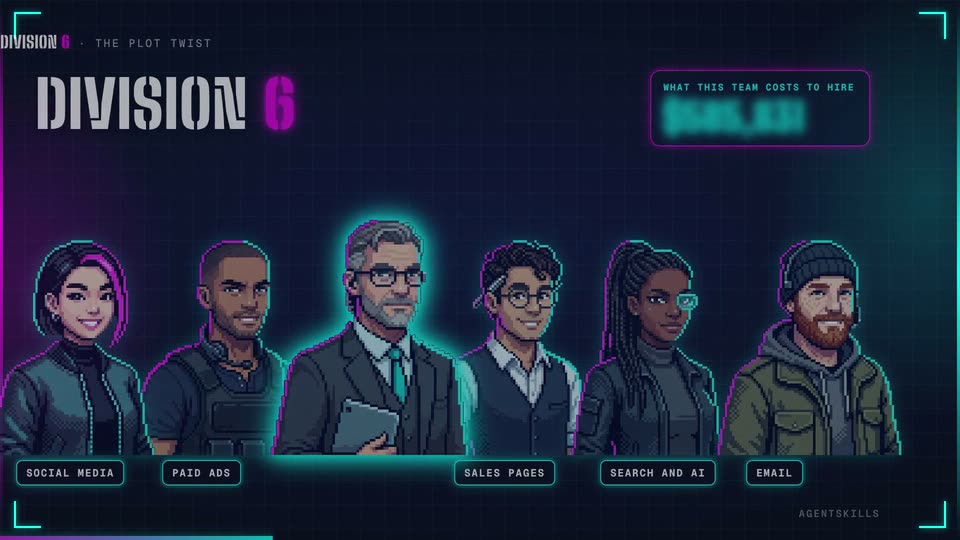
Pixel art team members pop into a row one by one on a dark grid, each with a cyan label chip. The suited leader is highlighted, a large DIVISION 6 title stamps in, and a magenta cost box appears at the upper right.
On-screen text: “DIVISION 6 · THE PLOT TWIST”, “AGENTSKILLS”, “PAID ADS”, “SALES PAGES”, “SOCIAL MEDIA”, “SEARCH AND AI”, “EMAIL”, “DIVISION 6”, “WHAT THIS TEAM COSTS TO HIRE”
Camera: Static
The six-agent pixel lineup cuts to a Paid Ads detail view: a flat Ads Manager window with three campaign rows sits left of a magenta 'YOUR LIST' panel where five tasks, each tagged YOU, stack vertically on a dark grid.
On-screen text: “DIVISION 6 - THE PLOT TWIST”, “DIVISION 6”, “WHAT THIS TEAM COSTS TO HIRE”, “SOCIAL MEDIA”, “PAID ADS”, “SALES PAGES”, “SEARCH AND AI”, “EMAIL”, “AGENTSKILLS”, “DONNI - PAID ADS YOUR LIST YOUR LIST YOUR LIST YOUR LIST YOUR LIST YOUR LIST YOUR LIST YOUR LIST YOUR LIST YOUR LIST YOUR LIST YOUR LIST YOUR LIST YOUR LIST DON”
Techniques: Split screen, Kinetic type
Camera: Static
A flat Ads Manager window sits beside a magenta 'YOUR LIST' checklist. An avatar card expands to 'JUSTIN BROOKE - 20 YEARS'; 'EVERY 4 HOURS' and 'DAY AND NIGHT' chips pop in. The bottom row toggles off, 'LOSERS PAUSED', the top row highlights, 'WINNERS SCALED +20%', then the frame zooms in.
On-screen text: “DIVISION 6 - DIVISION 6”, “DONNI - PAID ADS”, “YOUR ADS”, “EXAMPLE DATA”, “OFF YOUR PLATE 1 OF 5”, “YOUR LIST”, “RUN THE ADS”, “FIX THE SALES PAGE”, “YOU”, “POST ON SOCIAL YOU WRITE THE BLOG YOU EMAIL THE LIST YOU AGENTSKILLS TRAINED ON JUSTIN BROOKE - 20 YEARS EVERY 4 HOURS DAY AND NIGHT LOSERS PAUSED WINNERS SCA”
Techniques: Kinetic type, UI zoom
Camera: Static
A flat UI mockup on a dark grid: a browser window with a sales page, a chat panel from Ronni, and a task list. A checkmark lands on the highlighted task, numbered markers pop in, and the headline is retyped, ending on a “BUILT TO CONVERT” tag.
On-screen text: “DIVISION 6”, “RONNI · SALES PAGES”, “YOUR SALES PAGE”, “EXAMPLE DATA”, “OFF YOUR PLATE 2 OF 5”, “AGENTSKILLS”, “WRITES LIKE HALBERT · OGILVY”, “BUILT TO CONVERT”
Techniques: Kinetic type
Camera: Static
A flat Postiz calendar sits left on a dark grid, task cards fading in; a neon YOUR LIST panel right highlights POST ON SOCIAL with a check. Green dots tick in beside eight channels, an 8 PLATFORMS badge pops in, and overlay text resolves from a glitched double-exposure.
On-screen text: “DIVISION 6”, “NIKKI - SOCIAL MEDIA”, “YOUR SOCIAL”, “EXAMPLE DATA”, “OFF YOUR PLATE 3 OF 5”, “YOUR LIST”, “RUN THE ADS”, “FIX THE SALES PAGE”, “POST ON SOCIAL”, “WRITE THE BLOG EMAIL THE LIST YOU YOU YOU YOU YOU YOU YOU YOU YOU YOU YOU YOU YOU YOU YOU YOU YOU YOU YOU YOU YOU YOU YOU YOU YOU YOU YOU YOU YOU YOU YOU YOU”
Camera: Static
A flat neon layout on a dark grid: a Postiz browser mockup with a channel list and a comments panel, beside a task list panel. After a hold, a rotated magenta stamp reading TROLLS HANDLED slams over the comments panel as the composition pulls back slightly.
On-screen text: “DIVISION 6 · DIVISION 6”, “NIKKI · SOCIAL MEDIA”, “YOUR SOCIAL”, “EXAMPLE DATA”, “OFF YOUR PLATE 3 OF 5”, “YOUR LIST”, “RUN THE ADS”, “FIX THE SALES PAGE”, “POST ON SOCIAL”, “WRITE THE BLOG YOU EMAIL THE LIST YOU AGENTSKILLS TROLLS HANDLED”
Camera: Static
A flat neon-styled interface mockup holds a blog draft window on the left and a task list panel on the right. An avatar card with the caption “TRAINED ON GOOGLE AND AI SEARCH” slides in at the bottom left corner.
On-screen text: “DIVISION 6”, “VIKKI - SEARCH AND AI”, “YOUR BLOG”, “EXAMPLE DATA”, “OFF YOUR PLATE 3 OF 5”, “AGENTSKILLS”, “TRAINED ON GOOGLE AND AI SEARCH”
Camera: Static
On a dark grid, a flat browser mockup sits left of a neon task list. The blog headline types out word by word while a schedule pill pops in; search pills then appear as the layout slides apart.
On-screen text: “DIVISION 6 - DIVISION 6”, “VIKKI - SEARCH AND AI”, “YOUR BLOG”, “EXAMPLE DATA”, “OFF YOUR PLATE 4 OF 5”, “TRAINED ON GOOGLE AND AI SEARCH”, “WEEKDAYS - 6 AM”, “GOOGLE SEARCH”, “AI ANSWERS”
Techniques: Kinetic type, Parallax
Camera: Static
A dark grid layout pairs an email-sequence window left with a neon task list right. Glitched text decodes into readable headlines and rows, then a caption card with an avatar slides in bottom left. The layout scales down as a magenta OFF YOUR PLATE stamp drops in.
On-screen text: “DIVISION 6 · DIVISION 6”, “RIKKI · EMAIL”, “YOUR EMAILS”, “EXAMPLE DATA”, “OFF YOUR PLATE 5 OF 5”, “YOUR LIST”, “RUN THE ADS”, “FIX THE SALES PAGE”, “POST ON SOCIAL”, “WRITE THE BLOG', 'EMAIL THE LIST', 'WRITES LIKE A WORLD CLASS COPYWRITER', 'OFF YOUR PLATE ✓', 'AGENTSKILLS”
Techniques: Kinetic type
Camera: Static
Under a 'READY TO WORK' headline, six pixel-art characters with magenta and cyan outlines stand in a row on a dark grid, resolving from a glitch. A 'RUNNING' badge pops in under each, then a 'SKIP THE BUILD' box appears top right.
On-screen text: “DIVISION 6 - YOUR TEAM”, “DIVISION 6”, “READY TO WORK”, “BUILT BY AGENTSKILLS”, “SKIP THE BUILD”, “AGENTSKILLS”
Camera: Static
A dark grid HUD frame with corner brackets holds the scene. The title DIVISION 6 pops into the center, six pixel-art agent cards line up with names and RUNNING tags, schedule chips flash, then a large cyan DOZENS OF HOURS headline with BACK EVERY WEEK and a GROWTH TEAM badge settle in.
On-screen text: “AGENTSKILLS”, “DIVISION 6 · YOUR TEAM”, “YOUR TEAM”, “NEVER SLEEPS”, “DIVISION 6”, “DOZENS OF HOURS”, “BACK EVERY WEEK”, “GROWTH TEAM · NEVER SLEEPS”
Techniques: Kinetic type
Camera: Static
A dark grid title card with the DIVISION 6 logo and a row of six illustrated agent portraits dims as a phone mockup enters on the right, displaying a Friday wrap-up message list with magenta Approve buttons.
On-screen text: “DIVISION 6”, “NEVER SLEEPERS”, “DOZENS OF HOURS”, “BACK EVERY WEEK”, “FRIDAY WRAP-UP”, “ILLUSTRATED”, “A CREATORS TOOL”
Techniques: Masking
Camera: Static
A neon-outlined phone mockup lists five Friday jobs; a cursor taps each Approve button, which flip to checkmarks, while a 5 JOBS · 1 MESSAGE tag and an APPROVED stamp appear. It cuts to the desktop app window under a large HERMES AGENT title.
On-screen text: “DIVISION 6 · YOUR WEEK”, “TOMMI · FRIDAY 4 PM”, “FRIDAY WRAP-UP”, “ILLUSTRATED”, “AGENTSKILLS”, “5 JOBS · 1 MESSAGE”, “APPROVED ✓”, “DIVISION 6 · INSTALL”, “THE BUYER'S QUESTION”, “YOUR MOVE”
Techniques: Cursor demo
Camera: Static
A flat white app window sits on a dark grid. A cursor clicks send as the question fills the input; the welcome text clears and a NO CODE badge pops in. A cyan caption box reads TERMINAL = THE CODE WINDOW at right under glitching header labels.
On-screen text: “DIVISION 04 - INSTALL”, “THE BUYER'S QUESTION”, “YOUR MOVE”, “YOUR MOVE”, “REAL HERMES WINDOW”, “AGENTSKILLS”, “NO CODE”, “TERMINAL = THE CODE WINDOW”
Techniques: Cursor demo
Camera: Static
A dark grid backdrop frames the Hermes Agent window, which snaps from dimmed and blurred into sharp focus while a magenta YOUR MOVE tag and a TERMINAL callout fade out. A cursor hovers over the task input as a file chip sits below it.
On-screen text: “DIVISION 6 · INSTALL”, “NO CODE - NO TERMINAL”, “THREE WORDS”, “YOUR MOVE”, “TERMINAL = THE CODE WINDOW”, “AGENTSKILLS”
Techniques: Cursor demo
Camera: Static
The cursor types 'Install Division Six.' into the prompt and clicks send. The window switches to the bots list as a tilted magenta INSTALLED stamp slams over the chat, while a DIVISION 6 to HERMES READY diagram and a dashed GROK BOT SOON box pop in on the right.
On-screen text: “DIVISION 6 · INSTALL”, “NO CODE · NO TERMINAL”, “THREE WORDS”, “REAL HERMES WINDOW”, “AGENTSKILLS”, “INSTALLED ✓”, “DIVISION 6”, “HERMES”, “READY”, “GROK BOT”
Techniques: Cursor demo
Camera: Static
A dark grid HUD panel builds a two-column cost table: six salary rows fade in on the left, six agency rows on the right, then the totals roll from $0 to $585,831 a year and $13,100 a month beneath a glitching “WHAT IT COSTS” title.
On-screen text: “DIVISION 6 - THE COST”, “THE OLD WAY”, “WHAT IT COSTS”, “$585,831”, “$13,100”
Techniques: Kinetic type
Camera: Static
Locked-off dark grid card: stencil title “DIVISION 6” over six illustrated agent portraits in cyan boxes, captioned “ALL SIX AGENTS”. A magenta line strikes through “$585,831 A YEAR” as it fades in, then a boxed “A FRACTION OF THE COST” and a gradient “AGENTSKILLS.AI” pill enter below.
On-screen text: “DIVISION 6”, “ALL SIX AGENTS”, “HIRING IT OUT”, “$585,831 A YEAR”, “A FRACTION OF THE COST”, “AGENTSKILLS.AI”
Techniques: Kinetic type
Camera: Static