1:17
Introducing Fleetline
Fleetline · B2B · Aug 2025
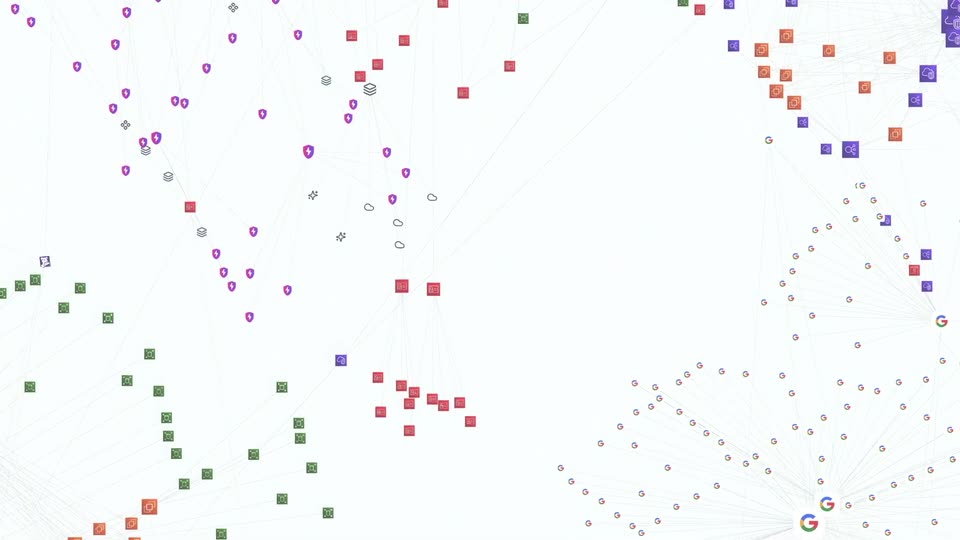
Tolmo’s 2:11 launch film runs 28 scenes, about 4.7 s each. The product is on screen from the first frame and 3 features are revealed. There is no explicit call to action; a voiceover carries the film. The video alternates perspective-tilted 3D interface cards on solid blue with flat UI walkthroughs and abstract node-graph interludes on off-white, cut at a steady mid-tempo. Its signature moves are the cards rotating from tilt to flat and the slow drifting, zooming network graph that opens and closes the demo.
Is this your launch? to your site or press kit.
Fleetline · B2B · Aug 2025
Anto Biosciences · Healthcare · Nov 2025
Films whose music sounds like this one, voice left out
Scaladown · Upbeat electronic
KelAI · Modern electronic
Cekura · Electronic
A white “t” logo sits centered on a solid blue field; its upper accent turns orange as a tilted Mission Control dashboard with a bar chart slides up from the bottom edge.
Techniques: 3D mockup
Camera: Static
A white Mission Control dashboard card floats on a solid blue field, angled in 3D at the open. It rotates flat to face the camera as its event log scrolls new rows upward through the clip, then tilts back into perspective at the close.
Techniques: 3D mockup
Camera: Pan
A web of small colored icon nodes, joined by thin gray lines, spreads across a pale background. The frame opens dim and brightens, the graph drifting slowly as the connections fan out.
Camera: Pull out
A white canvas fills with a sprawling network graph of small colored app icons, shields, and database stacks linked by thin gray lines. The camera slowly drifts and zooms out, revealing more clusters of nodes across the frame.
Camera: Pull out
Dots swarm from the center and condense into a radial network of colored square icons around a black GitHub logo. A Time Machine panel with a date range, stat pills and a slider appears below; the cursor clicks the added and removed pills, ringing matching icons in green and red.
Techniques: Particles, Cursor demo
Camera: Push in
A stacked bar chart and event log fill a security dashboard titled Mission Control. The shot opens tight on the chart, then pulls back to reveal the full interface with filter pills and a table of alerts, code changes, and cloud events.
Techniques: UI zoom
Camera: Pull out
A Mission Control dashboard on a blue background with a stacked bar chart and event table. The list scrolls as a new S3 bucket row lands on top, highlighted while the rest dims. A cursor clicks its 1 OPEN badge and a detail panel slides in from the right.
Techniques: Cursor demo
Camera: Push in
A dimmed dashboard with a stacked bar chart and event list sits left as a white detail panel slides in from the right. A cursor clicks Full investigation, expanding a scrolling list of agent steps, then hovers the OPEN badge.
Techniques: Cursor demo
Camera: Pull out
A light vulnerability report opens out of focus and cropped on the headline, then racks into focus and pulls back to show the whole card: a critical severity row, a summary panel, and a remediation list with colored status dots.
Techniques: UI zoom
Camera: Pull out
A light-themed vulnerability report scrolls down past the summary and remediation plan, reframing onto the infrastructure context diagram, where origin, routes, read and write arrows draw in between the CloudFront, ALB and ECS boxes.
Techniques: UI zoom
Camera: Pan
A product interface shows an infrastructure context diagram: a red line runs from a malicious public IP to an S3 bucket node ringed by a pulsing red halo. The camera zooms into the diagram, centering the red 'can reach' path and the highlighted bucket.
Techniques: UI zoom
Camera: Push in
A security dashboard shows a network diagram of an AWS account, with a red can reach line running from the public internet to an S3 bucket ringed in pulsing red. The view zooms out to reveal the Infrastructure Context card, then scrolls up to an evidence log and remediation list.
Techniques: UI zoom
Camera: Pull out
A white vulnerability report panel rests on a solid blue field, opening with a brief dissolve. The view slowly zooms into the page, lingering on the title and the Fix in Codex button as it glows, then eases back to the full layout.
Techniques: UI zoom
Camera: Pull out
Two white interface cards sit tilted in 3D on a solid blue field. The front card, a critical vulnerability report, lifts and rotates out of frame, exposing the integrations dashboard behind it with its workflow diagram and connected services list.
Techniques: 3D mockup
Camera: Pull out
A light-themed product interface displays an integrations dashboard, featuring a workflow diagram at the top and a grid of connected service cards below.
Camera: Static
The integrations page scrolls down its list of available tools. A cursor moves to the AWS card and clicks its Configure button. A white wipe from the left reveals the connected view with Slack, Datadog and AWS cards.
Techniques: Cursor demo, Masking
Camera: Pull out
A white AWS integration page shows a filled configuration form beside a setup instructions panel. A cursor clicks the ARN field, the Show code block expands to reveal Terraform code, and the cursor presses the Save account button before the page fades.
Techniques: Cursor demo
Camera: Pull out
A plain gray background brightens to near-white while small icons drift in from the right edge and hold: purple gradient shields with white lightning bolts, a four-diamond outline, a shield with an up arrow, and a stacked-layers icon.
On-screen text: “0”
Techniques: Particles
Camera: Static
Flat icons, purple shields with white lightning bolts, gray stack layers, orange and green squares, drift slowly leftward across a pale gray field, a few linked by thin lines on the right. The left half stays empty.
Techniques: Parallax
Camera: Pull out
A dense web of tiny colored icons, orange and green squares, purple shields and red tiles, links across a pale field by thin lines. Two larger grid icons anchor the left. The whole network drifts slowly to the right at a calm pace.
Camera: Pull out
A white field of tiny colored squares and small app icons linked by faint lines forms a sprawling network graph. The camera pulls back, widening the view so the web of connections spreads across the frame.
Techniques: Particles
Camera: Pull out
A scatter of multicolored dots on a pale background condenses into a spherical node network, then the word tolmo fades in white at the center.
On-screen text: “tolmo”
Techniques: Morph, Particles
Camera: Pull out
The white tolmo wordmark sits centered on a flat dark navy background, locked in place with no motion for the brief shot.
Camera: Static
The white tolmo wordmark sits centered on a flat orange field, held static in a locked-off frame for the full duration.
On-screen text: “tolmo”
Camera: Static
A blue 'tolmo' wordmark holds centered on a flat pale lavender background, static and locked off across the short shot.
On-screen text: “tolmo”
Camera: Static
The dark navy tolmo wordmark holds centered on a plain white background, static and locked-off for the full short clip.
On-screen text: “tolmo”
Camera: Static
A white lowercase wordmark reading “tolmo” sits centered on a flat gray field. The frame is locked off and the mark holds still for the full duration, with no movement or reveal.
On-screen text: “tolmo”
Camera: Static
The white tolmo wordmark sits centered on a solid blue field. The frame is locked off and the logo holds still for the full duration of the clip, with no entrance or exit motion.
On-screen text: “tolmo”
Camera: Static