
0:30
Explore
a0.dev - Phase 1 (WAGMA)
a0.dev · Jul 2025 · 1:44 · Full motion · AI-annotated
- Length
- 1:44
- Scenes
- 66 · 1.6 s avg
- Product on screen
- 0:07
- Features shown
- 8
- Voiceover
- No
- Views
- 1.2K on YouTube
as of November 23, 2026
00:00:00 / 01:44:08
- Length
- 1:44
- Scenes
- 66 · 1.6 s avg
- Product on screen
- 0:07
- Features shown
- 8
- Voiceover
- No
- Views
- 1.2K on YouTube
as of November 23, 2026
a0.dev’s 1:44 launch film runs 66 scenes, about 1.6 s each. The product shows up at 0:07 and 8 features are revealed. There is no explicit call to action. Tone is confident and futuristic, set on a near-black field of blue dots with a royal-blue glow that rises like a horizon. The video is built as a rapid title-card hook, a short product reveal, two build demos, a value-proposition tagline, then a feature tour driven by a recurring bento grid that the camera zooms into before each named feature, and a cycling feature recap into a held logo. Signature moves are the push-in on centered headlines, the 3D tilt of the interface and phone mockups, the
No filming indicatedEstimated needs: 11 capture groups — your screens or recordings · 1 official logo — reused across the film · 9 graphic passages — draw or supply · 11 3D passages — build or supply
Is this your launch? to your site or press kit.
More like this

Similar soundtrack
Films whose music sounds like this one, voice left out
1:02
1:56

Y Combinator - .@Salesgraph gives every rep a team of marketers, analysts, & str
Salesgraph · Corporate tech pitch with an upbeat electronic music bed
0:40


Solana - BREAKING: Samsung partners with Solana to bring stablecoins to 82 mil
Solana · Modern electronic, corporate
a0.dev - Phase 1 (WAGMA), scene by scene
· 66 scenes as text
01 · Hook · 0:00–0:02
On a dark blue dotted background, the white headline “What if building a mobile app” fades in, with “app” set in a blue pill, then the whole line scales up to fill the frame. The a0.dev logo stays fixed in the bottom right corner.
On-screen text: “What if building a mobile app”, “a0.dev”
Techniques: Kinetic type
Camera: Static
02 · Hook · 0:02–0:05
A white two-line headline sits centered inside a blue rounded frame echoed by concentric outlines on a dark dotted grid. The shot opens soft and small, then the camera slowly pushes in as the type sharpens into focus.
On-screen text: “Was easier than making a website”, “a0.dev”
Camera: Static
03 · Hook · 0:05–0:07
A white headline reads centered over a blue gradient that darkens, with a thin arc and dotted grid below. The text scales up rapidly, filling the frame and passing the camera until it exits.
On-screen text: “The Future of AI is here”, “a0.dev”
Techniques: Kinetic type
Camera: Static
04 · Product intro · 0:07–0:08
The frame fades from black into a blue dotted gradient as the white headline “Redesigned from the ground up.” sits centered over a dark toggle switch. A white cursor slides in from below and hovers on the toggle, while the a0.dev mark holds in the bottom right.
On-screen text: “The Future of AI is here”, “Redesigned from the ground up.”, “a0.dev”
Techniques: Kinetic type, Cursor demo
Camera: Static
05 · Product intro · 0:08–0:09
A centered white headline sits over a dark blue dotted grid while a cursor taps a dark toggle that flips to a glowing blue on state. The view then reframes onto a tilted 3D panel of the a0.dev app interface.
On-screen text: “Redesigned from the ground up.”, “a0.dev”
Techniques: Cursor demo, 3D mockup
Camera: Static
06 · Product intro · 0:09–0:11
A dark a0.dev landing page sits inside a glowing blue rounded frame on a bright blue background. The top-left wordmark scales in while the centered icon, headline and input box with suggestion chips stay still.
On-screen text: “a0.dev”
Camera: Push in
07 · Demo · 0:11–0:11
A dark blue grid background holds a glowing blue sphere rising from the bottom. A product interface window slides up from the lower edge, fading from transparent to opaque, while the a0.dev logo sits in the bottom right corner.
On-screen text: “a0.dev”
Camera: Static
08 · Demo · 0:11–0:12
A dark app window holds center over a glowing blue dome, the white A logo and twin light beams floating above it. The window scales up slightly. A small a0.dev mark sits in the bottom right corner.
On-screen text: “a0.dev”
Camera: Static
09 · Demo · 0:12–0:15
The a0.dev interface fills the frame: a chat panel shows a blue prompt for a 3D Ball Runner game and a gray reply, while the preview loads a mobile game with brown blocks and a red ball. The shot pulls back to center the interface on a blue dotted backdrop.
On-screen text: “a0.dev”
Camera: Pull out
10 · Demo · 0:15–0:16
A blue circular badge holding the white arch logo sits centered on a near-black field with a faint dot grid and a blue glow along the bottom. A thin ring ripples outward from the badge and fades, repeating once. The a0.dev lockup stays fixed in the bottom-right corner.
On-screen text: “a0.dev”
Camera: Pan
11 · Demo · 0:16–0:18
A blue logo disc slides left into a rounded prompt bar over a dark blue dotted gradient. The prompt is typed out letter by letter with a caret, then the frame zooms in on the bar's right end and its up arrow button.
On-screen text: “a0.dev”
Techniques: Kinetic type, UI zoom
Camera: Static
12 · Demo · 0:18–0:20
A dark UI panel on a dotted blue background. The title Home Loan Journey App and a list item changing background color/page.tsx are visible. A second item, applying code/layout.tsx, slides in below it.
On-screen text: “Home Loan Journey App”, “changing background color/page.tsx”, “applying code/layout.tsx”, “a0.dev”
Techniques: Kinetic type
Camera: Static
13 · Demo · 0:20–0:21
Three phone mockups float in 3D perspective over a dark dotted grid; the center shows a home loan app with a house drawing and blue buttons, the sides an emoji game and a player list. The camera eases in, enlarging the central device.
On-screen text: “a0.dev”
Techniques: 3D mockup
Camera: Pull out
14 · Product intro · 0:21–0:23
Floating app-screen mockups in 3D perspective drift apart and fade over a dark blue dotted grid, then the white headline 'One platform.' scales in at the center on the same background.
On-screen text: “a0.dev”, “One platform.”
Techniques: 3D mockup, Kinetic type
Camera: Pull out
15 · Product intro · 0:23–0:25
On a blue dot-grid backdrop that deepens from pale lavender to royal blue, the phrase One platform. scales in the center, then gives way to the still white text To build. A small a0.dev logo sits in the lower right corner.
On-screen text: “One platform.”, “To build.”, “a0.dev”
Techniques: Kinetic type
Camera: Static
16 · Product intro · 0:25–0:27
White text cycles through phrases at center on a black space backdrop: 'To build.' blurs out, 'To monetize.' scales in, then 'To deploy.' settles as a thin rounded-rectangle frame draws in on the right. A dark planet with a faint blue rim fills the background.
On-screen text: “To build.”, “To monetize.”, “To deploy.”, “a0.dev”
Techniques: Kinetic type
Camera: Static
17 · Product intro · 0:27–0:27
A black starfield fills a rounded frame edged with a blue glow on the top and right. The white phrase “To deploy.” sits centered and static, while a small a0.dev wordmark holds the bottom-right corner.
On-screen text: “To deploy.”, “a0.dev”
Camera: Static
18 · Product intro · 0:27–0:28
A black device screen fills the frame, its right edge a rounded corner rimmed with blue glow. White text To deploy. holds centered and still. Diagonal blue beams and faint stars sit in the dark background, the camera locked off.
On-screen text: “To deploy.”, “a0.dev”
Techniques: 3D mockup
Camera: Static
19 · Product intro · 0:28–0:30
Centered on a dark starfield, the white text 'To deploy.' holds, then the frame cuts to a dot-grid background where 'This is the new' scales in above a blue 'a0.dev'. A small a0.dev logo sits in the bottom-right corner.
On-screen text: “To deploy.”, “This is the new”, “a0.dev”
Techniques: Kinetic type
Camera: Static
20 · Demo · 0:30–0:30
A deep blue gradient with a faint dot grid holds the centered headline “This is the new a0.dev” in white and blue, which fades and scales out. “Phase 1” then scales up in muted blue-gray at the center, with a small a0.dev logo fixed in the bottom right.
On-screen text: “This is the new”, “a0.dev”, “Phase 1”
Techniques: Kinetic type
Camera: Static
21 · Demo · 0:30–0:31
A locked-off dark frame with a faint blue dot grid and a blue glow along the bottom edge. The white title Phase 1 scales up in the center, while a small a0.dev mark stays fixed in the bottom-right corner.
On-screen text: “Phase 1”, “a0.dev”
Techniques: Kinetic type
Camera: Static
22 · Demo · 0:31–0:32
A grid of blue feature cards fades in over a dark dotted backdrop, framing a central app window with a chat panel and phone mockup under a glowing A logo banner. Card captions like Ship and deploy and Mobile App sit beneath each tile, and a large Phase 1 headline scales in over the locked-off frame.
On-screen text: “Multiple Image Support”, “Deploy →”, “Ship and deploy”, “Build an”, “Build any”, “Mobile App”, “Build Stuff + Submit to Apps”, “Asset upload”, “Stats”, “Ongoing Projects”
Techniques: Kinetic type
Camera: Pull out
23 · Demo · 0:32–0:34
A grid of dark blue feature cards on black surrounds a central card showing the a0 builder interface with a phone mockup. The camera zooms into the central card, revealing a chat panel and a premium upgrade popup.
On-screen text: “Multiple Image Support”, “Ship and deploy”, “Build any”, “Mobile App”, “Bulk Upload + Submit to Apps”, “Asset upload”, “Stats”, “Cloning Projects”, “Integrations”, “Payments ( Web + App Store ) Agent Mode + Tool calls a0.dev”
Techniques: UI zoom
Camera: Push in
24 · Feature reveal · 0:34–0:34
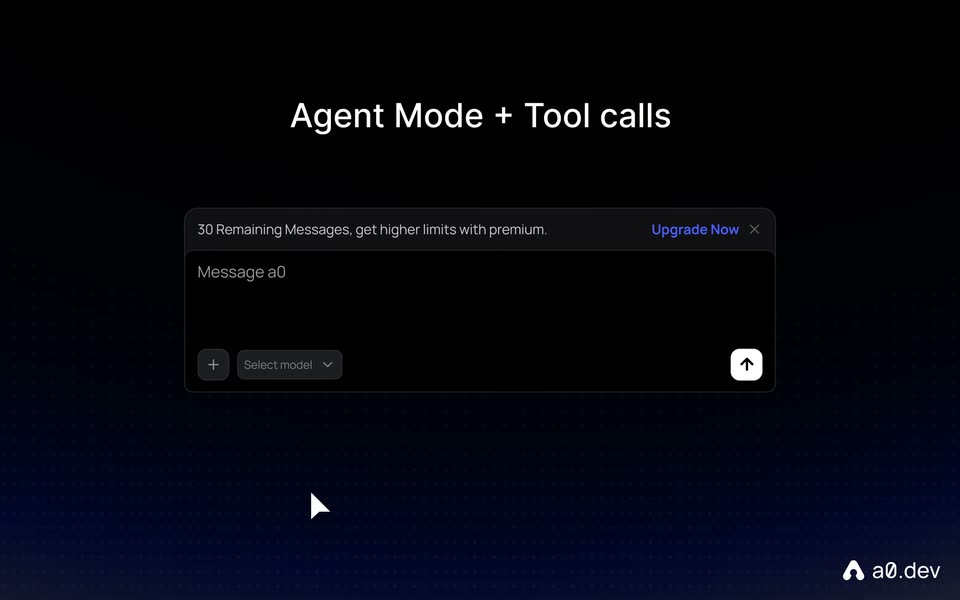
A dark dotted background holds a centered white headline above a flat chat panel with a message field, model dropdown and send button. A white cursor arrow travels upward from the lower center to rest on the Select model button.
On-screen text: “Agent Mode + Tool calls”, “a0.dev”
Techniques: Cursor demo
Camera: Static
25 · Feature reveal · 0:34–0:36
A dark chat input panel sits on a blue dotted gradient. A white cursor clicks the model dropdown, then moves down and selects the Agent row, which fills its radio button. The white headline holds above.
On-screen text: “Agent Mode + Tool calls”, “a0.dev”
Techniques: Cursor demo
Camera: Static
26 · Feature reveal · 0:36–0:37
A dark blue dotted background holds the white title Agent Mode + Tool calls above a chat input card with an open mode dropdown and a cursor on Agent. The UI and title fade out as a dark pill fades in at center reading Cloning Projects with a0.dev below.
On-screen text: “Agent Mode + Tool calls”, “a0.dev”
Techniques: Cursor demo
Camera: Static
27 · Feature reveal · 0:37–0:39
A dark dotted grid sits behind a centered card holding blue text 'Cloning Projects'. The card multiplies into stacked outlines, then a glowing wireframe dome rises from the top as pill shapes arrange in 3D perspective below.
On-screen text: “Cloning Projects”, “a0.dev”
Techniques: Morph, 3D mockup
Camera: Static
28 · Feature reveal · 0:39–0:40
A dark grid of blue feature cards fades in, each pairing an icon with a label like Stats, Integrations and Payments. The center card shows a browser window with a chat and a phone under a glowing blue A-logo header. The a0.dev logo sits bottom right.
On-screen text: “a0.dev”
Camera: Pull out
29 · Feature reveal · 0:40–0:41
A dark grid of blue feature cards sits flat on screen, each with an icon and a caption. The camera pushes in on the central card, a product chat interface with a phone mockup, while the surrounding cards drift outward and out of frame.
On-screen text: “Multiple Image Support”, “Ship and deploy”, “Build any”, “Mobile App”, “Build Stuff + Submit to Apps”, “Stats”, “Asset upload”, “Cloning Projects”, “Integrations”, “Payments (Web + App Store ) , Agent Mode + Tool calls , a0.dev”
Techniques: UI zoom, Parallax
Camera: Static
30 · Feature reveal · 0:41–0:42
On a dark background, the white headline brightens at the top while a glowing white A logo sits in a center circle ringed by thin concentric circles. File icons labeled .png and .jpeg flank it on horizontal lines, and a small blue upload window flashes briefly above the logo.
On-screen text: “Image Support & Asset Upload”, “a0.dev”
Camera: Static
31 · Feature reveal · 0:42–0:44
A white bold title sits above a central arc logo circle flanked by .png and .jpeg file icons on a dark blue dotted background. The title and icons fade upward as a dashed upload box with a down arrow rises into view.
On-screen text: “Image Support & Asset Upload”, “.png”, “.jpeg”, “a0.dev”, “Asset upload”
Camera: Static
32 · Feature reveal · 0:44–0:46
On a dark dotted grid with a blue glow at the bottom, a white heading reads Asset upload above a dashed drop zone holding a down-arrow icon. A small file icon labeled File slides in from the right and rests beside the arrow.
On-screen text: “Asset upload”, “a0.dev”
Camera: Static
33 · Feature reveal · 0:46–0:48
A dark phone silhouette fades into the center of a blue dotted gradient. A white bold headline reads a0 mobile app now available on Android with a Google Play badge, fading in over the device. A small white a0.dev logo sits in the bottom right corner.
On-screen text: “a0 mobile app now available on Android”, “a0.dev”
Camera: Static
34 · Feature reveal · 0:48–0:48
A centered title card on a dark blue dotted gradient with a faint phone silhouette behind it. The white headline and Google Play icon sit over the phone as the whole frame slowly zooms in. The a0.dev logo holds in the bottom right corner.
On-screen text: “a0 mobile app now”, “available on Android”, “a0.dev”
Camera: Static
35 · Feature reveal · 0:48–0:49
Dark feature tiles fly in from scattered spots and snap into a grid around a central 3D laptop-and-phone mockup showing a chat and code view. White labels name each tile, while the a0.dev logo holds the bottom-right corner.
On-screen text: “a0.dev”
Techniques: 3D mockup
Camera: Pull out
36 · Feature reveal · 0:49–0:50
A grid of dark-blue feature tiles fills the frame, each with a short caption and a small icon, the center tile holding a code editor and phone mockup. A cursor taps one tile, then a large white headline fades in across the top as the grid dims.
On-screen text: “Deploy to Phone + Submit to App Store”, “a0.dev”
Camera: Push in
37 · Feature reveal · 0:50–0:51
A dark a0.dev interface, tilted in 3D perspective, fills the lower frame beneath a two-tone headline. A chat panel on the left holds a blue prompt bubble; a code editor and preview panel sit on the right. The shot stays locked off.
On-screen text: “Deploy to Phone + Submit to App Store”, “a0.dev”
Techniques: 3D mockup
Camera: Static
38 · Feature reveal · 0:51–0:54
A white and blue headline sits above a dark app interface showing a chat panel and a phone preview. The view zooms into the top toolbar as a cursor hovers over the Deploy button while the phone plays a block game.
On-screen text: “Deploy to Phone + Submit to App Store”, “a0.dev”
Techniques: UI zoom, Cursor demo
Camera: Push in
39 · Feature reveal · 0:54–0:57
Four line icons with labels (Give Access, Download AAB File, Upload File, Enter App Details) settle into a horizontal row on a dark blue dot-grid background. A centered pill with the Apple logo, Publish to Appstore, takes its place, captioned Your app will be deployed in 20 sec...
On-screen text: “Give Access”, “Download AAB File”, “Upload File”, “Enter App Details”, “Publish to Appstore”, “Your app will be deployed in 20 sec...”, “a0.dev”
Camera: Static
40 · Feature reveal · 0:57–0:59
A glowing 'Publish to Appstore' button with an Apple icon fills with blue over a dark dotted grid, then morphs into a dark notification card reading 'Your App has been deployed!' while the 'deployed in 20 sec' label fades out below.
On-screen text: “a0.dev”
Techniques: Morph
Camera: Static
41 · Feature reveal · 0:59–1:01
A dark push-notification card with an Apple icon sits on a blue dotted gradient; the headline slides in while the subtitle and timestamp scale in, then the card drifts up as a phone screen rises from the bottom edge.
On-screen text: “a0.dev”
Camera: Static
42 · Feature reveal · 1:01–1:03
A dark blue dot-grid backdrop holds a 3D iPhone that eases from a tilted side angle into a flat front view. The screen shows an App Store page for a focus app, with the a0.dev mark fixed in the lower right.
On-screen text: “a0.dev”
Techniques: 3D mockup
Camera: Push in
43 · Feature reveal · 1:03–1:05
A dark grid of feature tiles settles into frame as the view pulls back, revealing a central card with a code editor and a phone mockup. White sans captions label each tile, and the a0.dev logo sits in the bottom right corner.
On-screen text: “Multiple Image Support”, “Ship and deploy”, “Build any”, “Build Stuff + Submit to Apps”, “Mobile App”, “Stats”, “Asset Upload”, “Cloning Projects”, “Integrations”, “Payments (Web + App Store )', 'Agent Mode + Tool calls', 'a0.dev”
Camera: Pull out
44 · Feature reveal · 1:05–1:05
A dark bento grid of feature cards sits above a receding dotted floor, the center card holding the A0 interface with a chat panel and a phone preview. The camera pushes in on that center card, enlarging it until it fills the frame while the outer cards slide toward the edges.
On-screen text: “a0.dev”
Techniques: UI zoom
Camera: Push in
45 · Feature reveal · 1:05–1:06
A dark pricing form sits under the white headline Payments ( Web + App Store ). The camera zooms in on the card as the word Monthly fills the Tier Name field.
On-screen text: “Payments ( Web + App Store )”, “a0.dev”
Techniques: UI zoom
Camera: Push in
46 · Feature reveal · 1:06–1:11
A dark pricing form fills in: Monthly plan, $9.99 and Every 1 month are typed into the fields as the view scrolls down, then the camera pulls back to reveal the full card with the blue Add payment method button above a glowing blue sphere on a dotted grid.
On-screen text: “a0.dev”
Techniques: UI zoom
Camera: Pull out
47 · Feature reveal · 1:11–1:14
A dark pricing form with a price and renewal fields fades out as the white headline scales in at the center over a blue dot grid.
On-screen text: “Total control”, “over your app”, “a0.dev”
Techniques: Kinetic type
Camera: Static
48 · Feature reveal · 1:14–1:15
A dark tablet mockup floats in 3D perspective over a blue gradient with a dot grid, showing a code editor with syntax-highlighted JavaScript. The headline 'Total control' scales in over the device while the a0.dev logo sits in the lower right corner.
On-screen text: “Total control”, “a0.dev”
Techniques: Kinetic type, 3D mockup
Camera: Static
49 · Feature reveal · 1:15–1:16
A dark code editor with a JavaScript snippet fades out as a red phone mockup of the Pokédex Pro app slides in from the bottom right, tilted in 3D, while the Preview tab turns active.
On-screen text: “a0.dev”
Techniques: 3D mockup
Camera: Static
50 · Feature reveal · 1:16–1:17
A floating phone mockup sits inside a dark device window with Code Editor and Preview tabs, over a blue dot-grid background. The phone scales down to center in the frame, then its screen switches from a Pokémon grid list to a yellow Vikavolt detail page.
On-screen text: “a0.dev”
Techniques: 3D mockup
Camera: Static
51 · Demo · 1:17–1:19
A dark bento grid of feature tiles settles into place around a central blue card showing a chat window and a phone mockup. The tiles carry white labels such as Stats, Integrations and Mobile App, while the a0.dev URL sits in the corner.
On-screen text: “a0.dev”
Camera: Static
52 · Demo · 1:19–1:20
A dark AI app builder fades in: a chat panel on the left holds a blue prompt for a water-tracking home screen, while a code editor on the right shows JavaScript. The a0.dev logo sits in the bottom-right corner.
On-screen text: “a0.dev”
Camera: Push in
53 · Demo · 1:20–1:22
A dark code editor fills the frame, its top toolbar showing an App Integrations dropdown and a Deploy button. The view zooms in slightly on the code, which lists a scroll listener, then holds steady.
On-screen text: “a0.dev”
Techniques: UI zoom
Camera: Push in
54 · Feature reveal · 1:22–1:24
A grid of dark feature tiles assembles on a dotted void background, each holding a small icon and a caption, with a larger central tile showing an interface mockup beside a phone. The tiles fade and scale into place, then hold static.
On-screen text: “a0.dev”
Camera: Pull out
55 · Feature reveal · 1:24–1:24
A dark blue bento grid of feature tiles with icons and labels fills the frame. The camera zooms into the Mobile App tile, which expands to full screen as the headline Build an app from your mobile phone slides in line by line under a Coming Soon.. pill.
On-screen text: “a0.dev”, “Coming Soon..”, “Build an app from your”, “mobile”, “phone”
Techniques: UI zoom, Kinetic type
Camera: Push in
56 · Feature reveal · 1:24–1:25
A dark grid background holds a “Coming Soon..” pill that scales in above a large white headline sliding in line by line. A small phone icon sits between the words and a cursor arrow hovers nearby.
On-screen text: “Coming Soon..”, “Build an app from your mobile phone”, “a0.dev”
Techniques: Kinetic type
Camera: Static
57 · Feature reveal · 1:25–1:28
A flat phone mockup sits centered on a dark blue gradient with a dotted grid. Its screen shows a chat prompt, then switches to a UNO game layout with three player columns. A stacked headline slides in beside it while the a0.dev mark holds the corner.
On-screen text: “a0.dev”, “Coming Soon..”, “Build an app from your”, “mobile”, “phone”
Techniques: Kinetic type
Camera: Pan
58 · Feature reveal · 1:28–1:31
A flat phone mockup centered on a dark dotted grid with sparse stars shows a UNO game screen. A green card at the bottom changes from 5 to 4 while the turn label flips from Charlie's Turn to Your's Turn, then the whole phone fades out.
On-screen text: “a0.dev”
Camera: Static
59 · Other · 1:31–1:34
On a dark blue gradient with a fine dot grid, the line “Agent Mode + Tool calls” slides up to center, holds, then slides down as “Android App” takes its place, with “Asset upload” entering below. The a0.dev logo sits in the bottom right corner.
On-screen text: “Agent Mode + Tool calls”, “Android App”, “Asset upload”, “a0.dev”
Techniques: Kinetic type
Camera: Pan
60 · Other · 1:34–1:36
On a dark blue gradient with a faint dotted grid, white bold “Asset upload” holds center as a dim “Android App” label slides out at the top. “Build Stuff + Submit to Apps” then slides in to take its place. The a0.dev mark stays fixed in the bottom right.
On-screen text: “a0.dev”, “Android App”, “Asset upload”, “Build Stuff + Submit to Apps”
Techniques: Kinetic type
Camera: Static
61 · Other · 1:36–1:37
On a dark blue gradient with a fine dot grid, the gray line Build Stuff + Submit to Apps slides out as Building in app slides in below it in white, then Cloning Projects follows. The a0.dev logo sits small in the bottom right corner.
On-screen text: “Build Stuff + Submit to Apps”, “Building in app”, “Cloning Projects”, “a0.dev”
Techniques: Kinetic type
Camera: Static
62 · Other · 1:37–1:39
A dark blue background with a dot grid displays a sequence of white text headlines. Each line slides in to replace the previous one, cycling through product features.
On-screen text: “a0.dev”, “Building in app”, “Cloning Projects”, “Mobile App updates,”, “(Create from phone)”, “Multiple Image Support”
Techniques: Kinetic type
Camera: Static
63 · Other · 1:39–1:39
A dark blue gradient card with a faint dot grid. The headline Multiple Image Support fades out as Payments ( Web + App Store ) fades in, then slides up to make room for Payments Dashboard appearing beneath it.
On-screen text: “Multiple Image Support”, “Payments ( Web + App Store )”, “Payments Dashboard”, “a0.dev”
Techniques: Kinetic type
Camera: Static
64 · Other · 1:39–1:41
Centered white headlines swap rapidly on a dark blue dotted gradient, cycling through two phrases before settling on a held title. A small a0.dev mark sits in the lower right corner.
On-screen text: “Payments Dashboard”, “Sharing your apps”, “Website Redesign”, “a0.dev”
Techniques: Kinetic type
Camera: Static
65 · Outro · 1:41–1:42
A white A logo sits centered on a deep blue radial gradient, then the frame cuts to a flat blue dot-grid background where the logo joins the lowercase wordmark a0.dev in pale blue, both held still in the center.
On-screen text: “a0.dev”
Camera: Static
66 · Outro · 1:42–1:44
The white a0.dev wordmark with its A-shaped mark sits centered on a black-to-blue gradient with a faint dot grid. The frame is locked off and the logo holds still for the full shot.
On-screen text: “a0.dev”
Camera: Static