2:50
Tom Kelly - Today, Heidi (@tryheidi) is announcing US$340M in new funding: a US$1
Heidi Health · Sep 2026
Wideframe’s 1:58 launch film runs 62 scenes, about 1.9 s each. The product shows up at 0:08 and 4 features are revealed, with social proof. The call to action lands at 1:49 (92% in), over a voiceover. The video is built as fear, fix, proof: blurred AI headlines and a 'creatives are done' panic give way to a calm feature walkthrough, each capability announced with a bold condensed headline over tilted 3D interface shots. Live-action desks ringed by floating prompt cards and two named case studies carry the second half, resolving into a free-trial line over a static logo card.
Is this your launch? to your site or press kit.
Heidi Health · Sep 2026
Aokumo · Nov 2026
Hyperagent · Nov 2026
Films whose music sounds like this one, voice left out
Lamina Labs · Electronic
Praxis Robotics · Electronic, Hip-Hop
Ledger · Modern electronic, corporate tech launch
A black headline reads center screen over a fast-cycling backdrop of heavily blurred news articles about AI and jobs. The text stays fixed while the article screenshots swap behind it.
On-screen text: “AI is in the tank”
Camera: Static
Two blurred news articles about AI cut in sequence behind a centered overlay that types out 'AI is a danger', the word AI in yellow. The first page shows a US jobs headline, the second a blue-masthead piece, while the overlay text extends.
On-screen text: “AI is a danger”
Techniques: Kinetic type
Camera: Static
A defocused news website background cuts from The Guardian to WSJ Opinion while sharp white text in the center swaps from a full sentence to a short phrase, the word AI boxed in yellow.
On-screen text: “Why new research by AI is changing economies”, “AI Job”
Techniques: Kinetic type
Camera: Static
A defocused news feed of article cards fills the frame while one centered headline stays in sharp focus. The headline reads as a single highlighted word, then expands to a full title with the keyword kept in a yellow box, as the blurred background scrolls slowly.
On-screen text: “The AI Question”
Techniques: Kinetic type, Parallax
Camera: Static
A woman in a pale shirt sits at a white desk against a black backdrop, head resting on her hand, fingers on a mouse. The shot fades in from an overexposed white wash to full contrast. A white mug and a black monitor on a stand sit on the desk.
Camera: Static
A dark video editor UI is bent into a curved 3D perspective, its panels and timeline bowing at the edges. A context menu vanishes from the preview window as the timecode drops to zero and a cursor rests in the timeline.
Techniques: 3D mockup
Camera: Static
A video editing interface is shown wrapped in a curved 3D perspective. A context menu opens on the right, then the view reframes onto the resolution settings panel on the left as the timecode advances.
Techniques: 3D mockup, UI zoom
Camera: Static
A video editing app bends in fisheye 3D perspective as the playhead scrubs forward; the preview monitor switches from purple circles to a white settings page while a cursor drifts across the panels.
Techniques: 3D mockup, Cursor demo
Camera: Static
A 3D monitor on a black background plays a glitching, color-shifted video while a wall of white news cards about AI drifts into place around it. The camera eases from an angled view to a flat frontal frame as the cards settle into a dense grid.
Techniques: 3D mockup, Parallax
Camera: Static
On a plain off-white field, the word They're holds center, then swaps to Wrong in the same spot, matching the spoken line. No other elements move.
On-screen text: “They're”, “Wrong”
Techniques: Kinetic type
Camera: Static
A woman in a pink t-shirt sits at a desk typing on a white keyboard in a warm, kitchen-lit room. Six dark translucent prompt panels fade in around her at different heights, each filling in with typed text as she types. The camera is locked off.
On-screen text: “Analyze and cut my raw footage”, “Add captions to my video”, “Generate: AI images, videos, voiceovers, music”, “Edit my video: Trim, cut, and assemble clips into a polished video”, “Turn script into a video”, “Reformat landscape video to vertical”
Techniques: Kinetic type
Camera: Static
A man in a cream sweater sits at a desk facing a monitor, ringed by dark prompt cards in 3D perspective, one reading 'Analyze and cut my raw footage'. He looks at the screen and touches his face as the cards drift at different depths.
Techniques: 3D mockup, Parallax
Camera: Push in
A man with curly dark hair and a goatee sits centered on a light gray backdrop, smiling faintly at the camera. Dark gray prompt cards float in 3D perspective around his head, each listing a video task, while a cursor arrow rests on the right card.
Techniques: 3D mockup
Camera: Static
A man with curly dark hair and a goatee, wearing a white ribbed shirt, sits in a tight close-up looking off-camera with a slight smile. A window with a blurred city view sits to the left against a pale wall, and the framing stays steady.
Camera: Static
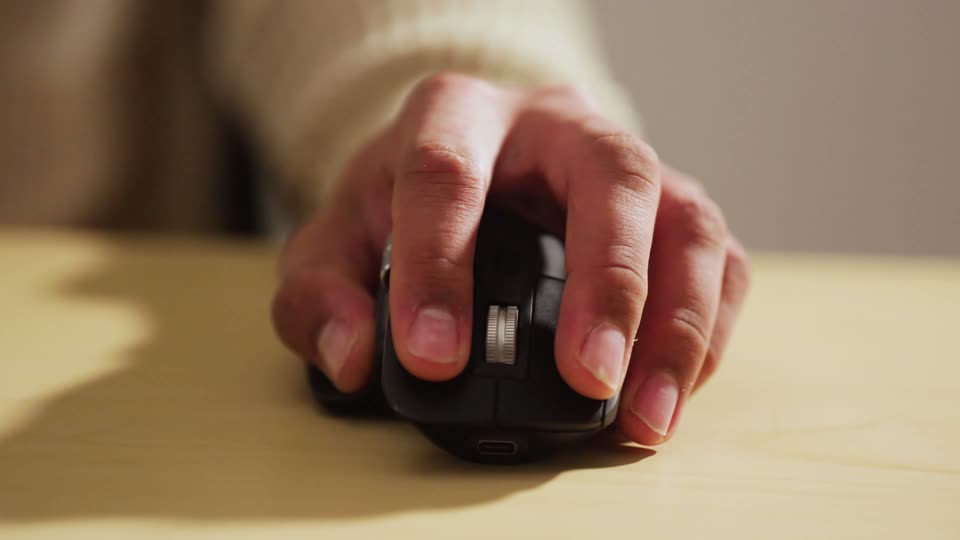
A hand in a cream sweater sleeve grips a black mouse with a silver scroll wheel and glides it forward across a light wooden desk. Low angle close-up with shallow depth of field; the mouse's USB-C port faces the camera.
Camera: Static
On a dark screen, a list of blue MP4 filename pills shifts downward with heavy motion blur while a white arrow cursor moves through the rows. The white caption “Hue look great today” holds left of center, and a small red dot glows at the right edge.
On-screen text: “Hue look great today”
Techniques: Cursor demo
Camera: Static
Tight close-up of a dark file browser with a column of blue-highlighted MP4 names. The list scrolls upward past a static caption while a text caret blinks at the end of the top file name, and an orange badge with the number 6 sits to the right.
On-screen text: “Hue look great today”
Camera: Static
A Mac monitor at an angle shows a video editor on the left and the agent panel on the right, where a chat message and a Technical Summary table of seven clips fill in line by line.
Camera: Static
A dark editing interface fills the frame: a video preview of a desk with a monitor on the left and a timeline of labeled clips below, while a column of analysis text scrolls upward on the right. A cursor hovers over the text.
Camera: Static
A dark editing interface fills the frame: a preview monitor shows a desk with an ultrawide screen, a clip timeline sits below. On the right, a metadata panel scrolls upward, listing clip titles, durations and specs in white text. A mouse cursor rests in the right column.
Camera: Static
A dark app window fills the frame. A shot-list table on the right bolds its rows one by one while large white phrases swap in on the left, then a dark rounded bar slides in from the left edge.
On-screen text: “Wideframe finds”, “footage by”, “meaning,”, “not filenames”, “Ask for”
Techniques: Kinetic type
Camera: Static
A dark app screen sits in 3D perspective on a light gray backdrop. Under the headline “Ask for”, a glowing search box types “Wide shots of Kelly typing”. The headline swaps to “your results” as a blurred green and blue waveform strip sweeps across the frame.
On-screen text: “Ask for”, “your results”
Techniques: 3D mockup, Cursor demo
Camera: Static
A tilted dark editing-app screen shows a timeline of green and blue clips with a soft glow, held under the centered white text 'in seconds.' on a plain white background. The frame is locked off.
On-screen text: “in seconds.”
Techniques: 3D mockup
Camera: Static
A laptop in 3D perspective on a pale background shows a dark editor with a floating folder panel; the panel swaps to a light window listing A-roll, B-roll, Reactions, Cutaways. White text on the right reads 'It organizes bins', then 'A-roll, your way.'
On-screen text: “It organizes bins”, “A-roll, your way.”, “in seconds.”
Techniques: 3D mockup
Camera: Static
A macOS Finder window sits centered over a blurred dark editing timeline, its folder rows highlighted in turn. White labels fade in around it, A-roll, B-roll, reactions, cutaways. The window then blurs and recedes, leaving the four words on the dark background.
On-screen text: “A-roll,”, “B-roll,”, “reactions,”, “cutaways.”
Techniques: Kinetic type
Camera: Static
A dark video editing interface with a timeline of green and blue clips sits tilted in 3D perspective on a white background, softly blurred. White words swap in the center: “a trusted”, then “Editor.”, then “Assistant”.
On-screen text: “a trusted”, “Editor.”, “Assistant”
Techniques: 3D mockup, Kinetic type
Camera: Static
A man in a cream sweater sits at a desk, hands on the keyboard, with the monitor's back facing camera. Cut to a close-up of his face seen over the monitor's top edge as he looks down at the screen.
On-screen text: “Editor.”
Camera: Static
A man with curly dark hair and a mustache sits behind a dark monitor against a plain white wall. He looks down at the screen, his head tilting slightly and his eyes shifting as he reads. The shot stays static.
Camera: Static
Locked-off close-up of a monitor running a video editor: the program monitor plays colorful abstract footage, a clip timeline sits below, and a text panel fills the right side. The preview shifts from a pink striped graphic to a purple-teal image.
Camera: Static
A tight, slightly angled close-up of a media bin scrolls left across rows of video thumbnails framed in green and a purple audio waveform track below, the clip labels gliding past the frame edge.
Camera: Pan
A woman in a lavender t-shirt sits centered at a white table, hands typing on a white keyboard as she holds a focused gaze at the camera. The warm kitchen behind her, with wooden cabinets and two pendant lights, stays softly out of focus in a locked-off medium shot.
Camera: Static
A woman in a pink t-shirt types at a white desk in a home office, a dark monitor seen from behind and a white mug in the foreground. The camera slowly pulls back, widening the frame to show a wooden stool and kitchen cabinets as her hands rest.
Camera: Pull out
A woman in a pink t-shirt sits in profile at a white desk, fingers moving over a keyboard. A monitor displays lines of code and a white mug rests nearby, set against a plain beige wall. The camera holds a static side-on frame.
Camera: Static
A woman with blonde hair in a pink t-shirt sits at a desk, typing on a keyboard while facing a monitor. A white mug rests out of focus in the foreground. The camera holds a static side profile of her at work.
Camera: Static
A man in a white vest over a black hoodie leans over a professional camera rig with a small monitor and shotgun mic, adjusting a dial. A blonde head sits soft and out of focus in the left foreground of the dim studio, with a softbox light above.
Camera: Static
A hand holds a small black SD card with a yellow label in front of a Sony cinema camera on a rig. The handheld camera then pans across a blurred workshop with a wooden floor as the hand lowers and drops the card onto a wooden table.
Camera: Pull out
Overhead view of a beige desk where a pair of hands types on a black keyboard. A mouse, white organizer tray, notepad, and black camera sit arranged around the keys. The camera holds a static top-down frame as the fingers move.
Camera: Static
Overhead view of a warm amber-lit desk. A pair of hands types on a black keyboard, then one hand lifts to the mouse. A notebook, pen tray, notepad and camera lens sit around the keyboard under hard side light.
Camera: Static
A dim, top-down view of a desk where two hands work a black keyboard and mouse. A white organizer tray, a notepad with handwritten notes, and small objects sit on the warm-toned surface, with a curved white monitor edge at the bottom.
Camera: Static
A man in a black hoodie and beige vest types on a laptop at a desk beside a bright window. 3D interface mockups, a light file browser and a dark list with checkboxes, fade in at an angle around his body.
Techniques: 3D mockup
Camera: Static
A man in a black-and-white hoodie types on a laptop at a wooden desk in a sunlit room. Tilted 3D Finder windows and a dark file-organizer panel float in the air around him, and a second Finder window slides in at the top right.
Techniques: 3D mockup
Camera: Static
A dark chat interface floats in 3D perspective, tilted to the left with shallow depth of field. The focus racks from the UUID file chips down to the bold reply line as checkmarked status lines stream in below.
Techniques: 3D mockup
Camera: Push in
A woman in a maroon top walks forward across a studio set as a man in a white vest points and directs the scene. To the right, an operator adjusts a camera on a tripod under a large overhead softbox.
Camera: Static
A hand steadies a camera rig with two stacked monitors in the foreground, each showing a woman at a table, while the real subject sits blurred in the background behind a microphone. The shot holds steady with a slight handheld drift.
Camera: Static
A man in a black hoodie and pale vest sits at a wooden desk in profile, drawing on a tablet with a stylus, then lifts the pen to his lips while studying the screen. Soft window light fills the beige room. The camera holds a locked-off side shot.
On-screen text: “SMALLHD”
Camera: Static
A man in a cream sweater sits at a desk before a curved monitor, its back to camera. He looks down at his hands on the keyboard, then raises his gaze to the screen. A black camera rests on the desk in the foreground.
Camera: Static
A close-up of a display at an angle shows a row of app icons. A white arrow cursor hovers over a dark icon as its white circle bobs up and down. The pixel grid of the screen is visible, with a white card and partial text on the right.
Techniques: Cursor demo
Camera: Static
Split screen. Left, a person's hands type on a MacBook whose screen shows the video editor. Right, a dark agent chat card on white scrolls its transcript upward while a short prompt is typed into the input field at the bottom.
Techniques: Split screen
Camera: Static
Overhead view of two hands typing on a laptop at a white desk, with a tablet, phone and mug beside it. A small File tag at the right grows into a dropdown menu listing project options.
Techniques: Morph
Camera: Static
Overhead locked-off shot of a person in a black hoodie typing on a laptop at a white desk. Dark UI panels float around the machine: a project panel left, a timeline below, and a File menu right that opens into a New Project dialog with a Create button.
Techniques: 3D mockup
Camera: Static
Overhead view of a white desk: a person in black types on a laptop while a New Project dialog and a timeline panel float at the sides, the project-name field filling in as they type.
Camera: Static
A close-up of a dark screen shows the prompt Analyze my footage typing out with a blinking cursor. A UUID string sits below it. The frame is locked off at a slight angle.
Techniques: Kinetic type
Camera: Static
A dark chat interface fills a tight angled close-up with shallow depth of field. A list of .mp4 file names with long IDs sits at the top as a bold white response line types out and status lines fade in below.
Techniques: Kinetic type
Camera: Push in
A dark room holds an angled laptop whose screen shows a video editor timeline on the left and an agent chat on the right. The chat panel updates in place, filling a technical summary table and bullet notes as the clip runs.
Techniques: 3D mockup
Camera: Static
A man in a cream ribbed sweater sits at a light wood desk, typing at a curved monitor seen from behind. He pauses, turns his head to the right and smiles, then looks back at the screen. Static medium shot in a bright white room with a window at left.
Camera: Push in
A man with curly hair and a goatee holds a slight smile facing the camera against a plain white wall. Two dark interface mockups, one a file list, streak past the left and right edges with motion blur.
Techniques: 3D mockup
Camera: Static
A man with curly hair and a goatee sits centered against a plain wall, smiling faintly. Three angled 3D panels of a video editor float around his head: an effects panel left, a scopes panel below, a color panel right. They blur and swish away at the end.
Techniques: 3D mockup, Cursor demo
Camera: Static
A curly-haired man with a goatee talks to the camera against a plain light wall. A dark Finder window with a folder icon slides in from the left and a video player window slides in from the right, briefly showing a man with earbuds before going dark.
Camera: Static
A blonde woman sits centered, facing the camera with a slight smile, as a translucent editing timeline of clip thumbnails slides and scales into place around her, each panel tagged with a clip number.
Camera: Static
A woman with long blonde hair sits centered and in focus, smiling faintly at the camera. Behind her, a blurred video editing timeline shows rows of clip thumbnails and audio waveforms with small labels. The frame stays locked-off while she holds her pose.
Camera: Static
A man in a striped cream sweater sits at a light desk with a black keyboard and mouse, typing at first, then stopping to gesture and rest his chin on his hand while speaking to camera against a plain gray wall.
Camera: Pull out
A black square holding the white WIDE FRAME wordmark sits centered on a cream background. The shot stays static for the full duration, acting as the closing brand card while the voiceover reads the offer.
Camera: Static