2:53

Ahrefs' Rapid-fire Product Updates: June 2022
Ahrefs · Jul 2022
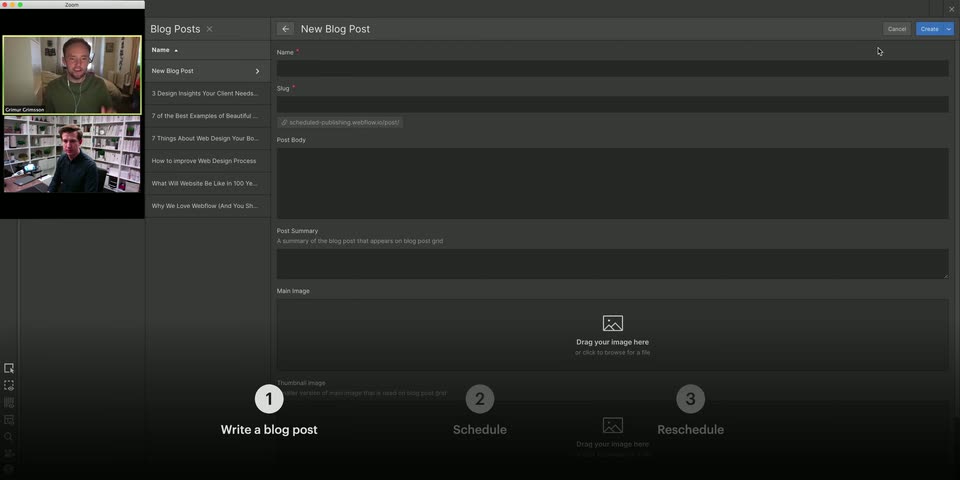
Webflow’s 0:47 launch film runs 13 scenes, about 3.7 s each. The product shows up at 0:08 and 3 features are revealed. The call to action lands at 0:42 (90% in), over a voiceover. A fast-cut tutorial built around a persistent three-step indicator that brightens as each stage is announced and demoed, alternating a static presenter shot with dark screen recordings that zoom into the date and time pickers. The pacing is brisk at roughly 14 cuts per minute over a neutral 122 bpm feel, with the signature moves being the step highlight shifts, the calendar and clock grid selections, and the closing wordmark that letter-scrambles into the URL.
Is this your launch? to your site or press kit.
Ahrefs · Jul 2022
Lightreel AI · Nov 2026
Street · Nov 2025
Films whose music sounds like this one, voice left out
Lamina Labs · Modern Electronic
Taxwire · Orchestral and electronic
A plain black screen holds for the first half second while the voiceover begins introducing how to schedule a blog post in Webflow.
Camera: Static
A man in a denim shirt sits at a desk in front of a bookshelf, talking to the camera, with an iMac at right. Numbered badges 1, 2, 3 pop in along the bottom, then captions appear in sequence: Write a blog post, Schedule, Reschedule.
On-screen text: “1”, “2”, “3”, “Write a blog post”, “Schedule”, “Reschedule”
Techniques: Kinetic type
Camera: Static
A dark blog-post editor fills the screen with a two-person Zoom call pinned top left. Along the bottom, three numbered steps read Write a blog post, Schedule, Reschedule, the first highlighted in white. The screen fades to black, leaving the step labels.
On-screen text: “1 Write a blog post”, “2 Schedule”, “3 Reschedule”
Camera: Static
On a black background, three numbered steps sit in a row: 1 Write a blog post, 2 Schedule, 3 Reschedule. The highlight shifts from step 1 to step 2, brightening its circle and label while the rest dim.
On-screen text: “1”, “Write a blog post”, “2”, “Schedule”, “3”, “Reschedule”
Camera: Static
In a dark post editor, a cursor opens the Create dropdown and picks Schedule, revealing a May 2020 date picker. The frame zooms onto the calendar as the cursor selects a day, then clicks Time and zooms to the hour and minute grids as 9 and :10 turn blue.
On-screen text: “2”, “Write a blog post”, “Reschedule”
Techniques: Cursor demo, UI zoom
Camera: Static
A dark article page fills the left, its right edge covered by a date and time picker panel. A cursor glides down from the highlighted minute cell to the blue Schedule button and clicks it, the panel staying static.
Techniques: Cursor demo
Camera: Static
A dark blog post table fills the frame, rows showing green Published and Staged Changes status labels under a toolbar with a search field and a blue New Blog Post button. A mouse cursor rests at the lower right edge.
Camera: Static
A static black frame shows a three-step indicator. Gray circles numbered 1 and 2 sit left and center, with gray captions beneath. The third circle is white with a white caption, highlighting the final step.
On-screen text: “1”, “Write a blog post”, “2”, “Schedule”, “3”, “Reschedule”
Camera: Static
A dark CMS table of blog posts fills the frame, listing titles, status, and dates in rows. A white cursor glides from the bottom row up to the first row, pausing over the status and created columns.
Techniques: Cursor demo
Camera: Static
A dark CMS editor displays a blog post form with a desk photo. The cursor moves to the top-right save button, opening a dropdown menu, then hovers over the “Save and reschedule” option.
Techniques: Cursor demo
Camera: Static
A man in a blue denim shirt sits at a desk before a white bookshelf, talking to the camera and gesturing with a pen. A lit lamp and the back of an iMac frame the shot on either side.
Camera: Static
A plain black background holds the centered white wordmark, with 'webflow' in bold italic and 'University' in regular weight. The frame is locked off and the text stays still for the full clip.
On-screen text: “webflow University”
Camera: Static
A black sign-off card centers the white webflow University wordmark, which letter-scrambles into the URL wfl.io/scheduled, then the frame fades to black.
On-screen text: “webflow University”, “wfl.io/scheduled”
Techniques: Kinetic type
Camera: Static