1:51

Street View now available in New Zealand
Google · AI · Nov 2008
Street · Nov 2025 · 1:00 · AI-annotated
Street’s 1:00 launch film runs 25 scenes, about 2.4 s each. The product shows up at 0:05 and 4 features are revealed. The call to action lands at 0:50 (84% in), over a voiceover. The video chains four rhetorical questions, each answered by a tight UI demo that scrolls, crossfades or types out its result, opening with a self-drawing floor plan on black and closing on a dusk aerial with the brand tagline. Signature moves include line-drawn reveals, purple gradient accents that flash as data fills in, count-up charts, and a live-action night call that cuts into the software's transcript.
Is this your launch? to your site or press kit.
Google · AI · Nov 2008
Slashy · B2B · Aug 2026
Traversal AI · Sep 2026
On a near-black field, faint white dots fade in and drift, then thin white line segments draw themselves into partial rectangular outlines, as if a floor plan begins to form.
Techniques: Particles
Camera: Pull out
A top-down floor plan of connected rooms is drawn in thin white lines on a black field of drifting specks. The line work brightens from faint to crisp, then dims again, while the dust-like dots twinkle around the walls.
Techniques: Particles
Camera: Static
A white line drawing of a house floor plan sits on a black field, room labels and dimensions faintly filled in. A thin vertical white bar at the right edge slides left while the plan drifts slightly, like a wipe edge.
Techniques: Masking
Camera: Pull out
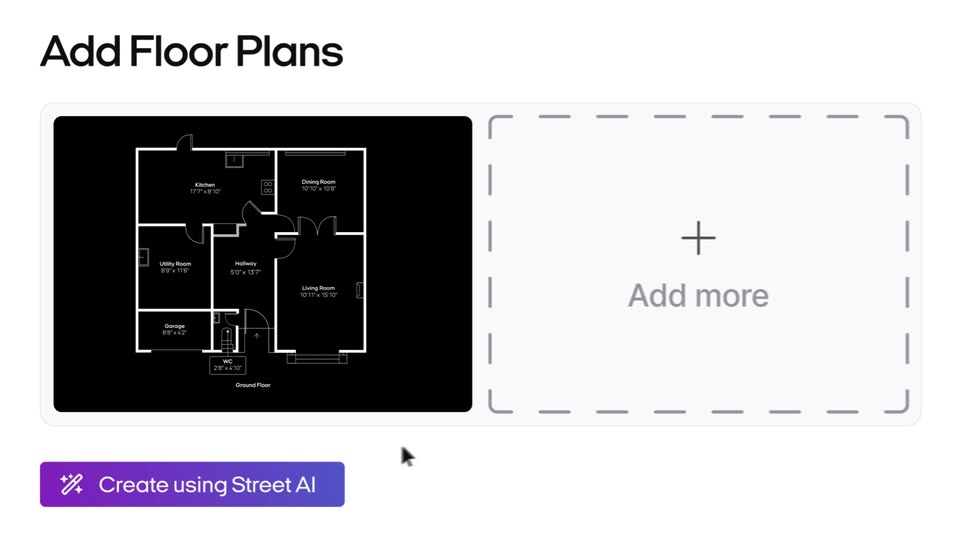
A flat UI mockup on a light gray field: a black card holds a white line floor plan, a dashed white card with a plus and Add more sits to its right, and a purple gradient button labeled Create using Street Al sits below. The headline Add Floor Plans fades in top left while the button scales up and a cursor appears.
On-screen text: “Add Floor Plans”, “Add more”, “Create using Street Al”
Camera: Pull out
A UI panel shows a black floor plan beside a dashed Add more slot, with a purple Create using Street AI button below. The view scrolls down to a room list whose dimension fields flash a purple gradient as values fill in. A cursor hovers the button, then the rows.
Techniques: Cursor demo, UI zoom
Camera: Pan
A table of room dimensions with purple measurement boxes crossfades into an email inbox showing two new messages, the two interface views overlapping during the brief transition.
Camera: Static
A light inbox view with a row of tabs scrolls vertically; a new email card from Lauren Darlow slides in at the top while the two existing cards shift down, the mid-scroll motion blurred.
Camera: Pan
A pale product screen pans vertically, sliding a Suggested Actions block with a Sale Summary line into view above the Activity tab bar and a new email item from Lauren Darlow.
Techniques: UI zoom
Camera: Pan
A product dashboard on a soft lavender gradient types out a Sale Summary paragraph, then scrolls down to reveal a Suggested Tasks list with two task rows and icon buttons.
Camera: Static
A light gray product screen shows a Suggested Tasks list. Three task rows, each with a bold dark title, gray body copy, and two purple line icons on the right, scroll up gently to settle into frame.
Camera: Pan
A light-gray interface panel titled Suggested Tasks shows three task rows, each with a bold black title, a gray description line, and two rounded square icon buttons on the right. The view holds still with no motion.
Camera: Static
On a plain white background, a loose grid of product dashboard cards fades from faint to full opacity: Suggested Tasks, Emails, Assignee, Price, Valuer and a Viewings card with a house photo. The tiles drift gently as they settle into place.
Camera: Push in
A grid of white interface cards sits on a pale background. The camera slowly zooms in, reframing onto the central Price card, which shows a value and three rating rows with colored dots.
Techniques: UI zoom
Camera: Push in
A white dashboard card slides into the center, then a red-yellow-green donut chart draws itself clockwise as the High, Fair and Good percentages count up to 10, 20 and 53 percent.
Camera: Push in
Two hands hold a tablet showing a red-headed property report. The shot opens close on the Price card and donut chart, then the camera pulls back and rises to reveal the whole report, from the Birchstone logo and house photo at the top to the Viewings tags below.
Techniques: UI zoom
Camera: Pull out
A dark aerial view of a city skyline at night, with a lit bridge spanning a river in the center. The camera drifts slowly forward over the water, keeping the glowing high-rises on the horizon.
Camera: Static
A top-down aerial view of a city intersection at night, with cars and their headlights crossing the junction. The frame stays locked off while a small clock-like text overlay slides and scales into view.
On-screen text: “00”, “0”, “X”
Camera: Static
A dim office desk at night: keyboard, mouse, and office phone sit beside a dark monitor, with a lit street and passing cars visible through the window. Warm amber light, locked-off frame, as a large text overlay scales in.
On-screen text: “X”, “6”
Techniques: Kinetic type
Camera: Static
Close profile of a person in a dark room holding a phone to their ear, lit by a warm lamp glowing in the soft-focus background. The hand grips a light phone; the couch and pillows sit blurred behind. The shot holds steady as the person speaks.
Camera: Static
A monitor on a desk against an orange wall shows the SIREET interface. The camera pushes in on a centered modal with a pulsing purple microphone ring while the call transcript types out line by line.
Techniques: UI zoom, Kinetic type
Camera: Push in
A dark UI card fades up from black, centered under the title SIREET_ with a blinking cursor. A darker inner panel sits inside the card, and the caption Call Transcript scales in below it.
On-screen text: “SIREET_”, “Call Transcript”
Camera: Static
The shot fades in from black to an aerial view of a coastal town at dusk, revealing rooftops, a dark shoreline and rolling hills under a sky streaked with pink clouds.
Camera: Static
A wide aerial shot drifts slowly forward over a coastal town at dusk, with soft pink clouds in a pale blue sky. The white tagline “Expect more.” fades in at center around 2s and holds to the end.
On-screen text: “Expect more.”
Camera: Static
A black STREET.co.uk wordmark holds centered on a plain off-white field, static and locked off for the full clip. The tagline Expect more. sits with it as the closing sign-off.
On-screen text: “Expect more.”, “STREET_ co uk”
Camera: Static
A static black screen displays the text 'SIREET_8' in the top left corner. The frame remains unchanged throughout the short duration.
On-screen text: “SIREET_8”
Camera: Static