1:38

Resend CLI 2.0
Resend · Developer tools · Apr 2026
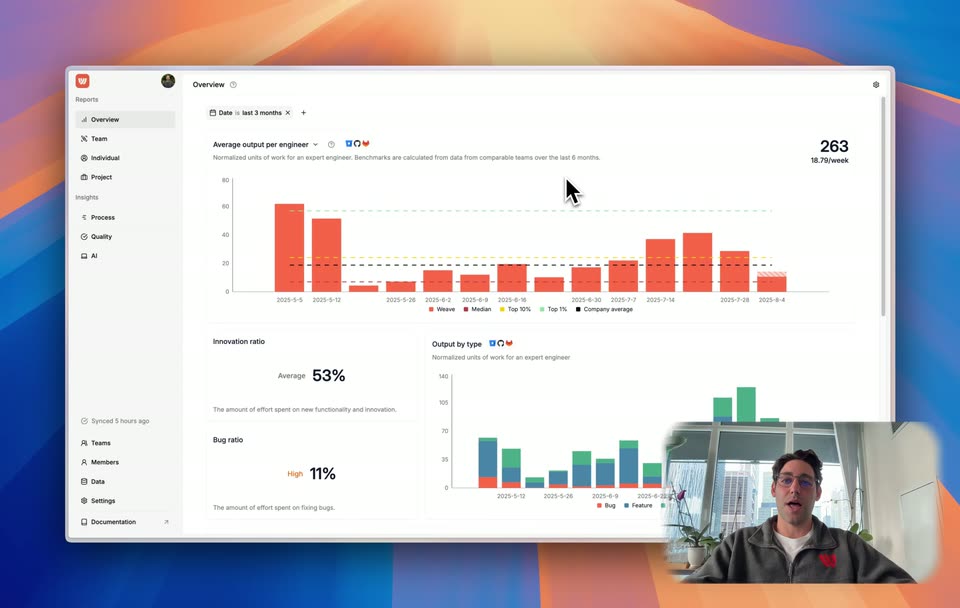
Weave’s 2:24 launch film runs 16 scenes, about 9.0 s each. The product is on screen from the first frame and 3 features are revealed. The call to action lands at 2:21 (98% in), over a voiceover. A screen-recorded product tour narrated by a picture-in-picture presenter, with the view zooming into charts, modals and tables in step with the voiceover. Signature moves are the corner webcam, tight zoom-ins on single data points, and particle-burst transitions between dashboard views.
Is this your launch? to your site or press kit.
Resend · Developer tools · Apr 2026
Eleven Labs · Sep 2026
Perplexity · AI · Sep 2026
A flat product window with a sidebar and a 263 stat sits on a diagonal orange-and-blue gradient. Inside, a man in a gray fleece and glasses talks to camera against a city-window backdrop, his head and mouth moving while the interface stays still.
Camera: Pull out
A white analytics dashboard with orange bar charts sits over a wavy blue and orange gradient, a small video of a talking presenter in the lower right. A cursor hovers over the main chart, then the view zooms into the chart header as a hand cursor clicks a button.
Techniques: Cursor demo, UI zoom
Camera: Push in
A dimmed analytics dashboard sits behind a white modal titled Output in Weave. The view scrolls down to a comparison table as a cursor hovers the rows, flashing the # of PRs entry in red. A presenter appears in a small video window at the bottom right.
Techniques: UI zoom, Cursor demo
Camera: Pan
A dimmed Weave dashboard sits behind a white card on the right holding a metric comparison table with red crosses and green checks. A cursor hovers over the # of PRs and DORA rows, highlighting each, while a small webcam feed of the presenter plays bottom right.
Techniques: Cursor demo
Camera: Static
A Weave dashboard sits over a colorful gradient with a presenter in the lower right. An Output in Weave modal fades away, then a cursor hovers a bar chart and a tooltip appears.
Techniques: Cursor demo
Camera: Pull out
A dashboard table fills in from gray skeleton bars into a list of pull requests while a hand cursor hovers a code-output cell, revealing a small tooltip, then moves to a column header. A presenter's webcam sits in the bottom-right corner over a colorful gradient backdrop.
Techniques: Cursor demo
Camera: Static
A Weave analytics dashboard fills the frame over a colorful gradient, with a man in a webcam inset at the bottom right. A cursor moves to the info icon and a How it works modal pops open in the center.
Techniques: Cursor demo
Camera: Static
A dashboard screen with a white 'Output in Wave' modal sits over a colorful gradient, a presenter video inset bottom right. The view zooms into the modal as a hand cursor points to the 0.94 value in the comparison table.
Techniques: UI zoom, Cursor demo
Camera: Push in
A white card with a comparison table and body text overlays dimmed red and green bar charts. A small webcam inset of a smiling man in a gray jacket sits in the bottom right corner. A cursor drifts from the highlighted 0.94 cell toward the charts.
Techniques: Cursor demo
Camera: Static
A close-up of two orange and stacked bar charts zooms out to reveal a full analytics dashboard with a left sidebar, set against an orange and blue gradient. A cursor moves across the screen while a presenter appears in a video-call inset at the bottom right.
Techniques: UI zoom, Cursor demo
Camera: Pull out
A reports dashboard on a wavy orange and blue backdrop, with a man in a small corner window. A hand cursor clicks the AI menu item, the page switches to orange bar charts and a dollar figure, then scrolls down to reveal more graphs.
Techniques: Cursor demo
Camera: Push in
A white dashboard with orange and green charts fills the frame, a presenter in a small webcam inset at bottom right. A custom cursor moves across panels as the view zooms into the tool-adoption list and the savings figure, then the page switches to an expanding adoption checklist.
Techniques: UI zoom, Cursor demo
Camera: Pull out
A white dashboard scrolls down an AI adoption checklist as a cursor hovers over the items. The view then bursts into scattered colored particles and settles into an analysis panel listing rule files and recommendations. A presenter's video window stays in the bottom right corner.
Techniques: Cursor demo, Particles
Camera: Static
A WorkWeave dashboard window sits on a gradient background, a presenter's video call inset in the corner. The view zooms into the AI analysis panels as a cursor clicks through rule files and AI-fit badges, confetti dots drifting over the screen at the start.
Techniques: Particles, UI zoom, Cursor demo
Camera: Pull out
A black pill-shaped search bar with a magnifying glass icon sits centered on an off-white field. A URL types itself into the bar character by character, ending on a blinking caret, while a gray caption pill below reads get started at workweave.dev.
On-screen text: “get started at workweave.dev”
Techniques: Kinetic type
Camera: Static
A black address bar holds the typed URL with a blinking caret on an off-white field, then gives way to the black weave mark and wordmark. A gray caption reading get started at workweave.dev stays pinned at the bottom.
On-screen text: “https://workweave.dev/”, “get started at workweave.dev”
Techniques: Kinetic type
Camera: Static