
2:27
Explore
00:00:00 / 00:49:02
- Length
- 0:49
- Scenes
- 17 · 2.9 s avg
- Product on screen
- 0:20
- Voiceover
- Yes
- Views
- 733 on YouTube
as of November 23, 2026
Wafer’s 0:49 launch film runs 17 scenes, about 2.9 s each. The product shows up at 0:20. There is no explicit call to action; a voiceover carries the film. The video is built as one continuous monospace caption that types word by word over slow macro and 3D shots, with hard cuts to black glitch cards to punctuate the problem beat and a 3D push-in on tilted terminal panels for the product reveal. Its signature moves are the white highlight-box emphasis on key words, the digital glitch distortion on the problem lines, and the amber-to-teal color shift that marks the turn from hardware awe to software solution.
Footage neededEstimated needs: 1 capture group — your screens or recordings · 1 official logo — reused across the film · 5 filmed passages — shoot, supply or replace · 2 graphic passages — draw or supply · 5 3D passages — build or supply
Is this your launch? to your site or press kit.
More like this
1:03

Launch YC: Simantic (F26)
Simantic · B2B · Nov 2026
1:30
Will Hoppin - I left @A24 to start Osmo, a storytelling studio with a software fact
Osmo Studio · Aug 2026
Similar soundtrack
Films whose music sounds like this one, voice left out
2:11

#Xiaomi18ProSeries Launch Event Highlights: Camera.
Xiaomi · Modern electronic
1:30

Aspect: AI platform for enterprise media content | YC F25
Aspect · Modern electronic
2:26

From sand to chip | Herdora (YC S25), scene by scene
· 17 scenes as text
01 · Hook · 0:00–0:01
A dark frame holds an amber plume of fine sand particles glowing above a black dune silhouette. White monospace text builds word by word on the right, the final word set in black inside a white box.
On-screen text: “it all starts with sand.”
Techniques: Kinetic type, Particles
Camera: Static
02 · Hook · 0:01–0:02
A bright orange flash fades to reveal glowing molten material pouring down into a vessel, a robotic arm at the left. Centered white captions appear in sequence: it all starts, with, sand., melted.
On-screen text: “it all starts”, “with”, “sand.”, “melted.”
Techniques: Kinetic type
Camera: Static
03 · Hook · 0:02–0:03
A dark teal close-up holds on a circular dish of bubbling liquid with a nozzle descending into it. Centered white captions swap from melted. to polished. over the still machinery.
On-screen text: “melted.”, “polished.”
Camera: Static
04 · Hook · 0:03–0:05
A 3D render holds a locked-off close-up of a laser tip touching a dark metal block with rectangular cutouts, a bright white flare at the contact point. The caption types in letter by letter across the center.
On-screen text: “polished.”, “etched by light.”
Techniques: Kinetic type, 3D mockup
Camera: Static
05 · Hook · 0:05–0:11
A 3D-rendered silicon die fills the frame in low-angle perspective, its grid of colored cells blurred at the edges by shallow depth of field. White monospace words appear in sequence over the surface as the camera drifts slowly across it.
On-screen text: “trillions of transistors”, “crafted into”, “raw computational power.”, “this hardware”, “perfection”, “meets a wall of”, “etched by light.”
Techniques: Kinetic type, 3D mockup, Parallax
Camera: Static
06 · Problem · 0:11–0:11
Two lines of white pixel text sit centered on black. Thin horizontal glitch bands in red and orange flicker in at the top, middle and bottom edges of the frame.
On-screen text: “meets a wall of”, “broken software.”
Camera: Static
07 · Problem · 0:11–0:12
Centered white monospace text on black reads “meets a wall of broken software.” A band of red dot-like static flickers across the upper frame, and the letters briefly smear and distort with a digital glitch.
On-screen text: “meets a wall of broken software.”
Camera: Static
08 · Problem · 0:12–0:13
White monospace text reads “meets a wall of broken software.” on a black field, the letters flickering with a digital glitch over a faint dotted grid. The frame stays locked as the noise pulses around the type.
On-screen text: “meets a wall of”, “broken software.”
Camera: Static
09 · Problem · 0:13–0:16
Macro shot of a silicon wafer in shallow focus, the camera drifting slowly across the dies. White lowercase monospace text types out at center: 'trillions of transistors', then 'brought to a halt.'
On-screen text: “trillions of transistors”, “brought to a halt.”
Techniques: Kinetic type
Camera: Pan
10 · Problem · 0:16–0:20
A glowing amber dune ridge with a thin stream of falling dust fills the frame as white monospace text types out on the left: “revolutionary chips locked at half speed.”, “half speed.” inverted in a white box. The line clears and “we're building the” starts typing.
On-screen text: “revolutionary chips locked at half speed.”, “we're building the”
Techniques: Kinetic type, Particles
Camera: Push in
11 · Product intro · 0:20–0:21
Over a flat amber background, white monospace text types in line by line while a dark macro object with a ribbed ring rises into focus at the bottom of the frame. The final line lands on a white highlight box.
On-screen text: “we're building the tools to set them free.”
Techniques: Kinetic type
Camera: Static
12 · Product intro · 0:21–0:23
A dark, out-of-focus machine with gears and metallic parts slowly drifts in the background while white monospace text stays locked on the left, the final line in black on a white highlight box.
On-screen text: “we're building”, “the tools to”, “set them free.”
Camera: Static
13 · Product intro · 0:23–0:24
Two tilted terminal windows float in 3D perspective on a black field, the front one showing a prompt line and the rear one a pixel HERDORA logo. The camera pushes in steadily, reframing from the stacked windows to a close-up of the logo and the prompt.
On-screen text: “were building”, “the tools to”, “set them free.”
Techniques: 3D mockup, UI zoom
Camera: Static
14 · Demo · 0:24–0:31
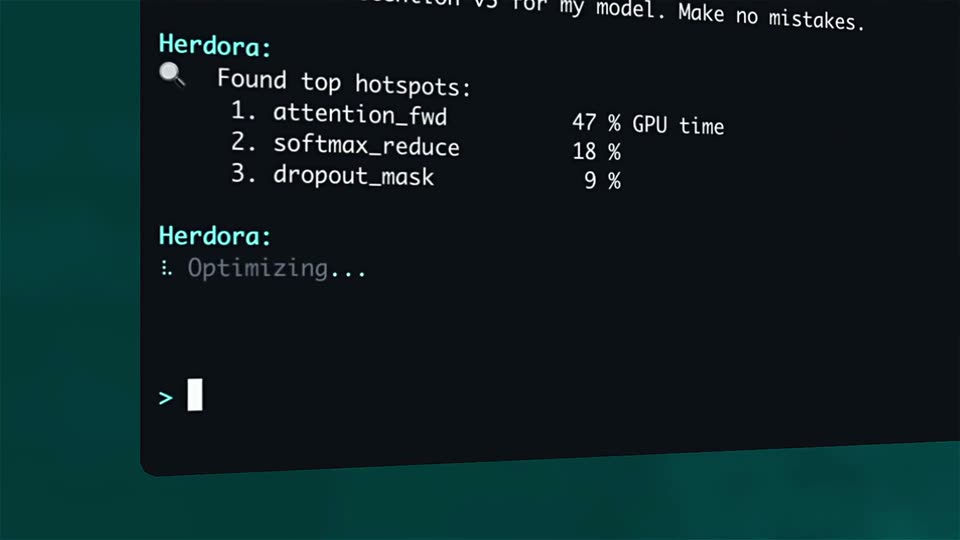
A dark terminal window on a teal gradient background. A user prompt is typed character by character at a command line, then the assistant Herdora replies with status lines (profiling, hotspots, optimizing, benchmarking) that scroll upward, each prefixed by a small icon. A blinking block cursor follows the active line.
Techniques: Kinetic type
Camera: Pull out
15 · Demo · 0:31–0:38
A dark terminal panel tilts into 3D perspective over a teal backdrop. A dotted HERDORA wordmark and italic tagline sit above a teal rule; below, a prompt types a CUDA-to-HIP request, then Herdora's analysis, optimization and benchmark lines cascade in.
On-screen text: “Maximize your productive compute.”
Techniques: Kinetic type, 3D mockup
Camera: Pull out
16 · Other · 0:38–0:43
The camera tracks along glowing teal light trails over a blurred circuit board. Monospace text types in word by word: “for the world, it’s the promise of” cuts to “next-generation computing, finally delivered,” with the first word in black on a white box.
On-screen text: “for the world, it's the promise of”, “next-generation computing, finally delivered.”
Techniques: Kinetic type, Parallax
Camera: Pull out
17 · Outro · 0:43–0:49
A white hexagonal herdora mark and lowercase wordmark settle into place on a black field, letters easing from a slight offset, then hold static for the rest of the shot.
On-screen text: “herdora”
Camera: Pull out