0:17

Hana V2 is here to stay 🌸 #3d #3danimation #uiux #productdesign #graphicdesign
Spline · Design · Sep 2026
Viggle · Jun 2024 · 0:40 · AI-annotated
Viggle’s 0:40 launch film runs 11 scenes, about 3.6 s each. The product is on screen from the first frame and 3 features are revealed. The call to action lands at 0:36 (90% in). The video alternates one-line lowercase text cards with quick UI demos, each feature announced in a single phrase and then proven with a three-frame equation of character plus motion leading to the result. Signature moves include the parallax wiggle inside rounded cards, green plus and arrow connectors, and a locked-off near-black frame with a soft green glow and the /move mark pinned top-left throughout.
Is this your launch? to your site or press kit.
Spline · Design · Sep 2026
A dark frame with a soft green glow in the lower-left. The title “Introducing /move” scales in at center, white with a green accent, then gives way to two white lines, “animate your pic” and “control the move anytime”, fading in stacked. A small /move logo sits top-left.
On-screen text: “Introducing /move”, “animate your pic”, “control the move anytime”
Techniques: Kinetic type
Camera: Static
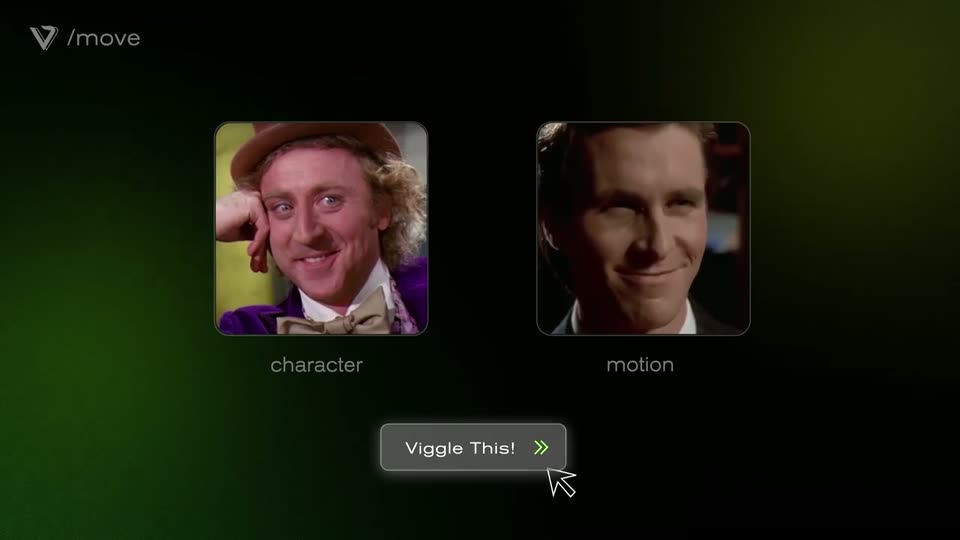
Two rounded cards labeled character and motion fill with a portrait photo and a video still on a dark green gradient. A cursor clicks the Viggle This! button, and the cards tilt in 3D while the images inside shift with a parallax wiggle.
On-screen text: “/move”, “animate your pic”, “control the move anytime”
Techniques: Cursor demo, Parallax, 3D mockup
Camera: Static
Three rounded video thumbnails line up on a dark, green-glowing background, joined by a green plus and arrow. The left frame stays still on a man in a brown hat; the middle and right frames play a blended face winking and laughing. A gray button reads Viggle This! below.
Camera: Static
On a dark green gradient, a rounded card holding a portrait of a man in a fedora drifts up and settles in the left half. The small /move mark stays fixed top-left while the caption record yourself fades in at the bottom right.
On-screen text: “/move”, “record yourself”
Camera: Static
A rounded clip of a man in a hat sits left of two text lines on a dark green gradient. The lines fade out and the clip shrinks into a row of three clips playing side by side, each stamped with a small V logo.
On-screen text: “/move”, “record yourself”, “give your meme a twist”
Camera: Static
Two lines of white lowercase text fade in at the center of a dark green gradient background: “keep the background” and “skip the greenscreen”. The /move logo sits in the top-left corner and the frame stays locked-off throughout.
On-screen text: “keep the background”, “skip the greenscreen”
Camera: Static
Two rounded upload cards sit on a dark green gradient. The left card fills with a photo of two people, the right with a video of a man walking, as a cursor hovers over it. Static captions note keeping the background and skipping the greenscreen.
On-screen text: “keep the background”, “skip the greenscreen”
Techniques: Cursor demo
Camera: Static
Two video cards labeled character and motion sit above a Viggle This! button on a dark green-glowing background, a cursor hovering on it. The layout expands to three cards with a plus and arrow, the third showing the green-screen dancer's moves composited onto the original clip.
Techniques: Cursor demo, Split screen
Camera: Static
A dark green gradient fills the frame with the /move logo locked top-left. The white line “recreate memes your way” rises from the lower center to the middle and brightens, holds, then fades out.
On-screen text: “recreate memes your way”
Techniques: Kinetic type
Camera: Static
A 5x3 grid of square video thumbnails plays short meme reaction clips against a black background with a green glow at the left edge. The /move logo sits in the top-left corner. The frame is locked off and static.
Camera: Static
A dark green gradient holds the white lowercase line get moving at, then the green URL viggle.ai scales in beside it. After a beat the line gives way to the white VIGGLE wordmark and V icon, centered, as the sign-off.
On-screen text: “get moving at viggle.ai”
Techniques: Kinetic type
Camera: Static