0:45


Macadamia | AI Mechanical Engineer
Macadamia · B2B · Feb 2025
Vanta · Apr 2023 · 3:21 · Full motion · AI-annotated
Vanta’s 3:21 launch film runs 32 scenes, about 6.3 s each. The product is on screen from the first frame and 10 features are revealed. The call to action lands at 3:17 (98% in), over a voiceover. A flat, screen-capture product demo framed by purple title and benefit cards, with a steady cursor narrating each module in turn. The pacing is even and methodical: short graphic cards bookend a long, uninterrupted UI walkthrough that moves left-to-right through the sidebar, so the signature move is the calm cursor glide paired with crossfades between screens.
Is this your launch? to your site or press kit.
Macadamia · B2B · Feb 2025
Subquadratic · Nov 2026
A title card fades up from black. A dark purple field on the left holds the white Vanta logo and the headline, while a gray panel on the right shows a line-drawn car with a dark llama character leaning out the window.
On-screen text: “Vanta Demo”
Camera: Static
A locked-off title card. A dark purple field on the left holds the white Vanta logo at top and a large headline reading Vanta Demo, with Demo in purple. A light panel on the right shows a line-art llama head leaning out of a car window.
On-screen text: “Vanta Demo”
Camera: Static
A scalloped purple shape fills the left of a dark purple background while a white bullet line with a purple arrow sits on the right. A second line, Save time and money, appears below it, then the frame crossfades to the Vanta home dashboard as the lines fade out.
On-screen text: “Automated compliance and security”, “Save time and money”
Techniques: Kinetic type
Camera: Static
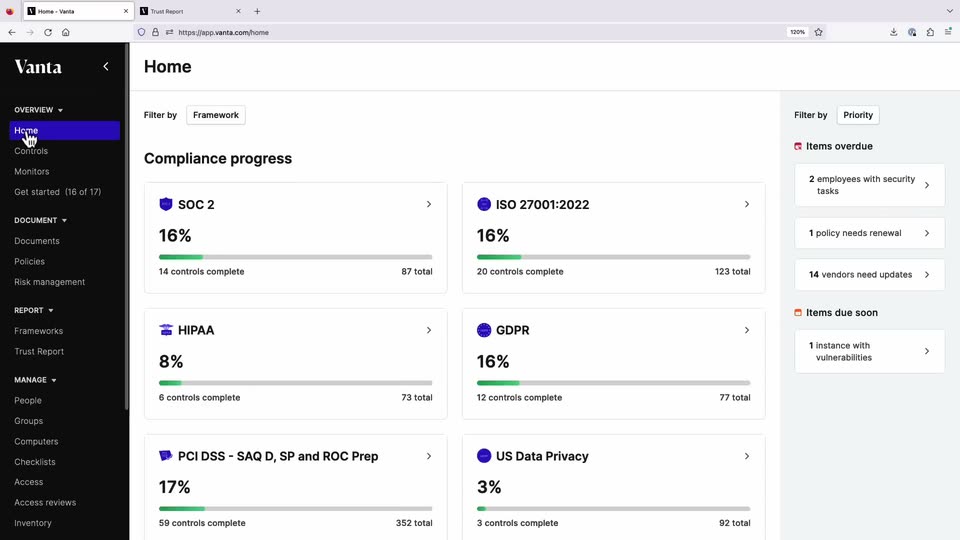
A browser window shows the Vanta home dashboard, with a dark left menu and a grid of compliance progress cards. A cursor hovers the Home item, then moves to the SOC 2 card. The view stays static.
Techniques: Cursor demo
Camera: Static
The Vanta SOC 2 controls page scrolls up to settle on the header and progress cards. A cursor types 'vulnerabilities' into the search field, filtering the control table to one row, then hovers over it.
Techniques: Cursor demo
Camera: Static
A browser window on a Vanta compliance page scrolls down a dense evidence table, then a cursor moves to the sidebar and rests on the Integrations link. The interface stays flat at 100% zoom.
Techniques: Cursor demo
Camera: Pan
A browser window shows the Vanta Integrations screen. A cursor clicks the Available tab, switching the list of connected apps into a grid of integration cards, then scrolls down the grid past rows of logos and Connect buttons.
Techniques: Cursor demo
Camera: Pan
A full browser window shows the Vanta Policies page, a dark left sidebar beside a table of policy rows with status pills. A cursor drifts down the list, each hovered row shading light gray, then clicks Access Control Policy as the address bar updates.
Techniques: Cursor demo
Camera: Static
A browser window shows the Vanta policy page with a Draft card stacked above an approved Version card. The cursor glides across the empty area to the Edit button on the Draft card and clicks it, loading the editor.
Techniques: Cursor demo
Camera: Static
A browser window displays a Vanta policy editor with a pending approval badge and a blue save button. The document lists purpose and scope sections. A cursor glides up to the close icon at the top left.
Techniques: Cursor demo
Camera: Static
A flat screen capture of the Vanta policies dashboard. A white cursor moves down the dark left sidebar and rests on the highlighted Policies tab, while the main panel holds a static table of policy rows with status pills.
Techniques: Cursor demo
Camera: Static
Flat screen recording of the Vanta Documents page with a dark left sidebar. A cursor clicks the search field and types 'network diagram', the category list filters live to a few matching rows, then scrolls down to the Network diagram entry under Engineering.
Techniques: Cursor demo
Camera: Static
A static view of a document page in a web app shows two cards, an empty upload panel and a network diagram thumbnail, above a details section. A cursor glides from the description text to the Upload button, then drifts to the top-left corner.
Techniques: Cursor demo
Camera: Static
A browser window shows the Vanta documents page. A list of department rows with status pills fills the main panel. A mouse cursor hovers over the Documents entry in the left sidebar, where a small tooltip pops in. The view stays static.
Techniques: Cursor demo
Camera: Static
A browser window shows the Vanta Monitors dashboard with a dark sidebar and a table of monitors. A cursor clicks the search field and types 'ec2 ins', filtering the list to six EC2 entries and updating the summary cards, then hovers a row to reveal an edit pencil.
Techniques: Cursor demo
Camera: Static
A browser window shows the Vanta monitor page for EC2 public ports. A cursor clicks the Jira issues row to expand a small table of linked tickets, the page scrolls, then the section collapses back over the remediation list.
Techniques: Cursor demo
Camera: Pan
A browser window shows a compliance report page that scrolls down past a numbered fix checklist into a remediation history panel with a circular four-item counter. A mouse cursor drifts at the left edge, then jumps to the top-left close icon and clicks it.
Techniques: Cursor demo
Camera: Pan
A web dashboard fills the frame, a dark left sidebar beside a white Monitors table with status cards. A cursor glides down the sidebar navigation, passing the OVERVIEW and DOCUMENT groups, and stops on the People entry under MANAGE.
Techniques: Cursor demo
Camera: Static
A dark-sidebar admin console shows a People table; the cursor clicks a row and a detail panel slides in from the right listing onboarding tasks, then the view crossfades to an Access reviews table.
Techniques: Cursor demo
Camera: Static
A browser window shows a dark left sidebar beside a light table titled Access reviews. A cursor clicks the sidebar item, and the panel swaps to a vendor detail page with a Draft to Completed progress bar and a list of service logos.
Techniques: Cursor demo
Camera: Static
A flat product interface shows a vendor access review list, then crossfades to a detail panel with a donut chart and account table while a cursor hovers over the rows.
Techniques: Cursor demo
Camera: Static
A full-screen browser view of the Vanta access review dashboard for Slack. A white cursor moves from the first account row in the table to the left sidebar and hovers over the Risk management item, which highlights.
Techniques: Cursor demo
Camera: Static
A browser window shows a compliance dashboard. A cursor travels down the dark left sidebar, highlighting items, and the main panel switches from a risk register with a colored impact heatmap to a vendors table. The motion is steady and deliberate.
Techniques: Cursor demo
Camera: Static
A browser window shows the Vanta Vendors page: a left navigation rail and a table listing vendors with owner, document status and risk level badges. A mouse cursor rests on the highlighted Vendors menu item, then moves up toward the page heading.
Techniques: Cursor demo
Camera: Static
A browser window displays the Vanta Trust Report page, opening on the company header and compliance badges. The view scrolls down steadily through monitoring cards, documents, data collected, and FAQ sections to the powered-by footer.
Camera: Pull out
A browser window shows the Vanta Vendors page, a table of vendor names with document status and risk level badges. A mouse cursor drifts down from the active tab to the left sidebar menu. The view stays static.
Techniques: Cursor demo
Camera: Static
A browser window displays the Vanta home dashboard, with a left navigation panel and a grid of compliance progress cards showing percentages. A cursor slides from the Home menu item to the SOC 2 card.
Techniques: Cursor demo
Camera: Static
A browser window shows the Vanta SOC 2 controls page, with a dark left sidebar, a Controls progress card and an Audit timeline card above a table of rows. A cursor drifts right and rests on the View as auditor button.
Techniques: Cursor demo
Camera: Static
A Vanta SOC 2 dashboard fills the frame with a left nav, a controls list and an audit timeline. A View as auditor modal opens in the center listing auditors and dates; the cursor moves from the top-right button to a Select option in the list.
Techniques: Cursor demo
Camera: Static
A browser window shows the Vanta Evidence page. A dark left sidebar lists navigation sections, while the main panel displays a SOC 2 Type II banner above a table of evidence rows tagged with red Needs attention and green OK status pills. A cursor rests near the filter controls.
Camera: Static
A purple wavy shape wipes in from the left, masking the previous UI screen, then three benefit lines with purple arrows appear one after another on the right of a dark purple field.
On-screen text: “Automated and integrated platform”, “Improve compliance and security”, “Increase revenue”
Techniques: Masking, Kinetic type
Camera: Static
A static sign-off card on a dark purple background: the Vanta logo sits top center, the line Learn more at Vanta.com is centered, and a large purple circle fills the top-right corner. The frame holds, then fades to black.
On-screen text: “Learn more at Vanta.com”
Camera: Static