3:18
Explore
Treg - OpenSource our AI-UGC workflow For as low as $0.2/s instead of $50
Treg · Nov 2026 · 4:02 · AI-annotated
- Length
- 4:02
- Scenes
- 78 · 3.1 s avg
- Product on screen
- 0:17
- Features shown
- 4
- Call to action
- 3:41 · 91%
- Voiceover
- Yes
00:00:00 / 04:02:10
Treg’s 4:02 launch film runs 78 scenes, about 3.1 s each. The product shows up at 0:17 and 4 features are revealed. The call to action lands at 3:41 (91% in), over a voiceover. A fast-cut tutorial built from screen recordings, face-cam insets and vertical UGC clips, moving from a provocative question through a step-by-step workflow to a free download call to action. Its signature style pairs white outlined captions with huge black condensed headline stamps, hand-drawn circles and arrows, and a cream diagram board against dark UI canvases, all kept energetic by a steady cut rate near 18 per minute.
Footage neededEstimated needs: 7 capture groups — your screens or recordings · 3 filmed passages — shoot, supply or replace · 1 graphic passage — draw or supply
Is this your launch? to your site or press kit.
More like this
Treg - OpenSource our AI-UGC workflow For as low as $0.2/s instead of $50, scene by scene
· 78 scenes as text
01 · Hook · 0:00–0:02
A man in a gray long-sleeve shirt sits at a white desk, hands on the keyboard and mouse, frowning and squinting at his monitor with a camera tripod and boxes behind him. Large white outlined type stacks in on the right, line by line, spelling out the question.
On-screen text: “WHAT THE”, “F*CK IS”, “UGC?”
Techniques: Kinetic type
Camera: Static
02 · Problem · 0:02–0:03
A vertical clip of a woman lifts her glasses to her head at center, beside a bright Instagram comment thread. Dimmed app and Instagram panels flank the sides, a man's face cam sits bottom right, and white outlined captions swap at the bottom and center.
On-screen text: “If you have”, “used Chat GPT”, “When you see a video like this”
Camera: Static
03 · Problem · 0:03–0:04
A vertical video of a woman talking fills the left, a comments panel sits on the right and a facecam of a man occupies the bottom corner. A hand cursor hovers over a reply link as bottom captions swap in line by line.
On-screen text: “When you see a video like this”, “on Instagram or TikTok,”
Techniques: Split screen, Cursor demo
Camera: Static
04 · Problem · 0:04–0:05
A YouTube video plays: left, a vertical clip of a laptop screen running an AI assistant as a hand reaches in; right, the comments panel with a bespectacled streamer in the corner and a hand cursor tapping a comment. A bottom caption reads “you think it's a real user”.
On-screen text: “assistant running”, “you think it's a real user”
Techniques: Cursor demo
Camera: Static
05 · Problem · 0:05–0:07
A vertical Reel of a young man eating McDonald's, with calorie labels over the food, plays beside a comments panel where a cursor hovers a post. A talking-head creator occupies the lower right. A white bottom caption swaps phrases to the voiceover.
On-screen text: “you think it's a real user”, “genuinely sharing a product they like.”
Techniques: Split screen, Cursor demo
Camera: Static
06 · Problem · 0:07–0:08
A hand holds a phone showing the Cal AI app under a Tracked with cal AI label; the white logo card flips to a weekly chart reading 2107. A YouTube comments column runs along the right with a cursor on a comment, and the creator gestures in the corner.
On-screen text: “Tracked with cal AI ✅”, “genuinely sharing a product they like.”
Techniques: Split screen, Cursor demo
Camera: Static
07 · Problem · 0:08–0:09
A hand holds a phone showing the Cal AI app, switching from a food photo tagged 'Tracked with cal AI' to a dashboard with a 2107 calorie total. A YouTube comments panel and a streamer's facecam sit on the right, under a bottom caption: 'It's most likely UGC content'.
On-screen text: “Tracked with cal AI ✅”, “It's most likely UGC content”
Techniques: Split screen
Camera: Static
08 · Problem · 0:09–0:10
A cream background holds a handwritten title at the top while a man in glasses and a black shirt talks in a small box at the bottom right, gesturing with his hand.
On-screen text: “The UGC playbook”, “It's most likely UGC content”
Camera: Static
09 · Problem · 0:10–0:14
A hand-drawn diagram assembles on a cream background: three building icons under COMPANIES, arrows to three creator avatars, and phone video cards below each. A $20-$50 per video note fades in at right and is circled in red. A bespectacled man speaks in a corner frame.
On-screen text: “created by the product company.”, “$20-$50 per video,”, “sometimes even thousands of dollars”
Techniques: Cursor demo
Camera: Static
10 · Problem · 0:14–0:17
A screen recording of a Reddit post about paid UGC holds on the title line, where a red hand-drawn ellipse circles the $3500 figure and then vanishes. A face-cam of a man in glasses sits in the bottom right corner as white subtitles read at the bottom.
On-screen text: “sometimes even thousands of dollars”, “for a single video.”
Camera: Static
11 · Product intro · 0:17–0:19
A file list fills the frame, rows of mp4, jpg and json files with dates and sizes. A small inset of a man with glasses talks in the lower right corner. White caption lines appear at the bottom center in sequence.
On-screen text: “For the past few days,”, “I tried all sorts of different ways.”
Camera: Static
12 · Product intro · 0:19–0:21
A split screen pairs a ChatGPT sidebar with a yellow stylus held across it on the left and a file list with a man giving a thumbs up on the right. A large black headline builds word by word while white captions list the steps.
On-screen text: “here's the setup”, “First, go to ChatGPT”, “I think I finally cracked it.”, “I FINALLY CRACKED IT”
Techniques: Split screen, Cursor demo, Kinetic type
Camera: Static
13 · Product intro · 0:21–0:24
A split screen: on the left a video player window shows a woman holding a microphone, with caption overlays; on the right a file list sits under a large black headline, and a man with glasses appears in the bottom corner. Bottom subtitles track the voiceover.
On-screen text: “I FINALLY CRACKED I”, “A workflow that allows you to produce”, “hyper-realistic UGC content,”
Techniques: Split screen
Camera: Static
14 · Product intro · 0:24–0:25
A macOS Finder window listing generated media files fills the frame. A vertical video of a woman holding a microphone plays on the left, a smaller clip of a man with glasses at the bottom right, and a bottom caption reads “hyper-realistic UGC content,”.
On-screen text: “hyper-realistic UGC content,”
Camera: Static
15 · Product intro · 0:25–0:27
A flat phone mockup of the ChatGPT menu floats over a Mac Finder window while a yellow finger taps through the items. A bespectacled presenter sits in the lower corner. White outlined captions state the setup step and the cost drop.
On-screen text: “here's the setup”, “First, go to ChatGPT”, “driving the cost from $20-$50”
Techniques: Cursor demo
Camera: Static
16 · Product intro · 0:27–0:29
A Mac desktop shows an email inbox window on the left and a Downloads file list on the right, with a small webcam feed of a person in the corner. White outlined captions sit over the inbox, and a large black '$0.2 PER SECOND.' scales into the center.
On-screen text: “here's the setup 👆”, “a personalized email”, “to only $0.2 per second.”, “$0.2 PER SECOND.”
Techniques: Kinetic type
Camera: Static
17 · Product intro · 0:29–0:31
A dark Claude Code terminal fills the frame. A large outlined $0.2 PER SECOND. graphic holds the right side, then clears. A man with glasses sits small in the bottom-right corner, gesturing as white bottom captions swap between two lines.
On-screen text: “$0.2 PER SECOND.”, “All of this UGC content”, “can be produced by Claude Code”
Techniques: Kinetic type
Camera: Static
18 · Product intro · 0:31–0:33
A screen recording of the Codex Plugins page; a cursor clicks New chat and the view switches to an empty chat prompt. A small webcam of a man sits in the bottom corner, and the caption “or Codex directly” overlays the lower center.
On-screen text: “or Codex directly”
Techniques: Cursor demo
Camera: Static
19 · Product intro · 0:33–0:35
A dark plugin page for treg fills the screen, listing example prompts and a long description, while a cursor hovers by the logo. A man with glasses talks in a small webcam box at the bottom right, his head bobbing as he speaks.
On-screen text: “using a free plugin like treg.”
Camera: Static
20 · Product intro · 0:35–0:38
A browser view of the treg site fills the frame, with the presenter's webcam inset at bottom right. The center line types out new roles, media buyer, SEO expert, social media manager, while the left and right cards swap matching tool lists. White captioned subtitles run along the bottom.
On-screen text: “that gives your agent access”, “to data and tools.”
Camera: Static
21 · Product intro · 0:38–0:44
A white table of AI model names and provider price tags fills the frame, a small webcam of the presenter pinned to the corner. Subtitles roll along the bottom. The view cuts to a prompt composer where the text treg is typed into the field.
On-screen text: “I'll take two minutes”, “to show you the whole workflow,”, “step by step,”, “including all the secret sauce.”
Camera: Static
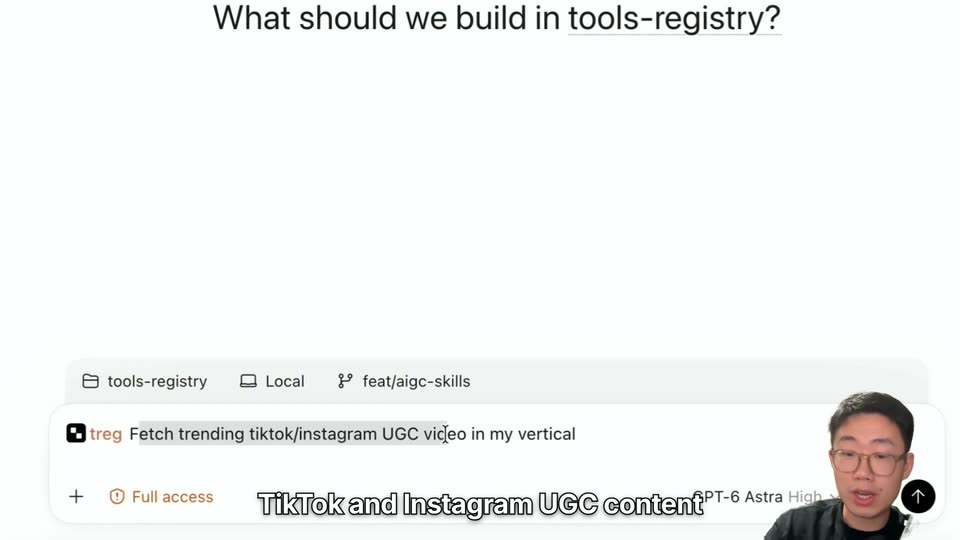
22 · Feature reveal · 0:44–0:49
A screen recording of a tool interface fills the frame, with a small face-cam of a man in the lower right. A prompt is typed into the bottom bar, and a bold black headline 'FIND WHAT WORKS.' pops in over the empty canvas as white captions roll along the bottom.
On-screen text: “First, we're going to tag treg”, “and ask it to find trending”, “FIND WHAT WORKS.”, “TikTok and Instagram UGC content”, “in your vertical.”
Techniques: Kinetic type
Camera: Static
23 · Feature reveal · 0:49–0:53
A screen recording of a product webpage listing social media API cards. The Trending & discovery heading and card labels get highlighted in blue as a cursor moves across, while a small webcam of a man sits in the bottom right corner.
On-screen text: “treg has access to trending content”, “across social channels.”
Techniques: Cursor demo
Camera: Static
24 · Feature reveal · 0:53–0:54
A screen capture of a Mac desktop shows a Finder icon view beside a QuickTime player running a video of a seated office worker; a cursor hovers at the left, a webcam feed of a bespectacled presenter sits lower right, and a white caption sits at the bottom.
On-screen text: “You can pull a list”
Camera: Static
25 · Feature reveal · 0:54–0:56
A macOS file manager grid of video and image thumbnails fills the screen, with a small webcam of a man speaking in the lower right corner. A bold white caption with black outline, “of trending UGC content”, settles at the bottom center.
On-screen text: “of trending UGC content”
Camera: Static
26 · Feature reveal · 0:56–0:56
A macOS screen shows a QuickTime window playing an office video captioned 'I just hired a full' beside a Finder window of file thumbnails, with a small webcam feed of a man in glasses in the corner and the caption 'of trending UGC content' below.
On-screen text: “of trending UGC content”
Camera: Static
27 · Feature reveal · 0:56–0:57
A desktop screen shows a Finder grid of file thumbnails behind a QuickTime window playing a video of a woman holding a phone, with a small webcam feed of a man in the bottom-right corner. A white outlined caption sits along the bottom edge.
On-screen text: “that resonates with your audience.”
Camera: Static
28 · Feature reveal · 0:57–0:58
A macOS Finder window fills the screen, playing a video preview of a mountain landscape captioned “We built our dream life.” A small webcam feed of a man with glasses sits in the bottom right corner. A white caption “that resonates with your audience.” is pinned along the bottom.
On-screen text: “that resonates with your audience.”
Camera: Static
29 · Feature reveal · 0:58–0:58
Finder window fills the frame with file thumbnails. A QuickTime Player overlay on the left plays a video that cuts from a bearded man to a man in a black shirt. The presenter's webcam sits in the bottom right corner, white captions along the bottom.
On-screen text: “that resonate with your audience.”, “Analyze the hook.”
Camera: Static
30 · Feature reveal · 0:58–0:59
A static screen capture of a Mac desktop shows a Finder window with a video of a woman holding a mug and tablet playing inside. A man's webcam feed sits in the bottom-right corner while a caption appears at the bottom.
On-screen text: “Analyze the hook.”
Camera: Static
31 · Feature reveal · 0:59–1:03
A macOS Finder window fills the frame behind a QuickTime player showing a woman holding a microphone, while a small webcam feed of a man sits in the corner. White outlined captions at the bottom swap from one line to the next.
On-screen text: “Most importantly, find the person”, “your audience actually likes”
Camera: Static
32 · Feature reveal · 1:03–1:05
A macOS Finder window fills the frame with a grid of file thumbnails. A floating dashboard window at left switches from a chart view to a subscription grid. Two hosts sit in small webcam insets at the bottom corners while a white caption runs along the bottom edge.
On-screen text: “and create an AI profile”, “out of that vibe.”
Camera: Static
33 · Feature reveal · 1:05–1:08
A browser window displays a YouTube thumbnail of a woman against a blue backdrop, while a presenter in a small bottom-right inset speaks. White outlined subtitles at the bottom read the line in two cuts.
On-screen text: “If you simply feed it a video image”, “and ask it to generate a profile,”
Camera: Static
34 · Feature reveal · 1:08–1:11
A locked-off browser screen shows an Excalidraw canvas where a YouTube video gives way to two AI-generated portraits side by side, labeled GPT image 2.5 and Gemini 3 pro with thumbs-down emojis. A presenter's webcam sits bottom right as subtitles change.
On-screen text: “and ask it to generate a profile,”, “10 out of 10 times,”, “you'll get AI slop like this.”
Camera: Static
35 · Feature reveal · 1:11–1:12
A browser window shows an X.com profile page that scrolls vertically, the left sidebar and main column shifting from the profile header to a file-tree view. A small webcam of a bespectacled man sits in the lower-right corner. A white caption with a black outline reads at the bottom.
On-screen text: “Luckily, my friend Harry”, “GPT image 2.5”, “Gemini 3 pro”
Camera: Push in
36 · Feature reveal · 1:12–1:13
A GitHub file page in a browser displays the portrait-clone skill markdown, its table and Non-negotiables list filling the frame. A small webcam of a bespectacled man sits in the lower right corner as he speaks, and a caption reads shared a skill with me along the bottom.
On-screen text: “shared a skill with me”
Camera: Static
37 · Feature reveal · 1:13–1:15
Locked-off screen capture of a browser showing the Excalidraw canvas with an embedded video of a woman on a blue background. A man's webcam inset sits in the bottom right corner, and a white subtitle line at the bottom reads “that lets Claude Code and Codex”.
On-screen text: “that lets Claude Code and Codex”, “use treg to take a person's picture”
Camera: Static
38 · Feature reveal · 1:15–1:15
A dark Excalidraw canvas in a browser shows an embedded video of a woman on a blue background, with an arrow pointing to a peach rectangle on the right. A man in a small webcam corner gestures while a white caption sits centered at the bottom.
On-screen text: “use treg to take a person's picture”
Camera: Static
39 · Feature reveal · 1:15–1:17
A browser window shows an embedded video of a woman gesturing against a blue backdrop, with a man's webcam in the lower right corner and a white arrow on the right. Bottom captions swap between two lines over the locked-off frame.
On-screen text: “use treg to take a person's picture”, “and create a new AI character.”
Camera: Static
40 · Feature reveal · 1:17–1:18
A dark whiteboard app in a browser shows a photo of a woman on a blue backdrop, with an arrow leading to an empty pink panel at right. A presenter's webcam sits in the lower right corner while a white caption runs along the bottom.
On-screen text: “and create a new AI character.”
Camera: Static
41 · Feature reveal · 1:18–1:18
A browser window shows a dark Excalidraw canvas with two photos of a woman, blue and pink backgrounds, joined by an arrow. A man with glasses gestures in a small webcam box at bottom right as white captions read “and create a new AI character.” then “It looks different,”.
On-screen text: “and create a new AI character.”, “It looks different,”
Camera: Static
42 · Feature reveal · 1:18–1:20
A locked-off Excalidraw canvas in a browser shows two photos of a woman, blue backdrop left, pink right, joined by an arrow, under a heading that swaps from NEW FACE to THE RIGHT VIBE. A man's webcam sits bottom-right; white captions read at the bottom.
On-screen text: “It looks different,”, “but gets the vibe right.”
Camera: Static
43 · Feature reveal · 1:20–1:24
A locked-off browser view of an Excalidraw canvas shows a bold white headline, a clip of a woman in a white tee, and an arrow pointing to a grid of her stills. A bespectacled man speaks from a corner webcam as white captions run along the bottom.
On-screen text: “I tested it a few times.”, “It worked really well,”, “almost every single time.”
Camera: Pan
44 · Feature reveal · 1:24–1:28
A GitHub file view shows a JSON schema in SKILL.md beside a file tree, with a small webcam of a man in the corner. White bottom captions read the line about forcing the model to output every detail, then large bold black 'EVERY. SINGLE.' stamps in over the left panel.
On-screen text: “The key is to force the model”, “to output every single detail”, “EVERY. SINGLE.”
Techniques: Kinetic type
Camera: Static
45 · Feature reveal · 1:28–1:36
A browser screen of a GitHub markdown file scrolls through JSON, zooms in, then cuts to a table that highlights row by row; a large stacked headline sits on the left at the start, a man's webcam holds the corner, and bold captions roll at the bottom.
On-screen text: “EVERY. SINGLE. DETAIL.”, “that would otherwise omit,”, “and give it a JSON structure”, “for consistent performance.”, “The model no longer defaults”, “to that AI-slop look.”, “Even with the right prompt,”
Techniques: UI zoom
Camera: Static
46 · Feature reveal · 1:36–1:40
A browser window shows an Excalidraw canvas with a reference photo of a woman on the left and five AI-generated portraits in a row, labeled by model name. The view zooms in as a presenter gestures in the bottom-right corner and white captions swap at the bottom.
On-screen text: “Even with the right prompt,”, “different models perform differently.”, “I use track to send the same prompt”
Techniques: UI zoom
Camera: Push in
47 · Feature reveal · 1:40–1:43
Bold black headline “SAME PROMPT.” snaps in top-left, then “DIFFERENT MODELS.” fades from gray to black beneath it. A prompt input bar sits along the bottom, and a small webcam of the speaker fills the bottom-right corner. Bottom captions track the voiceover.
On-screen text: “I use treg to send the same prompt”, “SAME PROMPT.”, “DIFFERENT MODELS.”, “to different image models.”
Techniques: Kinetic type
Camera: Static
48 · Feature reveal · 1:43–1:49
A screen recording of the treg model table scrolls down through rows of image models while a presenter speaks in a small webcam box at bottom right. A bold black headline overlays the top early on, and white outlined subtitles run along the bottom.
On-screen text: “SAME PROMPT. DIFFERENT MODELS.”, “treg lets Claude Code and Codex”, “call more than 60 image models”, “let me compare the providers”
Camera: Static
49 · Feature reveal · 1:49–1:56
A dark browser canvas displays five side-by-side AI portraits of a woman speaking into a microphone, each under a model name, with a small webcam of the presenter in the lower right. White captions cycle across the bottom as a cursor hovers over the middle image.
On-screen text: “I can easily compare the results.”, “Surprisingly, Gemini 3 Pro”, “did the best job”, “even better than GPT Image 2.5.”
Camera: Static
50 · Feature reveal · 1:56–1:59
A desktop screen capture shows a macOS Finder file list behind an image preview of a woman holding a microphone. A small live-action inset of a man with glasses sits in the lower right corner as white subtitles appear at the bottom.
On-screen text: “Once the character is ready,”, “video generation becomes easy.”
Camera: Static
51 · Feature reveal · 1:59–2:04
A browser canvas shows a diagram of a woman's photo, an audio icon and a black Seedance 2.5 box. Large outlined text builds above it, IMAGE. then + VOICE. then = VIDEO., while white captions run along the bottom and a small talking-head clip sits in the corner.
On-screen text: “IMAGE.”, “Pass the image plus a voice reference”, “+ VOICE.”, “from the original video”, “to Seedance 2.5.”, “= VIDEO.”, “In one shot, it can generate”
Techniques: Kinetic type
Camera: Static
52 · Feature reveal · 2:04–2:09
A macOS Finder window fills the frame; a video player on the left shows a woman speaking into a microphone, a bold black headline sits on the right, and a small talking-head overlay sits bottom right with a white caption along the bottom.
On-screen text: “IMAGE + VOICE = VIDEO.”, “In one shot, it can generate”, “hyper-realistic UGC content like this.”
Camera: Static
53 · Feature reveal · 2:09–2:10
A dark Excalidraw canvas fills a browser window, holding a block of white monospace notes at center. A woman's webcam clip occupies the left edge and a man's sits bottom right, both talking. A white caption reads at the bottom.
On-screen text: “There might be one problem.”
Camera: Static
54 · Feature reveal · 2:10–2:13
A browser window shows a text document on a dark canvas, with a small webcam feed of a man in the lower right corner. White subtitles with a black outline sit at the bottom and swap between two phrases as the man speaks.
On-screen text: “There might be one problem.”, “The default Seendance 2.5 API endpoint”
Camera: Static
55 · Feature reveal · 2:13–2:17
A browser window holds still on a markdown document showing an API error and numbered setup steps. A man in glasses talks in a small webcam box at the bottom right. White caption lines cycle across the bottom of the frame.
On-screen text: “The default Seedance 2.5 API endpoint”, “doesn't let you create a video”, “based on a real person's picture”, “The character looks so realistic”
Camera: Pull out
56 · Feature reveal · 2:17–2:21
A browser screen shows a dark canvas of monospace text beside a woman's webcam feed, with a man's small feed in the corner. White subtitles at the bottom swap from one line to the next while the speakers gesture.
On-screen text: “The character looks so realistic”, “that it triggers this restriction.”
Camera: Static
57 · Feature reveal · 2:21–2:22
A screen recording of the Higgsfield interface fills the frame, showing a three-step layout titled Make videos in one click with a hand cursor over the preset panel. A presenter's webcam sits in the bottom-right corner while the caption The endpoint from Higgsfield holds at the bottom.
On-screen text: “The endpoint from Higgsfield”
Techniques: Cursor demo
Camera: Static
58 · Feature reveal · 2:22–2:24
A dark Higgsfield video-creation screen fills the frame, with a small webcam of a bespectacled man in the bottom-right corner. A cursor moves and clicks through preset thumbnails while white captions read across the bottom.
On-screen text: “The endpoint from Higgsfield”, “allows you to bypass that,”
Techniques: Cursor demo
Camera: Static
59 · Feature reveal · 2:24–2:30
A browser screen shows a dark Excalidraw table comparing Byteplus and Higgsfield credit pack costs, while a presenter in a lower-right webcam window talks and gestures. A mouse cursor drifts over the canvas, and burned-in subtitles change at the bottom.
On-screen text: “but you may pay double”, “or even triple the cost”, “because of its margin.”, “We've added Cdance 2.5”
Camera: Static
60 · Feature reveal · 2:30–2:33
A screen recording of a model catalog list zooms in on the Seedance 2.5 (Less Restriction) row as a cursor hovers over it. A presenter with glasses sits in a small corner window. Bottom captions name the model and the site.
On-screen text: “We've added a Seedance 2.5”, “Less Restriction model on treg.to,”
Techniques: UI zoom, Cursor demo
Camera: Push in
61 · Feature reveal · 2:33–2:41
A white model table fills the screen; the cursor clicks the expand arrow on the Seedance 2.5 (Less Restriction) row, revealing sub-rows with provider badges and prices. A man with glasses speaks in a small webcam box at the bottom right as caption lines change.
On-screen text: “Less Restriction model on treg.to,”, “almost 60% cheaper than Higgsfield.”, “There's no subscription.”, “You pay for usage only.”
Techniques: Cursor demo
Camera: Static
62 · Feature reveal · 2:41–2:46
A terminal report fills the frame; a hand-drawn circle highlights the line 'Cost: about $2.67', and a small webcam of a bespectacled man sits bottom-right. Captions read 'With this, we generated' then 'for only $2.67' as a large white '$2.67' pops in on the right.
On-screen text: “With this, we generated”, “for only $2.67”, “$2.67”
Techniques: Kinetic type
Camera: Static
63 · Feature reveal · 2:46–2:47
A Mac Finder window lists project files with one row highlighted; a large outlined $207 sits right and a white caption runs along the bottom. A small circular face cam of a man with glasses sits in the corner as a second Finder window slides open on top.
On-screen text: “$207”, “that looks as good as this.”
Camera: Static
64 · Feature reveal · 2:47–2:47
A locked-off macOS desktop shows a vertical video of a woman holding a microphone, framed by a Finder window and a webcam head in the corner. White captions sit on the video while a bottom caption reads the line.
On-screen text: “that looks as good as this.”
Camera: Static
65 · Feature reveal · 2:47–2:58
A woman in a black shirt holds a black microphone and talks to camera, gesturing and counting on her fingers. A white outlined headline with a sleeping emoji and calendar icon stays fixed at top while white captions swap line by line below.
On-screen text: “booked 4 meetings while I was asleep”, “3am last night”, “my agent was researching”, “hundreds of customers”, “and emailing each of them”, “to book meetings for me”, “i woke up”, “and 4 meetings”, “on my calendar”, “Here's exactly how I set it up”
Camera: Static
66 · Feature reveal · 2:58–2:59
A close-up of the ChatGPT sidebar in a browser window, with a yellow stylus pointing at the Plugins row and the cursor hovering nearby. Static captions read “here's the setup” at the top and “First, go to ChatGPT” at the bottom.
On-screen text: “here's the setup 👇”, “First, go to ChatGPT”
Techniques: Cursor demo
Camera: Static
67 · Feature reveal · 2:59–3:04
A vertical screen recording of the ChatGPT app shows the sidebar, the Plugins page and a typed prompt, while a yellow stylus points at menu items. White outlined captions swap at the bottom to narrate each step.
On-screen text: “here's the setup 👇”, “first go to ChatGPT”, “search for the treg plugin”, “when i just asking for”, “who you're looking for”, “It researches every lead”
Camera: Static
68 · Feature reveal · 3:04–3:08
A close-up of a Gmail inbox list scrolls upward under a static top label while bottom captions swap. The scene cuts to a dark canvas showing a creator holding a mic, an audio file and a phone screen, with a presenter in the corner.
On-screen text: “here's the setup”, “It researches every lead”, “a personalized email”, “from my Gmail”, “One cost-effective way”
Camera: Static
69 · Feature reveal · 3:08–3:18
A dark whiteboard canvas fades a woman's video clip, an audio file icon, and a phone screenshot into a row joined by plus signs. A man with glasses speaks in a bottom-right corner inset, and bold white captions cycle along the bottom.
On-screen text: “One cost-effective way”, “to produce UGC content”, “is to use Seedance 2.5”, “to generate a hook”, “lasting around 10 to 19 seconds.”, “For the actual product demo,”
Techniques: Cursor demo
Camera: Pull out
70 · Feature reveal · 3:18–3:19
A dark design canvas displays a vertical video frame of a mobile browser interface with a play button. A person's face is visible in the bottom right corner, and a text caption reads at the bottom.
On-screen text: “For the actual product demo,”
Camera: Static
71 · Feature reveal · 3:19–3:22
A Mac screen shows a dropdown menu open over an inbox list, the cursor rests on a menu item, and a yellow diagonal bar sits in the center; a small inset of the presenter gestures in the bottom right corner.
On-screen text: “For the potential product demo,”, “use your phone to record the video.”
Techniques: Cursor demo
Camera: Static
72 · Feature reveal · 3:22–3:25
A screen recording of a voice cloning web app is shown with a presenter in the bottom right corner. A loading spinner spins in the center before a voice profile card appears, while a cursor moves across the screen.
On-screen text: “Use Fish Audio or ElevenLabs”, “to clone the voice”
Techniques: Cursor demo
Camera: Static
73 · Feature reveal · 3:25–3:34
A dark whiteboard canvas shows a diagram of UGC video generation, a grid of hook clips plus a demo clip, with a presenter in the corner. The view zooms in as bold white text ONE DEMO. then 5-10 HOOKS. pops in on the right.
On-screen text: “and generate the voiceover.”, “Use the same demo clips”, “ONE DEMO.”, “with 5 or even 10 different hooks”, “5-10 HOOKS.”, “to generate content at scale.”, “That's the workflow:”
Techniques: UI zoom, Kinetic type
Camera: Static
74 · Feature reveal · 3:34–3:37
A dark whiteboard canvas displays a three-step workflow diagram linked by arrows, and the view zooms out to frame the whole layout. A small video feed of a man with glasses sits in the bottom right corner, while white captions appear along the bottom edge.
On-screen text: “That's the workflow:”, “find trending content,”
Techniques: UI zoom
Camera: Pull out
75 · Feature reveal · 3:37–3:41
A dark whiteboard canvas shows a three-step workflow with mockup images and arrows. The view pans right to drop the first column. A man with glasses talks in a small corner overlay while white subtitle captions cycle across the bottom.
On-screen text: “create an AI profile”, “that resonates with your audience,”, “and generate video at scale.”, “are going to be the next ad tools.”
Camera: Static
76 · CTA · 3:41–3:47
The treg catalog page, a light grid of tool cards under category headings, scrolls down slowly. A brief crossfade opens the shot, the speaker's webcam sits in the bottom-right corner, and bold subtitles caption the voiceover at the bottom.
On-screen text: “treg has the data and tools”, “your agent needs”, “to complete the whole workflow”, “without leaving Claude Code or Codex.”, “We are fully open sourced”
Camera: Static
77 · CTA · 3:47–3:54
A GitHub repository file list fills the frame, with a man in glasses speaking in a small bottom-right webcam box. Oversized black condensed words “OPEN SOURCE.” and “0% MARKUP” stamp in over the left of the page and fade out, while white outlined subtitles roll along the bottom.
On-screen text: “We're fully open source”, “OPEN SOURCE.”, “with 0% markup”, “0% MARKUP”, “You get the best possible price”, “with the biggest coverage.”, “I've linked all the skills”
Techniques: Kinetic type
Camera: Static
78 · CTA · 3:54–4:02
A GitHub repository page shows a Markdown skill document; the page scrolls down slowly while large black words “SKILLS.”, “PROMPTS.”, “BELOW.” stack up on the left, and white outlined subtitles run along the bottom; a small webcam feed of a man sits in the bottom-right corner.
On-screen text: “I've linked all the skills”, “SKILLS.”, “and prompts mentioned in this video”, “PROMPTS.”, “in the article below.”, “BELOW.”, “Check them out and grab them for free.”, “Please comment with any feedback.”
Techniques: Kinetic type
Camera: Static