1:38

Introducing Claude Duet
Claude · Oct 2026
Treg · Oct 2026 · 0:45 · AI-annotated
Treg’s 0:45 launch film runs 17 scenes, about 2.6 s each. The product is on screen from the first frame and 3 features are revealed, with social proof. The call to action lands at 0:41 (93% in). The video chains flat card, table and diagram reveals on a plain gray field, stamping each claim in monospace with counting digits and green highlights. Signature moves are the pixel-typed headlines, rolling price numbers, a radial source map, and an avatar grid that condenses into one profile.
Is this your launch? to your site or press kit.
Claude · Oct 2026
Anthropic · AI · Oct 2026
PlotWeaver · Oct 2026
A pale gray field holds a centered monospace headline. 'Introducing' and 'OpenSource' sit above a third line carrying the blue LinkedIn mark and 'LinkedIn Recruiter', with 'Recruiter' in green. A thin caret blinks at the left margin as the lines type in and hold.
On-screen text: “Introducing”, “OpenSource”, “LinkedIn Recruiter”
Techniques: Kinetic type
Camera: Static
On a plain light gray background, a flat white card with a blue 'LinkedIn Recruiter Lite' header sits left; the price '$170' stamps in large black monospace, then 'per month' and '30 InMails, used or not' fade below. A second card with a black 'treg' header slides in from the right showing '$5.58' in pale green, and both hold static.
On-screen text: “$170”, “per month”, “30 InMails, used or not”, “$5.58”
Camera: Static
Two flat pricing cards sit side by side on a pale gray field: a blue LinkedIn card reading $170 per month and a black treg card reading $0.19 per candidate, the green digits rolling into place. A red line strikes through $170, then a pixel-type headline drops in above while the cards shrink and fade out.
On-screen text: “30x cheaper”, “than LinkedIn Recruiter”
Techniques: Split screen, Kinetic type
Camera: Pull out
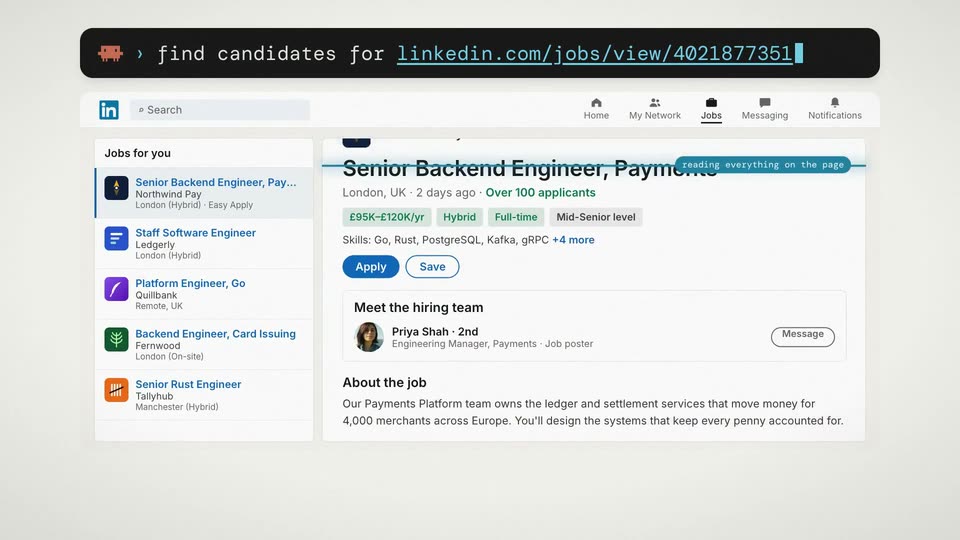
A black command bar with a pixel pig icon types out a prompt with a LinkedIn job URL, then a LinkedIn job posting page appears below with a blue progress line sweeping across and a reading-everything-on-the-page tag.
Techniques: Kinetic type
Camera: Pull out
A light gray field holds a radial diagram. A black pill with an orange pixel creature sits at the center, labeled Claude + treg with a green call and cost line. White source chips with icons pop in around it, each joined by a thin line, while a small LinkedIn window sits behind the center. The chips then fade out as the headline treg searches 14 sources holds above.
On-screen text: “treg searches 14 sources”, “Claude + treg”, “725 calls · $5.54”
Camera: Pull out
A tight cluster of circular profile avatars with small platform badges bursts outward from the center, spreading into a full-screen grid while a dark pill counter ticks up from 252 to 412. A green ring then circles one avatar in the grid.
On-screen text: “252”, “candidates · 14 sources”, “341”, “412”
Techniques: Particles
Camera: Push in
A light gray field fills with a dense grid of circular profile avatars, each tagged with a small social platform badge. Most avatars are dimmed while one woman's photo in the upper left is encircled by a bright green ring that holds steady.
Camera: Static
A grid of circular profile photos and small social icons dissolves out on a light gray background, leaving a single highlighted avatar in the upper left.
On-screen text: “0”
Camera: Static
A profile card assembles on a pale gray background: the avatar and name header appears, then four data cards (timeline bar, GitHub repo, company logos, vesting bar) fill in one by one, a source-count footer slides in, and the card fades out.
On-screen text: “Maya's full footprint, one profile”
Camera: Static
A small circular headshot of a smiling woman slides in from the upper left and settles near the top center of a pale gray background. Beside it, the first letters of a black and teal headline begin to form in place.
Techniques: Kinetic type
Camera: Static
A “Reach Maya directly” heading sits above two white cards listing email and phone providers. Status tags flip from waiting to found or none as the highlighted row steps down, then a green box pops in at each card's bottom revealing a verified email and live mobile number.
On-screen text: “Reach Maya directly”
Camera: Static
A tight frame on a white card and a small teal square quickly pulls back to reveal the full interface. A header row holds three labeled logos, Recruiter Lite, Sales Nav, treg, above the card. The teal square stays centered in the card.
Techniques: UI zoom
Camera: Static
Flat comparison table on beige lists price, reach, email and mobile for Recruiter Lite, Sales Nav and treg. A green rounded outline draws around the treg column as a Per person reached row fades in at $0.19. The table exits and a small green bar appears in the center.
On-screen text: “Recruiter Lite”, “Sales Nav”, “treg”, “Price”, “$170/mo”, “$99.99/mo”, “pay per hit”, “Reach”, “30 InMails”, “50 InMailsno limit”
Camera: Static
A small green marker holds the center of a plain off-white field, then a white card expands from it, revealing a dot-matrix headline in dark gray with the middle words in green, beneath a row of small caps labels.
On-screen text: “Best Personal Email Finder”
Techniques: Masking
Camera: Static
A benchmark table titled “Best Personal Email Finder” builds row by row, green cells and percentages counting up. The treg row lands last with a green outline as the table eases up, and a large green 80% with the caption “personal emails · $0.10 each” appears below.
On-screen text: “Best Personal Email Finder”, “benchmark: 30 real candidates · same LinkedIn URL to every vendor · every address verified”, “80%”, “personal emails · $0.10 each”
Techniques: Kinetic type
Camera: Pull out
Two white vendor comparison cards sit side by side on a cream background, their green bar charts filling in and the treg rows outlined in green. The right card's 57% stat fades in below it, then the whole layout fades to a blank background.
On-screen text: “Best Personal Email Finder”, “Also best Phone Number Finder”, “80%”, “personal emails · $0.10 each”, “57%”, “live mobiles · $0.21 each”
Techniques: Split screen
Camera: Static
A black app icon sits above center on a pale gray field. The pixel-mono title OpenSource LinkedIn Recruiter slides up into place, black then green. A dark rounded pill scales in below it, the cyan URL appearing inside, then a gray caption line fades in beneath.
On-screen text: “OpenSource LinkedIn Recruiter”, “→ treg.to/recruit”, “0% markup · runs in Claude Code & Codex · repo below”
Techniques: Kinetic type
Camera: Static