
2:16
Explore
Theta Software: Self-Learning for AI Agents
Theta · May 2025 · 0:55 · Full motion · AI-annotated
- Length
- 0:55
- Scenes
- 31 · 1.8 s avg
- Product on screen
- 0:31
- Features shown
- 2
- Voiceover
- No
- Views
- 1.7K on YouTube
as of November 23, 2026
00:00:00 / 00:55:18
- Length
- 0:55
- Scenes
- 31 · 1.8 s avg
- Product on screen
- 0:31
- Features shown
- 2
- Voiceover
- No
- Views
- 1.7K on YouTube
as of November 23, 2026
Theta’s 0:55 launch film runs 31 scenes, about 1.8 s each. The product shows up at 0:31 and 2 features are revealed, with social proof. There is no explicit call to action. The video is built as a before-and-after: fast 3D browser timelapses on black show a mock agent failing the same task run after run, then the frame opens into soft gradient cards that reveal Theta's memory layer, SDK and benchmark numbers. Signature moves include blur-in and blur-out transitions, the recurring red Run Failed dialog, and oversized gradient numerals scaling in over a blue-teal field.
No filming indicatedEstimated needs: 4 capture groups — your screens or recordings · 1 official logo — reused across the film · 1 graphic passage — draw or supply · 13 3D passages — build or supply
Is this your launch? to your site or press kit.
More like this


Similar soundtrack
Films whose music sounds like this one, voice left out
1:25

World Labs - Introducing Atlas: The world's first multimodal world model that gen
World Labs · Electronic
0:40


Superhuman - Meet Superhuman: the new AI platform that combines powerful tools lik
Superhuman · Modern electronic dance music (future bass, melodic dubstep, house)
0:35

Viral SaaS Product Launch Video Idea | Commas Webinar
Commas · Electronic, Trap
Theta Software: Self-Learning for AI Agents, scene by scene
· 31 scenes as text
01 · Hook · 0:00–0:00
On a plain white field, the black wordmark Operator slides in above a wide light-gray command bar. The bar holds the prompt Go to with a blinking caret, a paperclip icon, and a black circular up-arrow button on the right.
On-screen text: “Operator”
Camera: Static
02 · Hook · 0:00–0:00
A light gray command bar sits centered on a white field beneath the black heading “Operator”. The query “Go to icon.com and book a demo” types out character by character on the left, with a blinking cursor, while a black circular up-arrow button rests at the right edge.
On-screen text: “Operator”, “Go to icon.com and book a demo”
Techniques: Kinetic type
Camera: Static
03 · Hook · 0:00–0:02
On a white background, the black Operator wordmark slides in above a light gray rounded chat input. A caret types the command Go to icon.com and book a demo into the field, which holds a paperclip icon and a black circular up arrow button.
On-screen text: “Operator”
Techniques: Kinetic type
Camera: Push in
04 · Hook · 0:02–0:03
A white screen holds the black word Operator above a light gray prompt bar with a paperclip icon and a black round send button. The whole composition slides to the right, so the bar and heading drift off-center and get cropped at the frame edges.
On-screen text: “Operator”
Camera: Static
05 · Problem · 0:03–0:04
A browser window sits in 3D perspective, curved and tilted on a black field. Inside, the address bar types icon.com and the page loads from a Google new tab into the icon.com landing page, while a yellow Timelapse caption and a running counter tick in the lower left.
On-screen text: “Timelapse”, “Operator”
Techniques: 3D mockup, Kinetic type
Camera: Static
06 · Problem · 0:04–0:08
A tilted 3D browser window on black shows the Icon landing page. The page scrolls down past the hero section and a row of brand logos to three cards, then a chat bubble slides in over the right card. A yellow Timelapse timecode sits in the lower left.
On-screen text: “Timelapse 00:05”
Techniques: 3D mockup
Camera: Static
07 · Problem · 0:08–0:12
A tilted icon.com browser window floats in 3D against black, its page scrolling fast through news cards and a feature comparison table. A yellow Timelapse timecode ticks in the corner while a chat popup sits at right.
On-screen text: “Timelapse”
Techniques: 3D mockup
Camera: Static
08 · Problem · 0:12–0:12
A tilted browser window on a black background displays the icon.com page with two ad-creation steps and a chat bubble. A yellow Timelapse tag with a counting timer sits at the bottom left.
On-screen text: “Timelapse 0:00”
Techniques: 3D mockup
Camera: Static
09 · Problem · 0:12–0:12
A tilted browser window mockup of icon.com floats on a black background, locked off. The page shows pricing, brand tiles and a chat widget. A yellow Timelapse tag with a running timecode sits at the lower left.
On-screen text: “Timelapse”, “01:29”
Techniques: 3D mockup
Camera: Static
10 · Problem · 0:12–0:15
A tilted browser window with a $39 subscription payment page sits in 3D perspective on a black background; a corner timelapse counter counts up, then the page blurs as a red Run Failed dialog pops in.
On-screen text: “Timelapse 01:29”
Techniques: 3D mockup
Camera: Static
11 · Problem · 0:15–0:16
A sharp white error modal sits centered over a blurred app screen. The red X badge and the heading “Run Failed” scale in, while the red “FAILURE” label and the “Try again” button stay still.
Techniques: Kinetic type
Camera: Static
12 · Problem · 0:16–0:16
A white error dialog with a red X badge, a red FAILURE label, a Run Failed heading and a red Try again button scales in over a blurred browser window on black. The camera is locked off and the background stays soft.
Camera: Static
13 · Problem · 0:16–0:19
A plain white screen holds the black Operator wordmark centered above a light gray rounded input bar with a microphone icon on the left and a black circular up-arrow button on the right. Inside the bar a prompt types out character by character, ending with two exclamation marks, while the frame stays locked off.
Camera: Pull out
14 · Problem · 0:19–0:20
A browser window tilted in 3D crossfades from a Google search for icon to the icon.com pricing page. A woman's talking-head video and a black digital countdown timer overlay sit on top of the page.
On-screen text: “00:80”, “00:99”
Techniques: 3D mockup, Masking
Camera: Static
15 · Problem · 0:20–0:21
A tilted browser window of the icon pricing page floats on a black background. A centered offer overlay with a countdown timer swaps between a Pay card and a bare timer, while a chat popup with a profile photo stays pinned at the right.
Techniques: 3D mockup
Camera: Static
16 · Problem · 0:21–0:21
A tilted browser window mockup sits on a black background, showing the Icon pricing page. The page content rapidly switches between an ad-card grid and a profile post while a large digital clock in the center advances from 02:59 to 03:59.
On-screen text: “02:59”, “03:59”
Techniques: 3D mockup
Camera: Static
17 · Problem · 0:21–0:22
A tilted 3D browser window of the icon.com pricing page sits on black, profile cards shifting as a white flip-clock countdown ticks rapidly in the center.
On-screen text: “09:50”, “04:24”
Techniques: 3D mockup, Kinetic type
Camera: Static
18 · Problem · 0:22–0:23
A tilted 3D browser window showing the icon.com pricing page scrolls slightly against a black background. A large digital countdown timer in the center ticks down from 09:59 to 06:30 while a cursor moves over the page.
On-screen text: “09:59”, “06:30”
Techniques: 3D mockup, Cursor demo
Camera: Static
19 · Problem · 0:23–0:24
A tilted 3D browser window shows the icon pricing page against a black background. A large dark segmented countdown timer in the center ticks down rapidly from 08:40 to 07:38.
Techniques: 3D mockup
Camera: Static
20 · Problem · 0:24–0:24
A 3D-tilted browser window on a black background shows the icon pricing page scrolling upward, revealing brand examples and social stats. A large gray seven-segment countdown timer reading 08:84 sits centered on a white rounded panel over the page.
On-screen text: “08:84”
Techniques: 3D mockup
Camera: Static
21 · Problem · 0:24–0:26
A tilted 3D browser shows a Google search with a 7-segment clock reading 09:04 over the results. The frame blurs, then three failure cards with red crosses and red Try again buttons slide in on a gray background.
On-screen text: “09:04”
Techniques: 3D mockup
Camera: Static
22 · Problem · 0:26–0:27
Five white failure dialogs, each with a red X icon, a red FAILURE label, a Run number Failed line and a red Try again button, settle into a scattered grid over a blurred app screen as the frame pulls from soft focus to sharp.
Camera: Static
23 · Problem · 0:27–0:31
A pale blue and mint gradient fills the frame while centered text builds phrase by phrase, the final line scaling up to close the beat.
On-screen text: “Agents make the same mistakes”, “over & over again”, “until now”
Techniques: Kinetic type
Camera: Static
24 · Product intro · 0:31–0:33
A financial report PDF is open in a document window beside a spreadsheet, with large white lowercase text typing out across the center. The frame then widens to a grid of app windows, adding a calendar, a chat thread and a stock ticker around the document.
On-screen text: “Theta”
Techniques: Kinetic type, Split screen
Camera: Pull out
25 · Product intro · 0:33–0:34
A dark wall of small interface thumbnails fills the frame, slowly zooming out to reveal more screens. The white phrase in real-time sits centered and static over the moving grid.
On-screen text: “in real-time”
Camera: Pull out
26 · Feature reveal · 0:34–0:37
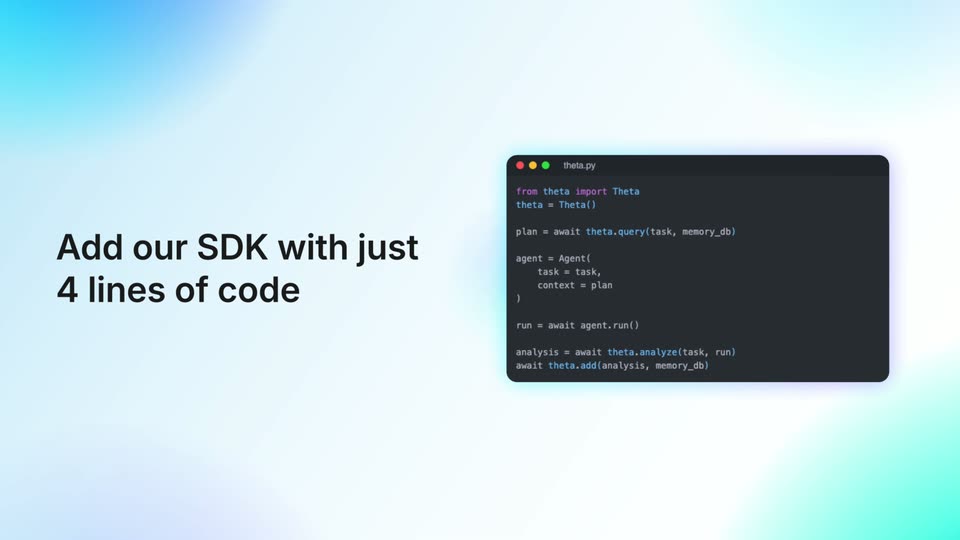
A soft blue-to-teal gradient fills the frame as a black headline slides in on the left and a dark code editor window titled theta.py with colored Python code settles on the right. The scene then blurs out, the headline words drifting apart as it exits.
On-screen text: “Add our SDK with just 4 lines of code”, “in real-time”
Techniques: Kinetic type
Camera: Static
27 · Feature reveal · 0:37–0:38
On a light blue gradient, a bold headline and a dark code editor mockup slide in fast, then cut to two white document panels that pop up side by side, all with heavy motion blur.
On-screen text: “4 lines of code”
Camera: Static
28 · Feature reveal · 0:38–0:46
Five spreadsheet thumbnails labeled Run 1 to 5 line up on a blue-teal gradient. X and check badges pop onto each as the headline We analyze each run fades in, then switches to and embed it in our memory layer while dashed lines draw to a theta box below.
On-screen text: “Run 1”, “Run 2”, “Run 3”, “Run 4”, “Run 5”, “We analyze each run”, “and embed it in our memory layer”
Camera: Static
29 · Social proof · 0:46–0:47
A centered dark navy headline sits over a soft blue-and-white gradient field. The frame opens blurred and sharpens into focus, bringing the text and the abstract color blobs into clarity. The text remains static throughout.
On-screen text: “RL in real-time means”
Camera: Pull out
30 · Social proof · 0:47–0:51
On a pale background with blurred cyan and blue blobs, oversized gradient numerals scale in one after another: 43%, then 7x, then a black italic theta. Below each, a small black caption types in word by word.
On-screen text: “43%”, “better accuracy than base OpenAI Operator”, “7x”, “less steps than base OpenAI Operator”, “θ”
Techniques: Kinetic type
Camera: Static
31 · Outro · 0:51–0:55
A black theta glyph scales up from the center and locks left of center as the brand name and tagline blur in to its right. The lockup holds, then the whole frame fades to black over a pale blue and teal gradient.
On-screen text: “Theta Software”, “Self-learning for AI Agents”
Camera: Static