2:37

Superblocks: The enterprise application platform of the future
Superblocks · Apr 2025
Teamble’s 0:59 launch film runs 19 scenes, about 3.1 s each. The product is on screen from the first frame and 2 features are revealed, with social proof. There is no explicit call to action; a voiceover carries the film. The video runs problem to proof to demo: a live-action office clip with a fixed white headline card states the pain, a logo row adds credibility, then a long screen demo walks the dashboard and feedback-loop setup, and a benefit card plus the wordmark close it. Signature moves are fixed headline cards over slow pans, tilted 3D dashboard mockups, and thin white line accents on a light palette.
Is this your launch? to your site or press kit.
Superblocks · Apr 2025
AgentMail · B2B · Nov 2026
Graphon Labs · Nov 2026
Films whose music sounds like this one, voice left out
Google · Upbeat corporate tech promotional
Slack · Upbeat electronic
Arcus Power · Electronic
A white lowercase t sits centered on a blue-to-cyan gradient. The t widens and the remaining letters slide in from the right to spell teamble.
On-screen text: “teamble”
Techniques: Morph
Camera: Static
A man in a beige shirt studies printed charts at a round meeting table while colleagues work around him. A white text panel with a bold navy headline stays fixed on the left as the camera slowly pans left across the sunlit office.
On-screen text: “Annual Reviews”, “are not enough to”, “manage performance”
Camera: Push in
A static over-the-shoulder shot of a team around a sunlit round office table reviewing documents and a tablet. A white text panel on the left holds the headline over the footage.
On-screen text: “Annual Reviews”, “are not enough to”, “manage performance”
Camera: Static
Two stock clips sit side by side on white: left, two women at a desk with a tablet; right, a woman in a navy blazer typing on a laptop, then smiling and raising both fists. “TOP ORGANIZATIONS” heads the slide above a logo row; the right clip fades out.
On-screen text: “TOP ORGANIZATIONS”
Techniques: Split screen
Camera: Static
A locked-off white slide with the heading TOP ORGANIZATIONS above a row of partner logos (BCG, IZA, Slack, Georgia Tech, Sentiance). A faint photo of two women at a table fades out behind the logos as the scene ends.
On-screen text: “TOP ORGANIZATIONS”, “slack”, “sentiance”
Camera: Static
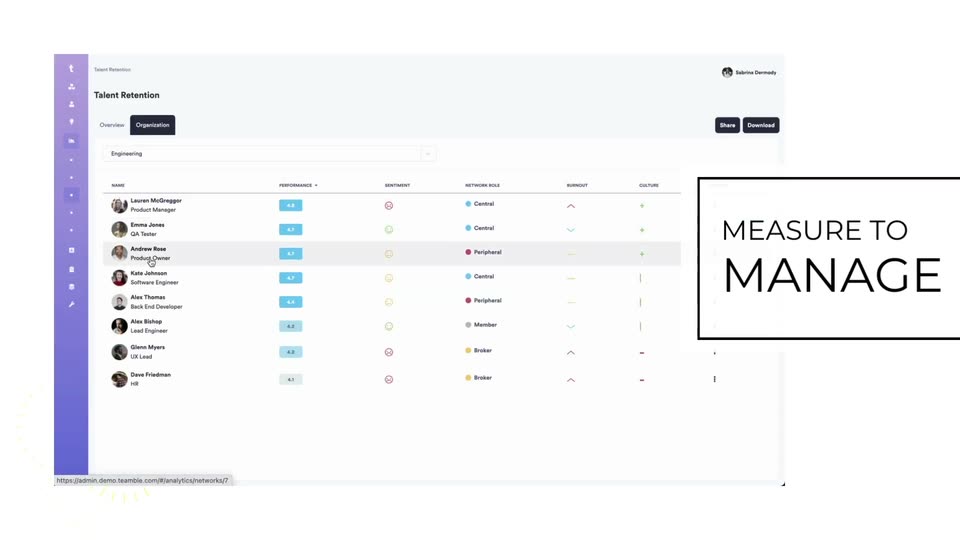
A tilted 3D mockup of a Teambition dashboard cycles through views: overlapping analytics cards settle into a Talent Retention table, then a filtered employee list, then an organizational network graph. A black-bordered MEASURE TO MANAGE caption stays fixed on the right.
On-screen text: “MEASURE TO MANAGE”
Techniques: 3D mockup
Camera: Pan
A flat dashboard interface scrolls vertically on the left, moving from a feedback chart to a teams list, while a black-bordered headline card reading MEASURE TO MANAGE holds the right side. A small yellow star sits in the lower-left corner.
On-screen text: “MEASURE TO MANAGE”
Techniques: Split screen
Camera: Pan
A tilted 3D view of a team dashboard scrolls through its overview and timeline tabs as a cursor clicks through them, while a white card reading MEASURE TO MANAGE holds steady on the right.
On-screen text: “MEASURE TO MANAGE”
Techniques: 3D mockup, Cursor demo
Camera: Static
A product UI screen shows a tabbed panel; a cursor clicks from the Sentiments tab to Settings, swapping the content from a sentiment summary to a team members table. A black-bordered box on the right holds the static headline throughout.
On-screen text: “MEASURE TO MANAGE”
Techniques: Cursor demo
Camera: Static
A team dashboard interface fills the frame, its left panel listing members and the main area switching from a settings tab to a feedback loops table as a cursor moves across the top. A bordered white card on the right holds the static headline.
On-screen text: “MEASURE TO MANAGE”
Techniques: Cursor demo
Camera: Static
A light product screen with a left icon rail and a row of four white template cards, each with an emoji and a label. A mouse cursor hovers over the first card while the frame stays locked off.
Techniques: Cursor demo
Camera: Static
A light app screen shows two template panels, Use Templates and Custom Templates, each with rows and Select buttons. A cursor moves down the left list and presses the Select button on the third row.
Techniques: Cursor demo
Camera: Static
A two-pane feedback builder interface fills the frame. The left list of three questions reflows as the selected item switches from Situation to Impact, while the right preview panel spins a loading circle then fills with the matching prompt. A cursor drifts to the green Next button.
Techniques: Cursor demo
Camera: Static
A light settings screen loads: a blue spinner spins at center, then the page populates with audience configuration fields, a green success toast sits in the top right, and a cursor rests at the bottom.
On-screen text: “C”
Camera: Static
A full-screen product UI: the cursor clicks the audience dropdown open, the page scrolls down a table of reviewer names, then the view switches to the Feedback Scheduler page with a blue loading spinner in the center.
Techniques: Cursor demo
Camera: Pan
A two-column product screen shows a feedback scheduler form on the left and a chat message preview on the right. A cursor opens the frequency dropdown, the option list expands, then collapses.
Techniques: Cursor demo
Camera: Static
The Teams app shows a left sidebar and a chat view behind a centered Give Feedback dialog, which fades in over the first second and then holds still. A cursor rests at the right edge.
Camera: Static
Two colleagues high-five in a bright office inside a rounded-corner frame, with a blurred, brighter version of the scene filling the left. A white panel carries the static headline. The clip cuts to a violet gradient showing the white teamble wordmark.
On-screen text: “Reduce Turnover”, “& Increase Engagement”, “teamble”
Camera: Static
On a purple gradient with a soft glow, the white teamble wordmark scales up at center, then the tagline where great teams are built appears beneath it. Locked-off frame.
On-screen text: “teamble”, “where great teams are built”
Techniques: Kinetic type
Camera: Static