0:55

Willow | AI Basecamp - 1/ "Ask me before you delete anything" is a prompt. Prompts get summ
Willow · Consumer · Nov 2026
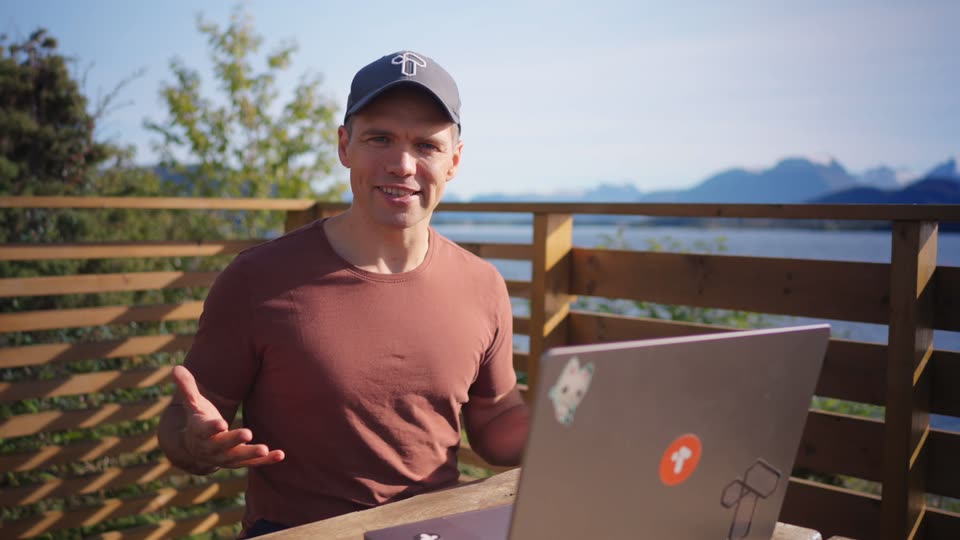
Tana’s 1:21 launch film runs 45 scenes, about 1.8 s each. The product shows up at 0:16 and 1 feature is revealed. The call to action lands at 1:14 (91% in), over a voiceover. Founder talking-head on a sunny lakeside deck alternates with rapid UI close-ups and short B-roll inserts, cutting at roughly 26 cuts per minute. Signature moves: white line icons (the Wi-Fi glyph) floating over B-roll, a 3D Tana mark hovering above the laptop, and zoom push-ins on screens with a pinned 'WORKING OFFLINE' badge.
Is this your launch? to your site or press kit.
Willow · Consumer · Nov 2026
The Browser Company · Productivity · Feb 2024
Films whose music sounds like this one, voice left out
Tenera · Upbeat electronic
Windsurf · Upbeat electronic
HeyGen · Electronic dance
A man in a dark cap and rust t-shirt sits at a wooden table, gesturing with both hands as he speaks to camera. A laptop with stickers on its lid sits in front of him; a wooden railing, lake and mountains fill the background.
Camera: Static
Two hands hold a tilted smartphone in a blurred outdoor cafe, its screen showing the Supertags app with a grid of colored tag tiles. The locked-off frame shifts only as the hands and phone tilt gently.
Camera: Static
A man in a gray cap and rust t-shirt sits at a wooden table on a lakeside deck, gesturing as he speaks to camera. An open laptop with stickers sits in the foreground, water and mountains behind. A static 'Supertags' caption is locked to frame.
On-screen text: “Supertags”
Camera: Static
A man in a black shirt and life vest sits on a boat, speaking to camera and spreading his hands, with a calm lake and mountains behind him. White text “The Everywhere OS” builds word by word across the lower frame.
On-screen text: “The Everywhere OS”
Techniques: Kinetic type
Camera: Static
A man in a dark cap and rust t-shirt sits on a wooden deck, talking to camera with a lake and hills behind. A laptop with a cat sticker sits in the foreground. The large caption “The Everywhere” slides in over the shot.
On-screen text: “The Everywhere”
Techniques: Kinetic type
Camera: Static
A man in a brown t-shirt and cap stands at a wooden table on an outdoor deck, gesturing with both hands as he speaks. An open laptop sits before him, with a lake and mountains in the soft-focus background.
Camera: Static
A man in a gray cap and rust t-shirt sits at a wooden table on a lakeside deck, speaking and gesturing with open hands, a sticker-covered laptop in front of him, water and mountains behind.
Camera: Static
A white Wi-Fi icon sits centered on an airplane window, framing the wing and red engine above a sunlit cloud layer. The shot holds static for the full duration.
Camera: Static
A group of campers sits around a fire on a dark beach at night. A white Wi-Fi signal icon hovers in the center of the frame above the fire, its outer arcs pulsing in and out of opacity.
Camera: Static
A pixelated first-person drive heads toward a mountain tunnel, the road and green slopes blurring with motion. A white arc-and-dot icon hovers at the center of the frame, growing as the camera enters the dim orange-lit tunnel interior.
Camera: Push in
A camera glides forward through a warm orange rock tunnel, the curving road and wall lights rushing past. A circular loading spinner of gray dots hovers fixed at the center of the frame, stable against the moving walls.
Camera: Static
A dark error state fills the frame: a crossed-out Wi-Fi glyph sits above the headline Tana can't load and two lines of gray body copy. The whole message fades from near-black to full brightness on a locked-off frame.
Camera: Static
A man in a brown t-shirt and dark cap talks to camera on a wooden deck, gesturing with both hands. An open laptop with stickers sits in the foreground right. Behind him, a lake and mountain range stretch under a clear sky.
Camera: Static
A laptop sits on a wooden desk in a softly lit room, its screen showing a list of questions with AI model names. A cursor moves down and clicks the send button as a Send tooltip pops up, while a white logo hovers above the lid.
Techniques: Cursor demo
Camera: Static
A laptop on a wooden desk in a bright room displays a dark meeting-notes interface; lines of notes with colored #tags scroll and update on screen while a white T logo hovers above the laptop and drifts slightly downward.
Camera: Static
A laptop on a wooden desk displays a dark app interface that switches from a Learning Goals list to a Past Meetings list, as a book cover panel slides in from the right. A cursor hovers the sidebar beneath a white logo floating above the lid.
Techniques: 3D mockup, Cursor demo
Camera: Static
A laptop rests on a wooden desk in a blurred office, its screen showing a task board with In progress and Done columns. A white geometric logo hovers centered above the screen. The frame is locked-off with no motion.
Techniques: 3D mockup
Camera: Static
A laptop on a wooden desk in a sunlit room shows a dark note-taking app. The screen scrolls from a task and project list to a lecture summary page. A white geometric logo hovers above the device.
Techniques: 3D mockup
Camera: Static
A silver laptop sits on a wooden desk in a sunlit room, its screen showing a note app where a lecture summary list scrolls upward. A white geometric logo hovers above the lid. The frame stays locked off.
Camera: Static
A laptop on a wooden desk displays a dark task-list screen, a white Notion logo floating above it. A cursor hovers over the tasks, the list scrolls to reveal a new item, and the cursor moves to the header checkbox.
Techniques: Cursor demo
Camera: Static
A man in a gray cap and rust t-shirt sits at a wooden table on an outdoor deck, talking and gesturing with both hands. An open laptop with stickers sits in the foreground, with a lake and mountains behind a wooden railing.
On-screen text: “Elevate Your Business with Al Series”, “All Open Tasks”, “4”
Camera: Static
A man in a gray cap and rust t-shirt sits on a sunlit wooden deck, gesturing with both hands as he talks to camera. A lake and distant hills sit behind him; a laptop with a cat sticker occupies the lower right corner.
Camera: Static
A daily notes page fills the frame, then a red offline banner slides down from the top carrying a warning icon and a Work offline button. The page behind dims and blurs as the banner settles.
Camera: Push in
A tight close-up of a light pink banner where a green “Work offline” button scales up from a smaller size, beside red text reading “r a while?” on the left. The frame stays locked-off.
Camera: Static
On a dark navy background, the white Tana mark with orange and blue fringes falls in from the top edge and settles above a pale green pill reading “Work offline,” which scales in with a soft glow.
On-screen text: “r a while?”, “Work offline”
Techniques: Kinetic type
Camera: Static
A man in a cap and leather jacket sits by a bright airplane window, working on a laptop. The caption “Work offline” scales in over the locked-off shot.
On-screen text: “Work offline”
Techniques: Kinetic type
Camera: Static
A note-app window shows a red offline banner above a daily task list; the view zooms in on the list and a cursor slides in at the lower right.
Techniques: UI zoom, Cursor demo
Camera: Push in
A white modal titled “Work offline?” overlays a dimmed task page, explaining that offline mode reloads the app. A cursor drifts down from the heading and rests on the green “Work offline” button.
Techniques: Cursor demo
Camera: Static
The view starts zoomed into a task detail card titled “Review yesterday's Content sync”, then pulls back to reveal the full app: a left list of today's tasks and right panels for Open tasks and Agenda.
Techniques: UI zoom
Camera: Push in
A close-up of the Open tasks list under a Working Offline badge pulls back to reveal the full daily note page with task list and agenda. A cursor clicks a task, opening a new tab that shows its properties.
Techniques: UI zoom, Cursor demo
Camera: Push in
A flat task page in a note app. The cursor taps the Add date field, a calendar date picker pops up showing September 2025, then closes, and the Due date row updates to Today.
Techniques: Cursor demo
Camera: Static
A two-panel note app sits over a mountain wallpaper. The left note's Decisions list fills in as a cursor types, and the right note scrolls down to reveal more meeting sections, while a WORKING OFFLINE badge stays pinned in the top-right corner.
On-screen text: “WORKING OFFLINE”
Techniques: Cursor demo
Camera: Static
A cursor clicks Project in the pinned sidebar list, and the task board view is replaced by a project overview table with status, duration and definition-of-done fields. A WORKING OFFLINE pill at the top right fades out as the new view settles.
On-screen text: “WORKING OFFLINE”
Techniques: Cursor demo
Camera: Static
A macOS window shows a project overview table with status and duration columns over a mountain wallpaper. A gray outlined badge reading WORKING OFFLINE sits in the top right corner while a cursor rests on the Project overview tab. The framing stays static.
On-screen text: “WORKING OFFLINE”
Camera: Static
A man in a brown t-shirt and gray cap sits at a wooden table on a lakeside deck, gesturing with both hands as he speaks. An open laptop with stickers on its lid sits in front of him, with water and mountains behind a wooden railing.
Camera: Static
A dark chat screen shows a user question about visiting Italy. The AI reply types out word by word beneath a Stop button, ending on a Rome bullet while an AI is writing indicator pulses below.
Camera: Static
A dark note editor and a publish preview panel sit side by side, both showing the same investor update document. A cursor glides over the preview's headings, moving from TL;DR down to Highlights.
Techniques: Split screen, Cursor demo
Camera: Static
A dark transcript interface tilts in 3D perspective, then levels to a flat front view. A red status banner spans the top with Pause and Stop buttons. Bulleted speaker lines with timestamps fill the list, the last line typing out as a cursor sits mid-screen.
Techniques: 3D mockup
Camera: Static
A man in a gray cap and rust t-shirt sits at a wooden table, gesturing with both hands as he speaks to camera. A sticker-covered laptop sits in the foreground; a wooden railing, lake and mountains fill the background.
Camera: Static
A man in a dark cap and rust t-shirt sits at a wooden table on an outdoor deck, a silver laptop with stickers open before him. He gestures with both hands while speaking. A wooden railing, lake, and mountains fill the sunlit background.
Camera: Static
A man in a dark cap and rust t-shirt sits at a wooden table outdoors, speaking as he looks at an open sticker-covered laptop. A slatted fence behind him frames a lake and hazy mountains under a clear sky. He shifts his hands slightly on the table.
Camera: Static
A white script panel with bulleted notes fills the left over a blue-orange gradient, while a rounded video window on the right shows a man in a cap talking outdoors, then covering the lens with his hand.
Techniques: Split screen
Camera: Static
Medium shot of a man in a rust t-shirt and dark cap seated at a wooden table on a lakeside deck. He speaks to camera, his hand moving from a small gesture to rest on a closed laptop with an orange sticker. Water, trees and mountains fill the background.
Camera: Static
A man in a dark baseball cap and rust t-shirt sits on a sunlit wooden deck, speaking directly to camera. He smiles and makes a small hand gesture. A lake and hazy mountains fill the soft-focus background.
Camera: Static
A man in a cap types on a laptop at a wooden table on a lakeside deck, snow-capped mountains behind. White text 'Work in Tana' with the Tana mark fades in at top, then 'Offline' and 'tana.inc' appear, while leaves sway.
On-screen text: “Work in Tana”, “Offline”, “tana.inc”
Camera: Static