0:45

Primer Bold & Punchy B2B Product Launch
Primer · Jun 2026
Superlist · Feb 2024 · 0:33 · AI-annotated
Superlist’s 0:33 launch film runs 19 scenes, about 1.8 s each. The product shows up at 0:20. There is no explicit call to action; a voiceover carries the film. Built as a four beat launch: a typographic tagline over a live action montage of professionals, a red question card over a montage of paper lists, a 3D interface tour, and a logo reveal with the value prop. Pacing is fast (around 37 cuts a minute, near 99 bpm) with hard cuts between stock footage and locked off title cards, while the signature move is word by word text reveals that hold, paired with 3D tilted interface renders that level out as the cursor moves.
Is this your launch? to your site or press kit.
A dark navy field holds the tagline as it types out word by word, “Great things” on the top line and “start with a list.” below, the closing phrase in red. The frame stays locked and the line holds at the end.
On-screen text: “Great things start with a list.”
Techniques: Kinetic type
Camera: Static
A space shuttle drifts in orbit over a blue, cloud-streaked Earth, a station module with solar panels filling the left edge. The locked-off frame holds as the two-line tagline rests over the footage.
On-screen text: “Great things”, “start with a list.”
Camera: Static
Close-up of a surgeon in teal scrubs, white cap, mask, and clear glasses, head bowed. Shallow focus keeps the face sharp against a blurred teal room with a second figure out of focus; a slight handheld drift follows the still head.
Camera: Static
In a washed-out lab, a woman in pink and a man in plaid stand at a white table fitted with orange robotic arms. The man holds a tablet as the woman points at the surface. Red chairs and glass walls fill the background; the camera holds still.
Camera: Static
Two designers lean over a glowing glass table where a white 3D car hologram floats. The man in black adjusts the front bumper while the man behind peers in, clay models and car sketches lining the concrete walls.
Techniques: 3D mockup
Camera: Static
A solid black frame holds for the full duration with no visible content, text, or motion, serving as a brief blank transition.
Camera: Static
Red solid background. A single line of bold sans text fills in word by word from left to right, reading “What do you want to get done?”. The final two words “get done?” switch to white and a blue hand-drawn oval strokes around them.
On-screen text: “What do you want to get done?”
Techniques: Kinetic type
Camera: Static
A hand writes a short list on a small spiral notepad, then lifts the pen and checks off the first item. The background is a dark cafe with blurred warm lights and a stack of white plates.
On-screen text: “What do you want to get done?”
Camera: Static
A hand in a mustard sweater writes in a notebook, then the view cuts to a top-down of two people at a desk, one typing on a laptop showing a budgeting app, the other taking notes, a yellow dish between them.
Camera: Static
A woman in a plaid shirt writes in a notepad at a cafe counter, then dissolves into a cockpit where two pilots sit at glowing instruments, then dissolves again into a woman in a dark jacket writing as a man in a suit stands beside her.
Camera: Static
A close-up shows two hands in green scrubs clasping in a handshake, then cuts to a hand gripping a baseball bat mid-swing, the bat blurred by motion against a dark background with soft bokeh lights.
Camera: Static
A close-up of a red pen tip glides across white paper marked with faint gray grid lines. The shot is shallow and soft-focused, the pen entering from the top right and moving left as the page fills the frame.
Camera: Static
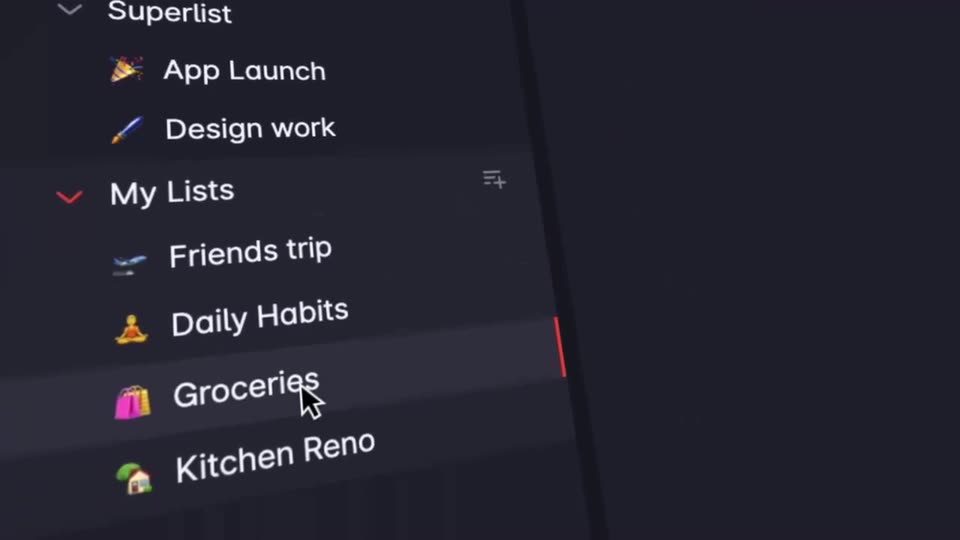
The dark interface of a to-do app sits at a 3D angle, sidebar of lists left, task list right. A white cursor slides down the sidebar to Groceries, highlighting it, while the right panel shows Salad and Butter checked off with red strikethroughs.
Techniques: 3D mockup, Cursor demo
Camera: Pan
A horizontal carousel of rounded video cards with red borders scrolls left, showing a white desk labeled Teamwork, a green wall being painted labeled Personal Projects, and a sunset scene, then a blue quotation mark draws in over the green card.
Camera: Pan
Three vertical panels on a red background show a whiteboard, a wall being painted, and an astronaut at sunset, each with a hand-drawn label. The view zooms into the left panel, which resolves into the app's project view as a cyan line draws across.
On-screen text: “Teamwork”, “Personal Projects”, “Everything in between”, “Superlist Launch”
Techniques: Split screen, UI zoom
Camera: Pan
A dark project board floats tilted in 3D perspective. The camera pushes in and levels as a cursor hovers on the Launch comms row, and a detail panel appears along the right edge.
Techniques: 3D mockup, Cursor demo, UI zoom
Camera: Pull out
A dark task-management interface zooms from a wider page view to the right-hand Launch comms panel. A cursor moves to the circular button beside E-mails and website and clicks it, while the checklist and note stay in frame.
Techniques: UI zoom, Cursor demo
Camera: Push in
A fingertip presses a metal toggle beneath an engraved MAIN SWITCH plate, then the frame cuts to a floating gray card bearing the white Superlist wordmark over a dark field.
Camera: Pan
A large white Superlist wordmark on dark navy shrinks to a small logo at top center as the headline Home to all your lists builds in, with a red checkmark badge and red lists. A small availability line fades in below, then the frame holds.
On-screen text: “MAIN”, “SWITCH”, “ON·”, “·OFF”, “Superlist”, “Home to”, “all your lists”, “Now available on”, “MacOS, iOS, Android, Web”
Techniques: Kinetic type
Camera: Static