1:16
Subquadratic — Efficiency is Intelligence
Subquadratic · Nov 2026
Superhuman · Feb 2026 · 0:38 · Full motion · AI-annotated
Superhuman’s 0:38 launch film runs 10 scenes, about 3.8 s each. The product shows up at 0:04 and 2 features are revealed. There is no explicit call to action. The video alternates full-frame gradient title cards with white interface panels, and every headline sharpens out of a soft blur before the UI slides in. Pacing holds each beat for a full second or more, and the signature moves are the focus-pull text reveals and the cursor-driven, character-by-character typing demos.
Is this your launch? to your site or press kit.
Subquadratic · Nov 2026
Invertix · Industrials · Nov 2026
Films whose music sounds like this one, voice left out
Canva · Eurodance / Electronic Dance Music
Microsoft · Modern electronic dance, funk, and disco
Airtable · Modern electronic dance, funk, and disco
A dark purple and teal gradient fills the frame. The centered white headline sharpens from a soft blur, holds briefly, then fades out.
On-screen text: “Book meetings”, “instantly”
Camera: Static
A white email card with sender name, date and body copy fades in over a light gray field, then the whole card slides upward to reveal a draft recipient row at the bottom edge.
On-screen text: “instantly”
Camera: Pan
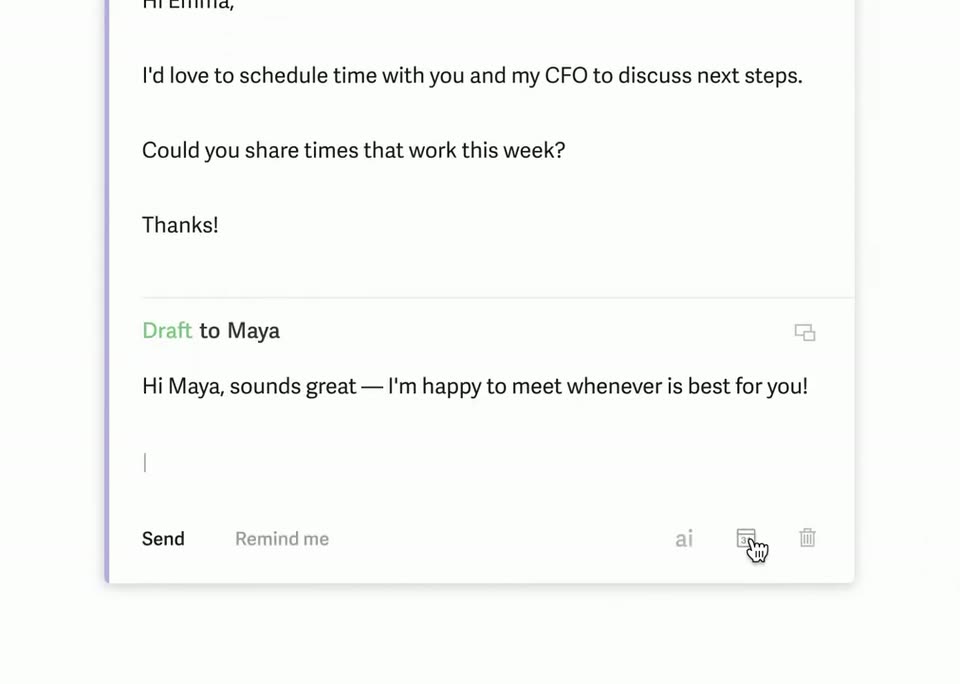
Below an incoming email, a draft reply to Maya types itself out character by character with a blinking caret. A cursor then clicks the calendar icon in the toolbar, opening a dropdown of booking page options.
Techniques: Kinetic type, Cursor demo
Camera: Push in
A close-up of an email draft: the user types 'vip' and a dropdown of booking options appears with 'VIP Intro call' highlighted. Selecting it inserts a blue 'schedule here' link into the message. The cursor moves to the Send button, then the view pulls back to white.
Techniques: Cursor demo
Camera: Pan
A white two-line headline sits centered on a dark purple-to-teal gradient. A blurred product form fades out from the top at the start, and a soft focus blur drifts across the words before settling sharp.
On-screen text: “Schedule without”, “back-and-forth”
Camera: Static
A white scheduling panel with a contact, a February 2026 calendar and a column of time slots slides in from the left over a dark gradient, its right column widening into view, then a cursor appears at the lower right while a static two-line headline holds.
On-screen text: “Schedule without”, “back-and-forth”
Techniques: Masking, Cursor demo
Camera: Push in
A white scheduling panel sits on a dark teal-to-purple gradient. A hand cursor selects a time slot, the view cuts to a details form where an email is typed and a guest field is added, then an arrow cursor clicks SCHEDULE and the screen wipes to white.
Techniques: Cursor demo
Camera: Static
A white confirmation card on a dark purple-to-teal gradient fades in, holds, then fades out. It displays a scheduled event with date, guest list and meeting link. A mouse cursor rests at the lower right corner at the start.
Camera: Static
On a dark purple and teal gradient, the white line “Email and calendar.” sharpens out of a blur, then “Better together.” fades in beneath it. Both lines hold, then dim and fade to black.
On-screen text: “Email and calendar.”, “Better together.”
Techniques: Kinetic type
Camera: Static
A dark gradient of deep purple and teal fills the frame. The white title SUPERHUMAN MAIL sits centered, holding static after a brief horizontal blur settles in on the opening frame.
On-screen text: “SUPERHUMAN MAIL”
Camera: Static