2:07


Y Combinator - Wato (@watolabs) is building the collaboration layer for teams workin
Wato · B2B · Jun 2026
Stardrift’s 1:06 launch film runs 20 scenes, about 3.3 s each. The product shows up at 0:06 and 4 features are revealed. The call to action lands at 0:54 (82% in), over a voiceover. Founder-led talking-head shots in a warm living room alternate with flat 3D phone mockups on a dotted off-white field, each feature announced by a single gray caption pill. Pacing is steady at about 4.5 cuts per minute, with captions building word by word and notification cards sliding in to punctuate each feature beat.
Is this your launch? to your site or press kit.
Wato · B2B · Jun 2026
Framer · Design · Jul 2024
Framer Convert · Mar 2026
A woman in a green cardigan sits on an orange sofa, speaking to camera and gesturing with her hands. Stylized white captions build word by word on either side of her, first stating a travel point, then asking a question.
On-screen text: “There is so much more to travel than just booking a flight.”, “So why is that the only thing today's AI assistants can help you do?”
Techniques: Kinetic type
Camera: Static
A woman in a green cardigan sits on an orange couch, talking to camera in a sunlit room with a plant and geometric wall panel behind her. A white serif name card appears at the lower right while captions track her speech along the bottom.
On-screen text: “Hi, my name is Leila”, “Leila”, “Founder / Stardrift”, “and I'm the founder of Stardrift.”, “Over the last few months,”, “So why is that the only thing today's AI assistants can help you do?”
Camera: Static
A woman in a green cardigan sits on an orange couch and speaks to camera on the left half, while a flat phone mockup on the right scrolls down a travel itinerary app. White subtitles caption her words at the bottom of the left panel.
On-screen text: “we've helped tens of thousands of”, “travelers plan out their trips day by day,”, “step by step”
Techniques: Split screen
Camera: Static
A woman in a green cardigan sits on a rust-orange couch in a bright living room, speaking to the camera and gesturing with her hands. A plant and a shelf with a vase sit behind her. White subtitles run along the bottom of the frame.
On-screen text: “And today we've distilled the lessons”, “we've learned into a mobile app”, “that you can download and put”, “in your pocket for your next trip.”
Camera: Static
Locked-off medium shot of a woman in a green cardigan seated on an orange couch, speaking to camera in a plant-filled living room. White subtitle captions sit at the bottom, the second one scaling in as it lands.
On-screen text: “in your pocket for your next trip.”, “Let me show you what it can do.”
Camera: Static
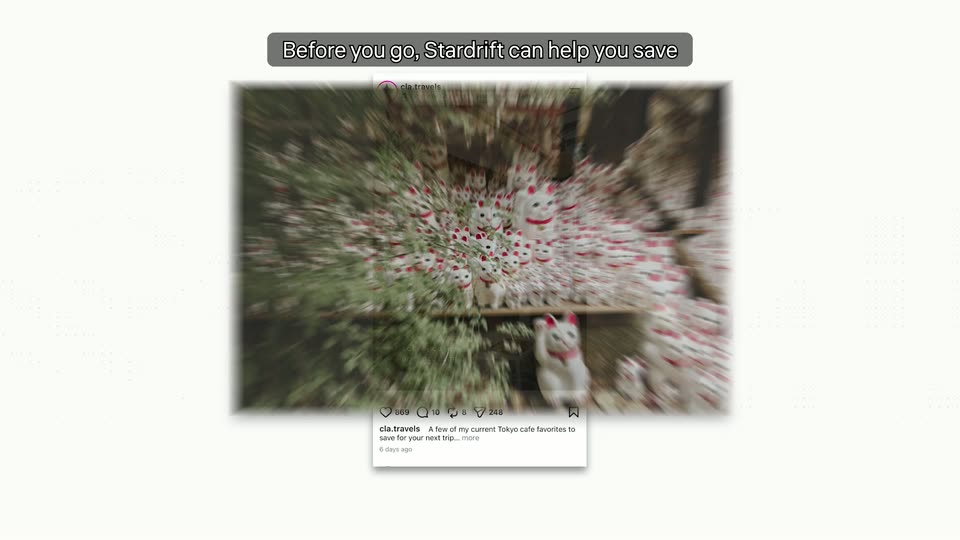
On a white dotted background, a gray pill caption reads across the top while an Instagram post card, showing a photo of white lucky-cat figurines, scales up into the center. A gray caption line sits at the bottom of the frame.
On-screen text: “Before you go, Stardrift can help you save”, “Let me show you what it can do.”
Camera: Static
A gray banner reads 'Before you go, Stardrift can help you save' above a centered phone mockup. The Instagram feed swaps from a Tokyo hotel to a bookstore, a blue chat bubble pops in, and a location card slides up as the backdrop becomes a Tokyo map.
On-screen text: “Before you go, Stardrift can help you save”, “recs you get from friends on social media.”
Camera: Static
A light map of Tokyo fills the frame as five rectangular photo cards with place names shrink into circular teardrop pins. A dark subtitle bar at the top swaps its caption while the pins settle into place.
On-screen text: “recs you get from friends on social media.”, “It also sorts them by country and region.”
Techniques: Morph
Camera: Pull out
A phone mockup tilts into focus on a dotted white background, showing a Tokyo map dotted with green and blue pins above the title Tokyo 2027. A dark caption box sits at the top of the frame.
On-screen text: “As you can see here,”
Techniques: 3D mockup
Camera: Pull out
A phone mockup on a dotted off-white background shows a maps app. The screen transitions from a Tokyo map with a trip card, to a blurred list of places, to a home grid of trip folders, while a gray caption bar sits at the top.
On-screen text: “of inspiration for our Tokyo trip.”
Camera: Pull out
A travel app fills a 3D phone mockup that eases from a side tilt to face the camera. A gray caption bar with white text slides in at the top.
On-screen text: “Once you've pulled enough inspiration,”
Techniques: 3D mockup
Camera: Static
A dark feed of travel inspiration cards fades into a light text input field, where a word is typed with the on-screen keyboard visible below. A caption bar with white text on a dark pill sits across the top of the frame.
On-screen text: “Once you've pulled enough inspiration,”
Techniques: UI zoom
Camera: Static
A mobile app screen on white shows a prompt box being typed into, while a gray caption pill at the top swaps phrases. Near the end, a weather card and a blurred card slide in from the left and right edges.
On-screen text: “Once you've pulled enough inspiration,”, “Stardrift can plan an initial”, “outline of your trip for you.”, “It'll pull in details like the weather,”
Techniques: Kinetic type
Camera: Static
A phone chat view with a typed prompt and keyboard sits center on a light background. Weather, flight, tea ceremony and saved-shop cards drift in and out around it, while a top caption highlights phrases in sequence as the voiceover speaks.
On-screen text: “your saved places,”, “a plan you've made”
Techniques: Kinetic type
Camera: Static
A phone mockup sits centered on a white background, its travel-app screen scrolling upward through a Tokyo itinerary: a hero cityscape with map overlay, then day-by-day rows and a breakfast-recommendation card. A dark caption pill above the phone reads the voiceover line, swapping once mid-scene.
On-screen text: “and any bookings you've made”, “to build a day-by-day itinerary.”
Camera: Static
A centered iPhone mockup on a light background shows a Golden Gate Bridge wallpaper and a white notification card with a red star icon: Time to leave for the airport, then flight details appear. A caption pill above the phone swaps phrases in sync with the voiceover.
On-screen text: “On your actual travel day,”, “StarJive will even tell you”, “when to go to the airport.”
Camera: Static
A front-facing iPhone screen shows an Upcoming travel list. A notification card slides down and fades out as the top caption changes to travel information in one place. A blue route line draws on the map from Mission to SFO above a flight card.
On-screen text: “As you open the app,”, “travel information in one place.”
Camera: Static
A woman in a green cardigan sits on an orange couch, speaking to camera. White notification cards slide in from the left; the first expands into a place card, then three more stack below with thumbnails and reasons. Subtitles run along the bottom.
On-screen text: “Stardrift knows what you like.”, “So as you're wandering around,”, “it'll send you notifications about cool”, “places you otherwise might have missed.”
Techniques: Morph
Camera: Static
A woman in a green cardigan sits on an orange cushion in a sunlit living room, speaking to the camera. Subtitles swap line by line at the bottom, an App Store badge drops in on the left, and a white Stardrift.ai wordmark fades in at the bottom right.
On-screen text: “The best travel involves discovering”, “something you didn't even know existed,”, “and we want to help you find it.”, “To get started, you can download Stardrift on”, “Download on the App Store”, “the App Store or sign up at stardrift.ai.”, “Stardrift.ai”
Camera: Static
A red five-pointed star holds center on black as a thin red line draws a curved orbit around it. A white caption line sits at the bottom. The star mark scales down and the caption fades, leaving a black frame.
On-screen text: “the App Store or sign up at stardrift.ai.”
Camera: Static