1:58
Introducing Devin Apps
Cognition · Nov 2026
Specific’s 1:28 launch film runs 10 scenes, about 8.9 s each. The product is on screen from the first frame and 1 feature is revealed. The call to action lands at 1:19 (89% in), over a voiceover. Built as a two-shot on-camera intro, an animated diagram explainer, a split-screen live demo, and a logo sign-off, all held on a clean white field with the footage framed in a rounded card. Signature moves are the card-on-white framing, the right-side animated panel (dotted-grid diagram and screen recording), and soft slide and zoom transitions at a steady ~83 BPM pace.
Is this your launch? to your site or press kit.
Cognition · Nov 2026
OpenAI · AI · Oct 2025
Films whose music sounds like this one, voice left out
Ramp · Upbeat electronic
Donkey · Electronic
Lua Global Inc · Upbeat electronic
Two men sit on a gray couch before a wall of framed travel posters; the man on the left speaks to camera. White name plates slide in from the left and right edges, and white subtitles run along the bottom of the frame.
On-screen text: “Specific”, “Hi, we couldn't be more excited to show you Specific”, “Fabian Lindfors”, “Iman Radjavi”, “a platform that builds and deploys backends from plain English”, “Specific can be integrated in minutes with”
Camera: Static
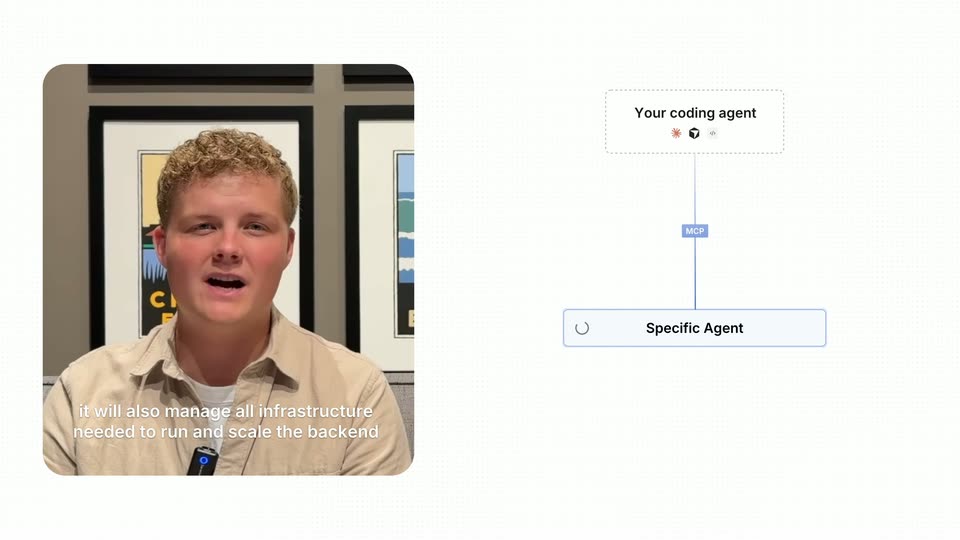
A man in a beige shirt speaks in a rounded card on the left while a dotted-grid panel on the right builds a diagram: a dashed “Your coding agent” box connects via an MCP line to a “Specific Agent” box, with feature chips and a moving “API spec” label appearing.
On-screen text: “Specific can be integrated in minutes with any coding agent that you are using”, “Your coding agent”, “to build web or mobile apps”, “like Claude Code, Cursor or even a custom agent”, “Simply connect to your Specific project over MCP and you are ready to go”, “Specific Agent”, “MCP”, “When your coding agent recognises that it needs backend functionality”, “it can send a natural language prompt to Specific, explaining what it needs”, “Build a todo list API', 'The Specific agent will build production-ready code', 'tailored for the use case', 'it will also manage all infrastructure needed to', ”
Techniques: Split screen
Camera: Pull out
A split layout pairs a filmed man on the left with a flow diagram on the right linking a coding agent to a specific agent and six integration tiles. The diagram fades out as the video shrinks to the corner, revealing a second man.
On-screen text: “that it can use to automatically integrate the backend into your app”
Techniques: Split screen
Camera: Static
A rounded live-action clip sits on the left of a white field, two men seated before a wall of framed travel posters, one in a beige shirt, one in a black cap. They glance at each other and the camera as white dialogue captions appear at the lower left.
On-screen text: “Should we see it in action?”, “Sure”
Camera: Static
Split screen: a man in a black cap talks left while a 3D browser mockup of a todo app sits right. The mockup zooms into the input field, a cursor types a task and clicks the plus button, then the panel cuts to a dark terminal.
On-screen text: “Here we have a nice todo list web app we built using Claude Code”, “but it doesn't actually do anything yet as there is no backend”
Techniques: Split screen, 3D mockup, UI zoom, Cursor demo
Camera: Static
Split screen on white: left, a man in a black cap talks on a gray couch; right, a macOS terminal on a blue wallpaper types a claude mcp command, then a prompt, then streams Claude Code output. White captions appear bottom left.
On-screen text: “We can easily connect Claude Code to the Specific MCP”, “and then ask it to make the app functional for us”
Techniques: Split screen
Camera: Static
A man in a black cap and t-shirt speaks to camera on the left, framed by posters, while a terminal window on the right scrolls through code and status lines. White subtitles change beneath him.
On-screen text: “and then ask it to make the app”, “functional for us”, “Claude Code will collaborate with the Specific agent”
Techniques: Split screen
Camera: Static
Split screen: a man in a black cap talks to camera on the left; on the right, a white task card where a cursor types a task, adds it, then checks it off. The UI panel slides out and the speaker frame widens at the end.
On-screen text: “to get a fully deployed backend”, “and after a few minutes, our app is fully functional and ready to scale”
Techniques: Split screen, Cursor demo
Camera: Pan
Two men sit on a gray couch before a wall of framed travel posters, framed in a rounded card on white. A white caption fades in below them. The card then slides down to show their torsos, revealing the Specific logo and a URL on the white field.
On-screen text: “That's Specific”, “Get in touch if you would like to try it out yourself”, “specific.dev”
Camera: Static
A white sign-off card holds the centered Specific logo above the URL specific.dev. A thin strip of live-action footage at the bottom edge is masked away in the first second, leaving the static logo.
On-screen text: “specific.dev”
Techniques: Masking
Camera: Static