2:32
Explore
00:00:00 / 01:00:09
- Length
- 1:00
- Scenes
- 28 · 2.2 s avg
- Product on screen
- 0:16
- Features shown
- 3
- Call to action
- 0:53 · 88%
- Voiceover
- Yes
- Views
- 833 on YouTube
as of November 23, 2026
Sparkles’s 1:00 launch film runs 28 scenes, about 2.2 s each. The product shows up at 0:16 and 3 features are revealed. The call to action lands at 0:53 (88% in), over a voiceover. The video runs as a tight beat sheet: a vibe-coding premise, a setup-hell problem montage, a CEO intro plus value prop, then three feature beats each built as a serif title card, a UI mockup demo, and a cartoon payoff line, closing on a single CTA card. Cuts land near twelve per minute over crumpled paper backdrops, with hand-drawn shape characters that snap into grids, bold outlined serif type, and UI panels that slide and zoom between beats.
Footage neededEstimated needs: 3 capture groups — your screens or recordings · 1 official logo — reused across the film · 1 filmed passage — shoot, supply or replace · 12 graphic passages — draw or supply
Is this your launch? to your site or press kit.
More like this

1:15

Google Cloud - Introducing Gemini Enterprise Agent Platform—our new platform to buil
Google · AI · Apr 2026
1:14

RouterPlus : Better inference pricing, latency and capacity for AI teams
RouterPlus · Oct 2026
Similar soundtrack
Films whose music sounds like this one, voice left out
1:11
Glean - The intelligence era is here….and it’s powered by Glean. 💡 Glean’s c
Glean · Lo-fi hip-hop / Chillhop
0:51
Launch YC - Retrofit (YC W25)
Retrofit · Electronic dance music
2:08

Superhuman AI 2.0
Superhuman · Lo-fi hip-hop / chillhop
Sparkles (YC W26) Launch video ✨, scene by scene
· 28 scenes as text
01 · Hook · 0:00–0:01
On a crumpled green paper background, a blue cartoon triangle holding a laptop hops up onto the black serif title “Vibe coding” as the words snap into place with a white outline and drop shadow. Below, a thin gray sans-serif line “is a thing now . . .” types in letter by letter.
On-screen text: “Vibe coding”, “is a thing now . . .”
Techniques: Kinetic type
Camera: Pull out
02 · Hook · 0:01–0:02
On a mint green background, the cartoon headline Vibe coding with a blue triangle mascot holding a laptop scales in above the thin gray line is a thing now .... The whole block scrolls up, revealing a hand-drawn dashboard wireframe at the bottom.
On-screen text: “Vibe coding”, “is a thing now ...”
Techniques: Kinetic type
Camera: Pan
03 · Hook · 0:02–0:05
Large “Vibe coding” scales in above a hand-drawn monitor of cartoon dashboard shapes, with “is a thing now...” below; a serif headline then types out at the top as a hand points at the screen, and a cut reveals a surprised face with “Right?”.
On-screen text: “Vibe coding”, “is a thing now...”, “You can finally ship product changes...”, “Right?”
Techniques: Kinetic type
Camera: Static
04 · Problem · 0:05–0:07
On a light blue paper background, a hand-drawn blue arch character with two eyes stands below the cream word Right? in black outline. A white search bar with a cursor and a red round button slides in from the left across the top.
On-screen text: “Right?”
Camera: Static
05 · Problem · 0:07–0:08
A cluttered desktop of overlapping browser and document windows. A white prompt bubble at top left asks how to install Claude Code. In the central Pages window a blue dome cartoon blinks in, then the document text changes to 'Installation Hell :' with a frown.
On-screen text: “Claude, how do I install Claude Code?!”
Camera: Static
06 · Problem · 0:08–0:09
A flat collage of mock interface windows holds on a cream background: a chat bubble asking how to install Claude Code, a centered Pages document reading Installation Hell with a crying emoticon, a Google search bar, and two documentation pages. The composition stays still for about a second, then crossfades into a black terminal scrolling red error logs.
On-screen text: “Installation Hell”, “:(((((”
Camera: Static
07 · Problem · 0:09–0:10
A dark macOS terminal window fills the frame in a static close-up. Monospace log lines scroll upward at a steady pace, new entries with amber and red status tags entering from the bottom edge.
Camera: Pan
08 · Problem · 0:10–0:11
A dark macOS terminal window fills with rows of white monospace ERROR text that scroll in from the top, the block expanding until it covers the whole window.
Techniques: Kinetic type
Camera: Static
09 · Problem · 0:11–0:14
A monospaced command line types out on a light gray field, the word pull swapping to chaos behind a blinking cursor. A hard cut lands on a beige frame where a worried red blob juggles three colored balls beside a serif caption.
On-screen text: “> git chaos_”, “Non-technical teams need something new”
Techniques: Kinetic type
Camera: Static
10 · Problem · 0:14–0:16
A sad orange round character with stick legs juggles three small balls, its face cycling through teary, worried expressions. It sits centered between two static text phrases on a crumpled beige paper background.
On-screen text: “Non-technical teams”, “need something new”
Camera: Static
11 · Product intro · 0:16–0:24
A young man in a black cap and white shirt sits on a desk before a window, gesturing as he speaks. Bubble-style white captions with black outlines pop in over him, and a white name box with a black border appears at lower right.
On-screen text: “Meet”, “Sparkles”, “Vibe coding IDE”, “for non-technical people”, “Daniil Bekirov”, “CEO @ sparkles.dev”, “So now everyone”, “(without breaking prod)”
Techniques: Kinetic type
Camera: Static
12 · Product intro · 0:24–0:26
A hand-drawn tower of cartoon blocks on a green background starts as line art, then fills with flat colors as a tan pyramid drops onto its top. The black serif headline holds still while the Sparkles wordmark pops into a white bubble.
On-screen text: “Sparkles enables vibe coding on existing repos”, “(without breaking prod)”, “Daniil Bekirov”, “CEO @ sparkles.dev”
Techniques: Kinetic type, Morph
Camera: Static
13 · Feature reveal · 0:26–0:29
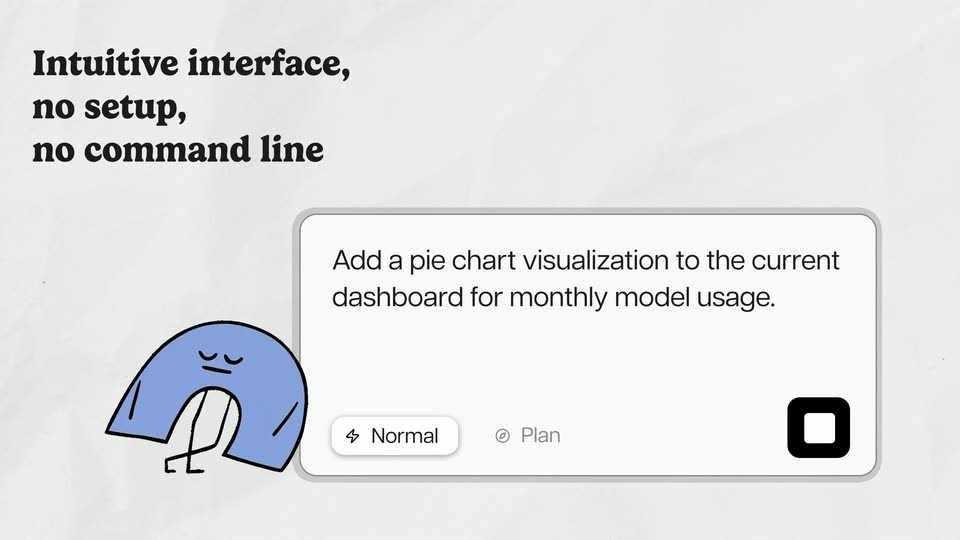
A bold serif headline sits at left on crumpled off-white paper while a white prompt card types out a request for a pie chart. A blue arch-shaped cartoon character with a face walks in, then sits with closed eyes as the prompt finishes and a stop button appears.
On-screen text: “Intuitive interface, no setup, no command line”
Camera: Pan
14 · Feature reveal · 0:29–0:30
A light gray screen scrolls down, moving from a prompt card beside a blue arch-shaped mascot to the acme-app dashboard, where the chat panel shows a Done note next to the original request.
Camera: Pan
15 · Feature reveal · 0:30–0:32
A three-panel dashboard fills the frame: a chat assistant on the left, an operations ticket list in the middle, and a donut chart of model usage on the right. The view slowly zooms out to reveal the input field and usage stats along the bottom.
Techniques: UI zoom
Camera: Pan
16 · Feature reveal · 0:32–0:33
A three-panel product UI (chat thread, operations list, donut-chart dashboard) slides up out of frame, revealing a crumpled paper background. Hand-drawn doodles, a pizza slice, a green block and an orange square face, drop in from the top edge.
Techniques: Parallax
Camera: Static
17 · Feature reveal · 0:33–0:36
Crayon-drawn colored blocks with cartoon faces drop in and snap into a grid on the left over a crumpled paper background. Their eyes blink and glance around. Two text lines appear top right, the second in a retro face.
On-screen text: “So you can ship”, “like playing legos”
Camera: Static
18 · Feature reveal · 0:36–0:38
A white Create Pull Request modal sits on a light blue field under a dark serif headline. The notes field types out a sentence while the camera slowly zooms into the modal, ending on the Cancel and Create PR buttons.
On-screen text: “Create clean git pull request with one click”
Techniques: UI zoom
Camera: Push in
19 · Feature reveal · 0:38–0:39
A close-up of a white dialog card zooms in on the dark “Create PR” button. The button shifts from black to navy and gains a glowing blue outline as the “Cancel” button slides out of frame on the left.
Techniques: UI zoom, Light sweep
Camera: Push in
20 · Feature reveal · 0:39–0:40
A close-up of a blue Create PR button on a white card pulls back and slides off to the left, revealing a cluster of hand-drawn shapes with cartoon faces that settle along a blue line on a crumpled paper background.
On-screen text: “Create PR”
Techniques: UI zoom
Camera: Pan
21 · Feature reveal · 0:40–0:41
A hand-drawn blue triangle in a white hard hat holds a laptop and raises a fist beside a stack of colored blocks with cartoon faces, while dark serif text appears on the right against a pale blue sketchy background.
On-screen text: “So your dev friends”, “love you too”
Camera: Pan
22 · Feature reveal · 0:41–0:44
A hand-drawn blue triangle in a hard hat gives a thumbs-up while holding a laptop, beside a cluster of colorful rectangles and triangles with cartoon faces. A GitHub comment card fills in at left under a bold black headline, and the shapes shift gently.
On-screen text: “So your dev friends”, “love you too”
Camera: Static
23 · Feature reveal · 0:44–0:47
A hand-drawn keyboard on beige paper holds three cartoon shapes, a blue arch, a blue triangle and a red circle, with stick limbs and faces. The headline above reads Multiplayer by design, then swaps to Create magic with your team as the characters' mouths and eyes animate.
On-screen text: “Multiplayer by design”, “Create magic with your team”
Camera: Static
24 · Feature reveal · 0:47–0:50
Four hand-drawn shapes with faces stand in a row on a green paper background. The caption's bold tail swaps from 'frontend engineer' to 'GTM engineer' to 'internal tool builder', then the line is replaced by 'with' and the Sparkles logo scales in.
On-screen text: “Everyone on your team can be a frontend engineer”, “Everyone on your team can be a GTM engineer”, “Everyone on your team can be a internal tool builder”, “with”, “Sparkles”
Techniques: Kinetic type
Camera: Static
25 · Feature reveal · 0:50–0:53
On a green paper background, the word Sparkles in bold outlined lettering squashes and settles into place beside the word with. Below, four hand-drawn shape characters, an orange circle, blue triangle, green square and blue arch, stand in a row with twitching mouths and legs.
On-screen text: “with”, “Sparkles”
Techniques: Kinetic type
Camera: Static
26 · CTA · 0:53–0:54
On a crumpled white paper background, the tagline sits centered above the Sparkles.dev logo, which scales up from a smaller size while the .dev badge slides into its lower-right position.
On-screen text: “book a demo at”
Techniques: Kinetic type
Camera: Pull out
27 · CTA · 0:54–0:58
On a crumpled white paper background, the thin line “book a demo at” sits static above the Sparkles.dev sticker logo. The chunky black wordmark scales and tilts into place, then the .dev badge slides in, settling into a locked frame before a hard cut to black.
On-screen text: “book a demo at”
Techniques: Kinetic type
Camera: Static
28 · CTA · 0:58–1:00
A black screen holds, then the closing card appears: small white text 'book a demo at' above the large words 'dev Sparkle', with the small Sparkle logo in the lower left corner. The word 'dev' slides into place beside 'Sparkle'.
On-screen text: “book a demo at”, “dev”, “Sparkle”
Techniques: Kinetic type
Camera: Static