0:32

Introducing the next gen Framework Laptop 12.
Framework · Hardware · Aug 2026
SpAItial AI · Nov 2026 · 0:41 · AI-annotated
SpAItial AI’s 0:41 launch film runs 20 scenes, about 2.1 s each. The product shows up at 0:35 and 2 features are revealed. There is no explicit call to action. The video pairs each live-action shot with its flat-colored voxel and point-cloud twin, flipping the scene into labelled 3D masks on a single Segment click, then scatters the isolated meshes across a black void before a mosaic-filled title card. Pacing is slow and steady, with slow pans, glitchy dissolves and sliding label chips as the signature moves.
Is this your launch? to your site or press kit.
Framework · Hardware · Aug 2026
Google Deepmind · Feb 2026
A white grid of rounded tiles fills the frame, each tile holding a colored 3D voxel render of household items and toys such as strollers, chairs and tractors. The grid scrolls vertically, shifting rows as it moves.
Camera: Static
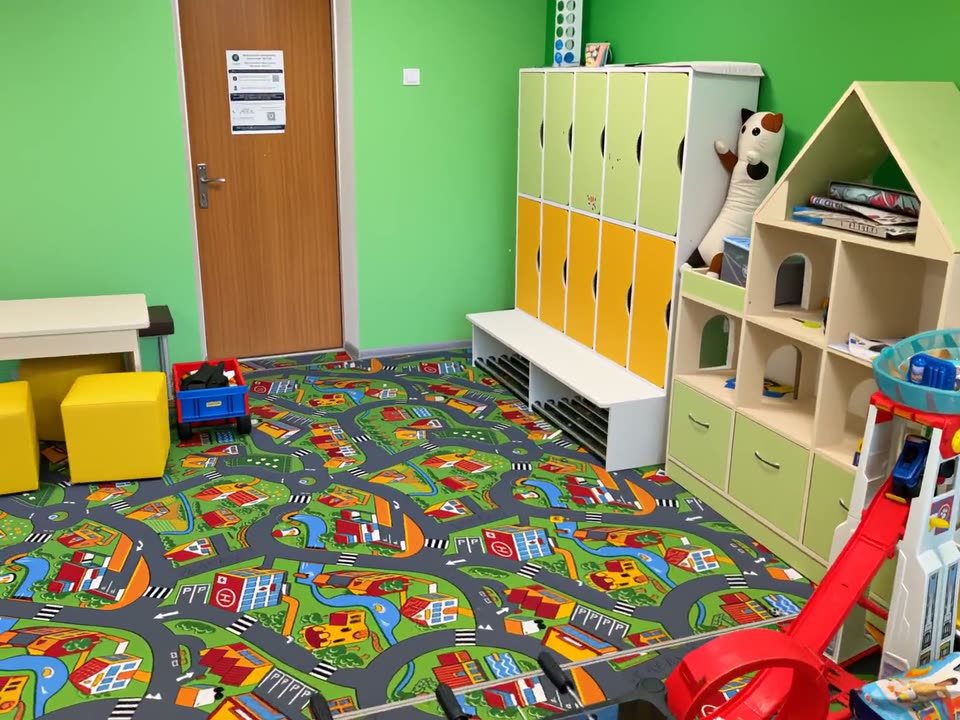
A wide shot of a bright children's playroom with green walls, yellow and green lockers, a wooden playhouse and a road-pattern play mat. The frame opens on a glitchy multi-image dissolve, settles into a clean view, then drifts slightly to the right.
Camera: Push in
A slow pan moves left across a green-walled playroom with a road-print carpet, revealing yellow cube stools, a white table, a play kitchen and a row of lockers. A blue Segment pill with a mouse cursor rests at the bottom center.
Techniques: Cursor demo
Camera: Push in
A real children's playroom with green walls, a yellow climbing wall and a play table with cube stools is shown, then the whole room dissolves into a green-and-white voxel point cloud, one stool highlighted in orange. A Segment tag with a cursor sits at the bottom.
On-screen text: “Segment”, “0123456780”
Techniques: Morph
Camera: Push in
A segmented voxel playroom spins as the camera orbits it, every object a solid color with a floating label and score. The pan slides left across a green dinosaur, red bean bags and a blue table while a white line of text holds at the bottom.
On-screen text: “Segment every object in a 3D world”
Techniques: Parallax
Camera: Push in
A voxel-rendered children's room in 3D perspective shows colored segmentation masks on bean bag chairs, a toy stroller and a stuffed animal, each tagged with a floating label and score. The camera pans slowly left across the scene.
On-screen text: “Segment every object in a 3D world”
Techniques: 3D mockup, Parallax
Camera: Pan
A voxel-built playroom in 3D perspective, with colorful bean bag chairs, small tables, a blue toy car and a stroller on a patterned rug. White object-detection labels with confidence scores hover over each item. The camera slowly pans left across the room.
Camera: Push in
A wide shot of a colorful children's playroom: round tables, bean bags and toy cars sit on a city-pattern mat beneath green-blinded windows. Colored object-detection boxes with confidence labels float over each item as the frame drifts slowly left.
Camera: Push in
A 3D render of a bright children's playroom with colorful round tables, small chairs, toy cars and bean bags on a city-map floor. The camera pans slowly left, revealing a green shelf and a foosball table, while floating detection tags hover over each object.
Camera: Push in
A tilted view of an outdoor yard with a green forklift, a white trailer and stacked containers settles level. A Segment button with a cursor appears at the bottom, then the frame becomes a colored 3D point cloud with object labels.
Techniques: Cursor demo
Camera: Push in
A 3D point-cloud scan of an outdoor yard shows objects in colored segmentation masks: a purple trailer, a green bin, magenta and cyan pallets, red and orange pipes. White confidence tags float above each. The camera dollies forward as a caption sits at the bottom left.
On-screen text: “Each one labelled, indoors and out”
Techniques: 3D mockup, Parallax
Camera: Push in
A 3D point cloud of an outdoor yard with stacked pallets and pipes transitions into a photorealistic 3D render. Colored bounding boxes with text labels identify objects like containers and pipes.
Techniques: Morph, 3D mockup
Camera: Static
A wide tracking shot of an industrial loading yard: a purple-tinted box truck on the left, stacks of colored IBC containers and long pipes on the right, each marked with a dark tag showing a class name and confidence score. The camera drifts forward along the paved yard.
Camera: Push in
A high-angle 3D field of hundreds of small household objects and furniture sits on a dark ground plane. The view opens in an outdoor scene with floating debug labels, then settles on a clean dark background as a caption appears at the bottom left.
On-screen text: “Export each object as its own mesh”
Camera: Pan
Hundreds of small 3D models, furniture, statues and toys, sit on a dark floor. The camera starts high and wide, then descends and glides toward a yellow sofa, a yellow toy car and a stroller. A white caption sits in the lower left.
On-screen text: “Export each object as its own mesh”
Techniques: Parallax
Camera: Push in
A dark void holds a scattered field of 3D objects in perspective, including a yellow sofa, a golden statue, a yellow ride-on toy car and a baby stroller. A small annotation tag reading 'toy car 0.85' slides in above the car with a dot marker beneath it.
On-screen text: “toy car 0.85”
Techniques: 3D mockup
Camera: Static
A 3D storage-room scene pans right past toy strollers, a yellow toy car and a seated stuffed animal, each carrying a sliding detection label with its name and score. Grey lockers and a yellow chair sit in the background.
Techniques: 3D mockup, Parallax
Camera: Pull out
A yellow wingback chair sits center frame on a dark floor, surrounded by 3D furniture, a teddy bear and lockers, as the camera pans right to reveal a chrome bar stool. A small label reading 'chair 0.85' slides across the top.
On-screen text: “chair 0.85”
Techniques: Parallax
Camera: Pull out
A 3D room of scattered furniture, a pool table and lockers on a dark reflective floor, pans right as small white labels slide in to tag a chair and an armchair with a 0.85 score.
Techniques: Kinetic type
Camera: Pan
On a black background, the headline 'Segmentation API' appears in large multicolored letters with a segmented mosaic fill, then two gray subtitle lines and a small blue-green geometric logo fade in below. The frame stays locked and static for the rest of the clip.
On-screen text: “Segmentation API”, “Segment Gaussian splat worlds into objects and meshes.”, “Coming soon to the SpAltial API”
Camera: Static