1:21

Introducing Claude Dashboards and Claude Motion
Anthropic · AI · Oct 2026
Spacesheep · Oct 2026 · 0:57 · AI-annotated
Spacesheep’s 0:57 launch film runs 27 scenes, about 2.1 s each. The product shows up at 0:12 and 2 features are revealed. The call to action lands at 0:49 (85% in), over a voiceover. A brick-wall talking head alternates with full-frame screen captures at roughly 22 cuts per minute, cut on a 124 bpm beat. The style is defined by scale-in captions with one yellow-highlighted word, scrolling walls of monospace text, and the pixel sheep logo that bookends the call to action.
Is this your launch? to your site or press kit.
Anthropic · AI · Oct 2026
Stripe · Finance · May 2023
Traversal AI · Sep 2026
A man in a green beanie and pink shirt sits at a wooden desk with a laptop, gesturing with his hands against a red brick wall. White caption lines with a yellow highlighted word appear at the bottom in sequence as he speaks.
On-screen text: “Some people say AI”, “will destroy humanity”, “in five to ten years”
Techniques: Kinetic type
Camera: Static
A man in a green beanie and glasses sits before a red brick wall, holding a sticker-covered laptop and speaking to camera. White captions with black outlines pop in at the lower center, the word 'how.' highlighted in yellow. The frame stays locked off.
On-screen text: “and I'll tell you”, “exactly how.”
Camera: Static
A man in a green beanie and glasses sits at a wooden desk against a brick wall, talking to the camera behind a sticker-covered laptop. Subtitles swap at the bottom of the frame as a monospace caption line appears.
On-screen text: “exactly how.”, “Agents will keep”, “Typechecking, then a local run through the new claim:”, “sending us”
Camera: Static
A man in a green beanie and glasses sits at a laptop against a brick wall, talking. A dark wavy panel rises across the lower third, filled with white monospace log lines, while large yellow words swap in sync with the voiceover.
On-screen text: “sending us”, “walls of text”, “Typechecking, then a local run through the new claim:”
Techniques: Kinetic type, Masking
Camera: Static
A man in a green beanie and glasses peeks over a dark blue panel that rises to cover the frame. A dense wall of monospace text scrolls behind a brick wall, and a yellow caption reads until we drown on the panel.
On-screen text: “until we drown”
Techniques: Masking
Camera: Static
A dense field of light-gray monospace code and commit notes scrolls vertically, filling the frame. Centered over it sits a static bold white caption reading “in them.” with a yellow period, holding still while the code moves.
On-screen text: “in them.”
Camera: Static
A man in a green beanie and glasses sits at a wooden desk against a brick wall, pinching his fingers then resting both hands on a sticker-covered laptop. A gray device and markers sit to his right. A bottom caption holds the line while he speaks.
On-screen text: “So we are fighting back,”
Camera: Static
A man in a green beanie and glasses speaks to the camera in front of a brick wall, a sticker-covered laptop in front of him. White outlined captions appear at the bottom, then a yellow Space Sheep tag with a black arrow points to the laptop.
On-screen text: “So we are fighting back,”, “and that's why”, “we've built”, “Space Sheep”
Camera: Static
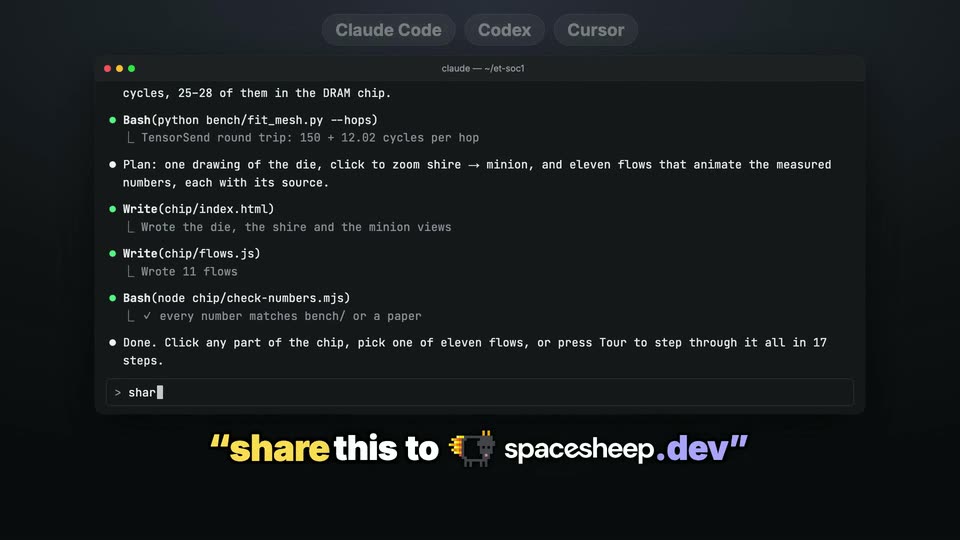
A dark terminal window fills the frame; its agent log scrolls upward while a command is typed at the prompt. The spacesheep logo beneath it fades out. Bold captions scale in at the bottom, agent names in yellow, echoed by gray pills at the top.
On-screen text: “Just tell your agent,”, “Claude Code,”, “Codex,”, “Cursor:”, ““share this to spacesheep.dev””, “And the whole session”
Techniques: Kinetic type
Camera: Pan
A dark terminal window fills the frame, its task log scrolling upward as new lines type in. A bold caption at the bottom swaps from one phrase to the next. A mouse cursor hovers over the log mid-clip.
On-screen text: “and the whole session”, “becomes a space you can actually understand”
Techniques: Kinetic type, Cursor demo
Camera: Push in
A browser window shows the dark ET-SoC-1 chip diagram, a grid of numbered cells beside a right-side explainer panel. Small purple dots travel along the grid lines to animate data flow while the Hot line step stays highlighted.
On-screen text: “becomes a space”, “you can actually understand.”
Techniques: Particles
Camera: Push in
A light browser page with a headline and stat cards remains centered on a dark background. A cursor moves to the purple Share button in the top right and clicks it, revealing a small gray tooltip beside the button.
Techniques: Cursor demo
Camera: Static
A browser window shows a doc page; a cursor clicks Share and a toast pops. The window duplicates into two side-by-side screens that tilt into 3D, while the caption 'Share it with your team' fills in from outline at the bottom.
On-screen text: “Share it with your team”
Techniques: Cursor demo, Kinetic type, Split screen, 3D mockup
Camera: Pull out
Two identical browser windows sit side by side on a dark backdrop, each showing the same stat-card page. A red dot pulses at the right edge, then a comment from Alex slides in at the bottom of both. A yellow-accented caption below reads 'can work on it together.'
On-screen text: “can work on it together.”
Techniques: Split screen
Camera: Static
Close-up of a motorcycle engine: a black finned heat sink and chrome pipes, a PAGID badge on the left, RGB lights on the right. A bottom caption reads People use it for, then research, scales in. The camera drifts slowly across the engine.
On-screen text: “People use it for”, “research,”
Techniques: Kinetic type
Camera: Push in
A macOS browser window on a black background displays a webpage showing a live thermal camera view of a circuit board in red, orange and yellow. The page scrolls down as the yellow outlined word research, scales up at the bottom center.
On-screen text: “research,”
Techniques: Kinetic type
Camera: Static
A flat browser window holds a dark dashboard that scrolls down, moving from a grid of machine cards and stat tiles to a Start here row and three circular live gauges. A yellow 3D word, dashboards, rests at the bottom edge.
On-screen text: “dashboards,”
Camera: Pan
A macOS browser window on a black background scrolls down a data page, panning past four stat cards and a bold headline to reveal a red line chart that climbs to a 765 total marker.
Camera: Pan
A flat browser window shows a design-doc page that scrolls upward, revealing a metrics table and a timeline row. A yellow-outlined white caption reads design docs, fixed at the bottom.
On-screen text: “design docs,”
Camera: Pan
A static browser window shows a two-panel slide with a country bar chart on the left and a large magenta 120 years statistic on the right. A yellow outlined caption, “slides,” pops in at the bottom center.
On-screen text: “slides,”
Camera: Static
A flat browser window shows a dark web app: a rotating dot-matrix globe on the left, a question panel with an orange button on the right. Bold yellow captions cycle at the bottom, swapping from one word to the next.
On-screen text: “micro-apps,”, “vibe-coding,”
Techniques: Kinetic type
Camera: Static
A flat browser window frames a low-poly subway platform. The view moves forward past green columns, benches and yellow platform edges while the caption “and even games.” sits at the bottom, with “games” turning yellow.
On-screen text: “and even games.”
Camera: Static
A browser window displays a first-person 3D subway game. The view pushes forward down a tiled platform flanked by green pillars, toward a far sign reading Panda St. A bottom caption reads and even games, the word games in yellow.
On-screen text: “and even games.”
Camera: Static
A grid of twelve small screens fades in on a near-black background, each framing a different demo: a map, a repeating pattern, a line chart, a 3D subway, a globe card, a thermal image, a bird grid, a paper, a form, a fractal, a dashboard, a grayscale city.
Camera: Pull out
A man in a green beanie and glasses sits at a wooden table against a brick wall, gesturing over an open sticker-covered laptop. A bottom caption reads Try it at, then swaps to a pixel sheep icon beside the URL.
On-screen text: “Try it at”, “spacesheep.dev”
Camera: Static
A man in a green beanie and glasses sits before a red brick wall, holding a sticker-covered laptop, speaking to the camera. Captions appear at the bottom, first the URL then a sentence with two words in yellow.
On-screen text: “spacesheep.dev”, “the best things you made.”
Camera: Static
On a plain white background, the pixel-art spacesheep logo and wordmark scale in above the tagline. A prompt line appears with a light gray code box that types out the command character by character behind a blinking caret.
On-screen text: “Sheep something great.”, “Ask your agent:”, “share this to spacesheep.dev”
Techniques: Kinetic type
Camera: Static