
1:07
Explore
We're building one AI system to interpret the data behind every commercial flight and automate the operation from schedule to landing - from the operations center to the cockpit. We’re now onboarding… | Skymerse (YC S26)
Skymerse · 0:55 · AI-annotated
- Length
- 0:55
- Scenes
- 34 · 1.6 s avg
- Product on screen
- 0:23
- Call to action
- 0:49 · 89%
- Voiceover
- Yes
00:00:00 / 00:55:17
- Length
- 0:55
- Scenes
- 34 · 1.6 s avg
- Product on screen
- 0:23
- Call to action
- 0:49 · 89%
- Voiceover
- Yes
Skymerse’s 0:55 launch film runs 34 scenes, about 1.6 s each. The product shows up at 0:23. The call to action lands at 0:49 (89% in), over a voiceover. A retro-glitch opening (scanlines, chromatic aberration) over archival and live clips builds a single sentence word by word, then the frame flips to a near-black data world where glowing route lines, morphing hexagons and checkmark lists do the selling. Cut at roughly 27 per minute on a 118 bpm pulse, the signature moves are word-by-word type reveals, the glitched inset-frame treatment on footage, and the bright-on-dark map animation that resolves into a clean logo lockup.
Footage neededEstimated needs: 3 capture groups — your screens or recordings · 1 official logo — reused across the film · 15 filmed passages — shoot, supply or replace · 2 graphic passages — draw or supply · 1 3D passage — build or supply
Is this your launch? to your site or press kit.
More like this





We're building one AI system to interpret the data behind every commercial flight and automate the operation from schedule to landing - from the operations center to the cockpit. We’re now onboarding… | Skymerse (YC S26), scene by scene
· 34 scenes as text
01 · Hook · 0:00–0:02
On a black background, white sans-serif words appear one by one to form the line “Flying looks simple from the outside”, the final word turning bold to land the point. The frame stays locked.
On-screen text: “Flying looks simple from the outside”
Techniques: Kinetic type
Camera: Static
02 · Hook · 0:02–0:03
A VHS-styled clip of a jet taxiing on a runway at dusk sits centered on a pale gray field, with red-cyan edge fringing and horizontal scanlines. The caption holds still over the locked-off frame.
On-screen text: “Flying looks simple from the outside”
Camera: Static
03 · Hook · 0:03–0:04
A black and white archival clip of a uniformed operator reaching toward a panel of dials and gauges plays inside a centered rectangle on a light gray field. A red and cyan chromatic aberration and horizontal scan lines give the footage a glitched, retro look.
Camera: Static
04 · Hook · 0:04–0:04
A grainy, low-res clip of a dark jet climbing through a flat gray sky plays inside a bordered rectangle with a thin red edge, centered on a white scanline field.
Camera: Static
05 · Hook · 0:04–0:05
A white airliner, landing gear down, holds in side profile against a gray cloudy sky, the frame wrapped in a scanline glitch with red and cyan fringing. The word But pops in on the left.
On-screen text: “But”
Camera: Static
06 · Hook · 0:05–0:06
White text on a black background fades in word by word.
On-screen text: “But every flight you've ever taken”
Techniques: Kinetic type
Camera: Static
07 · Hook · 0:06–0:07
A centered line of text on a plain white background fades in from left to right, the words shifting from light gray to solid black as the sentence completes. The frame stays locked and still throughout.
On-screen text: “But every flight you've ever taken”
Techniques: Kinetic type
Camera: Static
08 · Hook · 0:07–0:08
Air traffic control footage cuts from two headset-wearing operators seen from behind to a controller at a tower desk facing a lit night runway. A large white caption holds centered over both shots, with a smaller line above. The footage carries a subtle color-fringe glitch.
On-screen text: “But every flight you've ever taken”, “Started hours earlier”
Camera: Static
09 · Hook · 0:08–0:08
A dim control room with rows of glowing monitors cuts to a close-up of a woman in a headset, a man blurred behind her. White bold text builds word by word across the center of the frame over the footage.
On-screen text: “Started hours earlier”
Techniques: Kinetic type
Camera: Static
10 · Hook · 0:08–0:09
Inside a control tower, a man in a headset works at a desk of monitors, one showing a radar grid, with planes on the tarmac through the window. The shot sits as a centered horizontal band on a white scanline background, white text locked over it.
On-screen text: “Started hours earlier”
Camera: Static
11 · Hook · 0:09–0:11
A white narrow-body jet climbs off the runway, gear still down, in a locked-off shot with a faint RGB split on the edges. A lattice tower sits in the foreground while centered white captions swap over the image.
On-screen text: “Started hours earlier”, “With work nobody sees”
Camera: Static
12 · Hook · 0:11–0:12
A plane lifts off a runway, then the cut jumps to staff at desks in a control room. Both shots sit as inset frames with a glitch, chromatic-aberration effect and horizontal scanlines, while the white caption “With work nobody sees” holds centered and still.
On-screen text: “With work nobody sees”
Camera: Static
13 · Hook · 0:12–0:12
Two quick cuts of airport footage play in a small centered window on a white background. A man in a blue shirt stands at check-in, then a bearded man in a suit looks down near a window showing a plane. Both carry a red-cyan glitch fringe and a red border.
Camera: Static
14 · Problem · 0:12–0:13
A defocused airport departure board cuts to a 3D white passenger jet with a dark blue tail banking through a blue, cloudy sky. The render carries a faint red and cyan chromatic aberration along its edges.
Techniques: 3D mockup
Camera: Static
15 · Problem · 0:13–0:13
A filmed airplane wing silhouetted against a low sunset with a warm lens flare, then the view cuts to black as the word Today fills the frame, its letters revealing the same golden light through a masked fill.
On-screen text: “Today”
Techniques: Kinetic type, Masking
Camera: Static
16 · Problem · 0:13–0:15
On a plain white background, the light gray word Today sits left of center, then gives way to the black text A 100 thousand in the same position, which holds still.
On-screen text: “Today”, “A 100 thousand”
Techniques: Kinetic type
Camera: Static
17 · Problem · 0:15–0:17
On a plain white field, the bold black sans line “A 100 thousand flights a day” holds center, then gives way to the serif word “Still”, followed by “through”. The type is the only element, swapping in place.
On-screen text: “A 100 thousand flights a day”, “Still”, “through”
Techniques: Kinetic type
Camera: Static
18 · Problem · 0:17–0:18
A square, glitched clip of an aircraft cockpit plays in the center of a white field, flanked by the words Human and Hands. The clip cuts from a window view of the wing and sea to a close-up of the instruments and a pilot's arm.
On-screen text: “Human”, “Hands”, “Federal Aviation Administration”
Camera: Push in
19 · Problem · 0:18–0:21
A black screen streams gray monospace NOTAM data from top to bottom. A large white headline reveals across the center, then clears as a block of smaller teal monospace text with underlined links fades in over the dimmed data.
On-screen text: “Federal Aviation Administration”
Techniques: Kinetic type
Camera: Static
20 · Problem · 0:21–0:22
A near-black frame holds faint lines of small gray text in the upper left, like a dim data list, while the rest of the screen stays empty. The text glows weakly against the dark.
Camera: Static
21 · Problem · 0:22–0:23
A near-black screen fades up into five terminal panels set in a grid, each filled with monospaced aviation data in orange and pale yellow that scrolls and refreshes rapidly.
Techniques: Split screen, Kinetic type
Camera: Static
22 · Problem · 0:23–0:23
A dark aviation dashboard fills the frame with columns of dim monospaced text. A left panel labeled AIRCRAFT with a circular route map fades in, and the panels brighten.
Camera: Static
23 · Product intro · 0:23–0:26
A glowing white flight path runs from KSFO to KJFK over a dark US map. The frame pulls back to show the full route, then zooms into the line as wireframe globes and a color weather radar layer fade in. A bottom headline decodes to INTRODUCING SKYMERS.
On-screen text: “INTRODUCING SKYMERS”
Techniques: UI zoom
Camera: Push in
24 · Demo · 0:26–0:33
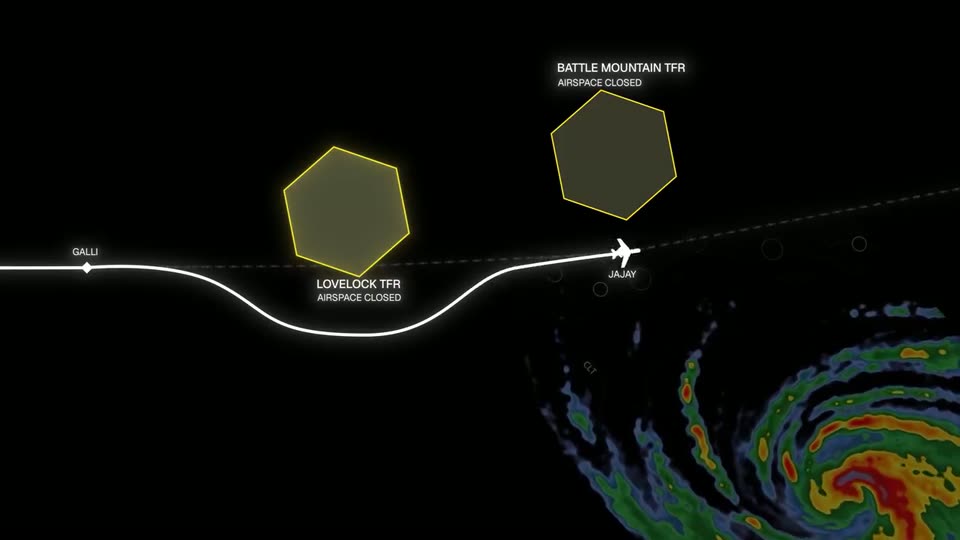
Two dot clusters morph into yellow hexagons marking closed airspace on a dark map. A white route line draws from GALLI to JA JAY; a small airplane follows it, dipping around the first hexagon. A colorful hurricane swirl sits bottom right, and the caption 'Each impact measured' appears.
On-screen text: “Each impact measured”
Techniques: Morph, Kinetic type
Camera: Static
25 · Demo · 0:33–0:33
A dark map view shows a glowing white flight route and two yellow hexagons marking closed airspace, with a swirling hurricane of green, blue and orange bands in the corner. The frame eases out to reveal flight data labels on the left while the caption holds at the bottom.
On-screen text: “Each impact measured”
Camera: Static
26 · Demo · 0:33–0:40
A column of NOTAM text scrolls up the left edge beside an airport diagram of pink, yellow, and gray runways. Status labels fade in on the map and a large 247 counter locks in top right, then the frame cuts to a checkmark and the title Airport infrastructure.
On-screen text: “✓ TAXI ROUTE CLEAR”, “Airport infrastructure”
Camera: Pull out
27 · Demo · 0:40–0:43
A black screen holds a vertical checklist of three lines, each with a square checkbox; the middle line glows white while the top and bottom dim, then the list resolves to one centered line, Runways, then SID, each ticked, before fading out.
On-screen text: “Opening hours”, “Airport infrastructure”, “Stands & aprons”, “Runways”, “SID”
Techniques: Kinetic type
Camera: Static
28 · Demo · 0:43–0:44
On a black field, the RFFS wordmark and its checkmark-in-a-rounded-square icon fade up from near-black to bright white, centered, with a soft mirror reflection beneath. The mark holds steady as the final sign-off.
Camera: Static
29 · Demo · 0:44–0:44
The Fuel logo sits centered on black, then a dark rounded card fills the frame holding two columns of white checklist items, each with a checkmark icon, while the voiceover runs.
On-screen text: “Opening hours”, “Runways”, “Stands & aprons”, “Taxiways”, “Procedures”, “Flight path restrictions”, “SID”, “Airspace”, “Required services”, “Navigation & visual aids”
Camera: Pull out
30 · Demo · 0:44–0:45
A dark checklist window with two columns of checked airport data items eases into place on a black background, the bottom row, Airport infrastructure, fading in last.
Camera: Static
31 · Demo · 0:45–0:47
A night shot of an airplane on a runway, lit by green and white ground lights, with horizontal scanlines across the frame. The white text 'We handle it all' scales up in the center as the plane taxis forward.
On-screen text: “We handle it all”
Techniques: Kinetic type
Camera: Push in
32 · Demo · 0:47–0:48
A hand reaches into a dark airplane cockpit and turns a knob on the glowing instrument panel. Mountains show through the windshield. A white caption sits centered over the dash, scaling into place.
On-screen text: “We handle it all”, “So you can focus on”
Techniques: Kinetic type
Camera: Static
33 · Demo · 0:48–0:49
A dark cockpit interior with a glowing instrument panel and a hand gripping the yoke at lower left. A terrain view fills the windshield. A white caption sits centered over the frame, static throughout the locked-off shot.
On-screen text: “So you can focus on flying”
Camera: Static
34 · CTA · 0:49–0:55
On black, a white paper airplane in an orbital ring draws itself, then scales up into the SKYMERSE wordmark. The tagline PLAN LESS, FLY MORE. fades in beneath, followed by the URL SKYMERSE.COM; the lockup holds, then fades to black.
On-screen text: “PLAN LESS, FLY MORE.”, “SKYMERSE.COM”
Techniques: Kinetic type
Camera: Static