4:34
Storyteller Tactics - Landing Page
Storyteller Tactics · Aug 2026
Shipper · Nov 2026 · 1:35 · Full motion · AI-annotated
Shipper’s 1:35 launch film runs 55 scenes, about 1.7 s each. The product is on screen from the first frame and 7 features are revealed, with social proof. The call to action lands at 1:27 (91% in), over a voiceover. Built as a fast cut-to-voiceover montage: word-by-word kinetic type cards set the premise, then a long run of UI and 3D desk mockups tours the build flow and each feature, closing on a logo burst, a confetti giveaway and the wordmark. Pacing is relentless at roughly one cut per beat, with signature moves of words popping in sync to the VO, tilted 3D device mockups on mint gradients, and a recurring hand cursor driving every interface.
Is this your launch? to your site or press kit.
Storyteller Tactics · Aug 2026
Ramp · Finance · Oct 2026
Phone Harness · B2B · Oct 2026
Films whose music sounds like this one, voice left out
Aristotle · Electronic, Corporate
Pine · Electronic
Voquill · Cinematic Corporate Tech
On a soft pink-to-white gradient, a white rounded-square icon with a coral asterburst sits centered, then slides left as the black headline 'Introducing Claude for Business' fades in beside it with a brief motion blur before settling.
On-screen text: “Introducing Claude for Business”
Techniques: Kinetic type
Camera: Static
Centered sentence builds word by word on a plain off-white field. Each new word pops in black, then the whole line settles to gray as the next word arrives, in time with the voiceover.
On-screen text: “Introducing Claude for Business”, “Let's say you're a person”, “who doesn't know”
Techniques: Kinetic type
Camera: Static
A dark navy field holds centered white text that types out word by word, building from a partial word into the full phrase. The frame stays locked off while the words land in the middle of the screen.
On-screen text: “who doesn't know”, “how to code”
Techniques: Kinetic type
Camera: Static
On a pale mint gradient, the word or sits in a blue selection box with corner handles. A duplicate or slides in from the right and merges with it while design rises to form the phrase or design.
On-screen text: “how to code”, “or design”
Techniques: Kinetic type, Morph
Camera: Static
Green dots ring the center of a white frame, rotating and swelling as the black caption swaps from “but want's to build” to “10 production ready apps”, the first line in italic serif.
On-screen text: “but want's”, “to build”, “10 production”, “ready apps”
Techniques: Kinetic type
Camera: Pan
Black text reads “10 production ready apps” on a white field, the word “production” set in italic. A vertical line of teal circles drifts upward along the left edge while the headline stays fixed.
On-screen text: “10 production ready apps”
Camera: Static
A dark rounded app-store card sits centered on a pale mint gradient. A hand cursor taps the blue price pill, which swaps into a green check circle as the card scales up slightly.
On-screen text: “10 production”, “ready apps”
Techniques: Cursor demo, Morph
Camera: Static
On a near-black background, the white words Right now scale up from a small blurred state to a large sharp headline centered in frame. The motion is a quick punch-in that lands on the second frame.
On-screen text: “Right now”
Techniques: Kinetic type
Camera: Static
Black type on a plain white field: “Right now” scales in, then “it takes thousands of dollars” builds word by word in a plain sans with italic serif accents, and the line is swapped for “sleepless nights” in large bold lettering.
On-screen text: “Right now”, “it takes thousands of dollars”, “sleepless nights”
Techniques: Kinetic type
Camera: Static
On a pale white-to-mint gradient background, the black phrase “to make just one app” builds up word by word and settles centered, continuing the line from “sleepless nights”.
On-screen text: “sleepless nights”, “to make just one app”
Techniques: Kinetic type
Camera: Static
A tilted 3D mockup of the Shipper web app floats over a dark green gradient, the camera easing in to center it. The interface shows the 'Chat it into existence' hero and a chat prompt box, while a caption reads 'to make just one app'.
On-screen text: “to make just one app”
Techniques: 3D mockup
Camera: Pan
A tilted browser mockup of the Shipper site, framed by a glowing green border, holds the hero heading and a chat input box. The view then zooms in to a head-on close-up of the same interface, centering the heading and the empty prompt field.
Techniques: 3D mockup, UI zoom
Camera: Push in
A close-up of a light product interface shows a prompt field under a Web, Chrome Extension, Mobile App tab row. The sentence Build an Airbnb-inspired car rental platform types itself out character by character while a heading sits above.
Techniques: Kinetic type
Camera: Pan
Close-up of the bottom corner of a white panel with a green border. A white hand cursor taps a green circular up-arrow button beside a gray microphone icon, and a soft teal ring ripples outward around the button on a dark background.
Techniques: Cursor demo
Camera: Static
A soft mint-green gradient fills the frame as white text “Build Queue...” fades in at center. Three white dots pulse beneath it in a loading rhythm. The camera stays locked off.
On-screen text: “Build Queue...”
Camera: Pull out
A locked-off split view pairs a scrolling AI task list on the left with the ProCar app on the right, which fills from a search bar into a car photo grid, then a white loading card fades in over the right panel.
Techniques: Split screen
Camera: Pull out
A static black headline sits above a light gray rounded card. Inside, a vertical list of setup steps with small colored icons scrolls upward, rows fading in at the bottom and out at the top. Near the end, a thin green outline draws around the card.
On-screen text: “Loading your app...”
Camera: Static
A green progress bar fills left to right beneath a faint gray “Loading your app...” line. The bar completes and turns into a solid green pill button with white text “Application Complete”, the loading line fading out.
Techniques: Morph
Camera: Static
A 3D desk with a monitor showing a car marketplace grid, flanked by a lamp, plant, headphones and clock. The view pushes in on the screen while the car listings scroll upward through the grid.
Techniques: 3D mockup, UI zoom
Camera: Push in
A light admin dashboard titled Shipper Cloud (Backend) scrolls vertically, revealing a users table where a password field toggles visible, then a Stripe payments section with a green switch and Submit button.
Camera: Pan
A settings form with a masked key field and green Submit button slides up the frame, the user info row above it scrolling off, followed by a green Stripe Connected banner and its caption.
Camera: Pan
A settings screen scrolls down from the Launch panel through Multi-Language Support to the Email panel, where a dropdown of two sender addresses opens under the From field. Green accent buttons and a green toggle mark the active states.
Camera: Pull out
A white email settings panel scrolls down. The top shows the Sender Identity form with an open dropdown listing noreply addresses; the scroll continues past the green Save Changes bar to an Analytics Preview banner with a Publish Site button.
Camera: Pan
A white analytics dashboard eases into a clean grid: a green preview-mode banner with a Publish Site button sits above five stat cards, each pairing a metric with a small line chart. The layout settles from a slightly offset state into alignment.
Camera: Pan
A plain mint gradient background holds one line of white text that slides gently across the center of the frame.
On-screen text: “and plenty of other stuff”
Techniques: Kinetic type
Camera: Pan
A masonry grid of UI template thumbnails scrolls upward, revealing more cards row by row. Near the end a dark gray panel slides up from the bottom, carrying the caption “and plenty of other stuff”.
On-screen text: “and plenty of other stuff”
Techniques: Kinetic type
Camera: Push in
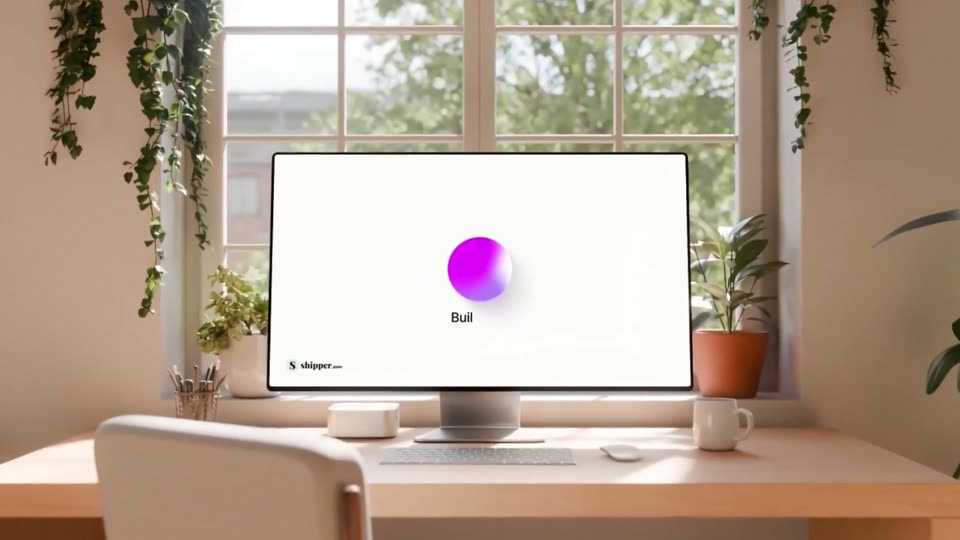
A rendered home-office desk with a monitor, plants and a bright window; the shot starts blurred and sharpens as the frame widens. The white screen shows a purple gradient circle above the word Building....
Techniques: 3D mockup
Camera: Push in
An iMac in 3D perspective sits on a desk by a sunlit window. Its screen shows a task checklist with phase labels beside a car rental interface; the list scrolls up to reveal more items and car cards while the camera holds still.
Techniques: 3D mockup
Camera: Static
A 3D iMac on a sunlit desk displays the Shipper app. The left task list scrolls up through phases while the right grid of car cards scrolls in sync. A small Shipper badge floats at the top right of the screen.
Techniques: 3D mockup
Camera: Pan
A white builder panel sits left of a dark website preview. A large white headline overlays the preview, then fades out as a cursor moves to the first template thumbnail and selects it, marking it with a green check.
On-screen text: “Analytics without the noise.”
Techniques: Cursor demo
Camera: Push in
A tilted browser window floats on a teal gradient, split into an AI builder pane on the left and a dark BUZZ site preview on the right. A cursor taps the top-right controls while white smoke particles swirl in behind the headline and task rows tick to complete.
Techniques: 3D mockup, Cursor demo, Particles
Camera: Pull out
A desktop editor window lists project features on the left while a phone mockup on the right switches through screens of a French learning app. A cursor taps the word card, then the home and lesson-path views scroll into place.
Techniques: Cursor demo
Camera: Static
A two-pane product screen fills the frame: a left panel of build instructions beside a right browser preview of a Pure Living website. The preview scrolls to reveal service cards while a cursor hovers over them.
Techniques: Cursor demo
Camera: Push in
A builder window shows a website preview; the page scrolls down from a six-card services grid to a four-step process row, then a rounded video player with a scrubber appears at the bottom. A cursor glides over the content.
Techniques: Cursor demo
Camera: Static
A white rounded panel floats on a soft green gradient. It holds an email field with an envelope icon, a Members dropdown, and a green Invite button, while a hand cursor moves up to click the button.
Techniques: Cursor demo
Camera: Static
A close-up of a white settings panel shows a Members dropdown and a green Invite button. A hand cursor glides in from below, hovers over the button, then presses it as the panel sits on a pale gradient background.
Techniques: Cursor demo
Camera: Static
Two app windows float on a blue-green gradient: a builder panel with a checklist and queue on the left, a car rental interface on the right. Three named cursors, magenta Martena, blue Lucas and green David, pop in over the panels and drift slightly, staging a shared session.
On-screen text: “Martena”, “Lucas”, “David”
Camera: Pull out
On a plain white background, the bold word “Now” appears at center, then the remaining words fill in to complete the line “Now we try something else.” The full sentence holds static and centered for the rest of the clip on a locked-off frame.
On-screen text: “Now we try something else”
Techniques: Kinetic type
Camera: Static
A light browser-style panel with Web, Chrome Extension and Mobile App tabs sits on a lavender background. The camera reframes down as the plus button opens a dropdown listing Add Files and Import from Figma, while a Kanban Board button appears behind.
On-screen text: “Turn your ideas into applications in minutes. Create a revenue-ready product by chatting with AI.”, “Now we try something else”
Techniques: UI zoom
Camera: Push in
A close-up of the interface with Web, Chrome Extension and green-outlined Mobile App tabs. The prompt field types a list of app names, then Rebuild the MyFitnessPal app please, while a file dropdown hovers at the bottom. A tagline heads the frame.
On-screen text: “Turn your ideas into applications, in minutes. Create a revenue-ready product by chatting with AI.”
Camera: Pan
Close-up of a white chat input bar on a soft mint gradient, with a gray mic icon and a green round send button holding an up arrow. A white hand cursor moves up onto the button and presses it, and a pale green ripple ring expands around it.
Techniques: Cursor demo
Camera: Static
The view pulls back from a tight crop of the loading panel to reveal a full builder window on a green gradient. A prompt list sits on the left; an isometric phone shows a loading screen with progress steps on the right.
Techniques: UI zoom
Camera: Pull out
A design-tool window sits in 3D perspective on a green gradient background. Its left panel holds a bulleted spec list, its right panel a phone mockup of a fitness app showing a calorie diary. The frame stays locked off.
Techniques: 3D mockup
Camera: Static
A tilted iPhone mockup of a meal-tracking app on a mint gradient; a smaller duplicate phone fades out, then the device slides to the right while a headline assembles word by word and crossfades into a second headline on the left.
On-screen text: “Clones the interface, functionality and onboarding experience”, “Enables a database with worldwide foods for you to log”
Techniques: 3D mockup, Kinetic type
Camera: Push in
Four green-outlined rounded squares sit on a white background. The digits 8, 2, 6 and 1 scale into their boxes one after another, completing the sequence 8261.
On-screen text: “8”, “2”, “6”, “1”
Techniques: Kinetic type
Camera: Static
A white card holds the dark word Authenticated! over a green check circle, then cuts to a green rocket lifting off with smoke. Below it, Your Project is Live! and a two-line congratulations caption scale into place.
On-screen text: “Authenticated!”, “Your Project is Live! 🎉”, “Congratulations! Your calorie tracking app is now published and ready to share.”
Techniques: Kinetic type
Camera: Static
A watercolor rocket with a green smoke trail hovers at the center of a plain white frame. Beneath it, a bold heading and a lighter two-line caption scale gently while the composition stays locked off.
On-screen text: “Your Project is Live! 🎉”, “Congratulations! Your calorie tracking app is now”, “published and ready to share.”
Techniques: Kinetic type
Camera: Static
A light UI card on a pale background crossfades between two states: first a Share to Twitter/X panel with a reward badge, then a Copy Link panel, each holding a sample tweet with a green highlighted phrase.
Techniques: Morph
Camera: Static
A white LinkedIn share card with a copy button fades out on a plain background, then a ring of tilted app logos bursts into view in 3D around a central Shipper S tile.
Camera: Push in
A black serif S on a pale blue tile holds the center while a ring of 3D app icons, including Netflix, Uber, Spotify and Apple, steadily radiates outward, growing and tilting as they fly past the camera on white.
Techniques: 3D mockup, Parallax
Camera: Push in
A 3D field of tilted app logos, including Netflix and Uber, surrounds a central S badge, with a few logos scaling up. It cuts to a plain off-white background where a black headline sits centered.
On-screen text: “So it understands how to”
Techniques: 3D mockup
Camera: Push in
On a near-white field, the line “build apps that actually sell” sits low and left, “build” in dark gray and the rest in pale gray. The phrase scales up and slides to the center as the pale words fill in to dark gray.
On-screen text: “build apps that actually sell”
Techniques: Kinetic type
Camera: Static
A burst of multicolor confetti falls over a white background as the headline To celebrate the launch scales in at center. The line then swaps to we're giving away free credits, with free set in italics, while the confetti thins out.
On-screen text: “To celebrate the launch”, “we're giving away free credits”
Techniques: Particles, Kinetic type
Camera: Push in
Close-up of a social post: a hand cursor taps the retweet icon, which turns green, then types Shipper into the reply field and hits Reply, after which the composer becomes the posted comment.
On-screen text: “we're giving away free credits”
Techniques: Cursor demo, Morph
Camera: Pan
A social feed with a video post and engagement counts sits behind the centered Shipper 2.0 wordmark. The feed fades to a soft green gradient as the oversized S scales down and locks up with the wordmark inside a rounded square.
On-screen text: “S shipper 2.0”
Techniques: Kinetic type
Camera: Pull out