0:29

Browserbase - Computer use is finally reliable. It just needed a real harness. Now
Browserbase · Jun 2026
Shippeo’s 3:57 launch film runs 31 scenes, about 7.7 s each. The product is on screen from the first frame and 8 features are revealed. There is no explicit call to action; a voiceover carries the film. Three persona chapters (Sophia, Laura, Lukas) each open on a name card and then run as a continuous screen recording of the Shippeo AI chat, with generated dashboards and maps sliding in as replies. The look is a flat light gray and navy system with one cyan accent, a geometric sans wordmark, and calm, steady cursor motion that lets the UI animations do the storytelling.
Is this your launch? to your site or press kit.
Browserbase · Jun 2026
Duckie · B2B · Feb 2024
Webflow · Design · Aug 2015
A plain light gray frame holds the SHIPPEO wordmark centered in bold dark navy. The mark stays locked in the middle of the frame, then its color eases from navy to a flat gray.
On-screen text: “SHIPPEO”
Camera: Static
The SHIPPEO wordmark moves from center to the top left as a white panel slides in from the top right and a blue panel from the bottom right. A blonde woman rises behind the blue panel while her name and title fade in on the left.
On-screen text: “Sophia”, “Head of Transport”
Camera: Static
A light gray card holds the SHIPPEO logo and the caption Sophia, Head of Transport on the left. On the right, a blonde woman in a gray polo slides up into a blue rounded frame as white and blue cards settle in, then the frame dims and the shapes drift apart.
On-screen text: “Sophia”, “Head of Transport”
Techniques: Parallax
Camera: Static
A gray field holds a character card: a large name and title on the left, a blue rounded card with a blonde woman's portrait at lower right, and a white card edge at top right. The whole locked-off layout fades to black over the shot.
On-screen text: “Sophia”, “Head of Transport”
Camera: Static
A spreadsheet window on a dark blue background fills the frame. A cursor glides to the column K header and clicks it, highlighting the cell green and filling the formula bar with its title. The motion is slow and steady.
Techniques: Cursor demo
Camera: Static
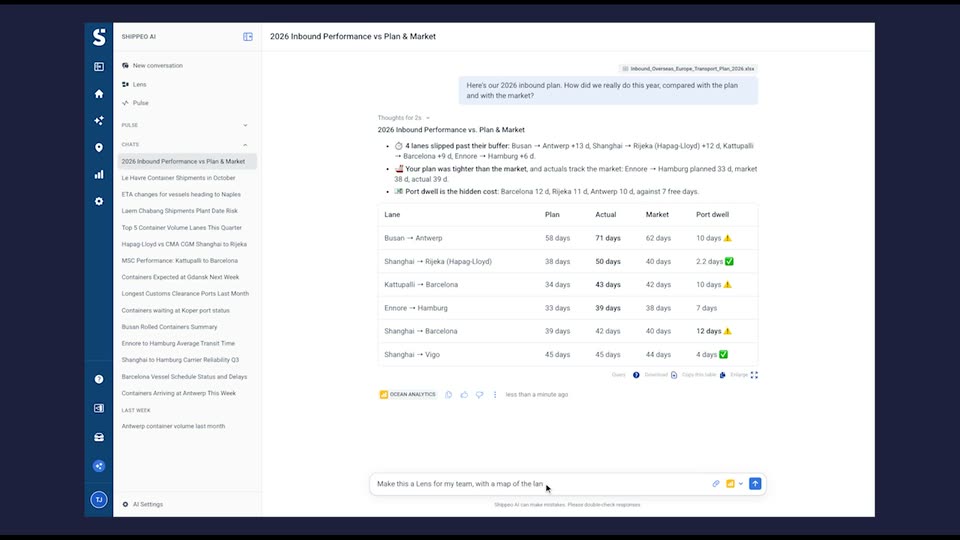
Screen recording of the Shippeo AI chat. A spreadsheet is dragged into the prompt box, a question is typed and sent, the AI replies with a summary and lane table, then a follow-up prompt is typed.
Techniques: Cursor demo
Camera: Static
A light chat interface fills the frame, a left sidebar lists conversation titles and the main panel shows a route performance table above an embedded analytics card. A mouse cursor drifts from the input box up onto the card's day-count metrics. The view stays static.
Techniques: Cursor demo
Camera: Static
A logistics dashboard fills the frame, KPI cards above a world map of gold shipping arcs. The cursor clicks a view toggle and the map zooms into Europe, gold arcs giving way to colored dwell-time bubbles, then hovers a bubble to reveal a tooltip.
Techniques: Cursor demo, UI zoom
Camera: Pan
A locked-off dashboard fills the frame: a chat list runs down the left, four KPI cards sit across the top, and a Europe map with green, orange and red port markers occupies the lower panel. A cursor hovers over the open water west of the UK.
Camera: Static
A dark logistics dashboard fills the frame. A cursor drags the target dwell-time slider left from ten to six, then four days, and the savings totals and corridor table recalculate as the view scrolls.
Techniques: Cursor demo
Camera: Static
In a Shipped AI chat window, a cursor types a prompt into the input bar, then clicks send. The message posts as a blue bubble, a thinking counter ticks up, and a new dashboard card with a 2027 tab slides in below.
Techniques: Cursor demo
Camera: Static
A dark logistics dashboard fills the frame. A cursor clicks the 2027 Replan tab, swapping the world map with its orange flow arcs for four stat cards and a lane table. The view scrolls down to reveal more rows, then back up.
Techniques: Cursor demo
Camera: Static
A flat UI screen of the Shippeo AI chat stays locked off as a cursor types a scheduling prompt into the input bar and clicks send. The thread scrolls, a Thinking counter ticks up, and a new AI reply begins typing.
Techniques: Cursor demo
Camera: Static
A three-column AI logistics app fills the frame. A New Pulse settings panel fades in on the right, listing schedule and delivery fields, then a cursor clicks Save & Activate and the header flips to a green Success confirmation.
Techniques: Cursor demo
Camera: Static
A product screen fades out as a light gray card slides in, with the SHIPPEO logo, the name Laura and her title on the left, and a photo of a woman in glasses at a desk on the right. The card holds, then slides down and fades to gray.
On-screen text: “Laura”, “Logistics Manager”
Camera: Static
A dark gray title card with the name Laura and the role Logistics Manager fades out to black; a white rounded shape sits in the top-right corner and a blue one in the bottom-right.
On-screen text: “Laura”, “Logistics Manager”
Camera: Static
A dark dashboard interface fades in from black. A left sidebar lists chats and a right panel shows the greeting “Hey Laura” above an empty input box. A cursor rests on a highlighted row in the sidebar. The frame stays locked-off.
Camera: Static
A logistics report panel scrolls through its data tables, then the layout reframes to a two-pane chat view. A cursor types a prompt, an email draft form assembles itself, the cursor fills the recipient address, and types a follow-up question.
Techniques: Cursor demo
Camera: Static
A split view shows the Shippa interface: a chat panel on the left and a report panel on the right. The left panel scrolls up, revealing a voyage-delay table and a pinned arrival-check card, while the right report stays still. The scene fades to black.
Techniques: Split screen
Camera: Static
A gray name card fades in from black. The Shippéo wordmark sits top left; the name and title anchor the left side, while a bearded man's photo slides into a blue rounded card at bottom right, beneath a white card shape.
On-screen text: “SHIPPEO”, “Lukas”, “Transport Manager”
Camera: Static
On a light gray field, the SHIPPEO logo and the static name Lukas with Transport Manager below sit at left. At right, a blue rounded card holding a filmed man smiling at a laptop slides up into frame, holds, then slides down out.
On-screen text: “Lukas”, “Transport Manager”
Camera: Static
A flat dark gray field fills the frame, then fades steadily to black across the clip. No text, logo, or moving element appears; the screen simply darkens to a solid black hold.
Camera: Static
The Shipio chat screen fades in from black. A cursor opens the agent dropdown, picks WorkFlow, then the prompt field types out a workflow request before the cursor moves onto the send button.
Techniques: Cursor demo
Camera: Static
The Shippeo app builds a late-delivery workflow: a node graph assembles on the right while the cursor ticks two settings in the chat panel. The view zooms into the graph, then opens a step to show an email form that updates after a new instruction is typed.
Techniques: Cursor demo, UI zoom
Camera: Push in
A locked-off view of a chat interface: a cursor types a question about late deliveries and sends it, the assistant answers with a bulleted report, then a follow-up prompt generates a Lens card that crossfades into a full-screen dashboard.
Techniques: Cursor demo, Morph
Camera: Static
A split product view holds still: on the left, a chat thread where an assistant summarizes late deliveries and embeds a small dashboard preview; on the right, a full Late-Delivery dashboard with KPI cards, a weekly bar chart, and a table of late runs. No motion occurs.
Camera: Static
On black, a dark rounded-rectangle frame fades in, its fill a subtle brown-to-blue gradient. In the center, the Shippeo AI wordmark with a sparkle icon and a one-line tagline emerge at low opacity.
On-screen text: “From first question to final action, on data you trust”
Camera: Static
A white panel framed by a rounded rectangle whose gradient border shifts color around the edges. The Shippeo AI logo with a sparkle mark and a one-line tagline sit centered and stay still.
On-screen text: “Shippeo AI”, “From first question to final action, on data you trust”
Camera: Static
A light gray card with a gradient border displays the Shippeo Al logo and a tagline, then fades to black.
On-screen text: “Shippeo Al”, “From first question to final action, on data you trust”
Camera: Static
On a pale gray field, the SHIPPEO wordmark fades in from a soft blur into a crisp dark navy logotype, holds centered, then dissolves as the background shifts to a flat gray. The frame stays locked off throughout.
On-screen text: “SHIPPEO”
Camera: Static
A flat dark gray field holds for a beat, then eases to solid black, marking a brief transition gap between segments.
Camera: Static