1:28

Introducing Webflow CMS
Webflow · Design · Aug 2015
Browserbase · Jun 2026 · 0:29 · AI-annotated
Browserbase’s 0:29 launch film runs 24 scenes, about 1.2 s each. The product is on screen from the first frame and 3 features are revealed. There is no explicit call to action; a voiceover carries the film. A rapid launch statement: a typed API call opens, a 3D montage of broken browsers states the problem, then three feature blocks (self-healing workflows, any-site scaling, out-of-the-box tools) each pair a title card with fast demo cuts. Signature moves are letter-by-letter typing, zoom punches on buttons, halftone grain, and the recurring orange-and-black landscape that anchors the brand color.
Is this your launch? to your site or press kit.
Webflow · Design · Aug 2015
Webflow · Design · Oct 2018
Motionfly · Oct 2026
A pixelated landscape of black and orange hills under a blue sky holds a centered white command bar. The text POST / types in letter by letter behind a blinking caret, then a black caption bar with white text appears at the bottom.
On-screen text: “We're launching Browserbase Agents.”
Techniques: Cursor demo
Camera: Push in
A grainy halftone landscape of blue sky, white clouds and black-and-orange dunes holds a white pill at center. Monospace code types out inside it, while a black caption bar sits at the bottom. The frame stays locked off.
On-screen text: “We're launching Browserbase Agents.”, “POST /v1/agents”
Techniques: Kinetic type
Camera: Static
A monospace prompt types itself in a light input field on a grid background. The camera pulls back to show the full line, a red Run button pops in, then a hand cursor clicks it as the view zooms in and the button turns blue with a Starting spinner.
On-screen text: “A single API call to run agents built for the web.”, “We're launching Browserbase Agents.”
Techniques: Kinetic type, UI zoom, Cursor demo
Camera: Pull out
A light gray interface with a blue Starting button zooms in toward the heading “the SpaceX IPO.” A retro Netscape browser window showing the Netscape Handbook appears in the lower right as the bottom caption changes to “Websites change frequently, and brittle scripts break.”
On-screen text: “A single API call to run agents built for the web.”, “Websites change frequently, and brittle scripts break.”
Techniques: UI zoom
Camera: Pan
A stack of old browser windows showing LinkedIn, Craigslist, Apple and Reddit flies apart in 3D perspective across the screen. A white caption sits on a dark bar along the bottom edge.
On-screen text: “Websites change frequently, and brittle scripts break.”
Techniques: 3D mockup, Parallax
Camera: Pull out
A dense collage of overlapping browser windows, code lines and an orange error card fills the frame, the layers shifting between frames. A white caption bar sits across the bottom.
On-screen text: “Websites change frequently, and brittle scripts break.”
Camera: Static
A dark code editor fills the frame behind a white error dialog with a red header and two buttons. A mouse cursor slides in and hovers the green button, while a black caption bar holds the tagline along the bottom.
On-screen text: “Websites change frequently, and brittle scripts break.”
Techniques: Cursor demo
Camera: Static
A white code bar types out agent.run with a red argument over a pixelated pink world map and a white grid. A dark caption pill at the bottom reads Our agents handle the messiness.
On-screen text: “Our agents handle the messiness,”
Techniques: Kinetic type
Camera: Static
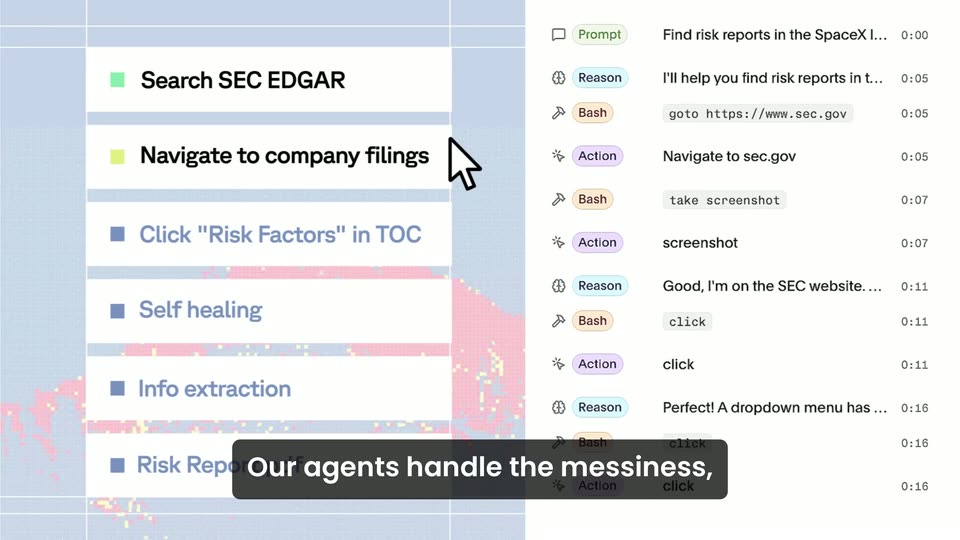
A two-panel agent dashboard fills the frame: a step checklist with colored bullets on the left and a scrolling action log with timestamps on the right, a white cursor hovering between them. A black caption bar at the bottom updates with the voiceover line.
On-screen text: “Our agents handle the messiness,”, “letting you build reliable and self-healing workflows.”
Camera: Static
A white pill button reading “Optimize this session” in red floats over a pixelated black-and-orange mountain range, with a cursor on its arrow. The label then swaps to green “Update & run again” with the arrow on the left, while a static caption bar stays at the bottom.
On-screen text: “letting you build reliable and self-healing workflows.”
Techniques: Cursor demo
Camera: Pan
Over a pixelated black-and-orange digital landscape on a pale blue grid, a white card with a robot icon expands open and its title letters tighten into place. A white caption on a black bar below reads the tagline.
On-screen text: “Browserbase Agents”, “Browserbase Agents scale across any site”
Techniques: Kinetic type
Camera: Static
A light article page with a red headline and yellow highlights cuts to a dark DeFi dashboard displaying total value locked. A black caption bar with the tagline stays fixed at the bottom.
On-screen text: “Browserbase Agents scale across any site”
Camera: Static
A flat web page with a keyword search box cuts to a job listing page, both shown full-frame. A black caption bar reading 'Browserbase Agents scale across any site' stays locked at the bottom throughout.
On-screen text: “Browserbase Agents scale across any site”
Camera: Static
A flat browser view cuts from a classifieds site with a red and blue jobs headline to a government jobs portal. A black rounded caption bar at the bottom updates its white text in sync with the voiceover.
On-screen text: “Browserbase Agents scale across any site”, “or layout and provide you browsers, web search,”
Camera: Static
Two web pages sit side by side in a split screen, a warranty form beside an earthquake archive, then swap to a jobs list and a registration page. A dark caption bar with white text runs along the bottom edge.
On-screen text: “or layout and provide you browsers, web search,”
Techniques: Split screen
Camera: Static
A flat browser view of a MyCitations fine-reduction page dissolves into a Google Scholar search screen. A dark caption bar with white text stays pinned at the bottom throughout.
On-screen text: “or layout and provide you browsers, web search,”
Camera: Static
A white card reading “browsers” shrinks into the top-left corner over an orange grid backdrop as a browser window cycles from a business filing page to a flight booking form. A dark caption bar at the bottom carries the voiceover line.
On-screen text: “browsers”, “or layout and provide you browsers, web search,”
Camera: Static
Flat locked-off composition on a grainy orange field. A light-blue UI panel on the left shows a flight search query that updates to a JSON results block, while a white tile on the right holds bold black “web search” and a dark caption pill at the bottom updates with the voiceover.
On-screen text: “or layout and provide you browsers, web search,”, “session replays, and agent identity all out of the box.”
Camera: Static
A static graphic frame holds a halftone orange-and-black desert landscape behind a white band reading session replays in bold black type, while a line-art browser mockup with a blue cursor sits at the right and a dark caption bar runs along the bottom.
On-screen text: “session replays”, “session replays, and agent identity all out of the box.”
Camera: Static
A grid of orange and white blocks frames a flat sign-in form and a spinning reCAPTCHA circle over a pixelated orange-and-black landscape. The black headline 'agent identity' sits left, with a dark caption bar across the bottom.
On-screen text: “agent identity”, “session replays, and agent identity all out of the box.”
Camera: Static
A black phrase “out of the box” sits on a white band over an orange grid background. A torn white paper edge with a blue fringe shifts along the bottom while two subtitle captions swap in turn.
On-screen text: “out of the box”, “session replays, and agent identity all out of the box.”, “The web was built for humans.”
Camera: Static
Solid orange background; the white lowercase headline 'the web was built for' holds on the left as 'humans' appears on the right, and a pixelated image of a person at a monitor switches to a close-up eye. A dark subtitle bar carries the voiceover at the bottom.
On-screen text: “the web”, “was built for”, “The web was built for humans.”, “humans”, “Now your agents can use it like one.”
Techniques: Kinetic type
Camera: Static
On a flat orange background, a lowercase white headline builds line by line while a pixel-art desk with a monitor, phone and calculator pops in and tilts into 3D perspective. The whole group scales down and centers as a black subtitle bar at the bottom fades out.
On-screen text: “now your agents”, “can use it”, “like one”, “Now your agents can use it like one.”
Techniques: Kinetic type, 3D mockup
Camera: Static
A wide red rectangle holding a small white tagline scales down into the square Browserbase mark as the black wordmark appears to its right, then holds centered on a white field.
On-screen text: “now your agents can use it like one”
Techniques: Morph
Camera: Static