2:21
Best SaaS Launch Video | ServiceUp
ServiceUp · Oct 2026
ServiceUp · Oct 2026 · 2:10 · AI-annotated
ServiceUp’s 2:10 launch film runs 107 scenes, about 1.2 s each. The product shows up at 0:26 and 6 features are revealed, with social proof. There is no explicit call to action; a voiceover carries the film. The video is built as a chain of short punchlines, cutting fast between locked-off text cards, 3D vehicle renders on a gridded canvas, and orange-to-purple gradient title screens. Its signature moves are word-by-word type reveals, red selection crop marks framing every UI card, and recurring gradient orbs plus the S logo that stitch the sections together.
Is this your launch? to your site or press kit.
Two tilted paper invoices listing repair costs and a red $650 amount gently rotate on a gridded light background with red corner handles. The caption builds word by word on either side as a large white W rises at the bottom.
On-screen text: “This is what a repair costs.”, “W”
Techniques: Kinetic type
Camera: Push in
A large dark sans-serif word “Well....” sits centered on a pale gray field. The W flashes red and the trailing dots pop in one by one before the line settles into solid dark type.
On-screen text: “Well....”
Techniques: Kinetic type
Camera: Static
Centered dark gray sans-serif text reads “Well it's” on a pale gray field, then “not.” fades in beside it with a brief reddish tint as the line scales up.
On-screen text: “Well it's not.”
Techniques: Kinetic type
Camera: Static
Extreme close-up of a cream paper form. A large red dollar figure reads $810, then changes to $590 beneath a gray “Paying around” label and a dotted rule.
Camera: Pull out
A tight close-up of a wrinkled paper slip labeled 'Paying amount' holds still while a large red bold figure rolls down from $730 to $620.
Techniques: Kinetic type
Camera: Static
A tight close-up of a paper form labeled “Paying amount” fills the frame. The large red figure sits between a dashed rule and a solid rule, then swaps from $710 to $680 while the camera holds still.
On-screen text: “Paying amount”, “$710”, “$680”
Camera: Static
A white van with its bonnet raised sits in a wet car park, street lamps glowing as the sky brightens from dusk to dawn. White text builds word by word across the center of the locked-off frame.
On-screen text: “The 3 days the van sat waiting”
Techniques: Kinetic type
Camera: Static
A white van with its bonnet open sits parked in a lot, framed by other vehicles and a traffic cone, as the headline builds word by word across the center.
On-screen text: “The 3 days the van sat waiting”
Techniques: Kinetic type
Camera: Static
A white van with its hood open sits in a wet car park at dusk. The sky brightens from dark blue to hazy daylight while the van and a red traffic cone remain fixed. Centered text reads over the van's front.
On-screen text: “The 3 days the van sat waiting”
Camera: Static
A van with its hood open sits centered in a parking lot, a traffic cone in front and other cars lined up along a green fence. The sky shifts from daylight to warm sunset while the caption fades from the full line down to the word to.
On-screen text: “The 3 days the van sat waiting”, “to”
Camera: Static
A white van with its bonnet open sits in a wet parking lot, a traffic cone in front, parked cars and a fence behind; the sky brightens from dusk to dawn in a locked-off shot while a white caption holds over the van.
On-screen text: “The 3 days the van sat waiting”, “to schedule the repair.”
Camera: Static
A dusk parking lot holds a van with its hood open under the caption 'to schedule the repair.' It cuts to black, where 'It's the manager' appears and the line 'stepping away from running the fleet' slides left, with 'away' and 'fleet' in orange.
On-screen text: “to schedule the repair.”, “It's the manager”, “stepping away from running the fleet”
Techniques: Kinetic type
Camera: Static
On a flat light-gray field, a centered line of text builds word by word: 'stepping away' slides out left as 'to chase an estimate.' locks in, the final word 'estimate.' tinted coral. The frame stays static and the pace is slow.
On-screen text: “stepping away”, “to chase an estimate.”
Techniques: Kinetic type
Camera: Static
A soft orange-to-purple gradient fills the locked-off frame. White caption text sits at center and grows word by word, starting as “And it's” and extending to “And it's having to”.
On-screen text: “And it's having to”
Techniques: Kinetic type
Camera: Static
A line of bold words and two tilted app icons, a blue envelope and a green phone, slides left across a light gray background. Center words are black while edge words fade to light gray, and the icons pop in as they cross the middle.
On-screen text: “And it's having to”, “and”, “call shops”
Techniques: Kinetic type
Camera: Static
A smooth orange-to-purple gradient fills the locked-off frame as white text appears word by word in the center, reading just to get a status update.
On-screen text: “just to get a status update.”
Techniques: Kinetic type
Camera: Static
On a light field with a faint gray grid, the phrase “None of it” assembles at center. “None” is coral, “of it” dark gray; the letters drift with a soft double-image echo and settle into a two-line lockup.
On-screen text: “None of it”
Techniques: Kinetic type
Camera: Static
On a light gray grid, the words of a sentence sit scattered across the center, then glide and scale into one horizontal line as a red arc slides in from the left edge.
On-screen text: “None of it shows up on the invoice.”
Techniques: Kinetic type
Camera: Pull out
On a pale gray field, a vertical column of large dollar figures sits at right, the centered one in bold black rolling through values while the rows above and below sit dimmed and cropped. At left, a thin-ruled label reads INVOICES beside a small red arrow.
On-screen text: “INVOICES”, “-$120”, “-$70”
Techniques: Kinetic type
Camera: Pull out
A light-gray interface list scrolls: the INVOICES row with a red arrow fades up as a red car row slides in. On the right, a column of large dollar figures scrolls up, the active one in black, while a center value dissolves from purple into a red -$998.
Techniques: Kinetic type
Camera: Static
A red sedan rotates from a front three-quarter view to a side profile on a light gray grid with orange corner dots. Large gradient text sits behind it, static while the car turns. The frame stays locked off.
On-screen text: “-$300”
Techniques: 3D mockup
Camera: Static
A white cargo van in 3D perspective morphs into a cab-chassis truck on a pale grid background. Behind it, a large gradient price reads -$450, then updates to -$598 as the vehicle changes shape.
On-screen text: “-$450”, “-$598”
Techniques: 3D mockup, Morph
Camera: Static
A black semi-truck render sits on a light grid backdrop with small orange dots. A large blue-to-orange gradient price behind it jumps from -$450 to -$600 while scaling up, and the truck drifts slightly forward.
On-screen text: “-$450”, “-$600”
Techniques: 3D mockup, Kinetic type
Camera: Pull out
On a light gray field, the centered headline “Every hour” shrinks and slides up as a white van card with a plate glides in; below it “your vehicles sit idle.” appears with “sit idle.” in coral, all inside a faint grid with orange corner dots. The cut is brief.
On-screen text: “Every hour”, “your vehicles sit idle.”
Techniques: Kinetic type
Camera: Pull out
On a light grid background, the headline 'Every hour' and 'your vehicles sit idle.' frame a white card holding a van photo and VIN. The list expands to three vehicle cards, a coral '-$373' tag slides onto the top card, and the headline shifts over the list.
On-screen text: “Every hour”, “your vehicles sit idle.”
Techniques: Kinetic type, Masking
Camera: Static
A light canvas with faint grid lines and red corner handles frames a vertical list of three white cards. Each card pairs a vehicle render, a bold label and a VIN code with a red-orange gradient block on the right, where a white negative dollar figure ticks upward.
Camera: Pull out
A white pill with a soft red glow sits on a light gray background. The black word Downtime completes as its final letters fade from gray to black, while the red glow spreads along the pill's top and bottom edges.
On-screen text: “Downtime”
Techniques: Kinetic type
Camera: Static
A smooth coral-to-purple gradient fills the frame. The white headline “Downtime is...” holds centered, then the word “expensive.” fades in at the right to complete the sentence.
On-screen text: “Downtime is expensive.”
Techniques: Kinetic type
Camera: Static
A dark gray sentence assembles word by word, centered on a pale field that fades into a soft purple and pink gradient. The line completes as 'So we built something to solve it.'
On-screen text: “Downtime is expensive.”, “So we built something to solve it.”
Techniques: Kinetic type
Camera: Static
A single black sentence sits centered on a soft pastel gradient that slowly drifts from purple and pink to pink and purple. The text stays locked in place for the whole shot, with no movement or entrance.
On-screen text: “So we built something to solve it.”
Camera: Static
A glossy red sphere glows on a black background while a white stylized S logo assembles at its center, the top bar and lower curve sliding together. The sphere's rim catches a moving glint. A still caption reads the line.
On-screen text: “So we built something to solve it.”
Techniques: Morph, Light sweep
Camera: Static
A glowing coral S logo starts large at the center of a dark field, then shrinks to settle above the white tagline, while a large thin outline S with a car silhouette sits behind it and soft colored bokeh circles drift in from the edges.
On-screen text: “The agentic repair platform”
Techniques: Kinetic type
Camera: Static
A red S mark and a one-line tagline hold the center of a black frame, backed by a faint outlined S. Soft gradient orbs in red, blue and purple drift slowly at the edges while the central lockup gently scales.
On-screen text: “The agentic repair platform”
Techniques: Parallax
Camera: Static
A white S mark scales into the center of a glowing red disc, ringed by eight soft gradient dots that settle into a circle. The words for modern and fleets flank the badge on a dark field, then the line The agentic repair platform scales in.
On-screen text: “for modern”, “fleets”, “The agentic repair platform”
Camera: Pull out
A white notification card floats in 3D perspective, tilted, with a soft red glow behind it. The card's brake-alert text resolves from a blurred skeleton into sharp labels, and the headline word 'fleets' scales in beside it.
On-screen text: “for modern”, “fleets”
Techniques: 3D mockup, Kinetic type
Camera: Pull out
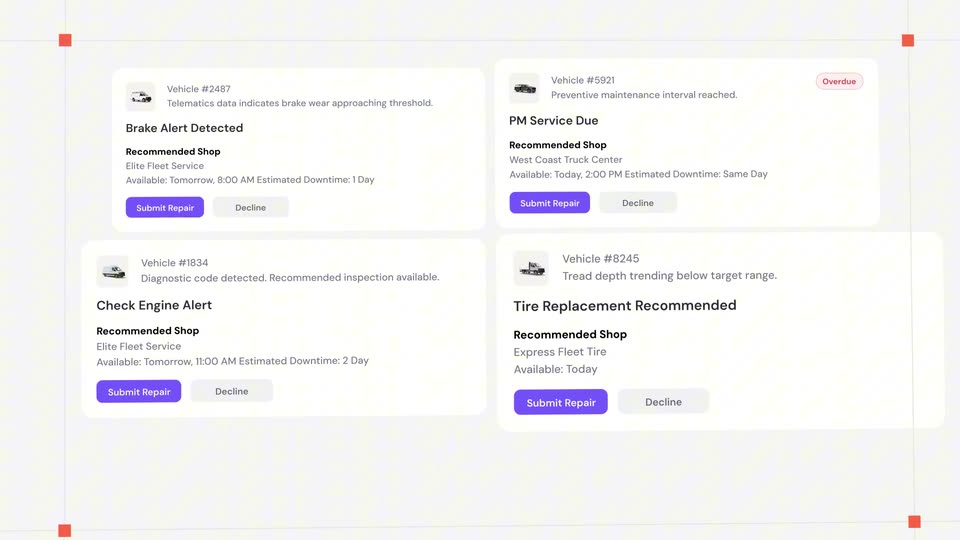
Four white maintenance alert cards settle into a two-by-two grid over a light grid background with red corner markers. A red AI recommendation bar with an orange button slides in along the bottom edge.
Camera: Pull out
A pale four-point star with a soft purple-pink glow and a small gradient S logo inside slides left across a light gray field. A dark gray line, AI agents automate your, sits beside it with a tiny purple sparkle at the end.
On-screen text: “AI agents automate your”
Techniques: Kinetic type
Camera: Static
A white four-pointed star with a soft pink and purple glow sits left of center, holding a purple-to-orange S logo topped by a small sparkle. To its right, dark sans-serif text states the headline. The star and its halo drift gently on a pale gray background.
On-screen text: “AI agents automate your maintenance and repair.”
Camera: Static
A row of dark trucks and coaches scrolls left on a light background while an orange rectangle highlights one vehicle. The caption builds word by word above the lineup, ending on 'So your team stops'.
On-screen text: “So your team stops”
Techniques: Kinetic type
Camera: Pan
A row of dark vans and trucks lines the lower frame on a light gray field. Above, a headline swaps phrases in dark gray and red, and a thin red box shrinks to frame the center van.
On-screen text: “So your team stops managing shops.”, “Managing your fleet.”
Techniques: Kinetic type
Camera: Push in
Five dark vehicles, a box truck, crane truck, van, refrigerated truck and semi, face the camera in a row on a pink-to-purple gradient with a faint grid. The headline sits centered above them while the vehicle row drifts slowly sideways.
On-screen text: “Managing your fleet.”
Camera: Push in
A white headline reads “Lets dive into the platform.” over a warm orange-to-violet gradient. The words appear in sequence and scale up into a centered lockup on a locked-off frame.
On-screen text: “Lets dive into the platform.”
Techniques: Kinetic type
Camera: Static
On a light grid, a white card with a van icon and “Delivery Van” slides right into a glowing orange-purple tile at center. The tile’s mark swaps to a sync icon as a second card, “Pacific Coast Collision,” slides in from the right.
On-screen text: “Lets dive into the platform.”
Techniques: Morph
Camera: Static
A row of white rounded cards on a light gray grid scrolls left. An orange gradient tile with a white S logo slides in between the Delivery Van and Pacific Coast Collision cards, trailed by a soft purple glow. Red corner brackets frame the active card.
Camera: Static
A white grid holds two cards, a delivery van labeled Mechanical Issue on the left and a collision shop on the right. A purple-to-orange gradient bar widens across the center as six agent pills stack vertically, while the headline We handle everything builds word by word, everything in red, with a small plane icon.
On-screen text: “We handle everything”
Techniques: Kinetic type
Camera: Static
Top left, the headline sits above a Delivery Van card; a Pacific Coast Collision card sits right. Six agent pills stack down the center as a purple-to-orange gradient bar expands horizontally to connect the two cards.
On-screen text: “We handle everything in between.”
Camera: Push in
On a pale gray field, a vertical list of workflow labels builds: Intake. in orange beside a small arrow mark and a long orange-to-purple gradient bar, then Shop routing., Approval. and Communication. in light gray. Intake. scales in while the gray labels slide in one after another.
On-screen text: “Intake.”, “Shop routing.”, “Approval.”, “Communication.”
Techniques: Kinetic type
Camera: Static
On a pale gray field, a red arrow points at a vertical list of five steps. A gradient bar slides down the list, and each word turns orange as it passes, while the list drifts upward.
On-screen text: “Intake.”, “Shop routing.”, “Approval.”, “Communication.”, “Payment.”
Techniques: Kinetic type
Camera: Pan
A vertical list of gray words on a light background scrolls upward while a red arrow sits at left and an orange-to-pink gradient bar tracks the active word, which shifts from Communication to Payment.
On-screen text: “Intake.”, “Shop routing.”, “Approval.”, “Communication.”, “Payment.”
Techniques: Kinetic type
Camera: Static
A soft orange-to-purple gradient fills a locked-off frame as white text builds word by word in the center, completing the line “Every step a fleet manager used to have to do by hand.”
On-screen text: “Every step a fleet manager used to have to do by hand.”
Techniques: Kinetic type
Camera: Static
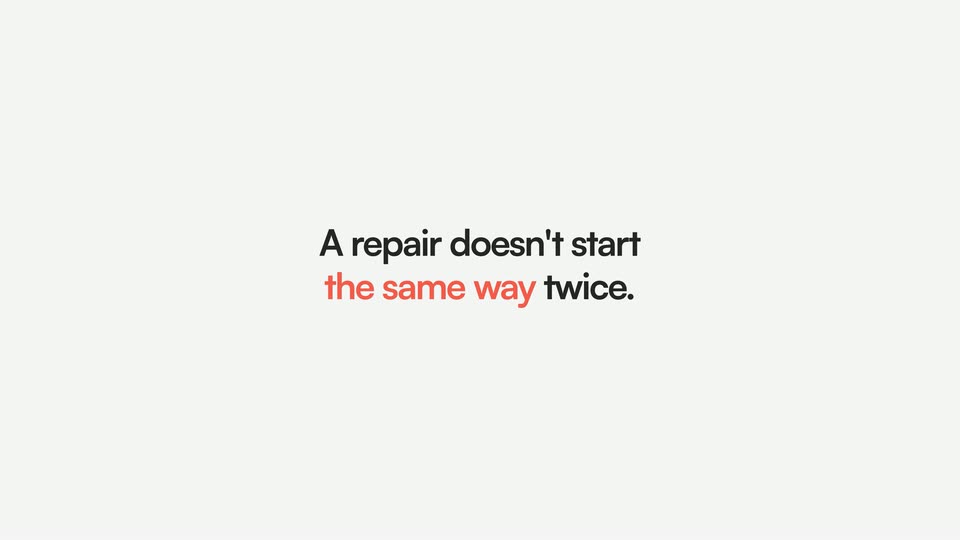
On a plain light gray background, the line 'A repair doesn't start' fades in dark, then 'the same way' appears in coral and 'twice.' in gray, word by word, and the full sentence holds still to the end.
On-screen text: “A repair doesn't start”, “the same way twice.”
Techniques: Kinetic type
Camera: Static
A two-line headline sits centered on a light gray field. The block then slides right with heavy motion blur until it leaves the frame. The phrase 'the same way' is set in coral, the rest in black.
On-screen text: “A repair doesn't start”, “the same way twice.”
Techniques: Kinetic type
Camera: Static
A repair-order card with a red van render eases in scale at the center of a light gridded field whose lines drift; the plate number slides in, and a tagline reads “A repair doesn't start the same way twice.”
On-screen text: “A repair doesn't start”, “the same way twice.”
Techniques: Parallax
Camera: Pull out
A locked-off light gray grid with orange corner markers holds two repair-order cards. The red-van card, headed 'Repair Order: Received from FMS' with plate E87UB55470, slides left and shrinks as a white-truck card slides in from the right.
Camera: Static
Three product cards with vehicle renders scale and slide into place over a light grid with red crop marks. A red van and gray truck card appear first, then a blue van card enters from the right, each with a colored status bar and warning icon.
Camera: Static
Four repair-order cards, each with a vehicle render and a warning triangle, slide left across a light gray background; the rightmost card carries a red header. Orange selection handles mark the frame corners.
Camera: Push in
A smooth orange-to-purple gradient fills the frame while white text builds word by word at the center, ending on the full line. The camera holds still on the locked-off composition throughout the reveal.
On-screen text: “Doesn't matter where it starts.”
Techniques: Kinetic type
Camera: Static
On a plain light-gray stage, large dark-gray words build left to right as a curved arrow points up at the lower left. A flat alert card with a red header, a black truck photo and an orange triangle slides in on the right.
On-screen text: “Doesn't matter where it starts.”, “We create the”
Techniques: Kinetic type
Camera: Push in
A headline and a truck repair-order card sit on a light gray field, then both clear to reveal a stylized city map. An orange ring marks the fleet lot at center while purple and orange pins drift over the streets as the map pans.
On-screen text: “We create the repair order automatically.”
Techniques: Parallax
Camera: Pull out
A light gray city map with white street lines fills the frame, scattered with red and purple pins. A white circle marked FLEET LOT pulses a red ring at the center. Green match-percentage tags pop in one by one near the pins.
Camera: Static
A light map shows red and purple pins, green match labels and orange fleet-lot rings, with a white recommendation card on the right. The map zooms in, then slides away to plain gray as the card rises from the bottom and “So the” appears at left.
On-screen text: “So the”
Techniques: UI zoom
Camera: Push in
A white shop-recommendation card slides up from the bottom and tilts into 3D perspective, revealing cost, time and distance fields. A black headline builds word by word above it, then exits as the card settles center frame.
On-screen text: “So the moment a repair is needed.”
Techniques: Kinetic type, 3D mockup
Camera: Push in
A white result card slides up and de-blurs to a sharp stop on a light gray background. It displays a green 94% match ring, the shop name Precision Auto Body, an address line, and a two-column grid of cost, cycle time, distance and capacity fields.
Camera: Static
A white panel van rests on a two-post lift with orange arms against a plain light background. A small line reads USE YOUR above a large line that fills in to read OWN SHOPS.
On-screen text: “USE YOUR”, “OWN SHOPS”
Techniques: Kinetic type, 3D mockup
Camera: Static
A white van fades from transparent to solid as it seats into a two-post lift frame on a plain light background. Above it, the gray line OR USE sits over a large orange OURS that slides in behind the lift's top bar.
On-screen text: “USE YOUR”, “OWN SHOPS”, “OR USE”, “OURS”
Techniques: 3D mockup, Kinetic type
Camera: Push in
On a plain light gray field, the black words OR USE hold center while the red word BOTH. slides in to complete the line.
On-screen text: “OR USE BOTH.”
Techniques: Kinetic type
Camera: Static
A close cluster of multicolor gradient spheres on thin lines pulls back to reveal a full elliptical orbit around the center. “The network is curated” holds in coral with an oversized “The”, then “and it adjusts to your fleet.” appears below in gray.
On-screen text: “OR USE BOTH.”, “The network is curated”, “and it adjusts to your fleet.”
Techniques: Kinetic type
Camera: Pull out
Ten gradient-colored circles form a tilted elliptical ring on a light gray background, drifting slowly in place. Two centered lines of text sit inside the ring, the top line in red and the bottom in black.
On-screen text: “The network is curated”, “and it adjusts to your fleet.”
Camera: Static
A glossy gradient sphere, blue on top fading to orange below, rests centered on a pale gray field with a soft shadow. Two lines of static caption text sit with it while the sphere holds still.
On-screen text: “The network is curated”, “and it adjusts to your fleet.”
Camera: Static
A white rounded card with a gradient avatar, the title Approval Agent and an off toggle scales up at center on a light gray background, framed by four orange corner handles, as the body copy types in line by line.
Techniques: Kinetic type
Camera: Static
A white Approval Agent card with red selection handles sits on a light grid; its toggle flips from gray to green as the frame zooms out, revealing the large black headline In seconds. along the bottom edge.
On-screen text: “In seconds.”
Techniques: UI zoom
Camera: Pull out
A white Approval Agent card with a purple icon, body copy, and green toggle sits centered on a light grid canvas, red selection handles at its corners. Behind it, the large gray headline changes from “Not … days.” to “In seconds.” as the card’s text lines slide in.
On-screen text: “Not”, “days.”, “In”, “seconds.”
Camera: Static
On a plain light gray background, a small dark gray label 'Working on it...' sits above a large black line that types out 'Reading pricing...', while a red arrow and red line type out 'Reviewing warranty' below it.
On-screen text: “Working on it...”, “Reading pricing...”, “→ Reviewing warranty”
Techniques: Kinetic type
Camera: Static
A light gray card holds three left-aligned lines: a small dark-gray “Working on it...”, a large black “Reading pricing...” with cycling ellipsis dots, and a large coral “→ Reviewing warranty” that types in letter by letter.
On-screen text: “Working on it...”, “Reading pricing...”, “→ Reviewing warranty”
Techniques: Kinetic type
Camera: Static
On a pale gray background, the phrase builds word by word: 'An SLA starts slipping?' with 'SLA' in coral and the rest in dark gray. Each word scales in, and the final word 'slipping?' slides in with a motion blur.
On-screen text: “An SLA starts slipping?”
Techniques: Kinetic type
Camera: Static
On a pale gray field, the centered line 'An SLA starts slipping?' (SLA in coral) scales down and is replaced by 'We catch it.' A white card then slides up over a faint grid, showing 'Repairs Moving Right Now' with an estimate audit agent at 0%.
On-screen text: “An SLA starts slipping?”, “We catch it.”
Techniques: Kinetic type
Camera: Static
On a light gray grid, a white card titled “Repair estimate ready” lists three line items with prices and orange “Under review” tags. A second card slides up and off the top, and a green progress bar under “Estimate audit agent” fills from 24% to 97%.
Camera: Static
A dark list of service cards scrolls upward over a light grid background. A white selection box with small corner handles rests on the AC Repair row, the only entry missing the green approval pill.
Camera: Pan
A dark service list inside a selected card on a light grid scrolls up one row; the bottom item's status changes to a red Flagged pill. On the right, a headline types in letter by letter next to a red arrow.
On-screen text: “We flag i”
Techniques: Kinetic type
Camera: Pull out
A list of four black service cards sits on a light grid, the last card marked with a red Flagged label while the others carry green Approved labels, and the phrase We flag it with a red arrow slides in on the right.
On-screen text: “We flag it”
Techniques: Kinetic type
Camera: Static
A soft orange-to-purple gradient fills the frame as the white line 'Not after it's paid.' builds in word by word beside a small arrow icon, centered and locked off.
On-screen text: “Not after it's paid.”
Techniques: Kinetic type
Camera: Static
On a near-black background, white bold sans-serif text builds line by line at the lower left, reading out the sentence, while a vertical purple-to-orange gradient bar widens at the right edge.
On-screen text: “→ Not after it's paid.”, “But none of this”, “means giving up”, “control.”
Techniques: Kinetic type
Camera: Static
On a dark background, a white headline reads “But none of this means giving up control.” beside a purple-to-orange gradient square. The line slides out as a cream square wipes in from the left, and a second headline, “Run it in manual mode.”, appears to its right.
On-screen text: “But none of this means giving up control.”, “Run it in manual mode.”
Techniques: Kinetic type
Camera: Static
A pill toggle holds center on a near-black field, its right knob a glowing sphere that shifts from violet to orange as the white label Co-pilot settles in. Behind it the oversized headline manual mode is hidden except its first and last letters, dim gray.
On-screen text: “Run it in manual mode.”, “Co-pilot”
Camera: Static
A glowing red 3D sphere rests inside a faint grid, bracketed by four corner dots. “Auto” holds at left and “Pilot.” lands at right as the framed group eases left and a thin red line draws out to a small forked tip.
On-screen text: “Auto”, “Pilot.”
Camera: Static
On a near-black background, translucent green, orange, blue and purple spheres drift right along thin orange and gray curved lines that arc in from the left edge. The lines bend like flight paths as the spheres travel across the frame at a steady pace.
Camera: Push in
On a near-black field, curved coral and gray lines radiate from the left edge, each carrying gradient spheres in green, orange, teal, purple and blue. The network drifts slowly rightward, the right-hand nodes sliding farther than the left ones.
Techniques: Parallax
Camera: Push in
A glowing red sphere rotates at the center of a black frame while thin red and gray lines extend from both edges into one horizontal line through it. The headline scales in above the sphere, then the second line fades in below.
On-screen text: “System gets smarter”, “with every repair.”
Techniques: Kinetic type
Camera: Push in
A glowing red sphere with thin filament lines on both sides sits between two white text lines on a dark background. The top line crossfades and scales, then the sphere morphs into a toggle switch with a white knob as the text clears.
On-screen text: “System gets smarter”, “with every repair.”
Techniques: Kinetic type, Morph
Camera: Static
A white pill-shaped toggle with a gradient knob sits centered on a soft purple and red gradient backdrop. The background hues drift and rotate slowly while the toggle stays still, its knob shifting from orange to violet.
Camera: Push in
A plain light gray frame holds the sentence “So repairs” in dark gray and “move forward.” in coral, which slide into place and lock off. The two color blocks read as one line, centered left of frame.
On-screen text: “So repairs move forward.”
Techniques: Kinetic type
Camera: Static
On a near-black background, a white sentence assembles word by word: “So repairs move forward.” slides in, then “Even while you sleep.” completes the line, with “you” set in red.
On-screen text: “So repairs move forward.”, “Even while you sleep.”
Techniques: Kinetic type
Camera: Static
A centered tagline, white with the last words in red, sits on a near-black field. It clears to reveal three vertical purple pills of stepped heights that scale gently in place.
On-screen text: “Even while you sleep.”
Camera: Static
A row of vertical pill-shaped bars, each fading from purple at the top to white at the bottom, pulses across a dark background. The bars change height and width in sequence, forming a wave-like equalizer pattern that drifts left to right.
Camera: Pull out
On a dark background, a row of vertical rounded bars rises and lights up left to right with a purple-to-white gradient, settling at four filled bars. Below, bold white 40% and a small red icon appear beside gray Downtime text.
On-screen text: “40%”, “Downtime”
Camera: Static
A row of vertical pill bars sits on a near-black field; the leftmost three, filled with a purple-to-white gradient, extend to full height, then 30% in white and Repair costs in gray fade in below, a small orange arrow between them.
On-screen text: “30%”, “Repair costs”
Camera: Static
A dark data graphic shows a row of twelve vertical rounded bars; the first three glow with a purple-to-white gradient while the rest stay dark gray. Below, white 30% and a red arrow sit left of gray Repair costs. The whole composition drifts slowly right.
On-screen text: “30%”, “Repair costs”
Camera: Pull out
On a pale gray background, the dark gray line “That's capital back in” builds word by word, then “your business.” appears below it in coral. The frame stays locked off throughout.
On-screen text: “That's capital back in”, “your business.”
Techniques: Kinetic type
Camera: Static
A plain off-white background holds two centered lines of text. The dark gray line scales into place while the coral line below stays still, locking off on the final frame.
On-screen text: “That's capital back in”, “your business.”
Techniques: Kinetic type
Camera: Static
A soft peach-to-purple gradient fills the frame, locked off. White sans-serif text builds word by word in the center, first line reading “And time”, second line “back for your team.”, settling into a two-line centered lockup.
On-screen text: “And time”, “back for your team.”
Techniques: Kinetic type
Camera: Static
White invoice cards slide in from the right and scroll left across a light gray field, each showing a repair-cost list and a red dollar amount, while a dark caption scales in.
On-screen text: “And time”, “back for your team.”
Camera: Pull out
Three flat white invoice cards with red dollar amounts sit on a pale gray field, drifting with a soft blur, while a large two-tone headline types out across the center.
On-screen text: “The waiting”
Techniques: Kinetic type
Camera: Pull out
On a pale gray field, the centered line reads “The waiting.” with “The” in coral. The word “waiting.” slides out downward and fades to gray as “guessing.” takes its place on the same line.
On-screen text: “The waiting.”, “The guessing.”
Techniques: Kinetic type
Camera: Static
A pale field fades into a soft pink and purple gradient as the headline The guessing. swaps to The forgetting., the coral The holding still while the earlier lines, guessing. and waiting., dim and stack below.
On-screen text: “waiting.”, “The guessing.”, “The forgetting.”
Techniques: Kinetic type
Camera: Static
A centered sans-serif line reads “We find it.” in dark gray on a soft pastel gradient, then swaps to “And erase it.” in a red-to-purple gradient as a wisp of dark smoke dissolves at its left edge.
On-screen text: “We find it.”, “And erase it.”
Camera: Static
The white SERVICEUP wordmark sits centered on a black background over a soft purple-pink glow. A bright band of light sweeps across the letters from left to right, and a faint 3D bevel edge appears on the type.
On-screen text: “SERVICEUP”
Techniques: Light sweep
Camera: Static
A soft purple halo glows on a black field as the white SERVICEUP wordmark slides up out of a horizontal mask, its lower half clipped, then settles into full form. The tagline fades in beneath it.
On-screen text: “SERVICEUP”, “Fleet repair that runs itself.”
Techniques: Masking
Camera: Static