1:30

Introducing Cursor 3
Cursor · Developer tools · Apr 2026
SchemeFlow · Jun 2024 · 0:34 · AI-annotated
SchemeFlow’s 0:34 launch film runs 19 scenes, about 1.8 s each. The product is on screen from the first frame and 5 features are revealed. There is no explicit call to action. A product launch video that opens on the SchemeFlow logo over a drifting aerial skyline, then walks through a chain of feature beats, each opened by a stacked orange headline on white blocks that later collapses into a top banner while a white UI panel demos the step. Transitions are driven by panels sliding and wiping between live-action aerials and interface shots, closing on a sunset crane silhouette with the logo and tagline.
Is this your launch? to your site or press kit.
Cursor · Developer tools · Apr 2026
Ember Robotics · Industrials · Aug 2024
An aerial cityscape with a river drifts slowly beneath a centered two-block logo, an orange block reading SCHEME in white beside a white block reading FLOW in orange. A white tagline sits below, locked in place while the skyline moves.
On-screen text: “Draft Technical Reports with Al”, “For Engineers & Built Environment Professionals”
Camera: Static
An aerial city skyline under a dark blue tint holds a centered orange-and-white SCHEME FLOW logo with a white headline and subline below. A white interface panel with a red-bordered document slides in from the left, covering the logo.
On-screen text: “SCHEME”, “FLOW”, “Draft Technical Reports with AI”, “For Engineers & Built Environment Professionals”
Techniques: Masking
Camera: Static
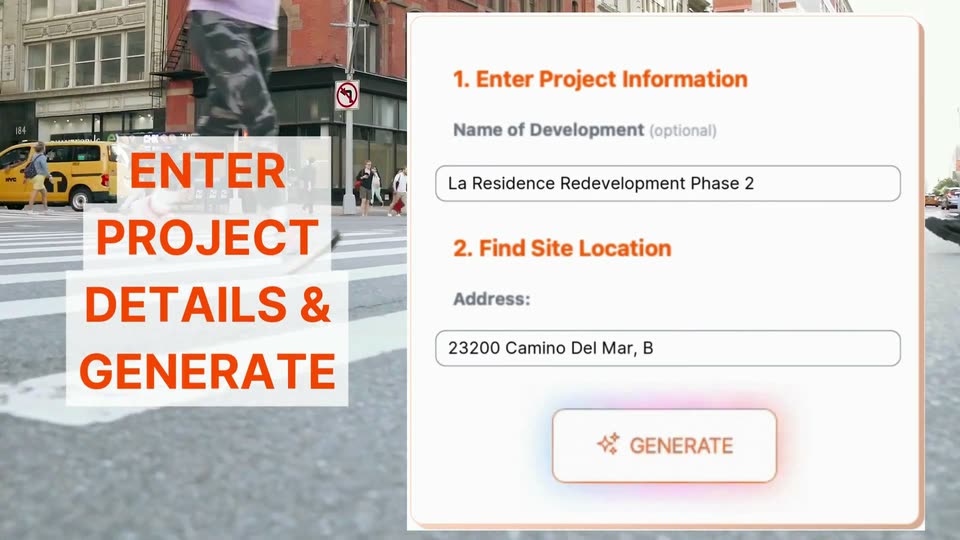
A split layout pairs a live street scene on the left with a white product form on the right. An orange headline on white blocks slides in over the footage while the address field types out 23200 Camino Del Mar, Boca and the GENERATE button glows.
On-screen text: “ENTER PROJECT DETAILS & GENERATE”
Techniques: Kinetic type, Split screen
Camera: Pan
A split screen shows a live-action crosswalk left and a white project form right. Within the clip the form swaps to a map isochrone view, the street dissolves into a map, and the orange headline changes to Your Technical Analysis.
On-screen text: “ENTER PROJECT DETAILS & GENERATE”, “YOUR TECHNICAL ANALYSIS”
Techniques: Split screen, Kinetic type
Camera: Pan
A flat map interface with an isochrones panel sits over an aerial view of a suburban neighborhood. A cursor clicks the Add new button, a 15 minute interval row appears, and colored walk-time layers expand across the map. The cursor then clicks zoom in.
On-screen text: “ADD YOUR TECHNICAL ANALYSIS”
Techniques: Cursor demo, UI zoom
Camera: Static
A map view with isochrone zones and a settings panel slides left to reveal an AI draft document behind it. An orange caption bar reading ADD YOUR TECHNICAL ANALYSIS stays fixed along the bottom.
On-screen text: “ADD YOUR TECHNICAL ANALYSIS”
Techniques: Masking
Camera: Pan
A product UI under an orange 'Refine Your Draft Using AI' banner: a document with a highlighted paragraph left, a feedback panel right. A cursor clicks Regenerate; the button shows a generating state and the paragraph rewrites with new wording. A white panel slides in from the right.
On-screen text: “REFINE YOUR DRAFT USING AI”
Techniques: Kinetic type, Cursor demo, Masking
Camera: Pan
A white document panel on the right scrolls upward through sections on data sources, analysis and validation over a static aerial dusk shot of a highway interchange. A fixed orange headline on stacked white blocks holds on the left.
On-screen text: “CHECK THE DETAILED SOURCES & GUIDANCE”
Camera: Pan
An aerial sunset view of a city with ring roads fills the frame. A white block on the left holds the orange headline, while a white document panel on the right scrolls up to settle on its bullet list.
On-screen text: “CHECK THE DETAILED SOURCES & GUIDANCE”
Camera: Static
Over a blurred aerial city, a left orange headline block reads CHECK THE DETAILED SOURCES & GUIDANCE beside a white bulleted panel. The left block snaps to a Microsoft Word window with a SchemeFlow banner and project card, while the headline collapses into a top banner.
On-screen text: “CHECK THE DETAILED SOURCES & GUIDANCE”, “CROSS OF USE WORD”
Techniques: Kinetic type
Camera: Pan
A Microsoft Word window sits over a sunset cityscape, with a SchemeFlow add-in pane on the right and a presentation slide in the document. A solid orange banner across the top carries the white headline. The shot holds steady with a cursor resting in the document.
On-screen text: “EASY TO USE IN MICROSOFT WORD”
Camera: Static
A Microsoft Word window sits over a cityscape backdrop, its document scrolling upward past a cover page and into a version control section, while an orange banner holds the headline above and a SchemeFlow toolbox panel stays fixed on the right.
On-screen text: “EASY TO USE IN MICROSOFT WORD”
Camera: Static
A Microsoft Word window with a SchemeFlow side panel sits under an orange banner reading EASY TO USE IN MICROSOFT WORD. A black-and-white solar field wipes in from the left, carrying three white icons over a handshake, compass and lock, each with a caption, while an orange bar slides up at the bottom.
On-screen text: “EASY TO USE IN MICROSOFT WORD”, “Secure data storage”, “High technical standards”, “Secure data storage”, “STRUCTURED, RELIABLE & SECURE”
Techniques: Masking
Camera: Pan
A drone glides low over rows of solar panels at sunset. Three white icons, a handshake, a drafting compass and ruler, and a padlock, sit above matching labels, while a gray banner with orange text spans the bottom.
On-screen text: “Trusted AI partner”, “High technical standards”, “Secure data storage”, “TRUSTED, RELIABLE & SECURE”
Camera: Static
Aerial view of a solar field at sunset carries three white icons, a handshake, a compass and a padlock, each with a caption. The background wipes left to right to a red suspension bridge over water while the icons and the orange headline bar stay fixed.
On-screen text: “Trusted AI partner”, “High technical standards”, “Secure data storage”, “TRUSTED, RELIABLE & SECURE”
Techniques: Masking
Camera: Pan
Aerial view of the Golden Gate Bridge at dawn fills the frame. Two orange bars grow across the center as bold white caps type in word by word, reading AT THE DAWN OF / THE AGE OF AI.
On-screen text: “AT THE DAWN OF”, “THE AGE OF AI”
Techniques: Kinetic type
Camera: Push in
Construction cranes silhouetted against a golden sunset sky with sun rays. The SCHEME FLOW logo lockup sits centered at the top, and the white tagline IT'S TIME TO BUILD AGAIN sits at the bottom; all elements hold still.
On-screen text: “SCHEME FLOW”, “IT'S TIME TO BUILD AGAIN”
Camera: Static
The SCHEME FLOW logo, white on orange and orange on white blocks, sits centered over a sunset sky with silhouetted construction cranes. Below, the white tagline IT'S TIME TO BUILD AGAIN holds still while the clouds drift slowly.
On-screen text: “IT'S TIME TO BUILD AGAIN”
Camera: Static
A two-tone logo lockup, orange block reading SCHEME and white block reading FLOW, sits centered over a sunset sky with sunbeams and silhouetted construction cranes. Below it the white tagline IT'S TIME TO BUILD AGAIN holds still across the frame.
On-screen text: “IT'S TIME TO BUILD AGAIN”
Camera: Static