5:24

New AirPods 5: Everything announced about the best Active Noise Cancellation in an open-ear design
Apple · Hardware · Sep 2026
Samora AI · Mar 2026 · 1:37 · AI-annotated
Samora AI’s 1:37 launch film runs 46 scenes, about 2.1 s each. The product shows up at 0:36 and 8 features are revealed. The call to action lands at 1:29 (92% in), over a voiceover. The video alternates warm live-action vignettes of callers with lavender UI mockups, introducing each feature with a word-by-word headline and demoing it through morphing cards, circuit traces, and parallax pans. Pacing is brisk at 123 bpm, with purple accent words, blurred duplicate cards for depth, and quick zooms into dashboard panels as its signature moves.
Is this your launch? to your site or press kit.
Apple · Hardware · Sep 2026
Giga (Scout) · Jun 2026
A man in a cream sweater sits in a brown leather armchair in a book-lined living room, a phone held to his ear. He gestures with his free hand while waiting. The camera eases in on him; a hammer lies on the wooden table in front.
Camera: Push in
A man in a sunlit study drops his phone onto the wooden floor; the camera tilts down to follow it as the incoming call screen stays lit. His feet hover over the phone, then he steps away, leaving the ringing call on the floor.
Camera: Push in
Four circular cutouts with purple borders reveal frustrated people on phones and a laptop, sliding into a horizontal row on a light grid background. Below, the caption appears left to right, the last word in purple.
On-screen text: “Your customers deserve excellence”
Techniques: Masking, Kinetic type
Camera: Static
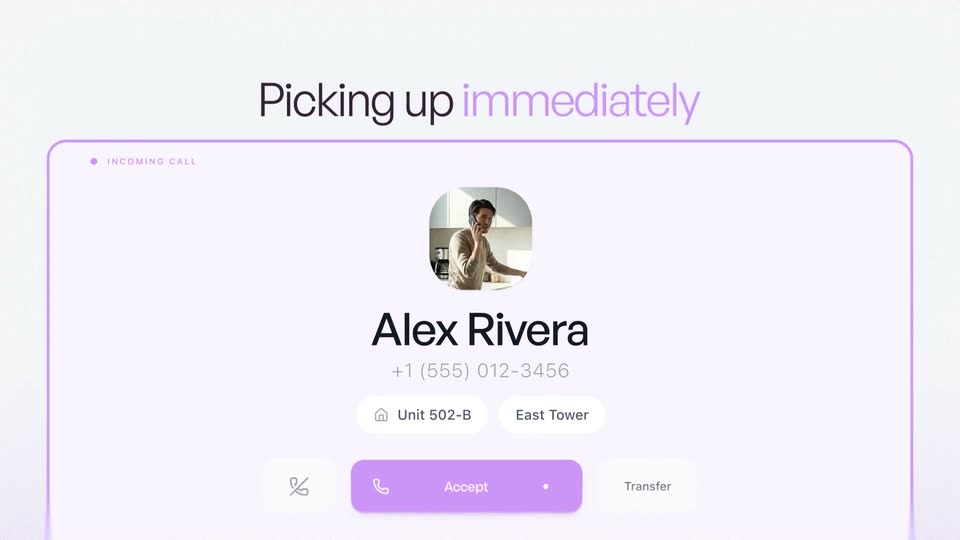
The view opens zoomed into the center of a pale purple incoming-call card, then pulls back to the full panel: a circular photo of a man, the name Alex Rivera, a phone number, unit and tower pills, and a purple Accept button. Above it, the headline Picking up immediately slides in, with immediately in lilac.
On-screen text: “Picking up immediately”
Techniques: UI zoom, Kinetic type
Camera: Pan
A light-lavender incoming-call card sits under the headline. A small video tile of a man holding a phone in a kitchen expands to fill the card, revealing the counter and sink, while the accept button grows into a large circle.
On-screen text: “Picking up immediately”
Techniques: UI zoom
Camera: Static
A man in a beige sweater stands at a kitchen sink, phone to his ear, as water runs from the faucet. The live-action shot sits inside a rounded purple frame on a lavender field and slowly pushes in.
Camera: Static
A man in a kitchen talks on a phone inside a rounded video frame; the frame morphs into a small circle beside a purple sparkle app icon, while a white card slides in on the right with samora.ai and a reply being typed.
On-screen text: “samora.ai”, “No p”
Techniques: Morph
Camera: Static
A circular clip of a man on a phone call anchors the left, connected by purple lines to a central icon and a chat card on the right. The chat reply types in, two contact rows drop in, and a headline assembles word by word as the man smiles.
On-screen text: “Handling requests faster than a human”
Techniques: Kinetic type
Camera: Push in
A light lavender layout shows the headline 'Handling requests faster than a human' at top. A live-action clip of a man on the phone sits in a circular mask that expands into a rounded rectangle, tied to a waveform icon and a chat card on the right.
On-screen text: “Handling requests faster than a human”
Techniques: Masking, Morph
Camera: Pan
A man in a beige sweater holds a blue phone to his ear while leaning into the open cabinet under a kitchen sink. The footage plays inside a rounded purple-bordered window on a pale lavender background, which scales down as a small sparkle icon fades in to its right.
Camera: Pull out
A circular cutout shows a man on a phone call in a kitchen, linked by a purple line to a central app icon and a white call card with a running timer. Above, the headline Smoothly hands off to a human when needed slides in word by word, Smoothly and human in purple.
On-screen text: “Smoothly hands off to a human when needed”
Techniques: Masking, Kinetic type
Camera: Pan
On a pale lavender gradient, the line “because great service isn't just fast” builds word by word, “great service” and “fast” in purple, the rest in dark gray. The completed line then slides left out of frame.
On-screen text: “because great service isn't just fast”
Techniques: Kinetic type
Camera: Static
On a pale lavender background, a purple rounded-square icon with a white eye mark settles in from the right while the word Clear resolves from blur on the left. The eye's inner ring morphs into a solid circle.
On-screen text: “Clear”
Techniques: Morph, Kinetic type
Camera: Pan
On a pale lavender background, a purple rounded square with a white eye icon drifts in from the right while the word “Clear” in dark gray sans appears on the left. The square grows and its icon swaps to a circle with a compass, and the text changes to “Language your,” which slides in.
On-screen text: “Clear”, “Aware”, “Language your”
Techniques: Kinetic type
Camera: Static
Light lavender backdrop. A purple rounded-square tile with a white grid-globe icon sits on the right, a blurred copy of it drifting behind for depth. On the left the two-line headline slides in, the second line fading up last.
On-screen text: “Language your”, “Customer speaks”
Techniques: Kinetic type, Parallax
Camera: Pan
A blurred website mockup sharpens into focus beneath a Samora AI logo and a tagline that types in. The camera then pushes in on the browser window, cropping the logo at the top.
On-screen text: “Samora AI”, “Built for real voice conversations”
Techniques: UI zoom
Camera: Pan
White config cards linked by thin lines pan right-to-left across a lavender gradient, each trailed by a blurred duplicate at the right edge for depth. The motion settles on the Voice Agent card, framed by a drawn purple highlight border.
Techniques: Parallax
Camera: Pan
A pale dashboard diagram shows a white Voice Agent card listing status, latency and cost, connected by thin lines to a Knowledge Base card below. The frame pans right, sliding the cards left and bringing a new panel into view on the right edge.
Camera: Pan
A white dashboard with glowing pink circuit lines pans right across a row of stat cards. A Voice Agent card, an active sessions counter, a latency figure and a traffic volume chart pass through frame in sequence.
Camera: Pan
A light dashboard zooms in on a central card holding a colorful gradient sphere, a pulsing purple waveform, and the title Acme's Customer Support Agent. A Traffic Volume line chart sits to the right, and a pink beam runs along the left sidebar.
Techniques: UI zoom
Camera: Pull out
A light lavender field holds a white rounded card along the bottom. Inside, an iridescent orange-and-purple orb sits left of a pulsing purple audio waveform. The frame pulls back to reveal two circular headshots of people on a call above the card.
On-screen text: “Traffic Volume”
Techniques: UI zoom
Camera: Pull out
Three circular video clips of people on calls drift above a white pill bar on a soft pink-tinged background; thin lines link each circle to the bar, which holds a gradient orb and a magenta waveform filling in left to right, a small purple play icon flashing once.
Camera: Pull out
A lavender diagram links three circular customer photos to a central audio bar with a pulsing waveform, pointing via a purple arrow to a scrolling list of language cards. White context cards feed a Domain-Aware Intelligence pill above a green 24/7 globe pill.
On-screen text: “Domain-Aware Intelligence”, “Knowledge Base”, “Policies”, “Order History”, “24/7”
Camera: Pull out
A white card titled Policies & Procedures slides up on a pale background, and its blurred document preview resolves into a readable security policy page. Small square and rectangle outlines sit static on either side.
Camera: Pan
A security policy document stands in 3D perspective, tilting and scrolling its text upward. A faint wireframe flowchart and a lavender node with a four-pointed star icon sit behind it.
Techniques: 3D mockup
Camera: Pan
A white four-point star sits in a rounded card at the center of a light diagram. The camera tilts down as the vertical line splits into branches, connecting the star to three resolution cards, Billing Resolution, Refund Query and CRM Resolution, while faint policy panels sit in the background.
Camera: Pan
Three white feature cards labeled Billing Resolution, CRM Resolution and Refund Query drift and rearrange over a faint gray circuit-trace diagram, each casting a soft shadow as the background layer slides at a different speed.
Techniques: Parallax
Camera: Pan
A white grid of plus marks holds a flow diagram. A pink Redirecting pill links by a magenta line to a Billing Resolution card at right; a human-professionals card with three ringed avatars sits at left. The view pans left as the pill scales.
Camera: Pan
On a white grid canvas marked with crosshairs, a small card holding three ringed portrait photos sits left, linked by a pink-to-orange line to a glowing “Redirecting” pill on the right. The composition drifts slowly as the pill's soft glow pulses and the connecting line stretches.
Camera: Push in
On a pale lavender background, the dark headline “Minimal engineering.” scales into focus above a purple line that cycles through three short phrases, each sliding or fading in as the block drifts slowly right, then the whole card blurs out.
On-screen text: “Minimal engineering.”, “No scripts to manage.”, “No AI models to train.”, “No Operational Burden.”
Techniques: Kinetic type
Camera: Pull out
On a near-white field, faint gray circuit-like line drawings fade in as an orange and a purple gradient rounded square drift slowly apart, each trailing a thin colored line that connects to small square nodes.
Camera: Pull out
A pale circuit-board illustration fills the frame. Curved pink, purple and gray lines grow downward from rounded square nodes, converging on a central gray bar at the bottom edge.
Camera: Static
On a white field, an abstract circuit of orange and purple rounded nodes links through curved traces to a glowing bar at the base. The glow fades as a small white card with a gray sparkle mark and a pink waveform rises into the lower frame.
Camera: Pan
A white chat card rests on a pale field with faint line art. A purple audio bubble from samora.ai loads, then a user reply with a round avatar, then a Redirecting typing bubble. The camera drifts right across the card while the background lags, adding depth.
Techniques: Parallax
Camera: Pan
A white chat card with a user message and round avatar slides out to the left across a pale grid canvas. As it exits, a gray pill card labeled Trained Professionals with a circular avatar slides up from the bottom edge into view.
Camera: Pan
A purple connector line draws from a white chat card at the top left to a pill with a small circular team photo. The pill, labeled Trained Professionals, fills from gray to purple, then the whole diagram slides up over a light gray grid.
Camera: Pull out
A faded close-up of ticket cards pulls back to a full list that scales in over a faint grid with crosshair markers, a date field and a Rachel chip slide in, then the panel tilts into 3D perspective with parallax depth.
Techniques: UI zoom, 3D mockup, Parallax
Camera: Pull out
A light list of resolved support tickets sits beside a vertical timeline. The frame zooms into the Upgrade Inquiry row, expanding it into a chat transcript panel with a purple View Transcript button.
Techniques: UI zoom
Camera: Static
A white ticket card labeled Upgrade Inquiry sharpens in the center over a faint grid and blurred neighbor cards. The view then pulls back to reveal a vertical list of four ticket cards, each with a title, status tag and summary line.
Techniques: UI zoom
Camera: Pull out
A white support-request card on a pale lavender interface holds a user photo and three lines of text. The card scrolls up slightly, then the photo and text pixelate as the text is redacted with asterisks and x's, before resolving back to a readable card.
Techniques: Masking
Camera: Pull out
A 3D field of rounded white cards, each with a purple padlock icon and masked placeholder text, recedes across a pale lavender grid. Two caption lines slide in over the floating cards as the field drifts slowly.
On-screen text: “[Resolved Req..]”, “Absolutely! The Pro plan supports”
Techniques: 3D mockup
Camera: Pull out
A rounded white chat card, marked with a purple padlock, rises and fades into view over a pale grid of crosshairs. A blue speech bubble with an avatar and a Request Access pill floats at its right edge.
Camera: Static
A white chat card with a purple border sits on a pale blueprint grid. A blue bubble with a user avatar and a 'Request Access' pill overlaps its right edge, then slides left across the card as the grid drifts at a different speed.
Techniques: Parallax
Camera: Pan
On a plain white background, a single line of text reads across the frame. The phrase wipes in from left to right, “Go live” in dark purple and “in one week.” in lavender, then the line slides left so the words “one week.” settle in the center.
On-screen text: “Go live in one week.”
Techniques: Kinetic type
Camera: Static
On a pale off-white field, a blurred purple four-point star snaps into focus at center as the wordmark Samora Al forms beside it. The tagline The voice your customers deserve fades in beneath, then a dark rounded pill carrying www.samora.ai slides up from the bottom edge.
On-screen text: “Samora Al”, “The voice your customers deserve”, “www.samora.ai”
Camera: Static
A black end card holds the brand name, a scaling tagline, and a small URL. The tagline grows to full size while the name and URL stay still, closing the video.
On-screen text: “Samora AI”, “The voice your customers deserve”, “www.samora.ai”
Techniques: Kinetic type
Camera: Static