2:15
Explore
00:00:00 / 02:08:33
- Length
- 2:08
- Scenes
- 42 · 3.1 s avg
- Product on screen
- 0:33
- Features shown
- 6
- Call to action
- 2:00 · 94%
- Voiceover
- Yes
- Views
- 476K on X
as of November 16, 2026
Ridge’s 2:08 launch film runs 42 scenes, about 3.1 s each. The product shows up at 0:33 and 6 features are revealed. The call to action lands at 2:00 (94% in), over a voiceover. Founder-led launch film that alternates live action (office, NYC streets, waterfront, courtyard) with green gradient motion graphics and white UI mockups, moving from a problem statement through feature reveals to a URL close. Signature moves: floating app-tab cards and icon rings orbiting the speaker, kinetic high-contrast serif headlines, and cursor-driven pans across clean dashboard screens.
Footage neededEstimated needs: 6 capture groups — your screens or recordings · 1 official logo — reused across the film · 16 filmed passages — shoot, supply or replace · 4 graphic passages — draw or supply · 1 3D passage — build or supply
Is this your launch? to your site or press kit.
More like this
1:55

Asakana: Automating sales and the entire back office for food distributors
Asakana · B2B · Oct 2026
1:02
Ridge - Introducing Ridge Forge! For the past year, our autonomous agents ha, scene by scene
· 42 scenes as text
01 · Hook · 0:00–0:00
A man in a light sweater sits at a desk, his face half hidden behind a laptop screen. A bright window, a lamp and a curved monitor fill the background. The caption “Most revenue teams” holds still at the bottom as the frame eases slightly wider.
On-screen text: “Most revenue teams”
Camera: Pull out
02 · Hook · 0:00–0:04
A man in a gray sweater sits at a desk behind a laptop as papers and dollar bills flutter around him. He closes the laptop and waves a hand dismissively while a green Sales Problem tag with an X mark pops in on the right.
On-screen text: “Most revenue teams”, “Sales Problem”, “X”, “don't have a sales problem.”
Techniques: Particles
Camera: Static
03 · Hook · 0:04–0:06
The shot resolves from a dark blur to a man in a beige sweater seated at a desk in a bright office, gesturing with both hands. A green brain icon with a green 'Intelligence problem' banner holds on the right, and a white subtitle caption sits at the bottom.
On-screen text: “Intelligence problem”, “They have an intelligence problem.”
Camera: Push in
04 · Problem · 0:06–0:16
A man in a gray sweater stands by a floor-to-ceiling window, gesturing with a pen as browser-tab cards for LinkedIn, Notion, Slack and Vantage pop in around him. Large white text lines appear across the frame, then the tabs fade and a green line links them.
On-screen text: “Elena Ruiz | LinkedIn”, “Prospecting in one tool,”, “Vantage - Account Plan”, “strategy in another.”, “Vantage - Call Recordings”, “Recordings and conversations”, “(3) Inbox — Maya”, “Scattered everywhere.”, “scattered everywhere.”, “No centralized place No centralized place to actually see to actually see and understand the machine. and understand the machine. We decided to fix that We have”
Techniques: Kinetic type
Camera: Push in
05 · Problem · 0:16–0:19
Four white browser-tab cards drift from a tight cluster into a ring around a 3D green arrow logo as the view pulls back, on a glowing green background with a thin circle line. A black caption box at the bottom reads the voiceover.
On-screen text: “We decided to fix that”, “from the ground up.”
Techniques: 3D mockup
Camera: Pull out
06 · Problem · 0:19–0:23
A man in a gray sweater and sunglasses walks a cobblestone New York street, talking to camera. On the right, a white headline pill scales in, then app icons pop in one by one, morphing from a green spiral to the LinkedIn mark, each with a label pill.
On-screen text: “Leaders are spending hours”, “Leaders are spending hours”, “stitching together”, “Call recordings”, “sales call recordings,”, “LinkedIn Messages”, “LinkedIn messages,”
Techniques: Kinetic type, Morph
Camera: Pull out
07 · Problem · 0:23–0:25
A man in sunglasses and a gray sweater stands on a city street in front of a DIOR storefront, talking to the camera while gesturing. On the right, a Gmail logo pops in with a scale-up, and a gray pill label reading “Email campaigns” sits below it. Black caption boxes at the bottom cycle the spoken words.
On-screen text: “Emails campaigns”, “email campaigns,”, “Email campaigns”, “LinkedIn messages,”
Techniques: Masking
Camera: Static
08 · Problem · 0:25–0:27
A man in sunglasses stands on a city street, gesturing, while a tilted white dashboard mockup floats to his right, a green cursor hovering over an Email Campaigns card. A dark caption box types out a line as the camera pulls back to a wide shot.
On-screen text: “all disorganized”, “within their dashboard.”
Techniques: Cursor demo, 3D mockup
Camera: Pan
09 · Problem · 0:27–0:33
A man in sunglasses walks a brick NYC street, talking to camera. Chat bubbles and notification pills pop in beside him, then green app icons snap onto a ring that draws itself around his head while a large serif headline fills the frame.
On-screen text: “Reps operate blind”, “admins are patching the fragments”, “and the more tools”, “you add to the stack,”, “the worse your visibility gets.”, “The worse your visibility gets.”
Camera: Pull out
10 · Problem · 0:33–0:33
A man in sunglasses stands on a cobblestone street as a green ring of four app icons hovers around his head and a large white serif headline reads across the frame. Cut to him on a keynote stage before a screen showing a wireframe building slide.
On-screen text: “The worse your visibility gets.”, “the worse your visibility gets.”, “That's a data architecture problem.”
Camera: Push in
11 · Product intro · 0:33–0:37
A man in sunglasses stands before a columned stone facade, gesturing as he speaks. White serif text 'That's a data architecture problem.' swaps to 'Model Level Solution' as a mint-green logo tile with a dark green arrow pops in at left. Subtitles run along the bottom.
On-screen text: “That's a data architecture problem”, “That's a data architecture problem.”, “Model Level Solution”, “model level solution.”
Techniques: Kinetic type
Camera: Pull out
12 · Product intro · 0:37–0:40
A man in a gray sweater stands on a street before the Manhattan Bridge, speaking to camera and gesturing. A green gradient lower-third card slides in from the left with his name and title, and a bottom caption shows his role.
On-screen text: “I'm Owen,”, “Owen Fitzgerald”, “Co-Founder & CEO at Ridge”, “co founder and CEO at Ridge.”
Camera: Pull out
13 · Feature reveal · 0:40–0:43
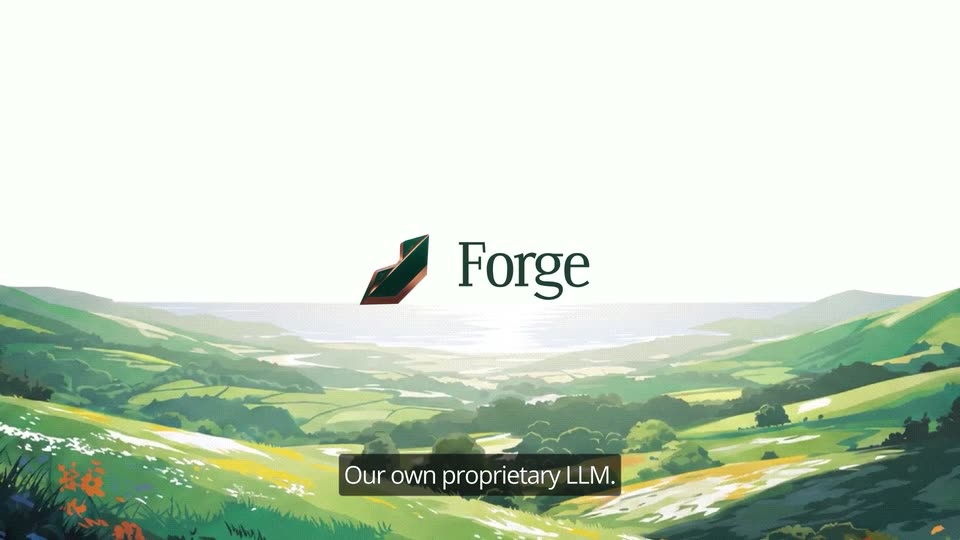
A painted landscape of green hills and a lake fades in from white. At center, a dark angular 3D mark spins and flattens into the Forge logo, a green-and-brown emblem beside a serif wordmark. A dark caption box at the bottom swaps text.
On-screen text: “We built Ridge Forge,”, “Our own proprietary LLM.”
Camera: Pull out
14 · Feature reveal · 0:43–0:46
An illustrated green valley fills the frame. A white card holding a dark angular 3D mark floats left, a glowing green sphere with a hexagon labeled B2B floats right, and thin green lines draw between them. A bottom caption reads “Trained specifically on” then “B2B revenue intelligence”.
On-screen text: “Trained specifically on”, “B2B revenue intelligence”
Camera: Pull out
15 · Feature reveal · 0:46–0:49
A white prompt field on a green gradient types a candidate-dossier prompt while the serif headline 'Build any agent' slides in above. The view zooms to the green send button as a cursor hovers over it; a black caption chip reads 'Forge makes it easy to deploy our custom agents'.
On-screen text: “Build any agent”, “Forge makes it easy”, “to deploy our custom agents”
Techniques: UI zoom, Cursor demo
Camera: Push in
16 · Feature reveal · 0:49–0:51
The Ridge Agents dashboard fills the frame; pipeline counters tick upward and the right prompt panel rewrites itself as a green cursor moves toward the Run a play button. A dark caption pill reading like Sales Edge, sits at bottom center throughout.
On-screen text: “like Sales Edge,”
Techniques: Cursor demo
Camera: Push in
17 · Feature reveal · 0:51–0:52
A light product dashboard with stat cards and a right-hand chat panel fills the frame. A green cursor arrow hovers over the green Run a play button as the view drifts right to reveal the panel.
On-screen text: “The goal is to replace tools”
Techniques: Cursor demo
Camera: Push in
18 · Demo · 0:52–0:59
A man stands in front of the New York skyline and river, talking to camera. Four white app icons hover around him, green 'agent' speech bubbles pop in, then the icons gather into a 2x2 grid panel at left. White subtitles on black bars run along the bottom.
On-screen text: “The goal is to replace tools”, “agent”, “that weren't working before”, “and to organize them”, “into one stack”, “across sales,”, “operations and productivity”
Camera: Static
19 · Demo · 0:59–1:00
A white navigation bar with icons and labels sits on a green gradient. A white cursor arrow glides up from the bottom toward the Overview tab. A dark subtitle caption at the bottom reads operations and productivity, then Inside every workspace.
On-screen text: “operations and productivity”, “Inside every workspace,”
Techniques: Cursor demo
Camera: Push in
20 · Demo · 1:00–1:01
A white pill navigation bar with icon tabs floats on a green gradient. A green cursor moves from the Ask tab to Overview, the gray highlight follows, and the bar slides right to reveal an Accounts tab. A black caption bar at the bottom updates with white text.
On-screen text: “Inside every workspace,”, “you'll see the overview for health,”
Techniques: Cursor demo
Camera: Static
21 · Demo · 1:01–1:03
A dashboard overview with stat cards and activity panels fills the frame, then the view reframes to a horizontal tab bar. A green cursor slides in to hover over the Intake tab above a green gradient.
On-screen text: “you'll see the overview for health,”, “CRM and intake for flow,”
Techniques: UI zoom, Cursor demo
Camera: Static
22 · Demo · 1:03–1:07
A white tab bar with icon labels pans left across the frame while a green cursor glides right, pausing on Intake, Intelligence, Accounts and Agents, each tab shading gray under the pointer. Black caption boxes appear centered over a blurred green gradient below.
On-screen text: “CRM and intake for flow,”, “strategy and intelligence”, “for direction”, “at the center”
Techniques: Cursor demo
Camera: Pan
23 · Demo · 1:07–1:09
A close-up of the agent builder screen zooms out to reveal the full dashboard window floating on a green gradient. A cursor hovers over a template card, then drops to the bottom. A dark pill caption reading Autonomous agents stays fixed at the lower edge.
On-screen text: “Autonomous agents”
Techniques: UI zoom, Cursor demo
Camera: Pull out
24 · Demo · 1:09–1:10
The Ridge Agents page fills the frame on a green backdrop, showing the “Build any agent” heading and a row of template cards. The view eases out to reveal the full app window while a dark caption pill with a green cursor arrow fades in at the bottom.
On-screen text: “powered by Ridge Forge”
Techniques: UI zoom
Camera: Push in
25 · Demo · 1:10–1:14
A green-tinted interface shows a row of agent template cards. A cursor glides left to right, each card lifting and enlarging on hover, while the camera pans right with it. White captions on dark pills sit at the bottom.
On-screen text: “AI that prospects,”, “scores and writes.”, “But every action”
Techniques: Cursor demo
Camera: Push in
26 · Feature reveal · 1:14–1:18
A white email card on a green gradient types out its message as a small white logo icon in a square outline sits left, linked by a thin line. The card scales up to center, the Approve button fills green to read Approved, and a cursor appears below.
On-screen text: “But every action”, “that reaches a person”, “waits in your approval queue.”, “You stay in control”
Techniques: UI zoom, Cursor demo
Camera: Push in
27 · Feature reveal · 1:18–1:20
On a green gradient, a rounded pill bearing the white text You stay in control slides left and exits. A thin connector line with two circular nodes fades in at center while a 3D green chevron assembles on the right. A black caption at the bottom reads while Forge.
On-screen text: “You stay in control”, “while Forge”
Techniques: Kinetic type, Morph
Camera: Static
28 · Feature reveal · 1:20–1:22
A green geometric logo mark holds center in a soft radial glow. A thin white line with a dot at its tip retracts from the left edge. White captions in a dark pill read at the bottom, then a large light word This fades in on the left.
On-screen text: “while Forge”, “does the cognitive work.”, “This”
Camera: Static
29 · Feature reveal · 1:22–1:26
White kinetic text on a green gradient: 'This means' scales in, then 'Every' slides in beside a rounded chip cycling 'recent run', 'connection', 'build', with a caption box tracking the voiceover below. The Ridge dashboard then slides up from the bottom as 'is visible.' appears.
On-screen text: “This means”, “this means”, “Every”, “recent run”, “every recent run,”, “connection”, “connection and build”, “build”, “is visible.”
Techniques: Kinetic type
Camera: Static
30 · Demo · 1:26–1:28
A white Ridge dashboard on a green gradient background zooms in slowly, revealing the overview stats and sidebar as the frame tightens. A dark caption pill reading Open any client workspace stays centered at the bottom.
On-screen text: “Open any client workspace”
Techniques: UI zoom
Camera: Push in
31 · Demo · 1:28–1:31
A flat product dashboard sits on a mint background; a soft white highlight box frames the top KPI row, then the view zooms and pans down to center the Gmail card. Dark subtitle bars swap phrases along the bottom.
On-screen text: “and you're looking at”, “their real dashboard,”, “live email activity,”, “LinkedIn inbox,”
Techniques: UI zoom
Camera: Push in
32 · Demo · 1:31–1:33
A green-tinted dashboard layers flat UI cards: a LinkedIn panel showing connection counts and an Open Inbox button floats in front of dimmed Calendar and Gmail cards, the layers drifting at different speeds. A dark caption box at the bottom reads LinkedIn inbox,. The Gmail message count ticks up from 94 to 95.
On-screen text: “LinkedIn inbox,”
Techniques: Parallax
Camera: Pan
33 · Demo · 1:33–1:34
A light green dashboard of white cards, including Calendar, Tasks and Gmail, slides diagonally as a soft green glow moves from the Calendar card to the Tasks card. Small black caption boxes appear at the bottom.
On-screen text: “calendar,”, “tasks,”
Camera: Pan
34 · Demo · 1:34–1:35
A light dashboard of white stat cards (accounts, pipeline, tasks, Gmail) pans slowly from right to left beside a green edge bar. A dark rounded caption reading etc. slides in at the lower right to close out the list.
On-screen text: “etc.”
Camera: Static
35 · Feature reveal · 1:35–1:37
A green waveform of rounded vertical bars animates across a dark green background. A white cursor arrow moves along the bars as the waveform shrinks to a smaller size, and a bottom caption swaps from “And recordings” to “are no longer black boxes.”
On-screen text: “And recordings”, “are no longer black boxes.”
Techniques: Cursor demo
Camera: Pull out
36 · Feature reveal · 1:37–1:45
On a blurred green background, a small card reading Maya scales up to add a circular avatar, then widens into a transcript card whose lines type in word by word. A green highlight and a Flagged pill pop in below the text as the bottom captions swap.
On-screen text: “are no longer black boxes.”, “Name,”, “company”, “face to the name”, “with transcripts and contacts”, “are just one click away.”, “Forge flags what matters”, “before you even press play.”
Techniques: Morph, Kinetic type
Camera: Static
37 · Problem · 1:45–1:53
A man in a gray sweater sits in a leafy courtyard, talking and gesturing to camera. A frosted glass card on the left stacks rows for CRMs, Automations and Data Enrichment Tools, then blurs to show “But each platform makes things harder to see.” Subtitles track his speech.
On-screen text: “Each generation”, “of enterprise software”, “promised the same thing.”, “CRMs,”, “CRMs”, “automations,”, “Automations”, “data enrichment tools.”, “Data Enrichment Tools”, “But each platform made things harder to see. But each platform makes things harder to see. harder to see.”
Camera: Pull out
38 · Feature reveal · 1:53–2:00
A man in a gray sweater walks toward the camera on a sunlit city sidewalk, gesturing as he speaks. A white serif headline builds over the frame with a mint-green arrow logo drifting across the top, then black-box subtitles caption his words at the bottom.
On-screen text: “Ridge Forge”, “Ridge Forge is a different bet.”, “The model actually understands”, “the language that”, “B2B revenue teams”, “are using currently.”
Techniques: Kinetic type
Camera: Push in
39 · CTA · 2:00–2:01
A man in a gray long-sleeve shirt and black shorts jogs toward camera along a waterfront path, the Brooklyn Bridge and Manhattan skyline rising behind a chain-link fence. The camera tracks him as he runs past a wooden bench. A subtitle line sits at the bottom of the frame.
On-screen text: “are using currently.”, “If you're done managing revenue”
Camera: Pull out
40 · CTA · 2:01–2:05
A man in a gray sweatshirt jogs toward camera along a riverside path, the Brooklyn Bridge and skyline behind. The camera tracks backward and reframes to a medium close-up. White captions on a dark bar appear line by line at the bottom, ending on a green blur.
On-screen text: “If you're done managing revenue”, “with tools and agents”, “that don't work,”, “bring your world into ours.”
Camera: Push in
41 · CTA · 2:05–2:06
A green pill button with the brand mark and the URL JoinRidge.co glows at center on a dark green gradient. The button tightens from a soft, wide state into a crisp one while the caption below switches from bring your world into ours. to Join Ridge.
On-screen text: “bring your world into ours.”, “JoinRidge.co”, “Join Ridge.”
Camera: Static
42 · CTA · 2:06–2:08
A glowing green pill badge with the Ridge mark and the URL JoinRidge.co holds center on a dark green dotted background. A black caption box reads Join Ridge. below. The whole frame fades to black by the end.
On-screen text: “JoinRidge.co”, “Join Ridge.”
Camera: Static