
1:26
Explore
Now Available: Replit Agent v2
Replit · Mar 2025 · 0:49 · AI-annotated
- Length
- 0:49
- Scenes
- 23 · 2.1 s avg
- Product on screen
- 0:01
- Features shown
- 4
- Call to action
- 0:43 · 88%
- Voiceover
- Yes
00:00:00 / 00:49:06
Replit’s 0:49 launch film runs 23 scenes, about 2.1 s each. The product shows up at 0:01 and 4 features are revealed, with social proof. The call to action lands at 0:43 (88% in), over a voiceover. The video is built as a dark, centered logo and text opening followed by a chain of 3D interface panels and device mockups, each paired with one short voiceover claim. Pacing stays slow and motivated, using depth pulls, 3D tilts, and purple glow accents to move from claim to claim.
No filming indicatedEstimated needs: 4 capture groups — your screens or recordings · 1 official logo — reused across the film · 1 graphic passage — draw or supply · 8 3D passages — build or supply
Is this your launch? to your site or press kit.
More like this

2:12
Zed - Zed 1.0: Your last next editor.
Zed · Apr 2026
0:44
Doruk - Introducing: 0 - the open-source AI security harness by @0securitylab
0.security · Nov 2026
Now Available: Replit Agent v2, scene by scene
· 23 scenes as text
01 · Hook · 0:00–0:01
On a dark navy field with a soft radial glow, the line 'Now everyone can make apps' assembles word by word in white sans-serif, the final word 'apps' in purple, then settles to the center.
On-screen text: “Now everyone can make apps”
Techniques: Kinetic type
Camera: Static
02 · Product intro · 0:01–0:05
A purple dotted globe with feature chips (Database, Login Page, Web Form, Admin Dashboard, Deploy, API Integration) on thin lines; the caption scales out as the chips fly outward and the globe dissolves into a glowing purple ring, ending on two circular logo icons.
On-screen text: “Now everyone can make apps”
Techniques: Parallax, Morph
Camera: Push in
03 · Product intro · 0:05–0:08
A purple node icon glows and scales up inside a ring on a dark gradient, then the layout resolves into a title card with the replit mark above and Agent v2 beside the icon. The whole lockup slides up out of frame.
On-screen text: “replit”, “Agent v2”
Techniques: Kinetic type
Camera: Static
04 · Feature reveal · 0:08–0:11
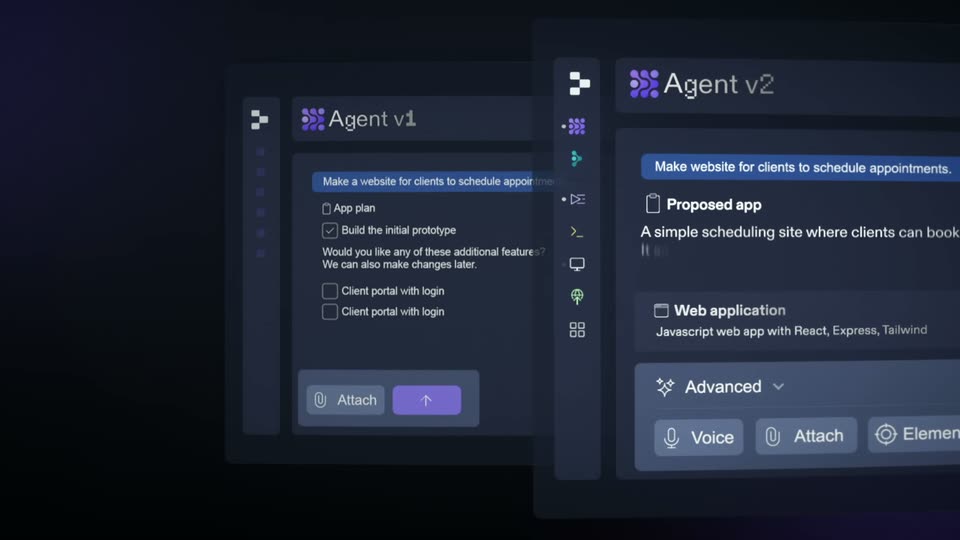
A tilted 3D close-up of a dark chat panel labeled Agent v2 pulls back and flattens to show two panels side by side, Agent v1 on the left and Agent v2 on the right, each with a blue prompt pill and a list of options.
Techniques: 3D mockup
Camera: Pull out
05 · Feature reveal · 0:11–0:12
Two dark chat panels sit side by side in a dim space, the left Agent v1 panel blurred in the background and the right Agent v2 panel sharp in the foreground. The composition drifts slowly, sliding the right panel's message bubble and button row further into frame.
Techniques: Split screen, Parallax
Camera: Static
06 · Feature reveal · 0:12–0:12
Two glassy interface cards float in 3D perspective on a dark field. The left v1 card slides out to the left and fades as the right v2 card glides forward to center, its chat prompt and proposed-app block coming into focus.
Techniques: 3D mockup
Camera: Pan
07 · Feature reveal · 0:12–0:16
A dark chat window titled Agent v2 floats in 3D perspective, a blue prompt bubble and a proposed-app card fill it as a cursor hovers the send button. The panel then slides down and a second window rises, showing the agent reporting a fixed TypeScript error.
Techniques: 3D mockup, Cursor demo, Speed ramp
Camera: Pull out
08 · Feature reveal · 0:16–0:19
A dark chat panel titled Agent v2 scrolls its message log upward, revealing checkmarked tasks and a purple card listing upcoming work. Behind it on the right, a circular gauge fills with a growing purple wedge as the feed advances.
Camera: Pan
09 · Feature reveal · 0:19–0:20
A dark Agent v2 panel shows checked tasks and a purple to-do list beside a second panel, then the frame zooms in tight on the label Add progress analytics.
Techniques: UI zoom
Camera: Static
10 · Feature reveal · 0:20–0:21
A dark command bar sits centered on a near-black background. A glowing purple dot-grid icon anchors the left, white text holds the typed command, and a purple two-arrow button sits at the right; a cursor fades in at the right edge.
Camera: Static
11 · Feature reveal · 0:21–0:25
A dark dashboard interface labeled Agent v2 sharpens from blur into focus. The left column lists step-by-step instructions with file references, while the right column fills in with a line chart, four stat cards, a pie chart, and a notifications panel.
Camera: Pull out
12 · Feature reveal · 0:25–0:26
A dark two-pane interface window eases to the center of a black background. The left pane holds an agent chat with a blue message bubble; the right pane renders a 3D solar system where planets trace dotted orbits around a glowing star.
Camera: Static
13 · Feature reveal · 0:26–0:27
A dark laptop mockup in 3D perspective floats on a black void, its screen split between an agent chat panel and a starfield planet map. The device fades in and scales up from small to full frame size.
Techniques: 3D mockup
Camera: Static
14 · Feature reveal · 0:27–0:29
A dark phone mockup in 3D perspective displays an Agent chat screen with code-related messages and a purple Deploy button. The device tilts and rotates gently against a black backdrop with a soft purple glow.
Techniques: 3D mockup
Camera: Static
15 · Feature reveal · 0:29–0:31
A purple connected-dots logo sits centered in a dark circle as concentric rings pulse outward. Bright arc glints trace the rings, and a small rounded up-arrow icon fades in on the right edge.
Techniques: Light sweep
Camera: Push in
16 · Feature reveal · 0:31–0:32
A purple node logo shrinks from the center and docks at the left end of a translucent prompt bar, as the placeholder text “Make an app” fades in beside it. Thin white and violet rings rotate slowly in the dark background.
Camera: Static
17 · Feature reveal · 0:32–0:33
A dark prompt bar with a purple send button floats over concentric glowing rings. The sentence “Make an app to track our revenue.” types in word by word while purple chips reading Authentication, Database and 7 scale in around the bar.
On-screen text: “Authentication”, “Database”, “7”
Techniques: Kinetic type
Camera: Pull out
18 · Feature reveal · 0:33–0:34
A dark prompt bar shows “Make an app to track our revenue.” with a cursor on the send button, flanked by purple Authentication and Database labels. The bar clears and a phone with a Business Dashboard app scales in at center over concentric rings.
Camera: Static
19 · Feature reveal · 0:34–0:38
A phone mockup of a dashboard app floats on a dark ringed background as purple pill labels Authentication and Database scale in and fade. The phone tilts into 3D, stacking on purple plates, while the camera orbits past blurred side cards.
On-screen text: “business-analytics.replit.app”, “Authentication”, “Database”, “Make an app to track our revenue.”
Techniques: 3D mockup
Camera: Static
20 · Social proof · 0:38–0:39
A 3D isometric phone mockup sits on a stack of purple plates over a dark reflective floor, its screen showing a business dashboard with line, bar and donut charts. Blurred purple panels frame the sides. The camera eases back, sliding white panels into the top and bottom edges.
Techniques: 3D mockup, Parallax
Camera: Static
21 · Social proof · 0:39–0:43
White tweet cards float in a dark 3D space. A headline fades in at the center, reading 'Join over 40 million creators', with '40 million' highlighted in purple.
On-screen text: “Join over 40 million creators”
Techniques: Kinetic type, Parallax
Camera: Static
22 · CTA · 0:43–0:44
On a dark blue gradient, the Replit logo reveals at center: an orange bracket of squares beside the gray replit wordmark brightens from near-black to full and holds.
Camera: Static
23 · CTA · 0:44–0:49
On a dark background, the Replit logo slides up into place above a purple Try it today button that fades from dim to bright. A glowing outline cursor glides in from the right, hovers at the button edge, then exits. The URL replit.com appears below the button.
On-screen text: “Try it today”, “replit.com”
Techniques: Cursor demo
Camera: Static